Material-components-android: [Slider] Floating label not visible
Description: Floating label not visible in the slider

Expected behavior: show floating label
Source code:
<com.google.android.material.slider.Slider
        android:id="@+id/slider"
        android:layout_width="match_parent"
        android:layout_height="match_parent"
        android:valueFrom="20f"
        android:valueTo="70f"
        android:stepSize="10"
        app:floatingLabel="true"
        />
Android API version: 23, 28 (probably not version specific)
Material Library version: 1.2.0-alpha01
Device: Pixel 2 emulator, LG Zero (probably not device specific)
 kaushalyap
All 10 comments
Problem seem that the view is not expanding to contain the floating label
kaushalyap
on 22 Oct 2019
Using something like:
    <LinearLayout
        android:layout_width="match_parent"
        android:layout_height="wrap_content"
        android:clipChildren="false"
        android:clipToPadding="false"
        android:orientation="vertical">

        <com.google.android.material.slider.Slider
           android:id="@+id/slider"
           android:layout_width="wrap_content"
           android:layout_height="wrap_content"
           .../>

    </LinearLayout>
it works.

 gabrielemariotti
on 22 Oct 2019
gabrielemariotti
on 22 Oct 2019
@gabrielemariotti why do I have to modify the container layout?
kaushalyap
on 22 Oct 2019
@gabrielemariotti This is what I see even with clipping

XML :
<LinearLayout xmlns:android="http://schemas.android.com/apk/res/android"
    xmlns:tools="http://schemas.android.com/tools"
    xmlns:app="http://schemas.android.com/apk/res-auto"
    android:orientation="vertical"
    android:layout_width="match_parent"
    android:layout_height="match_parent"
    android:gravity="center"
    tools:context=".MainActivity">

    <LinearLayout
        android:layout_width="match_parent"
        android:layout_height="wrap_content"
        android:orientation="vertical"
        android:clipToPadding="true"
        android:clipChildren="true">

        <com.google.android.material.slider.Slider
            android:id="@+id/slider"
            android:layout_width="match_parent"
            android:layout_height="match_parent"
            android:valueFrom="20f"
            android:valueTo="70f"
            android:stepSize="10"
            app:floatingLabel="true"
            />

    </LinearLayout>
</LinearLayout>
same thing I saw earlier, sorry I posted an incorrect image earlier, updated the OP
.
kaushalyap
on 22 Oct 2019
@kaushalyap In my code I am using android:clipChildren="false", android:clipToPadding="false".
gabrielemariotti
on 22 Oct 2019
@gabrielemariotti forgive me, my mistake. Although I set both to false, I still get the previous output (top portion of the label is still clipped)
<LinearLayout ...>

    <LinearLayout ...
        android:clipToPadding="false"
        android:clipChildren="false">

        <com.google.android.material.slider.Slider
            android:id="@+id/slider"
            android:layout_width="match_parent"
            android:layout_height="match_parent"
            android:valueFrom="20f"
            android:valueTo="70f"
            android:stepSize="10"
            app:floatingLabel="true"
            />

    </LinearLayout>
</LinearLayout>
use
app:floatingLabel="false"
to show floating label.
 somename6668
on 20 Nov 2019
somename6668
on 20 Nov 2019
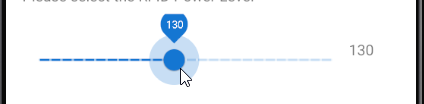
I am getting the issue above where the floating label is slightly clipped.
Any ideas?
<LinearLayout
        android:layout_width="match_parent"
        android:layout_height="wrap_content"
        android:layout_marginStart="16dp"
        android:layout_marginTop="8dp"
        android:layout_marginEnd="16dp"
        android:clipChildren="false"
        android:clipToPadding="false"
        android:gravity="center_vertical"
        app:layout_constraintEnd_toEndOf="parent"
        app:layout_constraintStart_toStartOf="parent"
        app:layout_constraintTop_toBottomOf="@+id/rfidPowerLevelLabel">

        <com.google.android.material.slider.Slider
            android:id="@+id/rfidPowerLevel"
            android:layout_width="0dp"
            android:layout_height="wrap_content"
            android:layout_weight="1"
            android:stepSize="10"
            android:valueFrom="10"
            android:valueTo="270"
            android:visibility="invisible"
            app:floatingLabel="false" />

        <TextView
            android:id="@+id/rfidPowerLevelValue"
            android:layout_width="48dp"
            android:layout_height="wrap_content"
            android:visibility="invisible" />
    </LinearLayout>
 brandscill
on 4 Dec 2019
brandscill
on 4 Dec 2019
@somename6668 Strange! setting it to false worked, is not setting it to false should disable the floating label?
@gabrielemariotti top of the floating label is clipped as @brandscill mentioned
kaushalyap
on 6 Dec 2019
We should have a solution soon which removes the requirement of setting clipChildren etc.
 cketcham
on 10 Dec 2019
cketcham
on 10 Dec 2019
Related issues
 danielwilson1702
·
3Comments
danielwilson1702
·
3Comments
 magnusfernandes
·
3Comments
magnusfernandes
·
3Comments
 Mirmuhsin
·
3Comments
gabrielemariotti
·
3Comments
Mirmuhsin
·
3Comments
gabrielemariotti
·
3Comments
 mnayef95
·
3Comments
mnayef95
·
3Comments
Most helpful comment
use
app:floatingLabel="false"to show floating label.