Material-components-android: [MaterialDatePicker] Manual Date input does not work on Samsung devices
Description:
When clicking the "edit" button next to "Selected Date" on the picker to manually input a date with the edit text it is not possible to enter a valid date with the Samsung stock keyboard since the number keyboard that is opened does not allow to enter "/" or ".".

Expected behavior: It should be possible to enter a valid date with the keyboard, either by automatically inserting the special characters to complete the date or by using keyboard variant that supports these needed characters.
Android API version: 27 / Android 9.0
Material Library version: 1.1.0-beta01
Device: Samsung Galaxy S8+ (SM-G955F)
 pwillmann
All 8 comments
Also having this issue. Hope it's going to get picked up.
 mcastagnolo
on 29 Oct 2019
mcastagnolo
on 29 Oct 2019
We'll definitely look into this one. We're setting the inputType to "date", but unfortunately that's not good enough for Samsung. Will see what we can do and thanks for the device specific report.
 ldjcmu
on 5 Nov 2019
ldjcmu
on 5 Nov 2019
Edit: This comment is outdated, please see below.
So Samsung has changed their date keyboard between versions 8.0 and versions 9.0 to not include slashes for their inputType="date"; it is simply the numbers keyboard. (I could not find a single inputType that had numbers + slashes or other appropriate separator characters, but if you know of an inputType that works please let me know.) We don't want to change the keyboard input type to all text as that's a much worse user experience; we do however, want to look into auto-adding separator characters in an i18n friendly way.
Because of this, we're going to block this bug on #695 and try to more thoroughly revamp the text input.
I'll finally add that we're ok with the workaround of using the calendar input mode or using speech input (as speech input of slashes does work) for the time being, but do recognize that it is not ideal.
ldjcmu
on 5 Nov 2019
We decided that auto-adding separator characters in an i18n/l10n friendly way is too error prone, so we're going to special case the keyboard on Samsung devices. We'd like to only do so on versions where the date input keyboard doesn't include the separator characters.
Has anyone seen this issue on a Samsung device between APIs 4.2 (14, Jellybean) and 9.0 (28, Pie)? Right now we're going to do it for all Samsung devices, but we intend to reduce that once we can confirm other API levels. We're also looking into ways to test across all these devices, but that isn't as easy as I'd hoped.
ldjcmu
on 7 Nov 2019
As a bonus, it looks like Samsung pushed an update to phones very recently that adds the slash to their date keyboard today.
ldjcmu
on 8 Nov 2019
 leticiarossi
on 11 Feb 2020
leticiarossi
on 11 Feb 2020
@leticiarossi It's still continues in Galaxy S8 - SMG950F. I use 1.2.0-alpha06 version.
 abalta
on 16 May 2020
abalta
on 16 May 2020
@leticiarossi I've tested it on
- Samsung Galaxy J7 Prime (Android 8.0)
- Samsung Galaxy Note 8 (Android 7.1)
- Samsung Galaxy S20+ (Android 10)
and it's showing the wrong keyboard.
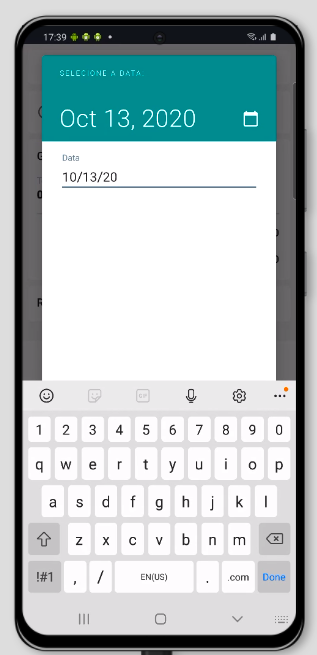
I'm using com.google.android.material:material:1.2.1
 victorbrndls
on 13 Oct 2020
victorbrndls
on 13 Oct 2020
Related issues
 jaychang0917
·
3Comments
jaychang0917
·
3Comments
 Sanusy
·
3Comments
Sanusy
·
3Comments
 ahmaducg
·
3Comments
ahmaducg
·
3Comments
 aarontwf
·
3Comments
aarontwf
·
3Comments
 hkchakladar
·
3Comments
hkchakladar
·
3Comments
Most helpful comment
Edit: This comment is outdated, please see below.
So Samsung has changed their date keyboard between versions 8.0 and versions 9.0 to not include slashes for their inputType="date"; it is simply the numbers keyboard. (I could not find a single inputType that had numbers + slashes or other appropriate separator characters, but if you know of an inputType that works please let me know.) We don't want to change the keyboard input type to all text as that's a much worse user experience; we do however, want to look into auto-adding separator characters in an i18n friendly way.
Because of this, we're going to block this bug on #695 and try to more thoroughly revamp the text input.
I'll finally add that we're ok with the workaround of using the calendar input mode or using speech input (as speech input of slashes does work) for the time being, but do recognize that it is not ideal.