Material-components-android: Supporting DayNight Theme
Will the lib support DayNight Theme in the future?
 kimcy929
All 10 comments
You can also do it yourself
res/values/themes.xml
<?xml version="1.0" encoding="utf-8"?>
<resources>
    <style name="Theme.YourApp.Light" parent="Theme.MaterialComponents.Light">
        <!-- your light theme attributes -->
    </style>

    <style name="Theme.YourApp.Dark" parent="Theme.MaterialComponents">
        <!-- your dark theme attributes -->
    </style>

    <style name="Theme.YourApp.DayNight" parent="Theme.YourApp.Light" />
</resources>
res/values-night/themes.xml
<?xml version="1.0" encoding="utf-8"?>
<resources>
    <style name="Theme.YourApp.DayNight" parent="Theme.YourApp.Dark" />
</resources>
Then you use Theme.YourApp.DayNight in your manifest or wherever you set a theme.
 gabrielittner
on 12 May 2018
gabrielittner
on 12 May 2018
Thank you so much.
kimcy929
on 12 May 2018
@gabrielittner Looks good, but what if my "light theme attributes" and my "dark theme attributes" are the same? Since multiple style inheritance isn't a thing, I haven't found a way to not copy-paste these attributes and have them twice in the same file... Theme.MaterialComponents.DayNight would be more convenient for this.
 herbeth1u
on 7 Jul 2018
herbeth1u
on 7 Jul 2018
@herbeth1u Something like this should work:
res/values/themes.xml
<?xml version="1.0" encoding="utf-8"?>
<resources>
    <style name="Theme.YourApp.Light" parent="Theme.MaterialComponents.Light">
        <!-- your light theme attributes -->
    </style>

    <style name="Theme.YourApp.Dark" parent="Theme.MaterialComponents">
        <!-- your dark theme attributes -->
    </style>

    <style name="Base.Theme.YourApp.DayNight" parent="Theme.YourApp.Light" />

    <style name="Theme.YourApp.DayNight" parent="Base.Theme.YourApp.DayNight">
        <!-- your light/dark theme independent attributes -->
    </style>

</resources>
res/values-night/themes.xml
<?xml version="1.0" encoding="utf-8"?>
<resources>
    <style name="Base.Theme.YourApp.DayNight" parent="Theme.YourApp.Dark" />
</resources>
If you don't put anything into Theme.YourApp.Light and Theme.YourApp.Dark you can remove those two and let the two Base.Theme.YourApp.DayNight use MaterialComponents directly as parent.
gabrielittner
on 11 Jul 2018
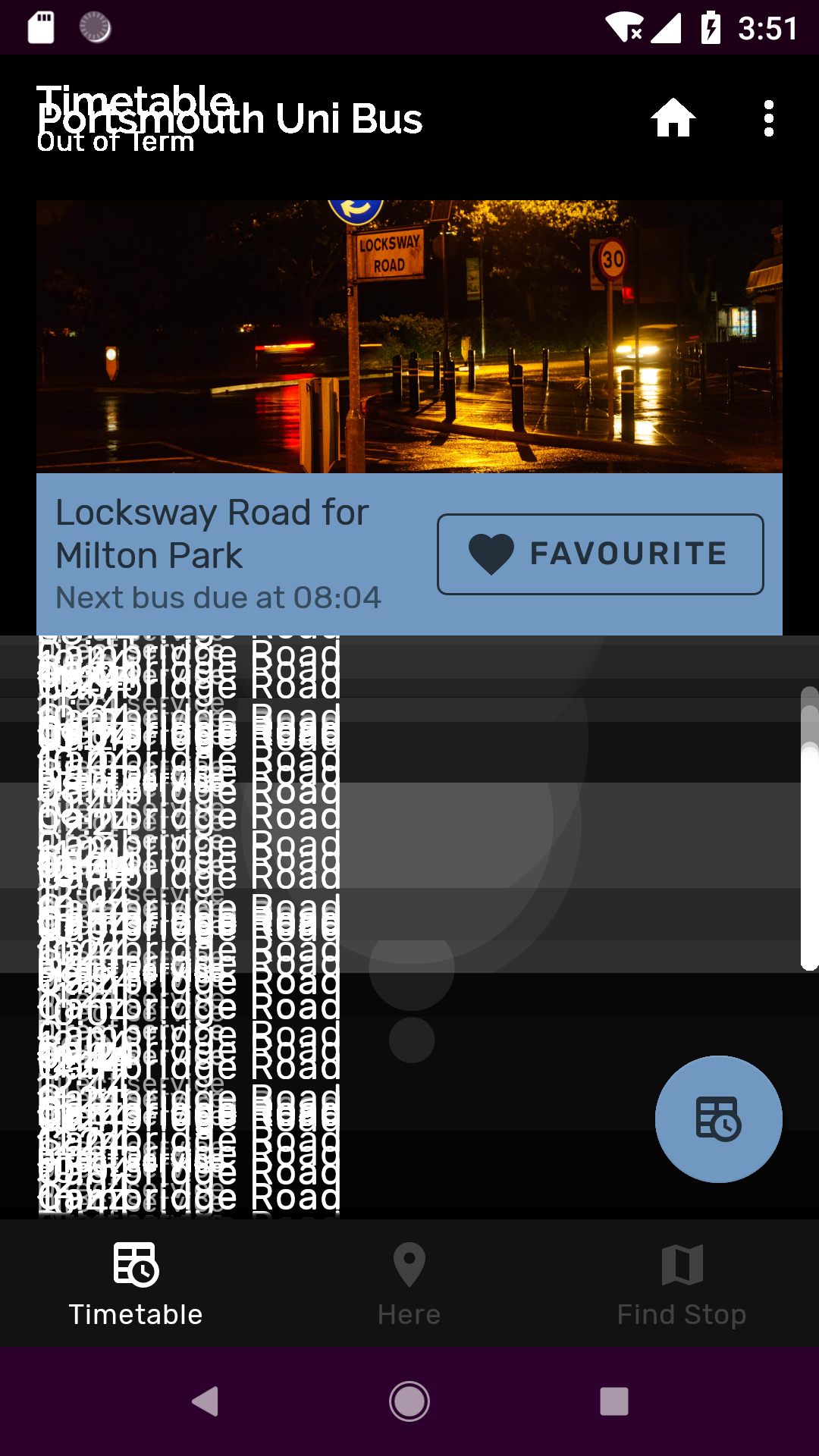
After trying to use this method of implementing DayNight support, I found that there is a strange smearing effect of all the views in the screen. Using RC1 of material components, for some readon it only affects API levels 27 & 28.
 malodita
on 28 Aug 2018
malodita
on 28 Aug 2018
https://github.com/material-components/material-components-android/issues/101#issuecomment-388542143 is that meant to be the official solution?
i think we should expose a Theme.MaterialComponents.DayNight as suggested earlier
 gaara87
on 19 Dec 2018
gaara87
on 19 Dec 2018
We now support DayNight themes:
 dsn5ft
on 19 Dec 2018
dsn5ft
on 19 Dec 2018
@dsn5ft Do I have to use androidx if I want to use DayNight?
 mgray88
on 19 Dec 2018
mgray88
on 19 Dec 2018
Yes, this is available in com.google.android.material:material:1.1.0-alpha02 which requires androidx. There will be no more feature releases for the non-androidx 28.0.0 path, across all of the Support Libraries.
dsn5ft
on 19 Dec 2018
Will this be released as a non alpha/beta version any time soon? As far as I see this feature is only available in alpha/beta versions
 ligi
on 27 Nov 2019
ligi
on 27 Nov 2019
Related issues
 ahmaducg
·
3Comments
ahmaducg
·
3Comments
 mnayef95
·
3Comments
mnayef95
·
3Comments
 gabrielemariotti
·
3Comments
gabrielemariotti
·
3Comments
 zkovar
·
3Comments
zkovar
·
3Comments
 Mirmuhsin
·
3Comments
Mirmuhsin
·
3Comments
Most helpful comment
We now support
DayNightthemes:https://github.com/material-components/material-components-android/blob/master/lib/java/com/google/android/material/theme/res/values/themes_daynight.xml
https://github.com/material-components/material-components-android/blob/master/lib/java/com/google/android/material/theme/res/values-night/themes_daynight.xml