Material-components-android: Feature request - CollapsingToolbarLayout: Allow multiple lines of text in expanded state
Overview
CollapsingToolbarLayout currently only allows for a single line title. However, in the expanded state, there would be enough space to display multiple lines.
Multiple app developers (such as WhatsApp) have already built their own custom views as a replacement for CollapsingToolbarLayout to solve this issue. However, these are mostly closed-source, use different, inconsistent animations when expanding and collapsing, and/or are not usable as a drop-in replacement for CollapsingToolbarLayout because they have a different API.
We (@raphaelm and I, with help from some contributors) have built an open-source library that tries to solve this problem. It is based directly on the original CollapsingToolbarLayout/CollapsingTextHelper classes from the Design Support Library with only a few code changes and an additional maxLines attribute. In addition to that, we feel that the animation we use is more smooth than the one from e.g. WhatsApp.
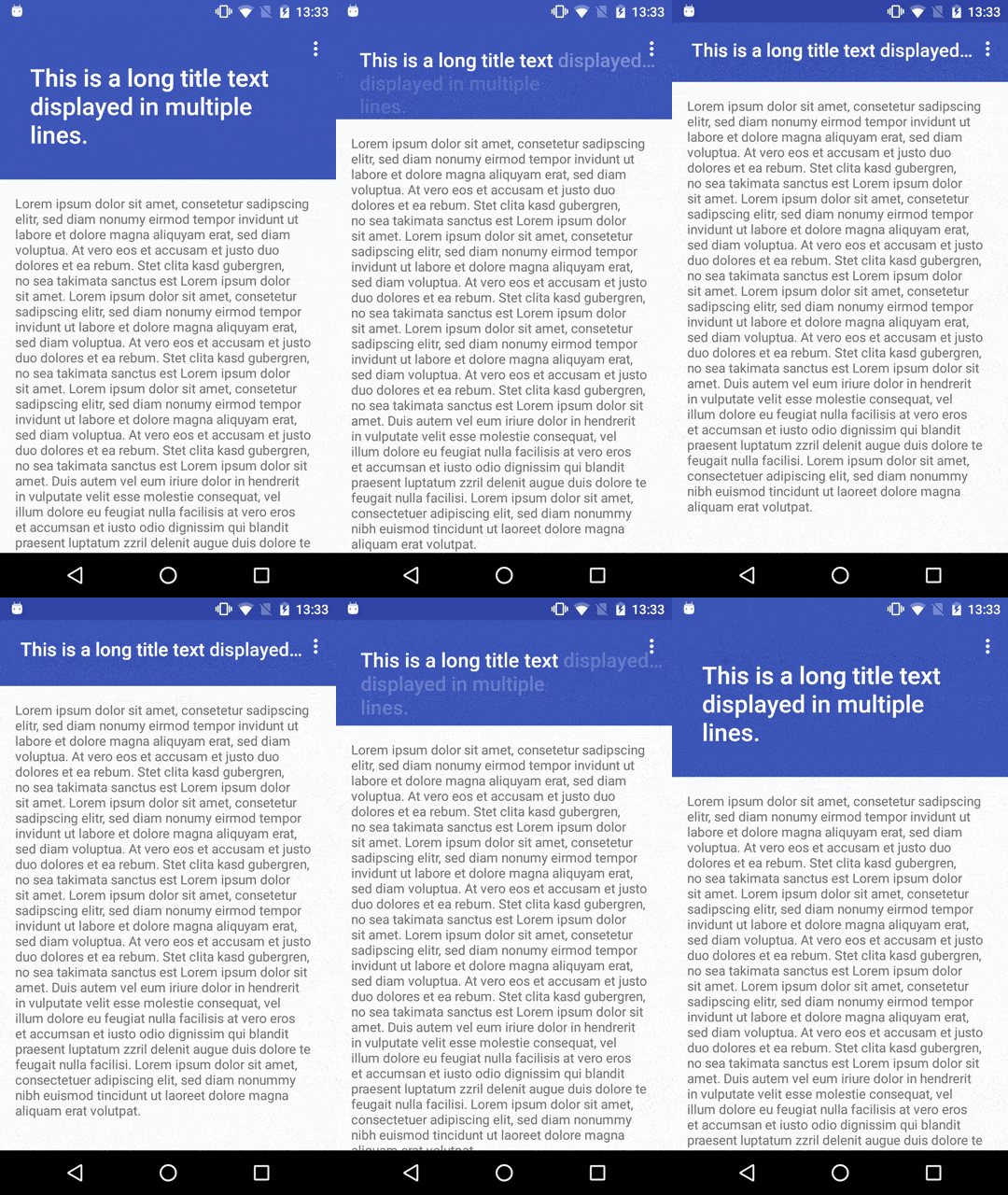
However, we had to copy quite a lot of files (basically all the classes that are referenced from CollapsingToolbarLayout) from the original support library when creating this library because they are package-private and therefore not accessible from our classes or because we needed access to private fields, which is not possible when extending a class. For this reason, it is quite tedious to keep our library up-to-date with changes from the support library.
Would you be interested in adopting our changes into the original library, e.g through a pull request? Or are you already working on the same feature?
There are some bugs in our library that occur when using text shadows or transparent text that we have not worked on ourselves because we don't use those features in our app, but they should be quite straightforward to resolve.
Related issues
 johan12345
All 12 comments
What’s the current status on this one? The Material guidelines state that multiple lines should be used and that the code for Android was readily available, however it doesn’t feature this option.

 PattaFeuFeu
on 21 Dec 2018
PattaFeuFeu
on 21 Dec 2018
We are still struggling to update our multiline-collapsingtoolbar library to support Android 9 and the new Material Components and AndroidX libraries, because the @RestrictTo annotations prevent us from accessing many classes that we previously used from the Support Libraries. Thus, the only solution is be to finally implement this functionality into the main Material Components libraries...
johan12345
on 28 May 2019
guys, any plan to add such support in material components library?
 alex-dokienko
on 12 Jun 2019
alex-dokienko
on 12 Jun 2019
Added this as a feature request on https://issuetracker.google.com/issues/136120586
 rion18
on 27 Jun 2019
rion18
on 27 Jun 2019
It seems they can accept PRs. https://issuetracker.google.com/issues/136120586
@johan12345 It'd be awesome if this makes part of material.components !
rion18
on 28 Jun 2019
Yep, we saw this already, one of the comments came from @raphaelm. I will try to implement this as a PR.
johan12345
on 28 Jun 2019
Brilliant. I can lend a hand if needed.
rion18
on 28 Jun 2019
johan12345
on 29 Jun 2019
So is this feature already available in com.google.android.material:material:1.2.0-alpha03 ?
 ArcherEmiya05
on 16 Jan 2020
ArcherEmiya05
on 16 Jan 2020
@ArcherEmiya05 Not as far as I can see - the last change to CollapsingToolbarLayout in the library was 5 months ago. See the PR #413 for the latest updates.
johan12345
on 16 Jan 2020
@ArcherEmiya05 Not as far as I can see - the last change to CollapsingToolbarLayout in the library was 5 months ago. See the PR #413 for the latest updates.
So there is no way to do this without needing to create your own xml layout?
Why is it already in the guidelines then? Just really confuse.
ArcherEmiya05
on 16 Jan 2020
So there is no way to do this without needing to create your own xml layout?
There is, you can use our fork of the Material Components library until it's merged. But it might cause incompatibilities with other libraries that depend on the Material Components library and we will provide no support.
Why is it already in the guidelines then? Just really confuse.
Well, I'm not from Google, so I can't really answer that. The Material Components library doesn't have implementations for all the things that show up in the guidelines, but I guess something needs to be added to the guidelines first before an implementation can be included.
johan12345
on 16 Jan 2020
Related issues
 mnayef95
·
3Comments
mnayef95
·
3Comments
 gabrielemariotti
·
3Comments
gabrielemariotti
·
3Comments
 ataulm
·
3Comments
ataulm
·
3Comments
 KelvinPac
·
3Comments
KelvinPac
·
3Comments
 Mirmuhsin
·
3Comments
Mirmuhsin
·
3Comments
Most helpful comment
What’s the current status on this one? The Material guidelines state that multiple lines should be used and that the code for Android was readily available, however it doesn’t feature this option.