Materia-theme: [Question] Change font color text panel
Questioner Info
- Materia version: 20190831
- GTK3 version: 3.22.30
- Distribution (and version): Ubuntu Mate 18.04
- Desktop environment (and version): Mate 1.20.1
- Theme used: Materia light compact
Description
I wish to modify the font color of the text of the panel bar, in order to set white. Currently, the original font text color used by materia-light-compact is grey. Please, could you tell me what file in the theme folder modify and what variables in the file to modify. I already investigated and tested some changes in gtk.css as the value of insensitive_fg_color but with no success. What file and what variable(s) to modify in order to change the color of text in panel bar ? I mean the font of text as the date and the titles windows opened in the panel bar:
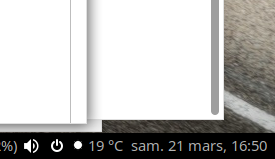
) ? Thanks in advance.
 Philippe734
All 4 comments
Hi @Philippe734, try this:
- Clone the repository.
- Open
src/_sass/gtk/apps/_mate.scsswith your text editor. - Replace _all_
text2string withtext. - Run
./parse-sass.sh. - Run
sudo ./install.sh. - Reload the theme.
what variables
We use our Sass function on() instead of Sass variables for the text colors in MATE Panel :)
 nana-4
on 22 Mar 2020
nana-4
on 22 Mar 2020
Hi @Philippe734, try this:
Clone the repository.
Open src/_sass/gtk/apps/_mate.scss with your text editor.
Replace all text2 string with text.
Run ./parse-sass.sh.
Run sudo ./install.sh.
Reload the theme.
Thank you to taken time to reply to me. I did your suggestion. But the result is weird. Font text color of panel is white, good!, but many buttons are blue without shadow effect, see:
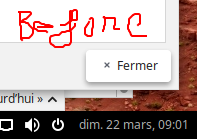
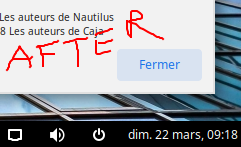
Philippe734
on 22 Mar 2020
but many buttons are blue without shadow effect
It's actually unrelated with my suggestion - it's just an intended change in the latest Materia :)
(But I’m planning to revert that change because I thought it was not a very good idea.)
nana-4
on 22 Mar 2020
OK ! So, you answered well to my question : solved. I will waiting for a next release with grey ripple button style
Philippe734
on 22 Mar 2020
Related issues
 vinyanalista
·
3Comments
vinyanalista
·
3Comments
 USBA
·
3Comments
USBA
·
3Comments
 TechnoSparks
·
3Comments
nana-4
·
4Comments
TechnoSparks
·
3Comments
nana-4
·
4Comments
 rahilwazir
·
4Comments
rahilwazir
·
4Comments