Questioner Info
- Materia version: Installed 1 month ago. Not sure how to check the version
- GTK3 version: 3.22.30
- Distribution (and version): Ubuntu 18.04
- Desktop environment (and version): Gnome 3.28
- Related application (and version): GIMP 2.10
Description
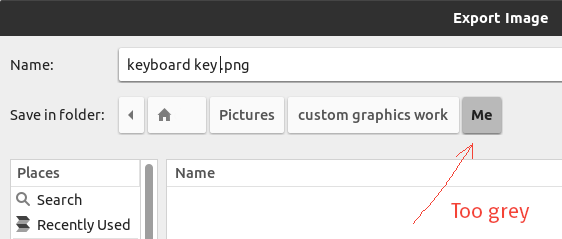
First of all, thank you for this awesome theme.
If possible, kindly help me change the button colour. The same colour is used in highlighting buttons inside Inkscape. I would happy if it is closer to white. Thanks.
 meetdilip
All 8 comments
Hi,
Please try the latest Materia by manually installing it. As written in the README, Ubuntu packages are very outdated. In the latest Materia, the activated button has a much lighter background-color :)

Please tell me if it's still too dark for you.
 nana-4
on 19 Nov 2019
nana-4
on 19 Nov 2019
Many thanks for the response. I was customizing Materia a bit with #03a9f4 colour. I would like to change grey to a lighter shade of #03a9f4. I would be happy to know where to find it in gtk.css.
I would like to install the new Materia. Just not sure how to remove the old one. Thanks.
meetdilip
on 19 Nov 2019
I would be happy to know where to find it in gtk.css.
gtk.css is for GTK3, and what you are showing in OP is GTK2. GIMP and Inkscape are using GTK2. So you need to edit the GTK2 theme.
I would like to install the new Materia. Just not sure how to remove the old one.
Usually you don't need to remove it. You can overwrite it while installing.
Try this:
Clone the source and move to
materia-themedir in your terminal:git clone --depth 1 https://github.com/nana-4/materia-theme cd materia-themeOpen
src/gtk-2.0/assets.svgin your text editor and edit this line to:<use xlink:href="#base-button-box" fill="#03a9f4" fill-opacity="0.2"/>(you may want to adjust
fill-opacityas well.)Run
./render-assets.sh gtk2in the terminal.- Run
sudo ./install.shin the terminal. - Reload the theme.
nana-4
on 19 Nov 2019
I have cloned materia-theme into my PC. I am in process of editing the gtk2 assets. Can the same be done for gtk asset as well ? Thanks.
meetdilip
on 19 Nov 2019
We don't use SVG/PNG assets for activated buttons in GTK3.
nana-4
on 19 Nov 2019
I see. I am really new to this. Thanks.
meetdilip
on 19 Nov 2019
It's fine :) So can we close this now?
nana-4
on 19 Nov 2019
Sure, please. :)
meetdilip
on 19 Nov 2019
Related issues
 Kibouo
·
3Comments
Kibouo
·
3Comments
 rudrab
·
4Comments
rudrab
·
4Comments
 TechnoSparks
·
3Comments
TechnoSparks
·
3Comments
 torqueyy
·
3Comments
torqueyy
·
3Comments
 luispabon
·
3Comments
luispabon
·
3Comments