Materia-theme: GDM customization Wiki needs to be updated
Hi @nana-4,
In Ubuntu 18.10 the command to copy the css would be different, since gdm3.css alias to the alternatives, point back to the Yaru/gnome-shell.css. Not sure how to document that, so I let it to you. Here are the commands to customize Ubuntu 18.10.
sudo cp -av /usr/share/gnome-shell/theme/Yaru/gnome-shell.css{,~}
sudo cp -v gnome-shell.css /usr/share/gnome-shell/theme/Yaru/gnome-shell.css
And for restore:
sudo mv -v /usr/share/gnome-shell/theme/Yaru/gnome-shell.css{~,}
Also... someone should confirm this, in order to exclude that it might be different on different Ubuntu installations/contexts.
 ddnexus
All 16 comments
I wonder if there is a more formal way to use the files under /usr/share/gnome-shell/modes ?
Here are the files in this directory...
├── initial-setup.json
├── ubuntu.json
└── yaru.json
Can we create a materia.json file and place it here?
Previously (Ubuntu 18.04), you could use update-alternatives --config gdm3.css to configure which gnome-shell.css file was used, but that no longer seems to be effective. So there must be a different way to configure which *.json file in modules is used (and effectively chose the gnome-shell.css file)???
 PJSingh5000
on 4 Nov 2018
PJSingh5000
on 4 Nov 2018
@ddnexus Thanks a lot for pointing it out! I've confirmed it and updated the wiki. :)
 nana-4
on 11 Nov 2018
nana-4
on 11 Nov 2018
@PJSingh5000 Sounds interesting. But I don't think it'll work well, because we need to replace /usr/share/gnome-shell/gnome-shell-theme.gresource as well in order to change the GDM theme.
However, if you confirm that it works well, please let me know.
nana-4
on 11 Nov 2018
@nana-4 Thank you!
ddnexus
on 12 Nov 2018
nana-4, ddnexus,
How about something like this?
I think it is more elegant than overwriting files.
The user can install as many themes as he/she wants and easily switch between them.
This approach allows the user to use a GUI to chose which theme he/she wants to use.
(I listed the commands in steps 1, 3, and 4 explicitly, just to make it clear. Ideally, a bash for loop can be used to reduce the number of lines).
(1)
Compile each theme
cd /usr/share/themes/Materia/gnome-shell/
sudo glib-compile-resources --target=gnome-shell-theme.gresource gnome-shell-theme.gresource.xml

cd /usr/share/themes/Materia-compact/gnome-shell/
sudo glib-compile-resources --target=gnome-shell-theme.gresource gnome-shell-theme.gresource.xml

cd /usr/share/themes/Materia-dark/gnome-shell/
sudo glib-compile-resources --target=gnome-shell-theme.gresource gnome-shell-theme.gresource.xml

cd /usr/share/themes/Materia-dark-compact/gnome-shell/
sudo glib-compile-resources --target=gnome-shell-theme.gresource gnome-shell-theme.gresource.xml

cd /usr/share/themes/Materia-light/gnome-shell/
sudo glib-compile-resources --target=gnome-shell-theme.gresource gnome-shell-theme.gresource.xml

cd /usr/share/themes/Materia-light-compact/gnome-shell/
sudo glib-compile-resources --target=gnome-shell-theme.gresource gnome-shell-theme.gresource.xml
(2)
Rename the original gnome-shell-theme.gresource
sudo mv /usr/share/gnome-shell/gnome-shell-theme{,-original}.gresource
(3)
Setup alternatives for top bar, dash, and lock screen (gnome-shell-theme.gresource)
path=/usr/share/gnome-shell/gnome-shell-theme-original.gresource
sudo update-alternatives --install /usr/share/gnome-shell/gnome-shell-theme.gresource gnome-shell-theme $path 100

path=/usr/share/themes/Materia/gnome-shell/gnome-shell-theme.gresource
sudo update-alternatives --install /usr/share/gnome-shell/gnome-shell-theme.gresource gnome-shell-theme $path 101

path=/usr/share/themes/Materia-compact/gnome-shell/gnome-shell-theme.gresource
sudo update-alternatives --install /usr/share/gnome-shell/gnome-shell-theme.gresource gnome-shell-theme $path 102

path=/usr/share/themes/Materia-dark/gnome-shell/gnome-shell-theme.gresource
sudo update-alternatives --install /usr/share/gnome-shell/gnome-shell-theme.gresource gnome-shell-theme $path 103

path=/usr/share/themes/Materia-dark-compact/gnome-shell/gnome-shell-theme.gresource
sudo update-alternatives --install /usr/share/gnome-shell/gnome-shell-theme.gresource gnome-shell-theme $path 104

path=/usr/share/themes/Materia-light/gnome-shell/gnome-shell-theme.gresource
sudo update-alternatives --install /usr/share/gnome-shell/gnome-shell-theme.gresource gnome-shell-theme $path 105

path=/usr/share/themes/Materia-light-compact/gnome-shell/gnome-shell-theme.gresource
sudo update-alternatives --install /usr/share/gnome-shell/gnome-shell-theme.gresource gnome-shell-theme $path 106
(4)
Setup alternatives for GDM (gdm3.css)
path=/usr/share/gnome-shell/theme/gnome-shell.css
sudo update-alternatives --install /usr/share/gnome-shell/theme/gdm3.css gdm3.css $path 100

path=/usr/share/themes/Materia/gnome-shell/gnome-shell.css
sudo update-alternatives --install /usr/share/gnome-shell/theme/gdm3.css gdm3.css $path 101

path=/usr/share/themes/Materia-compact/gnome-shell/gnome-shell.css
sudo update-alternatives --install /usr/share/gnome-shell/theme/gdm3.css gdm3.css $path 102

path=/usr/share/themes/Materia-dark/gnome-shell/gnome-shell.css
sudo update-alternatives --install /usr/share/gnome-shell/theme/gdm3.css gdm3.css $path 103

path=/usr/share/themes/Materia-dark-compact/gnome-shell/gnome-shell.css
sudo update-alternatives --install /usr/share/gnome-shell/theme/gdm3.css gdm3.css $path 104

path=/usr/share/themes/Materia-light/gnome-shell/gnome-shell.css
sudo update-alternatives --install /usr/share/gnome-shell/theme/gdm3.css gdm3.css $path 105

path=/usr/share/themes/Materia-light-compact/gnome-shell/gnome-shell.css
sudo update-alternatives --install /usr/share/gnome-shell/theme/gdm3.css gdm3.css $path 106
(5a) Select which theme you want to use (commandline technique)
sudo update-alternatives --config gnome-shell-theme

sudo update-alternatives --config gdm3.css

1. The new theme is now set.
2. To see the changes, restart gnome-shell (Alt-F2 r) or simply log-out and log back in.
(5b) Select which theme you want to use (GUI technique)
sudo apt install galternatives
- Launch Alternaives Configurator
- Click on gnome-shell-theme.gresource and select which theme you want for top bar, dash, and lock screen.
- Click on gdm3.css and select which theme you want for GDM.
- The new theme is now set.
- To see the changes, restart gnome-shell (Alt-F2 r) or simply log-out and log back in.

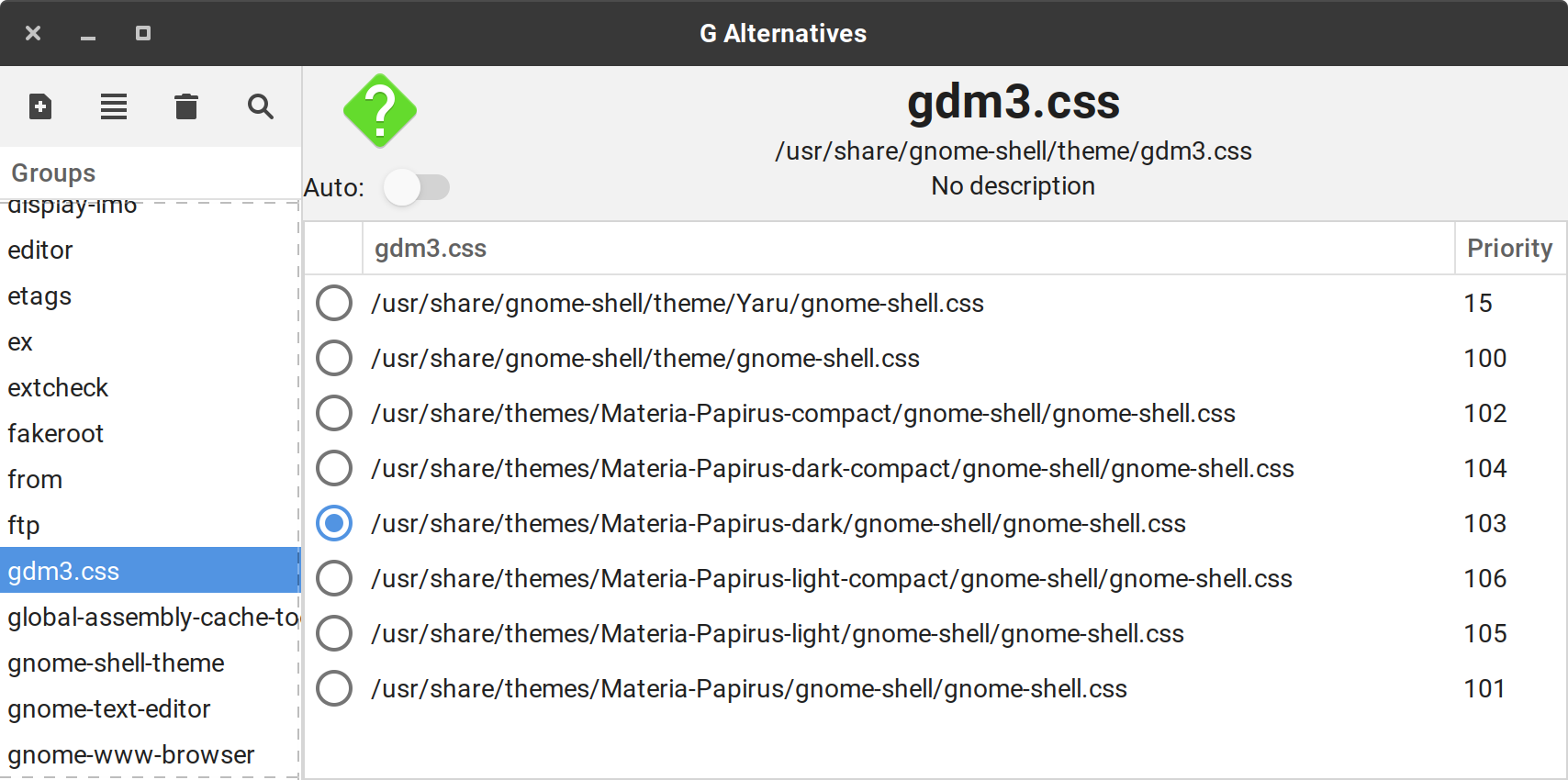
Notes:
If you see a "Commit failed" warning, this is normal and means you need to enter your admin password.
- Click the "Close" button on the warning dialog.
- An "Apply" button will appear at the bottom of the Alternatives Configuraor window.
- Click the "Apply" button.
- Enter your admin password when prompted and click "Authenticate".
A system update may reset the top bar, dash, and lock screen theme.
This will happen whenever the package gnome-shell-common is updated.
To correct this, simply execute the following:
sudo mv /usr/share/gnome-shell/gnome-shell-theme{,-original}.gresource
sudo ln -s /etc/alternatives/gnome-shell-theme /usr/share/gnome-shell/gnome-shell-theme.gresource
@PJSingh5000 If that works, I really really like it! :)
Could you put that into a single script that install the alternatives, that optionally sets the currently selected theme?
ddnexus
on 13 Nov 2018
I have a script, and I am refining and testing it. I'll simplify it and share it within a coule of days.
PJSingh5000
on 13 Nov 2018
@PJSingh5000 Please, share it with a PR ;)
ddnexus
on 13 Nov 2018
@PJSingh5000 Thank you for your great research!
Well, I tried your installation method on Ubuntu 18.10 VM, but unfortunately it doesn't work for me. :(
Maybe I just made some mistake, but both default gnome-shell theme and GDM theme are still Yaru.
How about something like this?
I think it is more elegant than overwriting files.
I'm still not sure if I'd agree with it, even if I could successfully change the theme.
I want to judge it after reviewing your script.
When you refine your script, please note that the /usr/share/gnome-shell/theme/gdm3.css is a Ubuntu specific file. Other distros don't have it. (IIRC, it is a file for Ubuntu to have a unique GDM theme.)
Also, can you implement a function to uninstall it completely in your script?
Finally, I have a small concern about renaming /usr/share/gnome-shell/gnome-shell-theme.gresource for security risks. What do you think about this?
nana-4
on 13 Nov 2018
Oh... I just noticed that Arch Linux doesn't provide update-alternatives package. See:
https://www.archlinux.org/packages/?sort=&q=update-alternatives
and AUR too:
So we shouldn't rely on update-alternatives. It's biased towards Debian/Ubuntu.
Is it possible to achieve it without using update-alternatives?
nana-4
on 13 Nov 2018
I do install gnome-session, and and then choose Gnome Session on the GDM screen.
That may be the part that you were missing when you tested?
(To ensure this Gnome Session is always used, I typically remove everything from /usr/share/xsessions except gnome-xorg.desktop).
I'll investigate if there is a nice way to do this without update-alternatives, and I'll share if I come up with something and let you guys judge if it's worthwhile.
PJSingh5000
on 14 Nov 2018
I do install gnome-session, and and then choose Gnome Session on the GDM screen.
That may be the part that you were missing when you tested?
Yes, I didn't install gnome-session on the VM. Maybe it is the cause. :)
I'll investigate if there is a nice way to do this without update-alternatives, and I'll share if I come up with something and let you guys judge if it's worthwhile.
Thanks a lot!
nana-4
on 14 Nov 2018
I ended up with two scripts. Please let me know what you think?
- The
init-switch-themes.shscript sets up theme switching. - The
switch-theme.shscript switches themes.
The solution also works for systems that do not have update-alternatives.
I've tested this on Ubuntu and Arch (Antergos).
Install required packages.
sudo apt install gnome-shell-common # wasn't necessary on Antergos
sudo apt install libglib2.0-dev-bin # glib2 on Antergos
sudo apt install bash-completion # if available
sudo apt install galternatives # if availableInstall the Materia theme, if not already installed. This script works with some other themes as well.
Remove or disable the "User Themes" extension, if you have it installed.
Run the
init-switch-themes.shscript to setup theme switching. The script also selects a theme for you, so you don't need to runswitch-theme.shafterwards.You can provide "hints" about which theme is automatically selected.
If you simply want the script to use your current desktop theme...
sudo init-switch-themes.shIf you want the script to use a dark variant of your current desktop theme...
sudo init-switch-themes.sh DarkIf you want the script to explicitly use the Materia theme and use a dark variant...
sudo init-switch-themes.sh --theme Materia DarkFor more information on arguments, see the "Usage" section in the script comments.
Reboot.
On the GDM login screen, be sure to select "GNOME on Xorg" or "GNOME" (Wayland).
In the future, you can switch themes using one of these three options:
a. Command line (works on all systems)
sudo switch-theme.shb. Command line (works on Debian based systems like Ubuntu)
sudo update-alternatives gnome-shell-theme
sudo update-alternatives gdm3.css
c. Launch Alternatives Configurator application GUI (works on Debian bases systems like Ubuntu).
init-switch-themes.sh
#!/bin/bash

# Setup themes so the user can easily switch themes for:
#
# 1. Gnome Shell (top bar, dash, and lock screen)
# 2. GDM (login screen)
#
# Before using this script:
#     Install required prerequisites (see Required Prerequisites section).
#
# Select the appropriate theme for Gnome Shell and for GDM based on the user's
# current desktop theme or the supplied arguments. (See the "Usage" section for
# details).
#
# This script does not change the user's desktop theme (i.e. the theme used for
# window decorations). The desktop theme may be set using a tool such Gnome
# Tweaks.
#
# After running this script once, subsequently change the Gnome Shell or GDM
# theme using:
#
# 1. Command line method #1:
#    This method works on all systems.
#    1. Execute 'sudo switch-theme.sh'
#    2. Select the desired theme.
#
# 2. Command line method #2:
#    This method only works on systems that have update-alternatives (included
#    in package bash-completion on Debian based systems such as Ubuntu).
#    1. Execute 'sudo update-alternatives gnome-shell-theme'
#    2. Select the desired theme.
#
# 3. GUI method:
#    This method only works on systems that have update-alternatives and the
#    Alternatives Configurator application. (These tools are included in the
#    bash-completion package and the galternatives package, respectively, on
#    Debian based systems such as Ubuntu).
#    1. Launch the Alternatives Configurator application.
#    2. Select the desired theme from the "gnome-shell-theme" group.
#
# Usage:
#
#   $ sudo init-switch-themes.sh [-r|--recompile] [-t|--theme THEME OVERRIDE] [PREFERRED VARIANTS]
#
#   Mandatory arguments to long options are mandatory for short options too.
#
#   -r, --recompile             Recompile Gnome Shell theme file
#                                   (gnome-shell-theme.gresource) even if it
#                                   already exists.
#
#   -t, --theme THEME OVERRIDE  Theme to use instead of the current desktop
#                                   theme.
#
#   PREFERRED VARIANTS          List of case-insensitive preferred variants.
#                               Must be the last set of arguments supplied.
#                               Must be separated by spaces.
#                               May contain any value in the global variants
#                                   array:
#                                   - "compact"
#                                   - "dark"
#                                   - "darker"
#                                   - "eta"
#                                   - "light"
#                                   - "nokto"
#                               Since some themes use unique variants, you can
#                                   add items to the global variants array
#                                   to add support for additional themes.
#
# Examples:
#
#   Automatically chose themes using the user's current desktop theme.
#     $ sudo init-switch-themes.sh
#
#   Automatically chose a dark variant of the user's current desktop theme.
#     $ sudo init-switch-themes.sh Dark
#
#   Recompile all themes, and automatically chose themes using the user's
#   current desktop theme.
#     $ sudo init-switch-themes.sh --recompile
#
#   Choose a dark variant of the Materia theme, disregarding the user's current
#   desktop theme.
#     $ sudo init-switch-themes.sh --theme Materia Dark
#
#   Recompile all themes, and choose a dark variant of the Materia theme,
#   disregarding the user's current desktop theme.
#     $ sudo init-switch-themes.sh --recompile --theme Materia Dark
#
#   Choose the Materia-dark theme.
#     $ sudo init-switch-themes.sh --theme Materia-dark
#
#   Recompile all themes, and choose a theme similar to Materia-dark, but with
#   both Compact and Light variants. (In this example, the selected theme will
#   be 'Materia-light-compact').
#     $ sudo init-switch-themes.sh -r -t Materia-dark COMPACT LIGHT
#
# Notes:
#
# After a system update, you may need to execute 'sudo switch-theme.sh' to reset
# the selected theme or re-enable the ability to select other themes using the
# methods described above. This may be necessary if package 'gnome-shell-common'
# is updated or reinstalled.
#
# After adding a new theme or updating an existing theme, execute this script to
# generate the theme's gnome-shell-theme.gresource file and allow the theme to
# be selected using the methods described above.
#
# This script works with themes that have the following file structures.
#
# 1. For Gnome Shell and GDM
#
#    /usr/share/themes/<theme name>/gnome-shell/
#     ├── gnome-shell.css
#     ├── gnome-shell-theme.gresource
#     └── gnome-shell-theme.gresource.xml
#
#    /usr/share/themes/<theme name>/gnome-shell/
#     ├── gnome-shell.css
#     └── gnome-shell-theme.gresource
#
#    /usr/share/themes/<theme name>/gnome-shell/
#     ├── gnome-shell.css
#     └── gnome-shell-theme.gresource.xml
#
# 2. For Gnome Shell only
#
#    /usr/share/themes/<theme name>/gnome-shell/
#     ├── gnome-shell-theme.gresource
#     └── gnome-shell-theme.gresource.xml
#
#    /usr/share/themes/<theme name>/gnome-shell/
#     └── gnome-shell-theme.gresource
#
#    /usr/share/themes/<theme name>/gnome-shell/
#     └── gnome-shell-theme.gresource.xml
#
# 3. For GDM only
#
#    /usr/share/themes/<theme name>/gnome-shell/
#     └── gnome-shell.css
#
# Required Prerequisites:
#
# - Be sure to select "GNOME on Xorg" or "GNOME" (Wayland) on the GDM screen, so
#   the top bar, dash, and lock screen theme will work.
#     $ sudo apt install gnome-shell-common
#
# - Required for glib-compile-resources, used by this script.
#     $ sudo apt install libglib2.0-dev-bin
#
# - Disable or uninstall the User Themes extension
#
# Required Prerequisites for Debian based systems:
#
# - Used for Update Alternatives (command line theme selection)
#     $ sudo apt install bash-completion
#
# Optional Prerequisites:
#
# - Used for Update Alternatives (command line theme selection)
#     $ sudo apt install bash-completion
#
# - Used for Alternatives Configurator (GUI theme selection)
#     $ sudo apt install galternatives
#
# - Used to change the user's desktop theme (i.e. the theme used for window
#   decorations)
#     $ sudo apt install gnome-tweaks # to set desktop theme
#
# Example themes this scrit works with:
#
# - Arc Theme (only for GDM)
#     $ sudo apt install arc-theme
#
# - Materia Theme
#     $ sudo apt install materia-gtk-theme
#
# - Adapta Theme
#     $ sudo apt-add-repository ppa:tista/adapta
#     $ sudo apt-get update && sudo apt-get install adapta-gtk-theme

################################################################################
# Global Static Variables
################################################################################

shell_link="/usr/share/gnome-shell/gnome-shell-theme.gresource"
shell_name="gnome-shell-theme"

# Use for systems with update-alternatives
gdm_link_1="/usr/share/gnome-shell/theme/gdm3.css"
gdm_name_1="gdm3.css"

# Use for systems without update-alternatives
gdm_link_2="/usr/share/gnome-shell/theme/gnome-shell.css"
gdm_name_2="gnome-shell.css"

# List of possible theme variants that appear as suffixes to the base theme.
# You can add items to this list to support other themes that have different
# variants.
variants=(
"compact"
"dark"
"darker"
"eta"
"light"
"nokto"
)

# List of alternative preferred variants used in the rare case when the current
# theme is not in the list of possible themes, and a list of preferred variants
# was not supplied as arguments to this script. In this case, themes with the
# alternative variants will be favored over other themes that match the base
# theme.
alternative_variants=("dark")

# The fallback theme used if this script is unable to select a theme based on
# the current theme and preferred variants.
fallback_theme=("Adwaita-dark")

################################################################################
# Functions
################################################################################

# ------------------------------------------------------------------------------
# Backup original gnome-shell-theme.gresource file
# ------------------------------------------------------------------------------
#
# This function creates a directory called gnome-shell for the Adwaita-dark
# theme in /usr/share/themes. It copies the gnome-shell-theme.gresource file and
# the gnome-shell.css file from /usr/share/gnome-shell/ into this new directory.
# This is done so that the add_alternatives function will treat Adwaita-dark
# like other the themes.
#
# This function also renames the gnome-shell-theme.gresource file in
# /usr/share/gnome-shell/ as gnome-shell-theme-original.gresource. This is done
# so that gnome-shell-theme.gresource can be a link to a gresource file in the
# selected theme directory under /usr/share/themes. (See the add_alternatives
# function).
#
# This function assumes that gnome-shell-theme.gresource and gnome-shell.css
# are the original files for Adwaita. If these files have been changed, replace
# them with the originals, or execute
# 'sudo apt install --reinstall gnome-shell-common'.
#
# Required arguments:
# - None
#
# Optional arguments:
# - None
#
# Required global variables (must be set before calling this function):
# - None
#
# Optional global variables:
# - None
#
# Updated Global variables:
# - None
#
# Returned values:
# - None

function backup_original_theme() {

    if [[ ! -L /usr/share/gnome-shell/gnome-shell-theme.gresource ]]; then

        # The Adwaita gnome-shell-theme.gresource and gnome-shell.css are for
        # the dark version. This script handles this situation by selecting
        # Adwaita-dark as the top bar, dash, and lock screen theme and as the
        # GDM theme, even if a preferred variant is not supplied as an argument.
        # Therefore it is not necessary to copy gnome-shell-theme.gresource or
        # gnome-shell.css into the Adwaita theme directory.

        # Adwaita-dark
        theme_directory="/usr/share/themes/Adwaita-dark/gnome-shell"
        mkdir --parents "${theme_directory}"
        cp /usr/share/gnome-shell/theme/gnome-shell.css "${theme_directory}"
        cp /usr/share/gnome-shell/gnome-shell-theme.gresource "${theme_directory}"

        # Backup original gnome-shell-theme.gresource file.
        mv /usr/share/gnome-shell/gnome-shell-theme{,-original}.gresource

        # Backup original gnome-shell.css file.
        mv /usr/share/gnome-shell/theme/gnome-shell{,-original}.css

    fi

}

# ------------------------------------------------------------------------------
# Add alternatives
# ------------------------------------------------------------------------------
#
# This function adds alternatives for all themes in /usr/share/themes.
#
# For the top bar, dash, and lock screen theme, the gnome-shell-theme.gresource
# file is recompiled if gnome-shell-theme.gresource.xml is available. If
# gnome-shell-theme.gresource has been recompiled or already exists, the
# alternative is added.
#
# For the GDM theme, if gnome-shell.css is available, the alternative is added.
#
# Required arguments:
# - None
#
# Optional arguments:
# - None
#
# Required global variables (must be set before calling this function):
# - recompile - Compile gnome-shell-theme.gresource even if it exists.
#
# Optional global variables:
# - None
#
# Updated Global variables:
# - None
#
# Returned values:
# - None

function add_alternatives() {

    local _priority=101

    local _theme_directory
    for _theme_directory in /usr/share/themes/*/gnome-shell; do

        cd "${_theme_directory}"

        local _theme
        _theme=${_theme_directory##/usr/share/themes/}
        _theme=${_theme%%/gnome-shell}

        # Compile (or recompile) the gnome shell theme.
        if [[ ( ! -f "gnome-shell-theme.gresource" || ${recompile} == true ) && -f "gnome-shell-theme.gresource.xml" ]]; then
            echo "Compile '${_theme}' theme"
            rm -f gnome-shell-theme.gresource
            glib-compile-resources --target=gnome-shell-theme.gresource gnome-shell-theme.gresource.xml
        fi

        if [[ ${alternatives_available} == true ]]; then

            # Add an alternative for the top bar, dash, and lock screen theme.
            local _shell_path="${_theme_directory}/gnome-shell-theme.gresource"
            if [[ -f $_shell_path ]]; then
                echo "Add alternative for '${_theme}' theme for top bar, dash, and lock screen"
                update-alternatives --remove "${shell_name}" "${_shell_path}"
                update-alternatives --install "${shell_link}" "${shell_name}" "${_shell_path}" "${_priority}"
            fi

            # Add an alternative for the GDM theme.
            local _gdm_path="${_theme_directory}/gnome-shell.css"
            if [[ -f $_gdm_path ]]; then
                echo "Add alternative for '${_theme}' theme for GDM"
                update-alternatives --remove "${gdm_name_1}" "${_gdm_path}"
                update-alternatives --install "${gdm_link_1}" "${gdm_name_1}" "${_gdm_path}" "${_priority}"
            fi

            # Use a unique priority for each theme.
            if [[ -f $_shell_path || $_gdm_path ]]; then
                (( ++_priority ))
            fi

        fi

        echo

    done

}

# ------------------------------------------------------------------------------
# Get the current theme
# ------------------------------------------------------------------------------
#
# This function gets the name of the desktop theme that is currently being used.
#
# Required arguments:
# - None
#
# Optional arguments:
# - None
#
# Required global variables (must be set before calling this function):
# - None
#
# Optional global variables:
# - None
#
# Updated Global variables:
# current_theme - The name of the desktop theme that is currently being used
#
# Returned values:
# - None

function get_current_theme() {

    # current_theme=$( gsettings get org.gnome.desktop.interface gtk-theme | sed "s|'||g" )

    user=$( logname )
    current_theme=$( su -c "gsettings get org.gnome.desktop.interface gtk-theme" ${user} | sed "s|'||g" )

}

# ------------------------------------------------------------------------------
# Calculate the base theme
# ------------------------------------------------------------------------------
#
# This function calculates the base theme using the current theme name. In order
# to determine the base theme, variants are removed from the current theme name.
#
# Required arguments:
# - None
#
# Optional arguments:
# - None
#
# Required global variables (must be set before calling this function):
# - variants
# - current_theme
#
# Optional global variables:
# - None
#
# Updated Global variables:
# - base_theme
#
# Returned values:
# - None

function get_base_theme() {

    base_theme=${preferred_theme}

    local _variant
    for _variant in ${variants[@]}; do
        base_theme=$( echo "${base_theme}" | sed "s|\W*${_variant}||Ig" )
    done

}

# ------------------------------------------------------------------------------
# Get a list of themes
# ------------------------------------------------------------------------------
#
# This function gets a list of themes in the /usr/share/themes directory that
# are appropriate for the top bar, dash, and lock screen theme. To get a list of
# themes for the top bar, dash, and lock screen, use
# "gnome-shell-theme.gresource" as an argument to ts function.
#
# This function gets a list of themes in the /usr/share/themes directory that
# are appropriate for the GDM theme. To get a list of themes for GDM, use
# "gnome-shell.css" as an argument to ts function.
#
# This function gets the names of directories that:
#   1. Are in directory /usr/share/themes/
#   2. Contan the file /gnome-shell/theme_file (argument)
#
# Required arguments:
# - theme_file
#   1. "gnome-shell-theme.gresource"
#   2. "gnome-shell.css"
#
# Optional arguments:
# - None
#
# Required global variables (must be set before calling this function):
# - None
#
# Optional global variables:
# - None
#
# Updated Global variables:
# - themes
#
# Returned values:
# - None

function get_themes_that_contain() {

    themes=() # Reset global variable
    local _theme_file=${1} # Argument
    local _theme_path
    local _theme

    # echo "Serch for themes that contain the file '${_theme_file}'"
    local _index=0
    for _theme_path in /usr/share/themes/*/gnome-shell/${_theme_file}; do
        # echo ${_theme_path}
        _theme=${_theme_path##/usr/share/themes/} # Remove path prefix
        _theme=${_theme%%/gnome-shell/${_theme_file}} # Remove path suffix
        themes[$_index]=$_theme
        # echo ${_theme}
        (( ++_index ))
    done

}

# ------------------------------------------------------------------------------
# Count the number of variants in a theme
# ------------------------------------------------------------------------------
#
# This function counts the number of specified variants in the specified theme.
# This function counts only unique occurrences of variants; repeated variants
# are counted only once.
#
# Required arguments:
# - theme - The name of the theme to check
# - variants - An array of variants to check
#
# Optional arguments:
# - None
#
# Required global variables (must be set before calling this function):
# - None
#
# Optional global variables:
# - None
#
# Updated Global variables:
# - None
#
# Returned values:
# - count - The number of specified variants in the specified theme

function count_variants() {

    local -n __theme="${1}"
    local -n _variants="${2}"
    local _variant
    local _count=0
    for _variant in "${_variants[@]}"; do
        if [[ ${__theme^^} =~ ${_variant^^} ]]; then
            # If the theme contains the variant, then increment the _count.
            (( ++_count ))
            # Remove the variant from the theme to prevent substring matches.
            __theme=$( echo "${__theme}" | sed "s|\W*${_variant}||Ig" )
        fi
    done

    echo "${_count}"

}

# ------------------------------------------------------------------------------
# Calculate the selected theme
# ------------------------------------------------------------------------------
#
# This function calculates the selected theme. It searches for an existing
# theme in /usr/share/themes that has the base theme name (derived from the
# current theme) and that contains as many of the preferred variants (supplied
# as arguments to this script) as possible.
#
# Required arguments:
# - None
#
# Optional arguments:
# - None
#
# Required global variables (must be set before calling this function):
# - current_theme
# - base_theme
# - themes
#
# Optional global variables:
# - preferred_variants
#   - May be any value in global array, variants
#   - Case doesn't matter
#
# Updated Global variables:
# - selected_theme
#
# Returned values:
# - None

function get_selected_theme() {

    # Initially, assume the selected theme is the preferred theme.
    selected_theme=${preferred_theme}

    # If the current theme is in the list of possible themes, then set the
    # selected theme score to 1. Otherwise, set the selected theme score to 0.
    local _theme
    local _selected_theme_score=0
    for _theme in "${themes[@]}"; do
        if [[ ${_theme^^} == ${selected_theme^^} ]]; then
            _selected_theme_score=1
            break
        fi
    done

    # Calculate the selected theme if the preferred theme is not in the list of
    # possible themes or if the preferred variants were supplied. (In other
    # words, if the preferred theme is in list of possible themes and if the
    # preferred variants were not supplied, then skip this step).
    if (( _selected_theme_score == 0 || ${#preferred_variants} > 0 )); then
        for _theme in "${themes[@]}"; do
            # Calculate score for theme.
            local _score=0
            if [[ ${_theme^^} == ${base_theme^^}* ]]; then

                # If no preferred variants were supplied, favor themes that
                # contain the alternative ("dark") variant(s), over themes
                # that have other variants.
                if (( ${#preferred_variants} == 0 )); then
                    # count_variants_print_2 theme alternative_variants
                    _score=$( count_variants _theme alternative_variants )
                else
                    # count_variants_print_2 theme preferred_variants
                    _score=$( count_variants _theme preferred_variants )
                fi

                # Inscrease score for this theme because it contans the base
                # theme name.
                (( _score+=1 ))

                # Select theme based on (higher) score and (shorter) length.
                if (( ${_score} > ${_selected_theme_score} )); then
                    # Select the theme with the higher score.
                    _selected_theme_score=$_score
                    selected_theme=${_theme}
                elif (( ${_score} == ${_selected_theme_score} && ${#_theme} < ${#selected_theme} )); then
                    # If the scores are the same, favor the theme with the
                    # shorter length. (This implies that the selected theme
                    # only contains preferred variants and no extra variants).
                    _selected_theme_score=$_score
                    selected_theme=${_theme}

                fi
            fi
        done
    fi

    # After the calculatons, if the selected theme score is still zero, then
    # default to the fallback theme ("Adwaita-dark").
    if (( ${_selected_theme_score} == 0 )); then
        selected_theme="${fallback_theme}"
    fi

}

# ------------------------------------------------------------------------------
# Sort elements by length
# ------------------------------------------------------------------------------
#
# This function sorts the static variants list by length. This is required for
# the function get_base_theme(), so this function must be called before
# get_base_theme() is invoked.
#
# In order to determine the base theme, variants are removed from the current
# theme name. Variants that appear first in the list, are removed first. To
# avoid removing a variant that is the sub-string of another variant, the
# variants must be ordered by length. For example, "darker" should be removed
# before "dark" to avoid leaving "er" in the base theme name.
#
# The following global variables are required and must be set:
# - variants
#
# The result is stored in the following global variable:
# - variants
#
# https://unix.stackexchange.com/questions/482393/bash-sort-array-according-to-length-of-elements

#
# Required arguments:
# - elements - The array to sort
#
# Optional arguments:
# - None
#
# Required global variables (must be set before calling this function):
# - None
#
# Optional global variables:
# - None
#
# Updated Global variables:
# - elements  - The sorted array (the input argumet is updated)
#
# Returned values:
# - None

function sort_elements_by_length() {

    local -n _elements=${1} # Argument

    readarray -t _elements < <(
    local _element
    for _element in "${_elements[@]}"; do
        printf '%d\t%s\n' "${#_element}" "$_element"
    done | sort -k 1,1nr -k2 | cut -f2- )

}

# ------------------------------------------------------------------------------
# Print array
# ------------------------------------------------------------------------------
#
# This function prints a list of array elements.
#
# Required arguments:
# - items - The array to print
#
# Optional arguments:
# - None
#
# Required global variables (must be set before calling this function):
# - None
#
# Optional global variables:
# - None
#
# Updated Global variables:
# - None
#
# Returned values:
# - None

function print_array() {

    local -n items=${1} # Argument

    local item
    local index=1
    for item in "${items[@]}"; do
        printf "  %2d. %s\n" "${index}" "${item}"
        (( ++index ))
    done

}

################################################################################
# Main
################################################################################

# ------------------------------------------------------------------------------
# Get arguments
# ------------------------------------------------------------------------------

# install [-r|--recompile] [-t|--theme <theme override>] [<preferred variants>]

recompile=false
theme_override=""
preferred_variants=()
while [[ $# > 0 ]]; do
    key="$1"
    case $key in
        -r|--recompile)
            recompile=true
            shift # past argument
            ;;
        -t|--theme)
            theme_override="$2"
            shift # past argument
            shift # past value
            ;;
        *)
            preferred_variants+=("$1")
            shift # past value
            ;;
    esac
done


# ------------------------------------------------------------------------------
# Sort variants
# ------------------------------------------------------------------------------

sort_elements_by_length variants

sort_elements_by_length alternative_variants

sort_elements_by_length preferred_variants

# ------------------------------------------------------------------------------
# Add alternatives for themes
# ------------------------------------------------------------------------------

alternatives_available=false
if ( hash update-alternatives 2>/dev/null ); then
    alternatives_available=true
fi

backup_original_theme

add_alternatives

# ------------------------------------------------------------------------------
# Prepare to set the selected themes
# ------------------------------------------------------------------------------

echo "Recompile themes?...................... ${recompile}"

get_current_theme
echo "The current theme is................... '${current_theme}'"

echo "The theme override is.................. '${theme_override}'"

if [[ ${theme_override} ]]; then
    preferred_theme="${theme_override}"
else
    preferred_theme=${current_theme}
fi
echo "The preferred theme is................. '${preferred_theme}'"

get_base_theme
echo "The base theme is...................... '${base_theme}'"

echo "The preferred variants are............. '${preferred_variants[@]}'"

echo

# ------------------------------------------------------------------------------
# Set the selected theme for the top bar, dash, and lock screen
# ------------------------------------------------------------------------------

# Search for top bar, dash, and lock screen themes.
get_themes_that_contain "gnome-shell-theme.gresource"
## print_array themes

# Get the top bar, dash, and lock screen theme to match the current theme.
get_selected_theme
echo "The selected theme for the top bar,"
echo "dash, and lock screen is............... '${selected_theme}'"

# Set the top bar, dash, and lock screen theme to match the current theme.
shell_path="/usr/share/themes/${selected_theme}/gnome-shell/gnome-shell-theme.gresource"
if [[ ${alternatives_available} == true ]]; then

    # Recreate the link to etc/alternatives to ensure alternatives is not broken.
    ln --symbolic --force "/etc/alternatives/${shell_name}" "${shell_link}"

    update-alternatives --set "${shell_name}" "${shell_path}"

else

    echo "Set '${selected_theme}' as the Gnome Shell theme."
    ln --symbolic --force "${shell_path}" "${shell_link}"

fi

echo

# ------------------------------------------------------------------------------
# Select the GDM theme
# ------------------------------------------------------------------------------

# Search for GDM themes.
get_themes_that_contain "gnome-shell.css"
## print_array themes

# Get the GDM theme to match the current theme.
get_selected_theme
echo "The selected theme for GDM is.......... '${selected_theme}'"

# Set the GDM theme to match the current theme.
gdm_path="/usr/share/themes/${selected_theme}/gnome-shell/gnome-shell.css"
if [[ ${alternatives_available} == true ]]; then

    # Recreate the link to etc/alternatives to ensure alternatives is not broken.
    ln --symbolic --force "/etc/alternatives/${gdm_name_1}" "${gdm_link_1}"
    # Do we need this for some systems?
    ln --symbolic --force "/etc/alternatives/${gdm_name_1}" "${gdm_link_2}"

    update-alternatives --verbose --set "${gdm_name_1}" "${gdm_path}"

else

    echo "Set '${selected_theme}' as the GDM theme."
    ln --symbolic --force "${gdm_path}" "${gdm_link_1}"
    # Do we need this for some systems?
    ln --symbolic --force "${gdm_path}" "${gdm_link_2}"

fi

echo
switch-theme.sh
#!/bin/bash

# Switch themes for:
#
# 1. Gnome Shell (top bar, dash, and lock screen)
# 2. GDM (login screen)
#
# This script does not change the user's desktop theme (i.e. the theme used for
# window decorations). The desktop theme may be set using a tool such Gnome
# Tweaks.
#
# Before using this script:
# 1. Install required prerequisites (see Required Prerequisites section).
# 2. Execute 'init-switch-themes.sh' before using this script.
#
# Usage:
#
#   $ sudo switch-theme.sh
#
# Examples:
#
#   $ sudo switch-theme.sh
#
# Notes:
#
# After a system update, you may need to execute this script to reset the
# selected theme or re-enable the ability to select other themes. This may be
# necessary if package 'gnome-shell-common' is updated or reinstalled.
#
# After adding a new theme or updating an existing theme, execute the
# 'init-switch-themes.sh' script to generate the theme's
# gnome-shell-theme.gresource file and allow the theme to be selected using
# this script or update-alternatives (if available).
#
# This script works with themes that have the following file structures.
#
# 1. For Gnome Shell and GDM
#
#    /usr/share/themes/<theme name>/gnome-shell/
#     ├── gnome-shell.css
#     ├── gnome-shell-theme.gresource
#     └── gnome-shell-theme.gresource.xml
#
#    /usr/share/themes/<theme name>/gnome-shell/
#     ├── gnome-shell.css
#     └── gnome-shell-theme.gresource
#
#    /usr/share/themes/<theme name>/gnome-shell/
#     ├── gnome-shell.css
#     └── gnome-shell-theme.gresource.xml
#
# 2. For Gnome Shell only
#
#    /usr/share/themes/<theme name>/gnome-shell/
#     ├── gnome-shell-theme.gresource
#     └── gnome-shell-theme.gresource.xml
#
#    /usr/share/themes/<theme name>/gnome-shell/
#     └── gnome-shell-theme.gresource
#
#    /usr/share/themes/<theme name>/gnome-shell/
#     └── gnome-shell-theme.gresource.xml
#
# 3. For GDM only
#
#    /usr/share/themes/<theme name>/gnome-shell/
#     └── gnome-shell.css
#
# In addition to this script, you can also select different system themes by:
#
# 1. Command line method:
#    This method only works on systems that have update-alternatives (included
#    in package bash-completion on Debian based systems such as Ubuntu).
#    1. Execute 'sudo update-alternatives gnome-shell-theme'
#    2. Select the desired theme.
#
# 2. GUI method:
#    This method only works on systems that have update-alternatives and the
#    Alternatives Configurator application. (These tools are included in the
#    bash-completion package and the galternatives package, respectively, on
#    Debian based systems such as Ubuntu).
#    1. Launch the Alternatives Configurator application.
#    2. Select the desired theme from the "gnome-shell-theme" group.
#
# Required Prerequisites:
#
# - Be sure to select "GNOME on Xorg" or "GNOME" (Wayland) on the GDM screen, so
#   the top bar, dash, and lock screen theme will work.
#     $ sudo apt install gnome-shell-common
#
# - Required for glib-compile-resources, used by this script.
#     $ sudo apt install libglib2.0-dev-bin
#
# - Disable or uninstall the User Themes extension
#
# Required Prerequisites for Debian based systems:
#
# - Used for Update Alternatives (command line theme selection)
#     $ sudo apt install bash-completion
#
# Optional Prerequisites:
#
# - Used for Update Alternatives (command line theme selection)
#     $ sudo apt install bash-completion
#
# - Used for Alternatives Configurator (GUI theme selection)
#     $ sudo apt install galternatives
#
# - Used to change the user's desktop theme (i.e. the theme used for window
#   decorations)
#     $ sudo apt install gnome-tweaks # to set desktop theme
#
# Example themes this script works with:
#
# - Arc Theme (only for GDM)
#     $ sudo apt install arc-theme
#
# - Materia Theme
#     $ sudo apt install materia-gtk-theme
#
# - Adapta Theme
#     $ sudo apt-add-repository ppa:tista/adapta
#     $ sudo apt-get update && sudo apt-get install adapta-gtk-theme

################################################################################
# Global Static Variables
################################################################################

shell_link="/usr/share/gnome-shell/gnome-shell-theme.gresource"
shell_name="gnome-shell-theme"

# Use for systems with update-alternatives
gdm_link_1="/usr/share/gnome-shell/theme/gdm3.css"
gdm_name_1="gdm3.css"

# Use for systems without update-alternatives
gdm_link_2="/usr/share/gnome-shell/theme/gnome-shell.css"
gdm_name_2="gnome-shell.css"

################################################################################
# Functions
################################################################################

# ------------------------------------------------------------------------------
# Backup original gnome-shell-theme.gresource file
# ------------------------------------------------------------------------------
#
# This function creates a directory called gnome-shell for the Adwaita-dark
# theme in /usr/share/themes. It copies the gnome-shell-theme.gresource file and
# the gnome-shell.css file from /usr/share/gnome-shell/ into this new directory.
# This is done so that the add_alternatives function will treat Adwaita-dark
# like other the themes.
#
# This function also renames the gnome-shell-theme.gresource file in
# /usr/share/gnome-shell/ as gnome-shell-theme-original.gresource. This is done
# so that gnome-shell-theme.gresource can be a link to a gresource file in the
# selected theme directory under /usr/share/themes. (See the add_alternatives
# function).
#
# This function assumes that gnome-shell-theme.gresource and gnome-shell.css
# are the original files for Adwaita. If these files have been changed, replace
# them with the originals, or execute
# 'sudo apt install --reinstall gnome-shell-common'.
#
# Required arguments:
# - None
#
# Optional arguments:
# - None
#
# Required global variables (must be set before calling this function):
# - None
#
# Optional global variables:
# - None
#
# Updated Global variables:
# - None
#
# Returned values:
# - None

function backup_original_theme() {

    if [[ ! -L /usr/share/gnome-shell/gnome-shell-theme.gresource ]]; then

        # The Adwaita gnome-shell-theme.gresource and gnome-shell.css are for
        # the dark version. This script handles this situation by selecting
        # Adwaita-dark as the top bar, dash, and lock screen theme and as the
        # GDM theme, even if a preferred variant is not supplied as an argument.
        # Therefore it is not necessary to copy gnome-shell-theme.gresource or
        # gnome-shell.css into the Adwaita theme directory.

        # Adwaita-dark
        theme_directory="/usr/share/themes/Adwaita-dark/gnome-shell"
        mkdir --parents "${theme_directory}"
        cp /usr/share/gnome-shell/theme/gnome-shell.css "${theme_directory}"
        cp /usr/share/gnome-shell/gnome-shell-theme.gresource "${theme_directory}"

        # Backup original gnome-shell-theme.gresource file.
        mv /usr/share/gnome-shell/gnome-shell-theme{,-original}.gresource

        # Backup original gnome-shell.css file.
        mv /usr/share/gnome-shell/theme/gnome-shell{,-original}.css

    fi

}

# ------------------------------------------------------------------------------
# Get a list of themes
# ------------------------------------------------------------------------------
#
# This function gets a list of themes in the /usr/share/themes directory that
# are appropriate for the top bar, dash, and lock screen theme. To get a list of
# themes for the top bar, dash, and lock screen, use
# "gnome-shell-theme.gresource" as an argument to ts function.
#
# This function gets a list of themes in the /usr/share/themes directory that
# are appropriate for the GDM theme. To get a list of themes for GDM, use
# "gnome-shell.css" as an argument to ts function.
#
# This function gets the names of directories that:
#   1. Are in directory /usr/share/themes/
#   2. Contan the file /gnome-shell/theme_file (argument)
#
# This function appends a * to the name of the theme in the list that matches
# the current_theme_path argument.
#
# Required arguments:
# - theme_file
#   1. "gnome-shell-theme.gresource"
#   2. "gnome-shell.css"
# - current_theme_path
#   1. The full path to the current "gnome-shell-theme.gresource" file
#   2. The full path to the current "gnome-shell.css"
#
# Optional arguments:
# - None
#
# Required global variables (must be set before calling this function):
# - None
#
# Optional global variables:
# - None
#
# Updated Global variables:
# - themes
#
# Returned values:
# - None

function get_themes_that_contain() {

    themes=() # Reset global variable
    local _theme_file=${1} # Argument
    local _current_theme_path=${2} # Argument
    local _theme_path
    local _theme

    # echo "Serch for themes that contain the file '${_theme_file}'"
    local _index=0
    for _theme_path in /usr/share/themes/*/gnome-shell/${_theme_file}; do
        # echo ${_theme_path}
        _theme=${_theme_path##/usr/share/themes/} # Remove path prefix
        _theme=${_theme%%/gnome-shell/${_theme_file}} # Remove path suffix
        # echo "${_theme_path}"
        if [[ ${_theme_path} == ${_current_theme_path} ]]; then
            themes[$_index]="* $_theme"
        else
            themes[$_index]=$_theme
        fi
        # echo ${_theme}
        (( ++_index ))
    done

}

# ------------------------------------------------------------------------------
# Select gnome shell theme (top bar, dash, lock screen)
# ------------------------------------------------------------------------------

function select_gnome_shell_theme() {

    echo "Gnome Shell Themes (Top Bar, Dash, Lock Screen)"
    echo "-----------------------------------------------"
    echo
    echo "  * Current Theme"
    echo

    themes=()
    current_theme_path=$( readlink -f ${shell_link} )
    get_themes_that_contain "gnome-shell-theme.gresource" "${current_theme_path}"

    PS3="Select a Gnome Shell theme ('s' skip, 'q' quit) : "
    select option in "${themes[@]}"; do

        if [[ "${REPLY^}" == "S" ]]; then

            echo
            echo "Skip changing the Gnome Shell theme."
            echo

            break;

        elif [[ "${REPLY^}" == "Q" ]]; then

            echo
            echo "Exit without changing the Gnome Shell theme."
            echo

            exit;

        elif (( ${REPLY} > 0 && ${REPLY} <= ${#themes[@]} )); then

            echo
            selected_theme=${option##* } # Remove prefix
            echo "Set '${selected_theme}' as the Gnome Shell theme."

            # Set the top bar, dash, and lock screen theme to match the current theme.
            shell_path="/usr/share/themes/${selected_theme}/gnome-shell/gnome-shell-theme.gresource"

            if [[ ${alternatives_available} == true ]]; then
                # Recreate the link to etc/alternatives to ensure alternatives is not broken.
                ln --symbolic --force "/etc/alternatives/${shell_name}" "${shell_link}"
                update-alternatives --set "${shell_name}" "${shell_path}"
            else
                echo "Set '${selected_theme}' as the Gnome Shell theme."
                ln --symbolic --force "${shell_path}" "${shell_link}"
            fi

            echo

            break;

        else

            echo
            echo "Enter a number between 1-${#themes[@]}."
            echo

        fi

    done

}

# ------------------------------------------------------------------------------
# Select GDM theme (login screen)
# ------------------------------------------------------------------------------

function select_gdm_theme() {

    echo "GDM Themes (Login Screen)"
    echo "-------------------------"
    echo
    echo "  * Current Theme"
    echo

    themes=()
    current_theme_path=$(readlink -f "${gdm_link_2}")
    get_themes_that_contain "gnome-shell.css" "${current_theme_path}"

    PS3="Select a GDM theme ('q' quit) : "
    select option in "${themes[@]}"; do

        if [[ "${REPLY^}" == "Q" ]]; then

            echo
            echo "Exit without changing the GDM theme."
            echo

            exit;

        elif (( ${REPLY} > 0 && ${REPLY} <= ${#themes[@]} )); then

            echo
            selected_theme=${option##* } # Remove prefix
            echo "Set '${selected_theme}' as the GDM theme."

            # Set the GDM theme to match the current theme.
            gdm_path="/usr/share/themes/${selected_theme}/gnome-shell/gnome-shell.css"
            if [[ ${alternatives_available} == true ]]; then
                # Recreate the link to etc/alternatives to ensure alternatives is not broken.
                ln --symbolic --force "/etc/alternatives/${gdm_name_1}" "${gdm_link_1}"
                # Do we need this for some systems?
                ln --symbolic --force "/etc/alternatives/${gdm_name_1}" "${gdm_link_2}"
                update-alternatives --verbose --set "${gdm_name_1}" "${gdm_path}"
            else
                echo "Set '${selected_theme}' as the GDM theme."
                ln --symbolic --force "${gdm_path}" "${gdm_link_1}"
                # Do we need this for some systems?
                ln --symbolic --force "${gdm_path}" "${gdm_link_2}"
            fi

            echo

            break;

        else

            echo
            echo "Enter a number between 1-${#themes[@]}."
            echo

        fi

    done

}

# ------------------------------------------------------------------------------
# Print array
# ------------------------------------------------------------------------------
#
# This function prints a list of array elements.
#
# Required arguments:
# - items - The array to print
#
# Optional arguments:
# - None
#
# Required global variables (must be set before calling this function):
# - None
#
# Optional global variables:
# - None
#
# Updated Global variables:
# - None
#
# Returned values:
# - None

function print_array() {

    local -n items=${1} # Argument

    local item
    local index=1
    for item in "${items[@]}"; do
        printf "  %2d. %s\n" "${index}" "${item}"
        (( ++index ))
    done

}

################################################################################
# Main
################################################################################

alternatives_available=false
if ( hash update-alternatives 2>/dev/null ); then
    alternatives_available=true
fi

backup_original_theme

# ------------------------------------------------------------------------------
# Gnome Shell Themes (Top Bar, Dash, Lock Screen)
# ------------------------------------------------------------------------------

select_gnome_shell_theme

# ------------------------------------------------------------------------------
# GDM Themes (Login Screen)
# ------------------------------------------------------------------------------

select_gdm_theme

echo
I ended up with two scripts. Please let me know what you think?
IMHO, this seems too complicated to adopt within this repository. (Additional dependencies, complex method/steps, and support for other third-party themes...) And to be honest, it does not look much user-friendly than the current method.
I think such extensive and complex method/scripts should be managed in another repository. (FYI, there is already a GDM theme manager in GUI called Loginized for similar purposes. Although I have never tried it.)
Even though I appreciate your efforts and hard work, I can't adopt it. To adopt within this repository, it needs to be simpler and more user-friendly. Sorry.
nana-4
on 25 Nov 2018
Of course, we can link Loginized and/or your scripts' repository in our doc to introduce alternative methods, though.
nana-4
on 25 Nov 2018
@PJSingh5000: it looks like a lot of work!
As @nana-4 suggested it would be more appropriate to put it in its own repository, where it will be likely also useful for other themes. And indeed it looks quite intimidating for simple theme-users.
ddnexus
on 25 Nov 2018
Related issues
 tuberry
·
3Comments
nana-4
·
4Comments
tuberry
·
3Comments
nana-4
·
4Comments
 MischievousTomato
·
5Comments
MischievousTomato
·
5Comments
 whnr
·
5Comments
whnr
·
5Comments
 rahilwazir
·
4Comments
rahilwazir
·
4Comments
Most helpful comment
I have a script, and I am refining and testing it. I'll simplify it and share it within a coule of days.