Materia-theme: Weird line in Budgie raven
- Materia version: 20180922
- GTK+ 3 version (You can check it with
pkg-config --modversion gtk+-3.0): 3.24.1 - Distribution (and version): Arch Linux
- Desktop environment (and version): Budgie v10.4-123-gf2dbc215
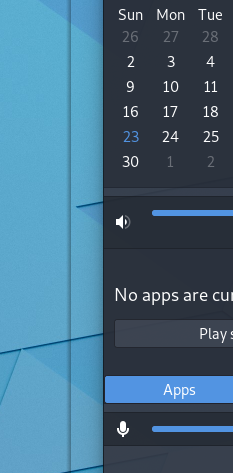
- Steps to reproduce: Open "Raven" in budgie
- Screenshot(s)
 FFY00
FFY00
All 8 comments
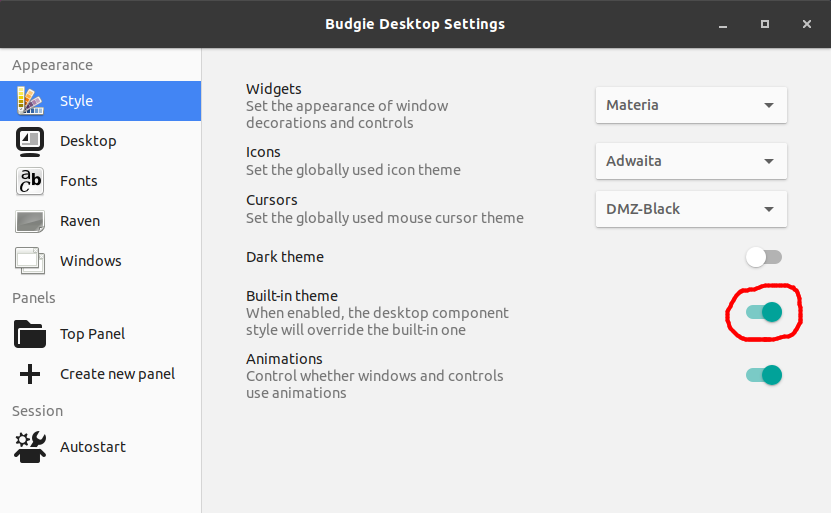
Hi, I guess you're enabling the "Built-in theme" option. Please try disabling it.
 nana-4
on 25 Sep 2018
nana-4
on 25 Sep 2018
@nana-4 Is there a tweak I can add to the theme that shows raven with the default theme and not having that weird line?
 rolurq
on 28 Sep 2018
rolurq
on 28 Sep 2018
@rolurq Yes.
If you have knowledge of SCSS, edit this line from 32px to 0 then run ./parse-sass.sh.
If you want to change the CSS directly, open the CSS and edit these four 32px to 0.
nana-4
on 28 Sep 2018
This is not the theme bug, and I won't (can't) add a workaround for the "Built-in theme".
So I would like to close this issue.
nana-4
on 28 Sep 2018
@nana-4 Thanks! I do have knowledge of SCSS, nevertheless your instructions are clear so I guess anyone could follow them.
rolurq
on 28 Sep 2018
Just curious, making such changes will break anything? Or change the intended behavior in other cases?
FFY00
on 28 Sep 2018
@FFY00 I made the changes to the theme, so far everything's ok. I guess @nana-4 will have more insights about this.
rolurq
on 28 Sep 2018
@FFY00 That margin is an area for Materia to draw Raven's box-shadow. That change only loses the shadow from Raven when you turn off the "Built-in theme" option.
nana-4
on 29 Sep 2018
Related issues
 MischievousTomato
·
5Comments
MischievousTomato
·
5Comments
 luispabon
·
3Comments
luispabon
·
3Comments
 tuberry
·
3Comments
tuberry
·
3Comments
 TechnoSparks
·
3Comments
TechnoSparks
·
3Comments
 johnfactotum
·
3Comments
johnfactotum
·
3Comments
Most helpful comment
@rolurq Yes.
If you have knowledge of SCSS, edit this line from
32pxto0then run./parse-sass.sh.If you want to change the CSS directly, open the CSS and edit these four
32pxto0.