Materia-theme: Wrong version of gnome-shell.css are contained in Ubuntu PPA
- Materia version: 20180110-1.2~ubuntu16.04.1
- GTK+ 3 version: 3.18.9-1ubuntu3.3
- Distribution (and version): Ubuntu 16.04
- Desktop environment (and version): Unity 7.4.5
I'm trying to enable the Materia Loginscreen with Unity as described in the wiki here. For generating the new gnome-shell-theme.gresource, the file gnome-shell-theme.gresource.xml is required. I can't find this file in any of the Materia theme directories, e.g. /usr/share/themes/Materia-dark/gnome-shell.
Do I require a newer version of the theme? I'm using the @igor-diatlov PPA (ppa:dyatlov-igor/materia-theme) for Ubuntu and can't seem to get a newer version. When using sudo apt update, I get the following message:
E: The repository 'http://ppa.launchpad.net/dyatlov-igor/materia-theme/ubuntu xenial Release' does not have a Release file.
N: Updating from such a repository can't be done securely, and is therefore disabled by default.
N: See apt-secure(8) manpage for repository creation and user configuration details.
 simon-mathewson
All 11 comments
related to #223 #228
Since the repository is empty atm, you cannot update your theme. So either install from github or use https://packages.ubuntu.com/bionic/materia-gtk-theme.
 svnset
on 27 Mar 2018
svnset
on 27 Mar 2018
Yes, the wiki is written for a newer version (v20180311 or later) of the theme, and the PPA was not working, but now it has been fixed.
So I would like to close this now, but please let me know if you notice any problems about changing the GDM theme with the new PPA.
Thanks for your report.
 nana-4
on 30 Mar 2018
nana-4
on 30 Mar 2018
@nana-4 I'm glad to hear the PPA is working now. I just successfully updated to the newest version and again followed the instructions from the wiki, overwriting the gnome-shell-theme.gresource file.
Then I switched my display manager from lightdm to gdm3 using
sudo dpkg-reconfigure gdm3
Unfortunately, once I restart my system, it crashes right before showing the lock screen. I am then presented with the terminal:
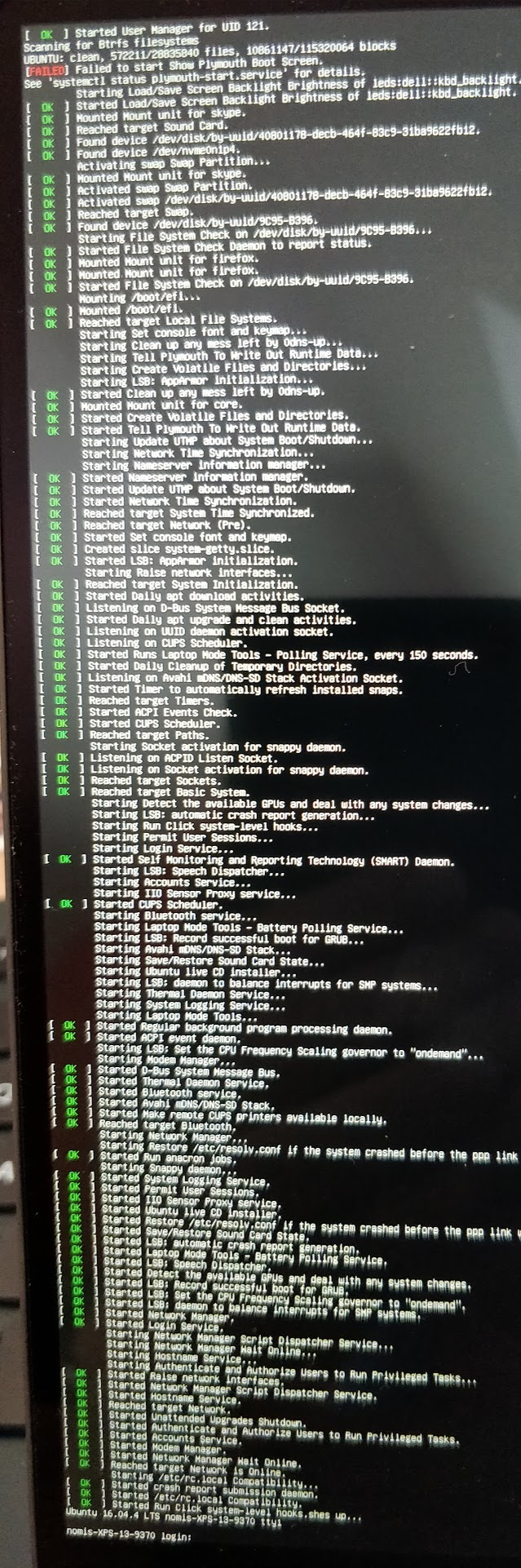
After switching back to lightdm and logging in, Ubuntu shows the following crash report:
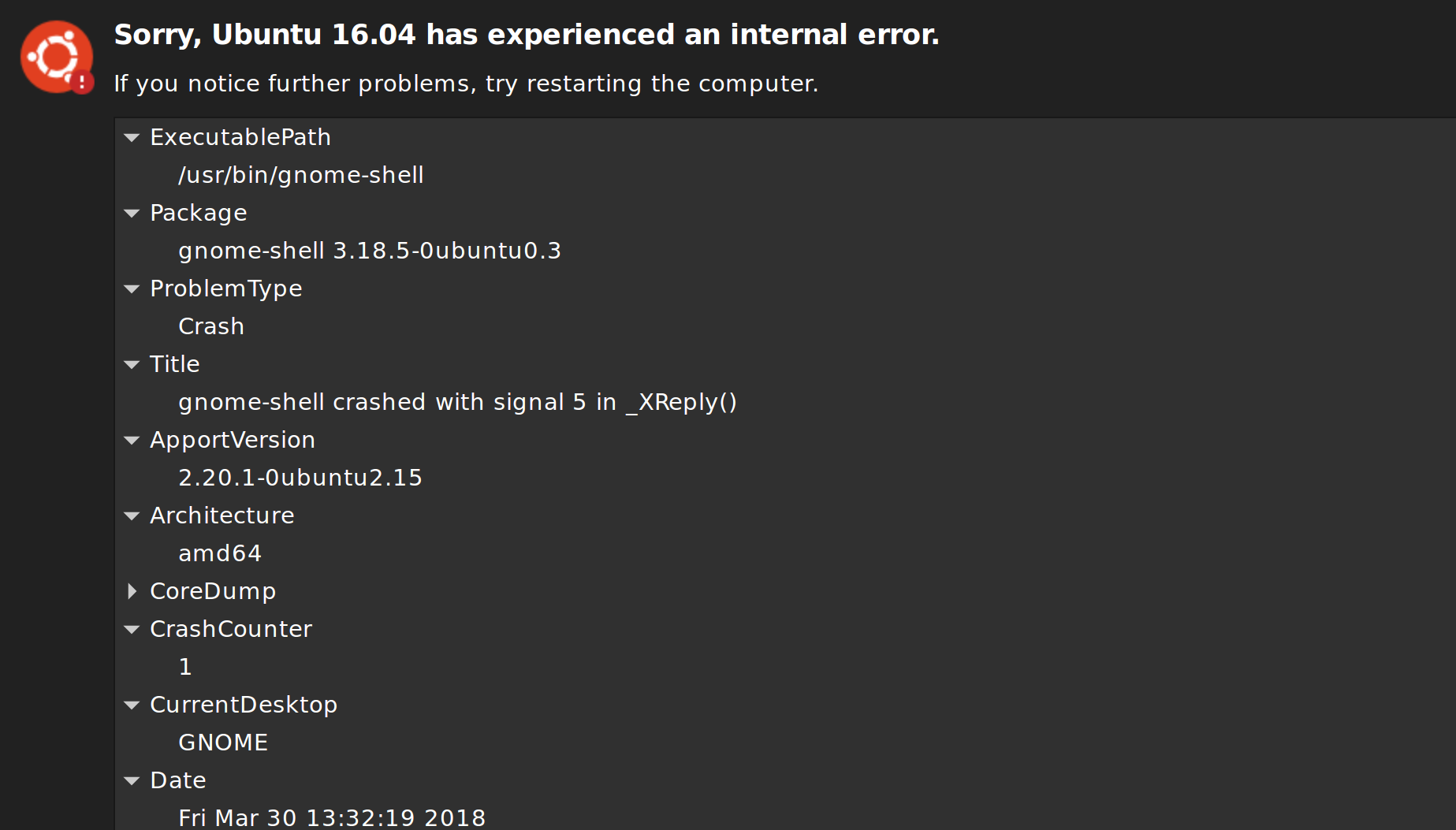
So as soon as gnome-shell --mode=gdm is executed, theres a crash. Maybe the gnome-shell-theme.gresource file is corrupt now? Have I forgotten anything? Any help would be greatly appreciated.
simon-mathewson
on 30 Mar 2018
~IIRC, only sudo dpkg-reconfigure gdm3 is not enough.~
~Please try:~
sudo dpkg-reconfigure gdm3
sudo systemctl stop lightdm.service
sudo systemctl start gdm.service
~UPDATE: Seems I made a mistake on older GDM theme. You're right. Sorry for the trouble. I'll fix it sooner, so please do not switch to GDM until then.~
UPDATE 2: Actually it seems to be due to the PPA.
nana-4
on 30 Mar 2018
@igor-dyatlov materia-gtk-theme - 20180321-1-0ubuntu1~xenial1 deb file (for Ubuntu 16.04.x / GNOME Shell 3.18.x) seems to have a wrong version of gnome-shell.css. The deb file for xenial should have gnome-shell.css for 3.18, but in fact it has the CSS for 3.28. (And this GDM crash seems to be due to that.)
Could you please fix the wrong version of gnome-shell.css in your PPA?
nana-4
on 30 Mar 2018
@igor-dyatlov
It seems materia-gtk-theme - 20180321-1-0ubuntu1~artful1 (for Ubuntu 17.10.x / GNOME Shell 3.26.x) also have gnome-shell.css for 3.28, but should have the CSS for 3.26 as well.
Also, just for your information, the official package for bionic is now available, so I think materia-gtk-theme - 20180321-1-0ubuntu1~bionic1 should no longer be necessary. ~I will update the README soon to make it clear.~ -> Updated with bf108c7eb80ec2649abef435eaeebeff2d5bdb4f
nana-4
on 30 Mar 2018
@nana-4 Thank you for figuring all this out. For now, I replaced the gnome-shell.css with the correct version manually and it works like a charm.
I just switched from Windows to Ubuntu and, as a huge Material Design fan, couldn't be happier now. Thank you so much and keep up the great work! :+1:
simon-mathewson
on 31 Mar 2018
@nana-4 Problem in Launchpad? Updating the dependencies in the control file for each version, the Launchpad could not compile the package.
Build-Depends: debhelper (>= 10),gnome-shell (>= 3.18.5),libglib2.0-dev (>= 2.48.2),libgdk-pixbuf2.0-dev (>= 2.32.2),libxml2-utils
...
Depends: gnome-themes-standard (>= 3.18.0),
    gtk2-engines-pixbuf (>= 2.24.30),
    gtk2-engines-murrine (>= 0.98.2),
    libgtk-3-common (>= 3.18.9),
    libgtk2.0-common (>= 2.24.30),
    ${misc:Depends}
Build Log:
./install.sh: line 21: bc: command not found
./install.sh: line 24: bc: command not found
./install.sh: line 21: bc: command not found
./install.sh: line 24: bc: command not found
./install.sh: line 21: bc: command not found
./install.sh: line 24: bc: command not found
./install.sh: line 21: bc: command not found
./install.sh: line 24: bc: command not found
Installing '/<<PKGBUILDDIR>>/debian/materia-gtk-theme/usr/share/themes//Materia'...
cp: cannot stat '/<<PKGBUILDDIR>>/src/gnome-shell//gnome-shell.css': No such file or directory
Installing '/<<PKGBUILDDIR>>/debian/materia-gtk-theme/usr/share/themes//Materia-compact'...
cp: cannot stat '/<<PKGBUILDDIR>>/src/gnome-shell//gnome-shell-compact.css': No such file or directory
Installing '/<<PKGBUILDDIR>>/debian/materia-gtk-theme/usr/share/themes//Materia-dark'...
cp: cannot stat '/<<PKGBUILDDIR>>/src/gnome-shell//gnome-shell-dark.css': No such file or directory
Installing '/<<PKGBUILDDIR>>/debian/materia-gtk-theme/usr/share/themes//Materia-dark-compact'...
cp: cannot stat '/<<PKGBUILDDIR>>/src/gnome-shell//gnome-shell-dark-compact.css': No such file or directory
Installing '/<<PKGBUILDDIR>>/debian/materia-gtk-theme/usr/share/themes//Materia-light'...
cp: cannot stat '/<<PKGBUILDDIR>>/src/gnome-shell//gnome-shell-light.css': No such file or directory
Installing '/<<PKGBUILDDIR>>/debian/materia-gtk-theme/usr/share/themes//Materia-light-compact'...
cp: cannot stat '/<<PKGBUILDDIR>>/src/gnome-shell//gnome-shell-light-compact.css': No such file or directory
 igor-dyatlov
on 31 Mar 2018
igor-dyatlov
on 31 Mar 2018
@igor-dyatlov Thanks for investigating. It seems bc is required for Build-Depends.
Sorry, but I didn't think it is needed to specify in the requirement...
nana-4
on 31 Mar 2018
@nana-4 Updated packages in PPA
igor-dyatlov
on 1 Apr 2018
@igor-dyatlov Thanks a lot!
I updated the PPA package on Ubuntu 16.04 and confirmed the GDM theme now works fine.
So I'd like to close this issue. :wink:
nana-4
on 1 Apr 2018
Related issues
 luispabon
·
3Comments
luispabon
·
3Comments
 USBA
·
3Comments
USBA
·
3Comments
 fthx
·
4Comments
fthx
·
4Comments
 TechnoSparks
·
3Comments
nana-4
·
4Comments
TechnoSparks
·
3Comments
nana-4
·
4Comments
Most helpful comment
@nana-4 Thank you for figuring all this out. For now, I replaced the
gnome-shell.csswith the correct version manually and it works like a charm.I just switched from Windows to Ubuntu and, as a huge Material Design fan, couldn't be happier now. Thank you so much and keep up the great work! :+1: