Materia-theme: oomox compatibility request for Flat-Plat
Hello, can you compatibilize to oomox your Flat-pat theme? Read these request that I posted to oomox owner: https://github.com/actionless/oomox/issues/94#issuecomment-323549164 :)
 Warmuser
All 21 comments
Thanks. Before deciding, I would like to talk a bit with oomox author.
 nana-4
on 20 Aug 2017
nana-4
on 20 Aug 2017
hello, i am open for the conversation
as a small introduction to our talk, i've recently refactored oomox app to split gui app and gtk theme to independent projects:
https://github.com/actionless/oomox
https://github.com/actionless/oomox-gtk-theme
so that oomox-gtk-theme just have one single entry point (./change-color.sh) which generates gtk theme with the selected colors (like bg_color, fg_color, selection and so on)
and my idea what any other gtk (or qt, whatever) theme which can have such single entry point for changing colors could be easily hooked to oomox gui application as one of export destinations
 actionless
on 20 Aug 2017
actionless
on 20 Aug 2017
@actionless
Hi, I'm sorry for starting to talk late. I was late for urgent business.
And thank you for your introduction! That is such a wonderful idea. 😃
By the way, I have a question I'd like to ask you. You mentioned that bitmap images should be replaced to SVG. However, can we not use ./render-assets.sh (and inkscape) without doing that?
In Flat-Plat, like the upstream Adwaita, PNG assets are generated from the source SVG by using ./render-assets.sh script. (For detailed generation method, please refer to here of point 3 and 4.)
Not only that, in this theme, those SVG codes are organized and use linearGradient as color variables. See:
https://github.com/nana-4/Flat-Plat/blob/5deebe69f1255dbac804f6e975c8925065d60b86/src/gtk-2.0/assets.svg#L9-L59
https://github.com/nana-4/Flat-Plat/blob/5deebe69f1255dbac804f6e975c8925065d60b86/src/gtk-2.0/assets-dark.svg#L9-L59
https://github.com/nana-4/Flat-Plat/blob/5deebe69f1255dbac804f6e975c8925065d60b86/src/gtk-3.0/gtk-common/assets.svg#L13-L75
So in this case, I think it is easier to choose this way than replacing them with hundreds of SVG, for you and me. What do you think? Am I missing something?
Warm Regards,
nana-4
on 21 Aug 2017
yup, they are actually svg so their colors can be replaced before running ./render-assets.sh
so the overall pipeline would look like following:
1) replace colors in SVG assets, _colors.scss (or wherever colors are defined in gtk3), .gtkrc-2.0 and so on
2) run ./render-assets.sh
3) build theme
actionless
on 21 Aug 2017
@actionless
I'm glad to hear that. :)
So, if oomox will support Flat-Plat, what else should I do?
(p.s. I'm sorry for the late reply again...)
nana-4
on 22 Aug 2017
so in order to easily add support for the theme in GUI app it need only to have such a single entry point (like bash script) which will be doing all steps of theme generation (see me previous comment and ./change-color.sh script and/or readme in oomox-gtk-theme for the reference)
actionless
on 22 Aug 2017
@actionless
Okay, but I'm not very familiar with bash script and/or oomox, and currently I don't have much time to tackle ./change-color.sh. So I won't be able to provide something like ./change-color.sh in the near future, sorry.
nana-4
on 25 Aug 2017
but you don't need to implement any special compatibility with oomox -- just ability to generate your theme with some selected colors
if you're not familiar with any scripting language, you can describe step by step how do you changing your theme colors manually and i can prepare a skeleton of a bash or python script for doing that which you can later improve to keep into account all small details of your workflow
actionless
on 25 Aug 2017
@actionless
Thanks, that would be great! The basic things about how to hack the theme is written in HACKING.md, so please also refer to that.
Here is the overall flow to change the theme colors:
Edit the following files that defined theme colors
./src/gtk-2.0/gtkrc./src/gtk-2.0/gtkrc-dark(for Flat-Plat-dark, but maybe no need this for oomox?)./src/gtk-2.0/gtkrc-light(for Flat-Plat-light, and same as above)./src/gtk-3.0/3.22/sass/_colors.scss./src/gnome-shell/3.18/sass/_colors.scss
Run
./parse-sass.shto regenerate CSS of GTK3 and GNOME ShellEdit the following SVG
linearGradientparts./src/gtk-2.0/assets.svg./src/gtk-2.0/assets-dark.svg(for Flat-Plat-dark, and also no need this for oomox?)./src/gtk-3.0/gtk-common/assets.svg
Delete existing png assets then run
./render-assets.sh(and./render-assets-dark.sh) to generate PNG assetsrm ./src/gtk-2.0/assets/*.png rm ./src/gtk-2.0/assets-dark/*.png rm ./src/gtk-3.0/gtk-common/assets/*.png # for GTK2 cd ./src/gtk-2.0 ./render-assets.sh ./render-assets-dark.sh # for GTK3 cd ../gtk-3.0/gtk-common ./render-assets.shEdit svg
fillofgnome-shellandunityFinally, run
sudo ./install.shOther notes
- You do not need to edit svg of
metacity-1to change the colors. Those colors are controlled with xml. - assets in
./src/gtk-3.0/gtk-common/assets/scalableare also no need to edit. xfwm4exists, but Xfce is not yet fully supported...chromeextensions are also able to change the colors, but I don't know how to create.crxfiles with CUI...
- You do not need to edit svg of
And I hope this will help !!
nana-4
on 26 Aug 2017
thanks!
looks quite useful, would you mind if i submit an initial implementation as a PR to your repo?
i think i'll have enough time this or next weekend
actionless
on 26 Aug 2017
@actionless
Well, I thought you would fork this repo and use it as submodule like oomox-gtk-theme...
I am wondering if the implementation will break this current _vanilla_ theme. How do you think?
nana-4
on 26 Aug 2017
no, maintaining the fork will take too much effort
no, i'll try to make it without changing the sources (like it's done now for spotify),
however if you'd want to implement more advanced color-changing options you'll probably need to some changes in sources as well
actionless
on 26 Aug 2017
@actionless
I understand. If you do it without changing the sources, your PRs will be much appreciated!
Thanks in advance. :)
nana-4
on 26 Aug 2017
Thank you, guys. Great job! :)
Warmuser
on 28 Aug 2017
I mentioned about oomox in README with 5555152c40787739b00ef364a11185d549c3b5bb. Thanks guys. I'd like to close this issue. :)
nana-4
on 29 Aug 2017
thanks!
actionless
on 29 Aug 2017
So its possible to configure Flat-Plat with oomox now?
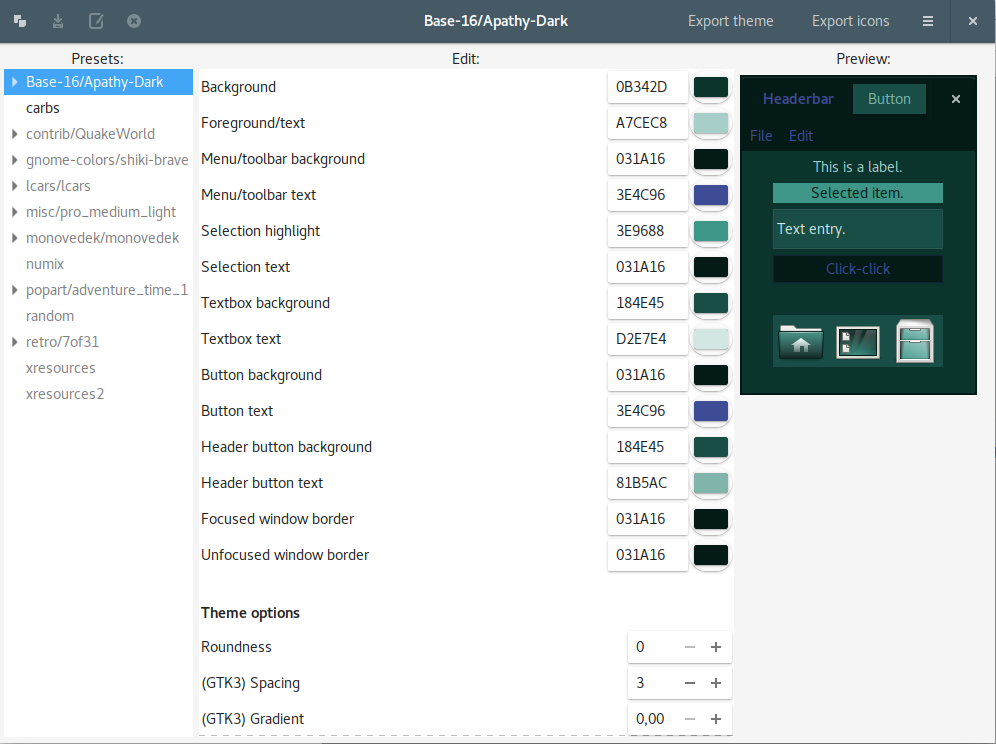
How can I do this? I don't see flat plat inside oomox-gui presets.
 couchcrew-thomas
on 30 Aug 2017
couchcrew-thomas
on 30 Aug 2017
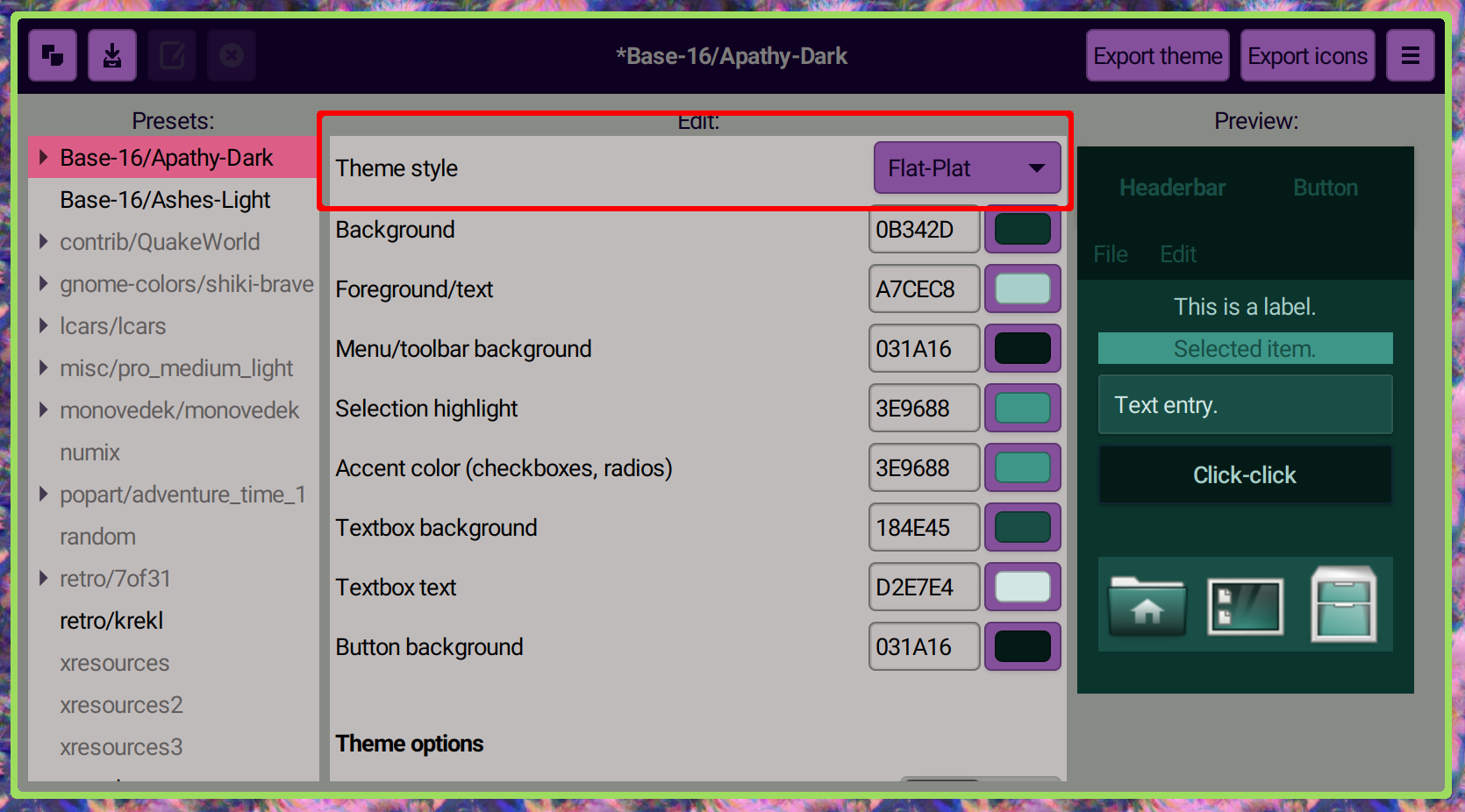
@couchcrew-thomas it's a first option called "Theme style":

actionless
on 30 Aug 2017
I don't understand your answer. I thought I can configure the Flat-Plat colors inside oomox. But the theme is not visible in the "Presets" list. Can I get it there somehow? If so, do I need additional tools?
couchcrew-thomas
on 30 Aug 2017
You probably using too old version, that option was added only in release 1.3.0:
actionless
on 30 Aug 2017
Thank you! I was using the version from PPA. After cloning the 1.3.0 tag the option appeared.
couchcrew-thomas
on 31 Aug 2017
Related issues
 johnfactotum
·
3Comments
johnfactotum
·
3Comments
 n3oxmind
·
4Comments
n3oxmind
·
4Comments
 TechnoSparks
·
3Comments
TechnoSparks
·
3Comments
 MischievousTomato
·
5Comments
MischievousTomato
·
5Comments
 torqueyy
·
3Comments
torqueyy
·
3Comments
Most helpful comment
You probably using too old version, that option was added only in release
1.3.0: