MatBlazor not loaded properly when environment is set to anything but Development
MatBlazor fails to load when ASPNETCORE_ENVIRONMENT is anything else than Development. For example, change it to Local, Staging or Whatever, then it fails on page load with this error:
Microsoft.JSInterop.JSException: Could not find 'matBlazor' in 'window'.
Full stack trace:
Microsoft.AspNetCore.Components.Server.Circuits.RemoteRenderer: Warning: Unhandled exception rendering component: Could not find 'matBlazor' in 'window'.
p/<@https://localhost:44322/_framework/blazor.server.js:8:30748
p@https://localhost:44322/_framework/blazor.server.js:8:30709
beginInvokeJSFromDotNet/r<@https://localhost:44322/_framework/blazor.server.js:8:31416
beginInvokeJSFromDotNet@https://localhost:44322/_framework/blazor.server.js:8:31390
C</e.prototype.invokeClientMethod/<@https://localhost:44322/_framework/blazor.server.js:1:19202
C</e.prototype.invokeClientMethod@https://localhost:44322/_framework/blazor.server.js:1:19173
C</e.prototype.processIncomingData@https://localhost:44322/_framework/blazor.server.js:1:17165
e/this.connection.onreceive@https://localhost:44322/_framework/blazor.server.js:1:10276
A</e.prototype.connect/</</</i.onmessage@https://localhost:44322/_framework/blazor.server.js:1:38091


Microsoft.JSInterop.JSException: Could not find 'matBlazor' in 'window'.
p/<@https://localhost:44322/_framework/blazor.server.js:8:30748
p@https://localhost:44322/_framework/blazor.server.js:8:30709
beginInvokeJSFromDotNet/r<@https://localhost:44322/_framework/blazor.server.js:8:31416
beginInvokeJSFromDotNet@https://localhost:44322/_framework/blazor.server.js:8:31390
C</e.prototype.invokeClientMethod/<@https://localhost:44322/_framework/blazor.server.js:1:19202
C</e.prototype.invokeClientMethod@https://localhost:44322/_framework/blazor.server.js:1:19173
C</e.prototype.processIncomingData@https://localhost:44322/_framework/blazor.server.js:1:17165
e/this.connection.onreceive@https://localhost:44322/_framework/blazor.server.js:1:10276
A</e.prototype.connect/</</</i.onmessage@https://localhost:44322/_framework/blazor.server.js:1:38091

   at Microsoft.JSInterop.JSRuntime.InvokeWithDefaultCancellation[T](String identifier, Object[] args)
   at MatBlazor.BaseMatComponent.JsInvokeAsync[T](String code, Object[] args)
   at MatBlazor.BaseMatButton.OnFirstAfterRenderAsync()
   at MatBlazor.BaseMatComponent.OnAfterRenderAsync(Boolean firstRender)
   at Microsoft.AspNetCore.Components.RenderTree.Renderer.GetErrorHandledTask(Task taskToHandle)
Steps to reproduce:
- Create a new Blazor application, using "Server" template
- Add
MatBlazordependencies - An a Mat component somewhere, for example to
Index.razor - Check application is loading correctly and the component is displayed properly
- Open
launchSettings.jsonand change the value ofASPNETCORE_ENVIRONMENTto anything thanDevelopment.
At this moment:
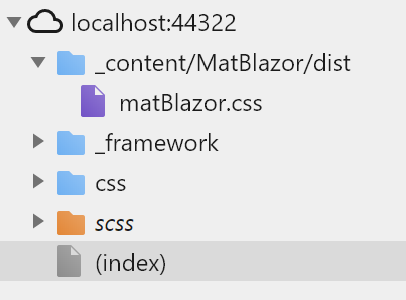
- page will fail to load with the error cited above.
- Sources loaded in browser doesn't contain the
matBlazor.jsfile:
 vcaraulean
All 6 comments
There's even simpler way to reproduce the problem:
- clone the repo
- Open
launchSettings.jsonofMatBlazor.Demo.ServerAppproject - Change the value of
ASPNETCORE_ENVIRONMENTvalue toAnything - Run
MatBlazor.Demo.ServerApp
vcaraulean
on 27 Feb 2020
It's not MatBlazor problem, It releted for all Blazor projects. Maybe you can solve this in https://github.com/dotnet/aspnetcore
 SamProf
on 28 Feb 2020
SamProf
on 28 Feb 2020
Thanks for confirming my suspicion!
I've seen that recently released .NET Core SDK 3.1.2 has some fixes related to static files. Will try to give it a try to see if it solves the problem
vcaraulean
on 28 Feb 2020
Well, after digging into it, as it often happens, it's not a bug but a feature, related to loading of static assets. Consume content from a referenced RCL describes the correct way of referencing static assets. To get the resources loaded properly in environments other than Development one has to explicitly tell that to web host builder with UseStaticWebAssets
    public static IHostBuilder CreateHostBuilder(string[] args) =>
        Host.CreateDefaultBuilder(args)
            .ConfigureWebHostDefaults(webBuilder =>
            {
                webBuilder.UseStaticWebAssets();
                webBuilder.UseStartup<Startup>();
            });
And it it works.
A little caution in case if your web host builder is located in an assembly that is not the "executing assembly", it _might_ not work. ASP.NET Core likes the configuration to be in the startup assembly. I've got through FW's code to see why that happens but have no idea if that's a bug or a badly documented feature...
vcaraulean
on 28 Feb 2020
@SamProf you might want also to close #423 and point it to this.
vcaraulean
on 28 Feb 2020
can you please consider adding this to the MatBlazor home page...just spent 2 hours trying to find out why MatBlazor wasn't loading in my app :(
 darraghjones
on 1 Jul 2020
darraghjones
on 1 Jul 2020
Related issues
 GioviQ
·
6Comments
GioviQ
·
6Comments
 snerting
·
3Comments
snerting
·
3Comments
 rogeralsing
·
5Comments
rogeralsing
·
5Comments
 sowsan
·
3Comments
sowsan
·
4Comments
sowsan
·
3Comments
sowsan
·
4Comments
Most helpful comment
Well, after digging into it, as it often happens, it's not a bug but a feature, related to loading of static assets. Consume content from a referenced RCL describes the correct way of referencing static assets. To get the resources loaded properly in environments other than
Developmentone has to explicitly tell that to web host builder withUseStaticWebAssetsAnd it it works.
A little caution in case if your web host builder is located in an assembly that is not the "executing assembly", it _might_ not work. ASP.NET Core likes the configuration to be in the startup assembly. I've got through FW's code to see why that happens but have no idea if that's a bug or a badly documented feature...