Mastodon: Using Omniauth/federated identity makes migrating the account impossible because of security challenge logic
Expected behaviour
As a user who's using federated identity (in our case SAML through Omniauth) I would like to be able to "migrate" my account away from the SSO instance towards another server using the UI exposed in the preferences.
Actual behaviour
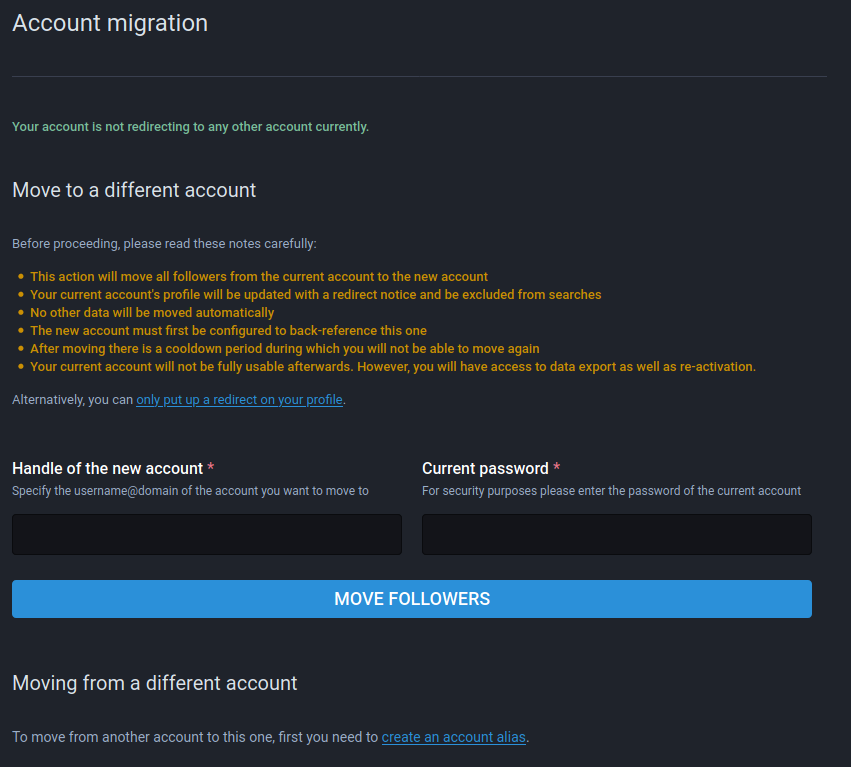
Unfortunately, the current UI exposed for migrating accounts forces the user to enter their "current password", which, in case of SSO, doesn't exist/has never been set, therefore barring the user from moving their account away from said server:
Steps to reproduce the problem
- Go to the preferences on a SSO-enabled instance
- Navigate to "Account migration" in the "Account settings" tab
- Observe the "Current password" form field, which is required to complete the process
Specifications
Mastodon 3.1.4
 moritzheiber
All 5 comments
Okay, here's the deal. External accounts (e.g. LDAP) are saved with an empty password. For empty password accounts, the challenge just makes you enter your own username for confirmation instead of password. However, it seems like the Omniauthable concern, unlike LDAP, generates a random password for new external users. That's where the problem comes from...
 Gargron
on 27 Nov 2020
Gargron
on 27 Nov 2020
Quickly dropping in to say the issue persists on 3.2.1 _and_ the workaround @Gargron suggested works:
$ bundle exec rails c
irb(main):001:0> account = Account.find_by(username: 'myuser')
irb(main):002:0> user = User.find_by(account: account)
irb(main):003:0> user.encrypted_password = ""
irb(main):004:0> user.save!
will yield an account for myuser that can use the migration feature with SAML enabled.
moritzheiber
on 1 Dec 2020
Okay, here's the deal. External accounts (e.g. LDAP) are saved with an empty password. For empty password accounts, the challenge just makes you enter your own username for confirmation instead of password.
I'm currently using a SAML-authenticated Mastodon instance, and using my own username as a password does not work.
 resynth1943
on 4 Jan 2021
resynth1943
on 4 Jan 2021
@resynth1943 I believe you misunderstood Eugen. He didn’t say that for external accounts your username is _also_ your password but rather for accounts with empty passwords (which external accounts should have, _but also don’t, due to this bug_) you should just have to enter _your username_ instead of _your username and a password_, i.e. the password input field literally doesn’t exist/isn’t needed once this bug is resolved (or you reset the password of the external account to an empty string, like I described earlier)
moritzheiber
on 4 Jan 2021
Ahh, I see. That's interesting. I wonder why it was set up this way in the first place. :+1:
My apologies, thanks for the clarification.
resynth1943
on 4 Jan 2021
Related issues
 ghost
·
3Comments
ghost
·
3Comments
 sorin-davidoi
·
3Comments
sorin-davidoi
·
3Comments
 Lewiscowles1986
·
3Comments
Lewiscowles1986
·
3Comments
 hidrarga
·
3Comments
hidrarga
·
3Comments
 golbette
·
3Comments
golbette
·
3Comments