Mastodon: Emoji pop-up falls off the end of the page and I can't get to it
cybre.space just updated to v2.0.0rc1, and I use the default Mastodon theme.
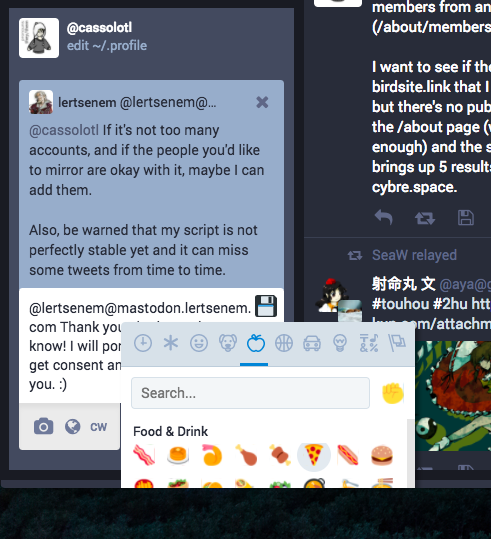
You can see how the scrollbar on the emoji box is out of view - it's past the bottom of the page, and there is no way to scroll the first ("new toot") column to show the whole emoji panel like there was in the last version.
I use the latest version of Chrome on a Mac running 10.12.6.
- [Y] I searched or browsed the repo’s other issues to ensure this is not a duplicate.
- [N/A] This bug happens on a tagged release and not on
master(If you're a user, don't worry about this).
 Cassolotl
All 7 comments
It's the same problem with others pop-up, likes confidentillity menu :
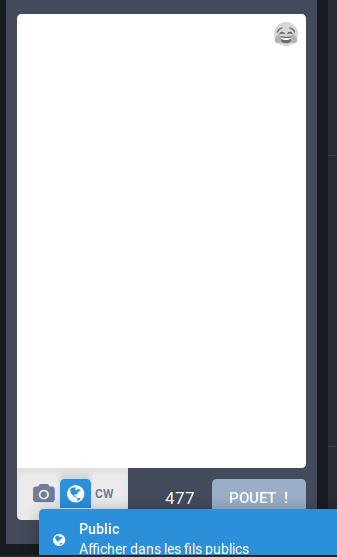
Here on Firefox 56.
 JohnD28
on 11 Oct 2017
JohnD28
on 11 Oct 2017
Question, how did it work before?
 Gargron
on 11 Oct 2017
Gargron
on 11 Oct 2017
Before, you could scroll with the mouse to bring up the rest of the pop-up.
JohnD28
on 11 Oct 2017
Yes, the column on the left would become a little bit longer than the end of the pop-up, so you could scroll down. Then when the pop-up disappeared the column would spring back to shorter again.
Cassolotl
on 11 Oct 2017
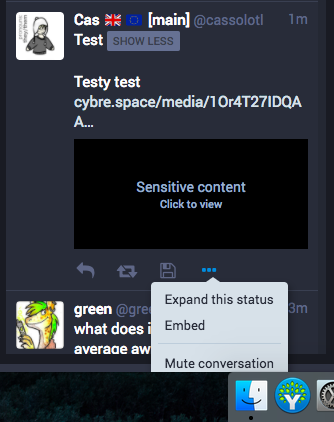
I think it might be connected to the way menus drop off the bottom of the screen too, and when I scroll the menu stays where it is while the toot moves upwards:
Cassolotl
on 12 Oct 2017
Some menu stuff still a bit not working, see #5466!
Cassolotl
on 19 Oct 2017
This is technically fixed because you can now scroll it into view, although indeed #5466 is valid.
 nolanlawson
on 19 Oct 2017
nolanlawson
on 19 Oct 2017
Related issues
 hugogameiro
·
3Comments
hugogameiro
·
3Comments
 selfagency
·
3Comments
selfagency
·
3Comments
 KellerFuchs
·
3Comments
KellerFuchs
·
3Comments
 sorin-davidoi
·
3Comments
sorin-davidoi
·
3Comments
 ccoenen
·
3Comments
ccoenen
·
3Comments
Most helpful comment
I think it might be connected to the way menus drop off the bottom of the screen too, and when I scroll the menu stays where it is while the toot moves upwards: