Masstransit: Messages with nested MessageData is sending to error queue
Is this a bug report?
Yes
Can you also reproduce the problem with the latest version?
Yes, MT version 6.3.2
Environment
- Operating system: Linux
- Dotnet version: 3.1.101
Steps to Reproduce
- Create a Message with nested MessageData:
```c#
public interface MyCustomizedFile
{
string Name { set; get; }
MessageData
}
public interface MyEventMessage
{
MyCustomizedFile MyFile { get; set; }
}
2. Send the event massage including file content.
3. So the message is not consumed and is sent to error queue.
4. Send the event massage with null file content.
5. So the message is consumed normally.

### Expected Behavior

I expect the `MyEventMessage.MyCustomizedFile.FileContent` contains the sent file.

### Actual Behavior

The message event is sent normally, but when the nested message data is filled the consumer don't receive the message.

### Reproducible Demo

1. Clone the repository: https://github.com/rafaelcaviquioli/MassTransitMessageDataTest
2. Start RabbitMQ: `docker-compose up rabbitmq`
3. Run the console app.
4. The console app is sending two events.
5. This is the expected log because only the event which has no file content is received:

```bash
$ dotnet run
Listening for events, press a key to exit...
Received the event MyEvent with null message data - Doesn't have file value
 rafaelcaviquioli
All 26 comments
Can you post an error from the logs? Nested message data is supported and there are unit tests covering it.
Might be that you’re using a class, instead of an interface for the message contract. Or it might be something else
 phatboyg
on 25 May 2020
phatboyg
on 25 May 2020
Sorry my bad, I already tested with just interfaces, I updated the repository of reproducible demo now.
Currently, I'm not receiving any error log. Are there any way to active log about this message that was sent to error queue?
I saw that unit test to cover this use case, this is why I tested with different ways ex: using memory repository, file repository, List
rafaelcaviquioli
on 25 May 2020
Look in the RabbitMQ Management console and review the headers of the message in the _error queue.
phatboyg
on 25 May 2020
These are the message headers:
MT-Fault-ExceptionType: | MassTransit.MessageDataException
MT-Fault-Message: | The message data is empty
MT-Fault-StackTrace:

at MassTransit.MessageData.Values.EmptyMessageData`1.get_Address()
at MassTransit.MessageData.PropertyProviders.GetMessageDataPropertyProvider`2.GetProperty[T](InitializeContext`2 context)
at MassTransit.Initializers.PropertyInitializers.ProviderPropertyInitializer`3.Apply(InitializeContext`2 context)
at MassTransit.Initializers.MessageInitializer`2.<>c__DisplayClass14_0.<InitializeMessage>b__0(IPropertyInitializer`2 x)
at System.Linq.Enumerable.SelectArrayIterator`2.MoveNext()
at System.Threading.Tasks.Task.WhenAll(IEnumerable`1 tasks)
at MassTransit.Initializers.MessageInitializer`2.InitializeMessage(InitializeContext`1 messageContext, TInput input)
I'll perform some tests using different types of MessageData instead of string.
rafaelcaviquioli
on 25 May 2020
This is the message payload:
{
  "messageId": "470a0000-559a-e0db-7ef2-08d8008a9892",
  "conversationId": "470a0000-559a-e0db-46fa-08d8008a9897",
  "sourceAddress": "rabbitmq://localhost/rafaelubuntu_MassTransitMessageDataTest_bus_ehfyyyniumopz19ubdcybnwzge?temporary=true",
  "destinationAddress": "rabbitmq://localhost/my-event-channel",
  "messageType": [
    "urn:message:MassTransitMessageDataTest:MyEvent"
  ],
  "message": {
    "name": "MyEvent",
    "myFile": {
      "name": "My file name",
      "content": {}
    }
  },
  "sentTime": "2020-05-25T09:04:13.8149618Z",
  "headers": {},
  "host": {
    "machineName": "rafael-ubuntu",
    "processName": "MassTransitMessageDataTest",
    "processId": 21738,
    "assembly": "MassTransitMessageDataTest",
    "assemblyVersion": "1.0.0.0",
    "frameworkVersion": "3.1.1",
    "massTransitVersion": "6.3.2.0",
    "operatingSystemVersion": "Unix 5.3.0.53"
  }
}
I performed a test with an array of messageData string type and I haven't success. In this case the list came filled with items, but they don't have content.
```c#
public interface ArrayFilesMessage
{
string Name { get; set; }
MessageData
}
await endpoint.Send
{
Name = "MyEvent with message data",
Files = new string[]
{
"File 1 content...",
"File 2 content..."
},
});
```
rafaelcaviquioli
on 25 May 2020
There are a ton of tests that pass every build in this directory:
You might look there, to see what's different. It's unlikely I'll have time to pull this down and verify it today.
phatboyg
on 25 May 2020
Hi @phatboyg, now I have had success sending nested messages. I believe that I was sending the message in a wrong way. May you confirm it?
Initially, I was sending messages this way:
```c#
await endpoint.Send
{
Name = "MyEvent with message data",
Files = new []
{
Encoding.ASCII.GetBytes("File 1 content..."), // byte[]
Encoding.ASCII.GetBytes("File 2 content...") // byte[]
},
});
So, now, looking for the test file that you sent me I realized that you are using something like a factory to construct the `messageData` object. I too saw on the MassTransit documentation that I can use `putBytes` method from message data repository to obtain a `messageData` object and upload the file.

**This is working well:**

```c#
byte[] fileData = Guid.NewGuid().ToByteArray();

await endpoint.Send<ArrayFilesMessage>(new
{
    Name = "MyEvent with file array",
    Files = new []
    {
        await messageDataRepository.PutBytes(fileData),
        await messageDataRepository.PutBytes(fileData)
    },
});
My questions are:
- Must I always use this repository to upload a file for the first time?
- Or are there another message data initializer to create a message data for the first time? It will upload the file automatically when the message is sent?
rafaelcaviquioli
on 26 May 2020
There are initializer conversions for many of the types, but I'm not sure about a regular array of MessageData<>. I'm pretty sure you'd have to put it inside of a file.
public interface File
{
    MessageData<byte[]> Data {get;}
}
Then have in your message contract, File[] Files and use new [] { new { Data = byteArray } };
Then it would write them to the repository for you.
phatboyg
on 26 May 2020
Did you sort this out on your end?
phatboyg
on 27 May 2020
For now, I'll work with implicit repository what work well with nested objects.
But I have implemented conform your suggestion but is not working yet:
```c#
public interface MyCustomizedFile
{
string Name { get; }
MessageData
public interface ArrayFilesMessage
{
string Name { get; }
MyCustomizedFile[] Files { get; }
}
byte[] fileData = new byte[10000];
await endpoint.Send<ArrayFilesMessage>(new
{
    Name = "MyEvent with file array",
    Files = new []
    {
        new { Content = fileData, Name = "File 1" },
        new { Content = fileData, Name = "File 2" },
    },
});
On Rabbit:
MT-Fault-Message: | The message data is empty
at MassTransit.MessageData.Values.EmptyMessageData`1.get_Address()
"message": {
"name": "MyEvent with file array",
"files": [
{
"name": "File 1",
"content": {}
},
{
"name": "File 2",
"content": {}
}
]
},
```
rafaelcaviquioli
on 27 May 2020
I found a new situation that is not working well.
As can be reproduced in this last commit: https://github.com/rafaelcaviquioli/MassTransitMessageDataTest/tree/fe0ece19c0fcf5e0adc92977120b9e069738fe41
I'm sending a nested object with data and messageData together, then when it comes to consumer the messageData is ok but other properties with any data is null.
Looking for message on RabbitMQ it is ok, the message is populates with all data:
"message": {
    "name": "MyEvent with file array",
    "files": [
      {
        "name": "File 1",
        "content": {
          "data-ref": "urn:msgdata:yyyywth4kzp6bsbqbdcyf57gdc"
        }
      },
      {
        "name": "File 2",
        "content": {
          "data-ref": "urn:msgdata:yyyywth4kzp6ydoibdcyf57gdp"
        }
      }
    ]
  },
This case is an array of MyCustomizedFile with string Name and MessageData Context
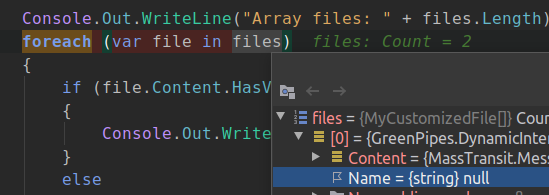
c#
public interface ArrayFilesMessage
{
    string Name { get; }
    MyCustomizedFile[] Files { get; }
}
public interface MyCustomizedFile
{
    string Name { get; }
    MessageData<byte[]> Content { get; }
}
This case is just one MyCustomizedFile inside the message
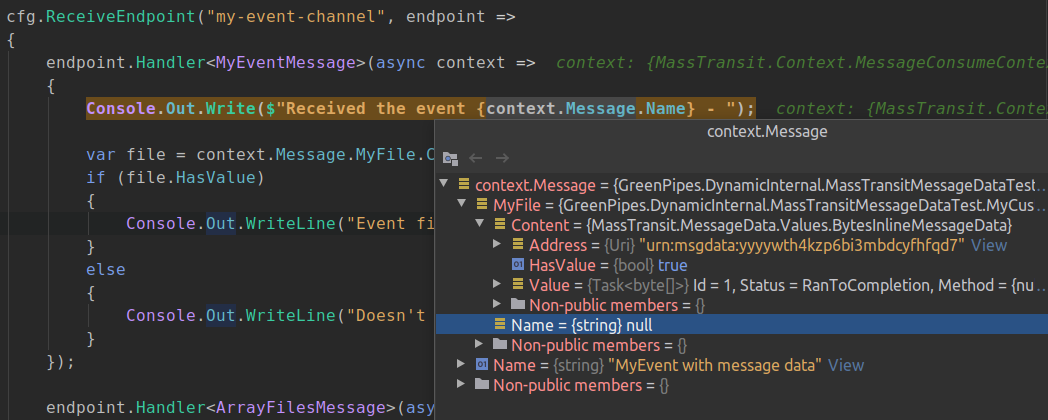
rafaelcaviquioli
on 28 May 2020
I have an idea of why it’s happening. The failure I see is with initializers and then the convention to store the data. I can reproduce it so I can fix it.
phatboyg
on 29 May 2020
Hi @phatboyg ,
Rafael is my teammate :)
Here is the repo of my tests https://github.com/tonholis/MTEncTest, as requested in Discord.
As I mentioned, the tests pass but the actual application/service doesn't work. The response message containing the complex structure with MessageData is not fully populated.
 tonholis
on 29 May 2020
tonholis
on 29 May 2020
Right - and I know the exact line where it's happening, I just need to step through it again with a fresh set of eyes since it wasn't obvious to me why I wrote it the way I did.
_It's probably another one of those single-line fixes_
phatboyg
on 29 May 2020
Awesome. Thanks @phatboyg !
Could you share with us what line/file are you talking about? At least we can learn something :)
tonholis
on 29 May 2020
So this fixes what I found, I haven't tested it with your projects yet. Once the latest 7.0.0 packages build you can update and see if it resolves the issue.
You shouldn't have to use the repository at all, just use the initializer with byte[] and it works.
phatboyg
on 29 May 2020
Great @phatboyg ,
I'll test that. Thanks!
We were upgrading our system from MT v5 to v6. Are there any breaking changes from v6 to v7?
tonholis
on 29 May 2020
I've updated my test project to use the latest build (7.0.0.2747) and the issue is still there... :(
In the consumer, the message is not complete. Only the top-level message has the correct values.

tonholis
on 29 May 2020
This is what I get when I run your program (and all the unit tests pass as well).
================================================================================
TEST 1
================================================================================
Start - Request message--------------
 Message.TopText=A message WITH NO messageData at the top-level
 Message.Foo.SomeText=Animal world
 Message.Foo.File.Length=4
 Message.Foo.Bars.Count=1
 Message.Foo.Bars[0] - SomeNumber=999, SomeText=It barks, SomeEnum=Dog, SomeDatetime=05/29/2020 13:38:37, File.Length=4
 Message.Bars[0] - SomeNumber=888, SomeText=It meows, SomeEnum=Cat, SomeDatetime=05/30/2020 13:38:37, File.Length=4
End - Request message--------------

----------- Consuming A message WITH NO messageData at the top-level

Start - Response message--------------
 Message.TopText=Message 1 consumed
 Message.File.Length=3
 Message.DataReceived.Foo.SomeText=
 Message.DataReceived.File.Length=4
 Message.DataReceived?.Foo?.Bars.Count=1
 Message.DataReceived.Foo.Bars[0] - SomeNumber=0, SomeText=, SomeEnum=Unknown, SomeDatetime=01/01/0001 00:00:00, File.Length=4
 Message.DataReceived.Bars[0] - SomeNumber=0, SomeText=, SomeEnum=Unknown, SomeDatetime=01/01/0001 00:00:00, File.Length=4
End - Response message--------------

================================================================================
TEST 2
================================================================================
Start - Request message--------------
 Message.TopText=A message WITH messageData at the top-level
 Message.Foo.SomeText=Animal world
 Message.Foo.File.Length=4
 Message.Foo.Bars.Count=1
 Message.Foo.Bars[0] - SomeNumber=999, SomeText=It barks, SomeEnum=Dog, SomeDatetime=05/29/2020 13:38:38, File.Length=4
 Message.Bars[0] - SomeNumber=888, SomeText=It meows, SomeEnum=Cat, SomeDatetime=05/30/2020 13:38:38, File.Length=4
End - Request message--------------

----------- Consuming A message WITH messageData at the top-level

Start - Response message--------------
 Message.TopText=Message 2 consumed
 Message.File.Length=3
 Message.DataReceived.File.Length=19481
 Message.DataReceived.Foo.SomeText=
 Message.DataReceived.Foo.File.Length=4
 Message.DataReceived.Foo.Bars.Count=1
 Message.DataReceived.Foo.Bars[0] - SomeNumber=0, SomeText=, SomeEnum=Unknown, SomeDatetime=01/01/0001 00:00:00, File.Length=4
 Message.DataReceived.Bars[0] - SomeNumber=0, SomeText=, SomeEnum=Unknown, SomeDatetime=01/01/0001 00:00:00, File.Length=4
End - Response message--------------
Oh, I see, it isn't initializing the other properties – only the message data.
phatboyg
on 29 May 2020
Oh, I see, it isn't initializing the other properties – only the message data.
Exactly! That's the issue
tonholis
on 29 May 2020
Okay, maybe this time I actually fixed it.
phatboyg
on 29 May 2020
Packages are built if you want to check it again.
phatboyg
on 29 May 2020
And that works like a charm. 👏 🎉
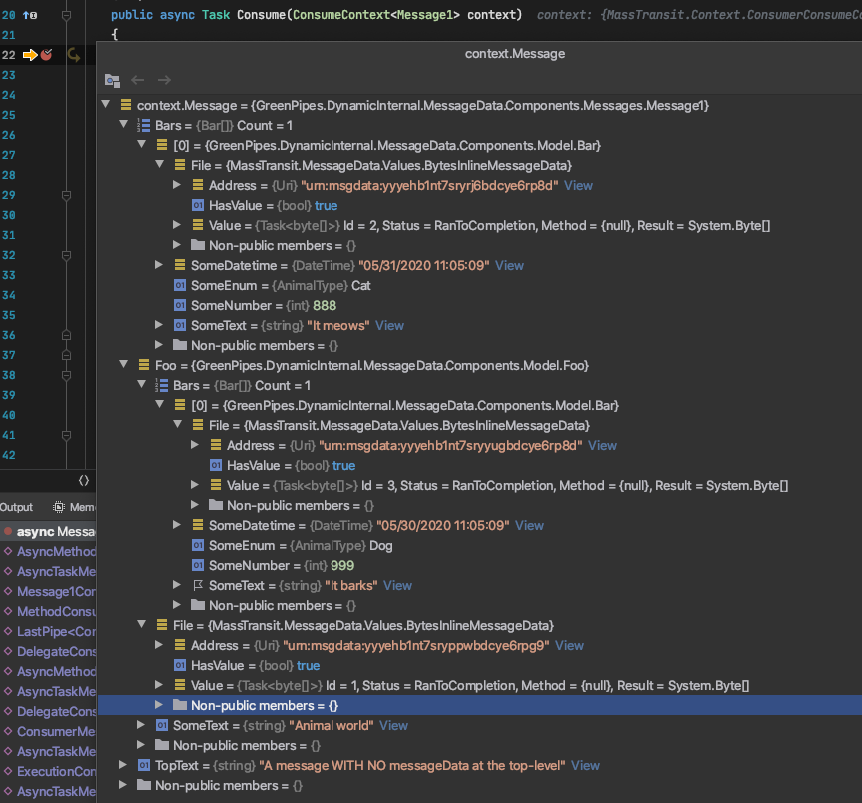
================================================================================
TEST 1
================================================================================
Start - Request message--------------
 Message.TopText=A message WITH NO messageData at the top-level
 Message.Foo.SomeText=Animal world
 Message.Foo.File.Length=4
 Message.Foo.Bars.Count=1
 Message.Foo.Bars[0] - SomeNumber=999, SomeText=It barks, SomeEnum=Dog, SomeDatetime=05/30/2020 11:07:11, File.Length=4
 Message.Bars[0] - SomeNumber=888, SomeText=It meows, SomeEnum=Cat, SomeDatetime=05/31/2020 11:07:11, File.Length=4
End - Request message--------------

----------- Consuming A message WITH NO messageData at the top-level
 Message.Foo.File.Length=4

Start - Response message--------------
 Message.TopText=Message 1 consumed
 Message.File.Length=1000
 Message.DataReceived.Foo.SomeText=Animal world
 Message.DataReceived.File.Length=4
 Message.DataReceived?.Foo?.Bars.Count=1
 Message.DataReceived.Foo.Bars[0] - SomeNumber=999, SomeText=It barks, SomeEnum=Dog, SomeDatetime=05/30/2020 11:07:11, File.Length=4
 Message.DataReceived.Bars[0] - SomeNumber=888, SomeText=It meows, SomeEnum=Cat, SomeDatetime=05/31/2020 11:07:11, File.Length=4
End - Response message--------------

================================================================================
TEST 2
================================================================================
Start - Request message--------------
 Message.TopText=A message WITH messageData at the top-level
 Message.Foo.SomeText=Animal world
 Message.Foo.File.Length=4
 Message.Foo.Bars.Count=1
 Message.Foo.Bars[0] - SomeNumber=999, SomeText=It barks, SomeEnum=Dog, SomeDatetime=05/30/2020 11:07:12, File.Length=4
 Message.Bars[0] - SomeNumber=888, SomeText=It meows, SomeEnum=Cat, SomeDatetime=05/31/2020 11:07:12, File.Length=4
End - Request message--------------

----------- Consuming A message WITH messageData at the top-level

Start - Response message--------------
 Message.TopText=Message 2 consumed
 Message.File.Length=3
 Message.DataReceived.File.Length=19481
 Message.DataReceived.Foo.SomeText=Animal world
 Message.DataReceived.Foo.File.Length=4
 Message.DataReceived.Foo.Bars.Count=1
 Message.DataReceived.Foo.Bars[0] - SomeNumber=999, SomeText=It barks, SomeEnum=Dog, SomeDatetime=05/30/2020 11:07:12, File.Length=4
 Message.DataReceived.Bars[0] - SomeNumber=888, SomeText=It meows, SomeEnum=Cat, SomeDatetime=05/31/2020 11:07:12, File.Length=4
End - Response message--------------
Thank you very much @phatboyg!
Last question:
We were upgrading our system from MT v5 to v6. Are there any breaking changes from v6 to v7?
tonholis
on 30 May 2020
there are no breaking changes you can notice, except you are using parts marked as obsolete
 NooNameR
on 30 May 2020
NooNameR
on 30 May 2020
Related issues
 castroal
·
3Comments
castroal
·
3Comments
 kirill-gerasimenko
·
4Comments
kirill-gerasimenko
·
4Comments
 jvdonk
·
4Comments
jvdonk
·
4Comments
 Ashtonian
·
6Comments
phatboyg
·
6Comments
Ashtonian
·
6Comments
phatboyg
·
6Comments
Most helpful comment
there are no breaking changes you can notice, except you are using parts marked as obsolete