Masstransit: Remote RabbitMQ Connection Timeout using .NET Core 2.0
I am not sure if this is due to Core 2.0 but I can run it fine on non core.
The code I am using is below.
Options
  "RabbitMQ": {
    "Host": "rabbitmq://192.168.160.131/",
    "Username": "test",
    "Password": "1"
  },
Bus
            var busControl = Bus.Factory.CreateUsingRabbitMq(cfg =>
            {
                var host = cfg.Host(new Uri(_rabbitMQOptions.Host), h =>
                {
                    h.Username(_rabbitMQOptions.Username);
                    h.Password(_rabbitMQOptions.Password);
                });


                cfg.ReceiveEndpoint(host, nameof(TestCommand), e =>
                {
                    e.Consumer(() =>
                    {
                        return new TestConsumer();
                    });

                    e.PrefetchCount = 2;
                });

            });


            _logger.LogInformation("Starting bus");
            busControl.Start();
            _logger.LogInformation("Bus started");
            _logger.LogInformation("Waiting for messages");
Command & Consumer
    public class TestCommand
    {
    }

    public class TestConsumer : IConsumer<TestCommand>
    {

        public TestConsumer()
        {
        }

        public async Task Consume(ConsumeContext<TestCommand> context)
        {
            Console.WriteLine("Consumed");
        }
    }
When I run the code, it fails with
'Connect failed: [email protected]:5672/'
TimeoutException: The operation has timed out.
This issue occurs with both 3.5.7 and 4.0.0.1216-develop.
I have confirmed that I can connect fine by following the rabbitmq hello world tutorial.
Each connection creates the following log entries in rabbitmq.
=INFO REPORT==== 25-Jul-2017::05:00:19 ===
accepting AMQP connection <0.31858.0> (192.168.160.1:51098 -> 192.168.160.131:5672)

=ERROR REPORT==== 25-Jul-2017::05:00:19 ===
closing AMQP connection <0.31858.0> (192.168.160.1:51098 -> 192.168.160.131:5672):
{handshake_timeout,handshake}
 thedumbtechguy
All 37 comments
I just installed a localhost server and it worked.
Getting remote connections is still quite important. Any tips on what to look out for?
thedumbtechguy
on 25 Jul 2017
I have been using it fine with remote connection, there is so many things that could block a remote connections, local or remote firewall is a common one.
Simplest way to replicate.
- Install docker for windows
docker run -d --hostname my-rabbit --name some-rabbit -p 5672:5672 -p 15672:15672 rabbitmq:3-management
Connecting locally change your rabbitmq options to
  "RabbitMQ": {
    "Host": "rabbitmq://localhost:5762/",
    "Username": "guest",
    "Password": "guest"
  },
or remotely change rabbitmq options to
  "RabbitMQ": {
    "Host": "rabbitmq://10.0.75.2:5762/",
    "Username": "guest",
    "Password": "guest"
  },
 gertjvr
on 31 Jul 2017
gertjvr
on 31 Jul 2017
@thedumbtechguy did you get it working?
gertjvr
on 4 Aug 2017
Remotely no, so I'm using a local install for now.
Unfortunately, I'm not willing to install docker on my windows machine for
now due to space constraints.
On 4 Aug 2017 12:31 a.m., "Gert Jansen van Rensburg" <
[email protected]> wrote:
@thedumbtechguy https://github.com/thedumbtechguy did you get it
working?—
You are receiving this because you were mentioned.
Reply to this email directly, view it on GitHub
https://github.com/MassTransit/MassTransit/issues/946#issuecomment-320125089,
or mute the thread
https://github.com/notifications/unsubscribe-auth/AA4XZVhIpanobOATg8GqiplBKVYq-KKwks5sUmZ8gaJpZM4OiElK
.
thedumbtechguy
on 4 Aug 2017
In that case you could try Little Lemur - For Development from CloudAMQP for free.
gertjvr
on 4 Aug 2017
@phatboyg I have been using the pre-release package on netcore1.1 and netcore2 without any issue. think we can close this issue.
gertjvr
on 8 Aug 2017
I had the same issue as described here. In order to resolve it, I added to the windowslinux host file new hostname - "192.168.1.20 rabbitmq_server" (192.168.1.20 - the IP address of the server) and in the connection string put "rabbitmq://rabbitmq_server" and it works.
I guess that there is some bug in the code. ("rabbitmq://192.168.1.20" - doesn't work)
 zamiramos
on 13 Aug 2017
zamiramos
on 13 Aug 2017
@zamiramos I created another example for #966 using the latest development packages where I connect to either my host ip address or docker container ip address.
gertjvr
on 13 Aug 2017
@zamiramos similar things reported in #966 about not being able to reach RMQ by ip address of the container instance, but it seems to be the OS/RabbitMQ limitation rather than MT.
 alexeyzimarev
on 14 Aug 2017
alexeyzimarev
on 14 Aug 2017
Ok thanks,
The strange thing is that if I running the same code under .net framework
4.5.1 console application on the same environment(and on the same OS) with
IP address it works great.
2017-08-14 19:48 GMT+03:00 Alexey Zimarev notifications@github.com:
@zamiramos https://github.com/zamiramos similar things reported in #966
https://github.com/MassTransit/MassTransit/issues/966 but it seems to
be the OS/RabbitMQ limitation rather than MT.—
You are receiving this because you were mentioned.
Reply to this email directly, view it on GitHub
https://github.com/MassTransit/MassTransit/issues/946#issuecomment-322243733,
or mute the thread
https://github.com/notifications/unsubscribe-auth/AXwamuUvBr0ujcTZ4JtnPjB5vtAdPixnks5sYHpfgaJpZM4OiElK
.
zamiramos
on 14 Aug 2017
Well, you can try the same MT package version (BTW we are on 4.5.2, you can't have it on 4.5.1) and see if it works. If it does - this is definitely the .NET itself or RabbitMQ since MT code will be the same.
alexeyzimarev
on 14 Aug 2017
I have same issue. Geting timeout when connecting by ip. It works with localhost or host name defined in hosts file but fails when I use ip address.
Tried with standard RabbitMQ.Client and it works with ip correctly.
.net core 2.0.
masstransit 4.0.0.1265-develop.
 stanb
on 24 Aug 2017
stanb
on 24 Aug 2017
The same problem here, remote connection to RabbitMQ broker results a Timeout Exception. however: after 3 - 4 restarts of docker container results sucessfully connection and stable work.
4.0.0.1261-develop with Masstransit in the same version
 Tival
on 30 Aug 2017
Tival
on 30 Aug 2017
I think the oddity that has been mentioned again which I also observed is
being able to connect with RabbitMQ.Client directly but not with MT.
On Wed, Aug 30, 2017 at 12:06 PM, Tival notifications@github.com wrote:
The same problem here, remote connection to RabbitMQ broker results a
Timeout Exception. however: after 3 - 4 restarts of docker container
results sucessfully connection and stable work.4.0.0.1261-develop with Masstransit in the same version
—
You are receiving this because you were mentioned.
Reply to this email directly, view it on GitHub
https://github.com/MassTransit/MassTransit/issues/946#issuecomment-325970375,
or mute the thread
https://github.com/notifications/unsubscribe-auth/AA4XZYjAGoTJEsXsMc47LgHKEKR0fgiuks5sdVBdgaJpZM4OiElK
.
--
Regards,
Stefan Froelich.
thedumbtechguy
on 31 Aug 2017
Same issue. I stopped rabbitmq service and started it. Issue went away. Perhaps, the previous connection is still alive and stopping the service kills it?
 jvelezc
on 10 Sep 2017
jvelezc
on 10 Sep 2017
Hello.
I have the exact same problem here and i should take a decision on how i'm going to proceed with a long-term project that i have been assigned to. Any info please?
Thanks!
ps: No firewall problems,no docker is used(just plain hardware) and it does work on .net framework!!!
 tasoss
on 10 Sep 2017
tasoss
on 10 Sep 2017
Does bus.StartAsync() work?
To my understanding timeout is caused by deadlock , occuring due to single threaded SynchronizationContext in bus.start() and lack of .ConfigureAwait(false) in RabbitMq client.
Created PR in client's repo.
 jacobpovar
on 11 Sep 2017
jacobpovar
on 11 Sep 2017
Hello.
Indeed bus.StartAsync() works! What does this mean?
BTW it is always tried to be connected using ipv6 which fails and so an exception is caught but it then continues to ipv4.
Is this normal?
tasoss
on 11 Sep 2017
I guess it's better to use async version until an updated version of rabbitmq dotnet client is released.
Also, SocketFrameHandler in that lib does actually try to connect using ipv6 and than falls back to ipv4 on failure.
jacobpovar
on 19 Sep 2017
IBusControl.Start() is just a wrapper for the StartAsync. I am wondering how this can be a problem.
alexeyzimarev
on 20 Sep 2017
BTW it is always tried to be connected using ipv6 which fails and so an exception is caught but it then continues to ipv4
@tasoss it depends on your DNS resolution. If your IPv6 address is resolved first - it will be used.
alexeyzimarev
on 20 Sep 2017
@jacobpovar I see it now, they use different API for Core. Makes sense. Your PR is accepted, so I assume we just need to wait a little :)
alexeyzimarev
on 20 Sep 2017
@alexeyzimarev thanks for the information
 ghost
on 20 Sep 2017
ghost
on 20 Sep 2017
Same issue. I stopped rabbitmq service and started it. Issue went away. Perhaps, the previous connection is still alive and stopping the service kills it?
I'm seeing the same problem, it happens after my PC goes to sleep and then wakes up again. Restarting the RabbitMQ service always fixes it.
I'm using rabbitmq://localhost and username guest password guest so I don't think it's just an issue with IP addresses or remote servers etc.
I'm using .NET 4.7 "full framework" (nothing .NET Core in my app) so I don't think it's a .NET Core specific problem either.
I'm using bus.Start(); in a regular console app (not using bus.StartAsync()) so I'll update my code and see if that fixes the issue and report back.
 todthomson
on 19 Oct 2017
todthomson
on 19 Oct 2017
@todthomson are you hosting rabbit in docker? might be dockers stupid tcp proxy.
gertjvr
on 19 Oct 2017
@gertjvr Just hosting locally on Windows (for local development purposes) :)
todthomson
on 19 Oct 2017
Hi, guys are there any updates on the problem?
I faced with the same issue in our projects when we trying to connect to RMQ server through IP address.
A test code is pretty simple.
            var bus = Bus.Factory.CreateUsingRabbitMq(cfg =>
            {
                cfg.Host(new Uri("rabbitmq://10.20.30.40/vHost"), h =>
                {
                    h.Username("user");
                    h.Password("****");
                });
            });

            bus.Start();
            while (true)
            {
                bus.Publish<LogItem>(logitem);
            }
            bus.Stop();
Packages:
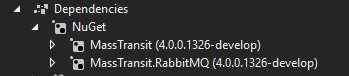
Framwork: .Net Core 2.0
 bvadeveloper
on 23 Oct 2017
bvadeveloper
on 23 Oct 2017
My understanding is waiting on a RabbitMQ.Client update.
 phatboyg
on 23 Oct 2017
phatboyg
on 23 Oct 2017
My understanding is waiting on a RabbitMQ.Client update.
Just as an FYI RabbitMQ.Client version 5.1.0-pre1 doesn't fix it for me.
Also, using bus.StartAsync() vs bus.Start() doesn't fix it for me either.
I'm happy to test potential fixes if you need me to. On .Net 4.7 "full framework" so I'm not even sure that my issue is related to what the .Net Core 2.0 people are seeing here.
Restarting the RabbitMQ service (in Windows) seems to be the only thing that with "fix" it for me.
todthomson
on 30 Oct 2017
We had this problem, it worked for Erlang 20 but not for some 19.something version.
 wallymathieu
on 31 Oct 2017
wallymathieu
on 31 Oct 2017
Any update on this? We are trying to connect from our Azure ASE App service to a VM with RabbitMQ and Mass Transit on it. Works fine with the API running locally against a Docker container of RabbitMQ with port forwarding to 5672, but trying to either hit the IP of the VM or go through the DNS in Azure, it times out.
 mmoser-rivermoss
on 14 Dec 2017
mmoser-rivermoss
on 14 Dec 2017
This is weird because I am running a couple of services inside Linux containers, reaching out to RabbitMq hosted on Windows VMs (production) and I experience no issues at all.
alexeyzimarev
on 14 Dec 2017
well, we have had some issues with different rabbitmq instances on cloudamqp, while for some instances of erlang 19 we have been able to use it (while not for others).
wallymathieu
on 14 Dec 2017
What version of RabbitMq and Erlang are you using @alexeyzimarev? We are using RabbitMq docker containers, 3.6.14 with Erlang 19.2.1. I tried updating to 3.7.0 yesterday with Erlang 20.1 and the permissions_topic kept blowing up in management after adding a user and then going to permissions. I tried a local install as well as the container, but both had the same issue. So I went back to 3.6.14
mmoser-rivermoss
on 14 Dec 2017
@mmoser-rivermoss I can check tomorrow.
alexeyzimarev
on 14 Dec 2017
@alexeyzimarev After a bit of troubleshooting and trying things, our problem turned out to be an NSG not taking into account the Subnet IP range, so we weren't allowing the traffic through properly. We are now able to communicate to the VM from the app service.
mmoser-rivermoss
on 15 Dec 2017
I'm going to close this, enough have it working with core that this isn't an MT issue.
phatboyg
on 22 Dec 2017
Related issues
 kirill-gerasimenko
·
4Comments
kirill-gerasimenko
·
4Comments
 Ashtonian
·
6Comments
Ashtonian
·
6Comments
 icsharp
·
4Comments
icsharp
·
4Comments
 jvdonk
·
4Comments
jvdonk
·
4Comments
 ghd258
·
6Comments
ghd258
·
6Comments
Most helpful comment
@phatboyg I have been using the pre-release package on netcore1.1 and netcore2 without any issue. think we can close this issue.