Maskrcnn-benchmark: Can I use pytorch versions after 1.0 (like currently, pytorch is at 1.2)?
❓ Questions and Help
And does it need to be the nightly build.
The reason I'm asking is that I'm running pytorch version '1.2.0.dev20190525'. I followed the install instructions as listed in INSTALL.md, and I get the error:
ImportError: ...miniconda3/envs/maskrcnn_facebook/lib/python3.7/site-packages/torchvision/_C.cpython-37m-x86_64-linux-gnu.so: undefined symbol: _ZN3c106Device8validateEv
Yes, I know several other people have listed this issue; however, doing rm -rf build/ and then rebuilding it doesn't help. I get the same error.
 jsuit
jsuit
All 9 comments
It should work. It might be the case that the PyTorch version you are using to compile maskrcnn-benchmark is not the same as the one you are using to load it
 fmassa
on 26 May 2019
fmassa
on 26 May 2019
Please use the torchvision-0.2.2.post3 to solve the problem.There is something wrong with the version 0.3.0 of the torchvision.
 fantuslk
on 27 May 2019
fantuslk
on 27 May 2019
Hi @jsuit , installing pytorch-nightly-1.1.0 to replace pytorch-nightly-1.2.0 can avoid this problem now.
 ghost
on 28 May 2019
ghost
on 28 May 2019
@fantuslk what is the problem that you are facing with torchvision 0.3?
I think the only thing that you should pay attention to is, once you've installed both pytorch and torchvision 0.3, to recompile maskrcnn-benchmark, and it should be good to go.
fmassa
on 28 May 2019
@fmassa Using torchvision 0.3 I was able to compile, but when importing from predictor COCODemo I was having an Undefined Symbol error.
This was only able to be resolved with the setup I mention in https://github.com/facebookresearch/maskrcnn-benchmark/issues/771#issuecomment-498996443.
Hope this helps.
 manueldiaz96
on 6 Jun 2019
manueldiaz96
on 6 Jun 2019
Hi @jsuit, I met this issue as well when I installed pytorch-nightly 1.2.0, torchvision 0.3.0 for python3.7. After I downgrade them to 1.0.0 and 0.2.2 respectively, I rm -r build/ under maskrcnn-benchmark folder and rebuild it. The issue is resolved then.
 SleepyTT
on 20 Jul 2019
SleepyTT
on 20 Jul 2019
Hi @jsuit, I met this issue as well when I installed pytorch-nightly 1.2.0, torchvision 0.3.0 for python3.7. After I downgrade them to 1.0.0 and 0.2.2 respectively, I rm -r build/ under maskrcnn-benchmark folder and rebuild it. The issue is resolved then.
I am not able to find a 1.0.0 nigtly for python 3.7. Could you give me the way to install pytorch-nightly 1.0.0 and torchvision 0.2.2
 yuteng
on 24 Jul 2019
yuteng
on 24 Jul 2019
I am not able to find a 1.0.0 nigtly for python 3.7. Could you give me the way to install pytorch-nightly 1.0.0 and torchvision 0.2.2
@yuteng As far as I know, what nightly version means, is a version that is not fully stable but works, this is usually done to release new features so people can test them. Please correct me if I am wrong.
What you can do is just install Pytorch 1.0.0 via conda by:
conda install pytorch=1.0.0 -c pytorch
Remember to install the cudatoolkit version compatible with the CUDA Version you are using!
manueldiaz96
on 24 Jul 2019
Hi @jsuit, I met this issue as well when I installed pytorch-nightly 1.2.0, torchvision 0.3.0 for python3.7. After I downgrade them to 1.0.0 and 0.2.2 respectively, I rm -r build/ under maskrcnn-benchmark folder and rebuild it. The issue is resolved then.
I am not able to find a 1.0.0 nigtly for python 3.7. Could you give me the way to install pytorch-nightly 1.0.0 and torchvision 0.2.2
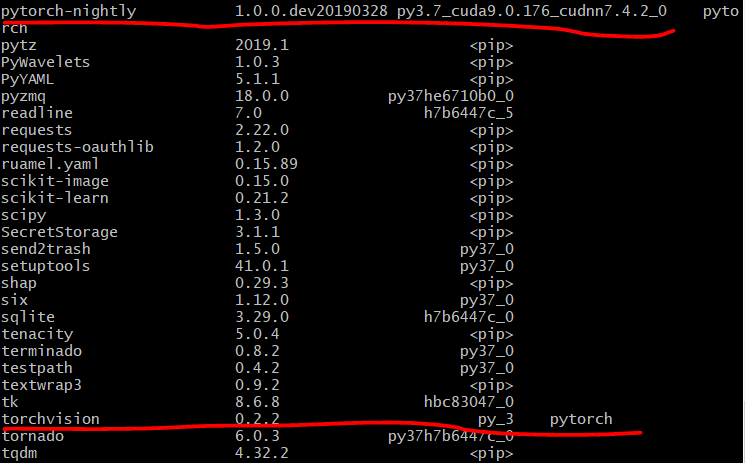
@yuteng I use "conda install -c pytorch pytorch-nightly=1.0.0 torchvision=0.2.2 cudatoolkit=9.0" to install the pytorch-nightly 1.0.0 and torchvision 0.2.2, and it works for me.
SleepyTT
on 24 Jul 2019
Related issues
 qijiezhao
·
3Comments
qijiezhao
·
3Comments
 krumo
·
3Comments
krumo
·
3Comments
 IenLong
·
4Comments
IenLong
·
4Comments
 auroua
·
3Comments
auroua
·
3Comments
 Nacho114
·
4Comments
Nacho114
·
4Comments
Most helpful comment
@yuteng I use "conda install -c pytorch pytorch-nightly=1.0.0 torchvision=0.2.2 cudatoolkit=9.0" to install the pytorch-nightly 1.0.0 and torchvision 0.2.2, and it works for me.