Maskrcnn-benchmark: Distributed training speed is slower on 2 machines than 1 machine
❓ Questions and Help
I run this code correctly on one machine with 4 or 8 GPUs, however, when I run it on 2 machines with 8 GPUs (each machine has 4 GPUs), I can run it with backend 'gloo', but error happended with 'nccl'. Also, when I run the code on 1 machine with 2 GPUs and 2 machines with 2 GPUs (each one uses 1 GPU), the speed of front one is faster than second one, I don't know why, can someone help me? Thanks in advance.
Training command:
Node 1:
NCCL_SOCKET_IFNAME=eno1 python -m torch.distributed.launch --nproc_per_node=2 --nnodes=2 --node_rank=0 --master_addr="192.168.110.25" --master_port=1234 train_net.py
Node 2:
NCCL_SOCKET_IFNAME=eth0 python -m torch.distributed.launch --nproc_per_node=2 --nnodes=2 --node_rank=1 --master_addr="192.168.110.25" --master_port=1234 train_net.py
NCCL DEBUG INFO:
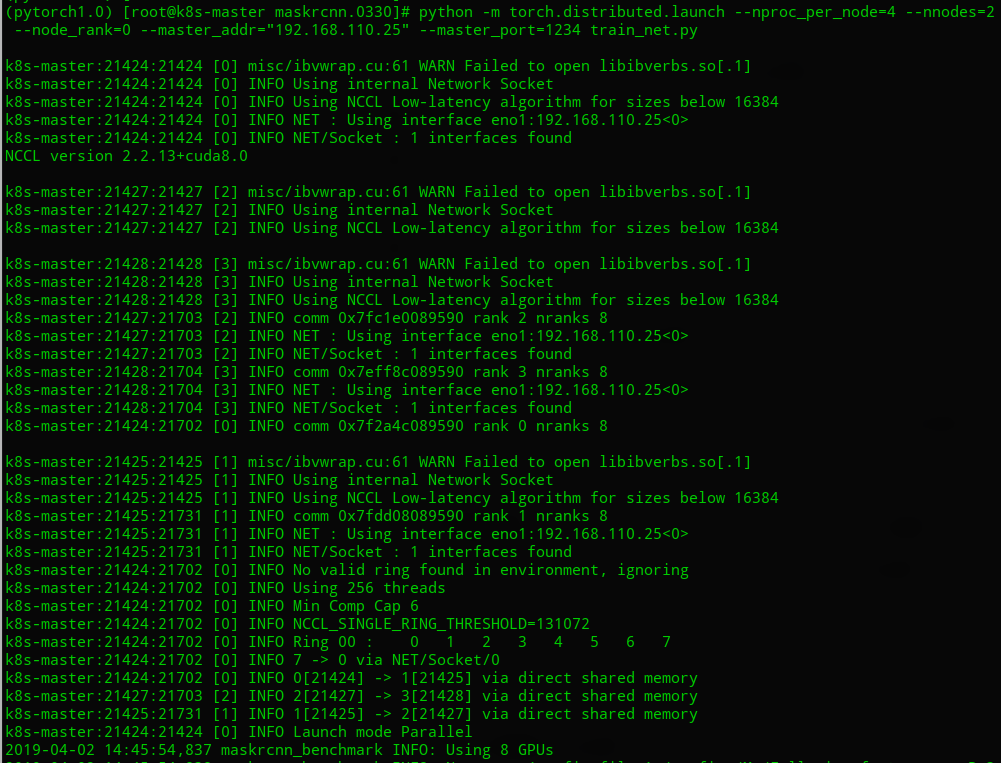
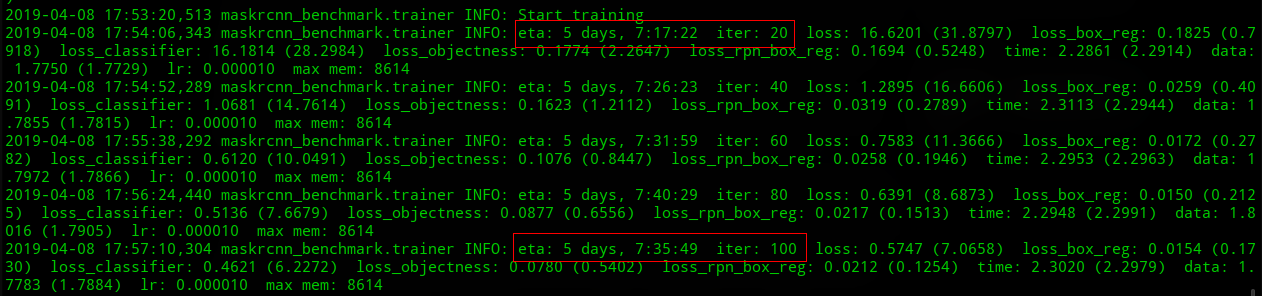
Speed comparation:
One machine, 2 GPUs:

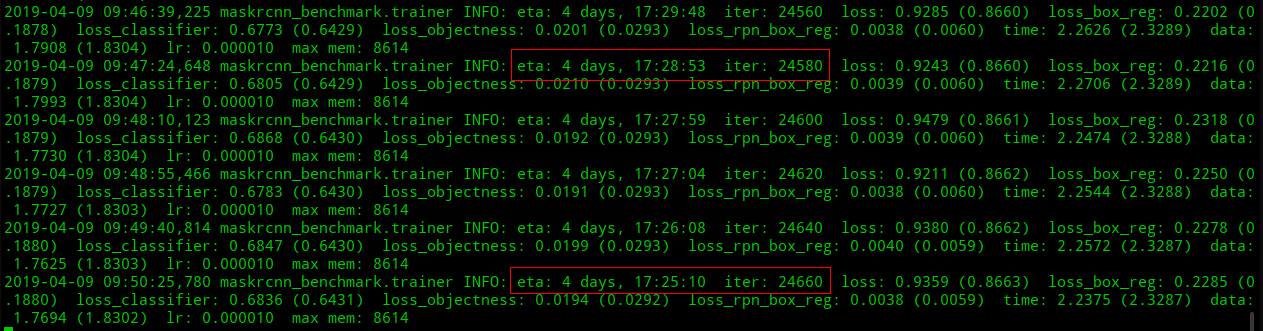
Two machines, each one uses 1 GPU:

 Eric-Zhang1990
All 17 comments
Regarding the ETA: these values can change a lot through the training process, it is not very reliable in its early stages. Could you tell the difference between the ETA's after some thousands iterations ?
 LeviViana
on 3 Apr 2019
LeviViana
on 3 Apr 2019
@LeviViana I run maskrcnn-benchmark for about 25000 iters (2 machines, total 4 gpus), its eta starts from 5 days, 7:35:49 in iter 100, and that is 4 days, 17:25:10 in iter 24660, the eta is just reduced by about 14 hours. It is still slower than on 1 machine with 4 gpus. Do you think it is normal?
Thank you.
Eric-Zhang1990
on 9 Apr 2019
Gloo is probably the culprit here, and is probably much slower. Maybe trying to make nccl work would be the best?
 fmassa
on 10 Apr 2019
fmassa
on 10 Apr 2019
@fmassa Now I can run it with nccl, its speed is faster than using gloo. Thank you.
Eric-Zhang1990
on 11 Apr 2019
@Eric-Zhang1990 for the others, what did you have to do to enable multi-machine training with nccl? I suppose it's only running the commands you posted in the beginning of the issue and getting nccl to be properly installed?
fmassa
on 11 Apr 2019
@Eric-Zhang1990 Hi, I also want to know what did you have to do to make multi-machine training with nccl running properly. Since when I used the same command , I met bug info as the following:
RuntimeError: NCCL error in: /opt/conda/conda-bld/pytorch-nightly_1553663942394/work/torch/lib/c10d/ProcessGroupNCCL.cpp:260, unhandled system error
Thank you very much !
 Lausannen
on 18 Apr 2019
Lausannen
on 18 Apr 2019
@Lausannen Hi, I met the same bug as yours. Have you fixed this? Could you give me some advice?
Thanks a lot !
 djiajunustc
on 10 May 2019
djiajunustc
on 10 May 2019
@djiajunustc Sorry for my late reply, actually , I have solved this problem but the speed may be slower than single machine in my test. Firstly, I think you can set NCCL_DEBUG=INFO for more info; Secondly, you may check your NCCL_SOCKET_IFNAME to an IP interface. You may come to https://github.com/NVIDIA/nccl/issues/207 for further suggsetions. Hope this can help you.
Lausannen
on 11 May 2019
Hi, @Lausannen
I set the NCCL_DEBUG=INFO and I get:
55d3479b71fb:91:91 [0] misc/ibvwrap.cu:63 NCCL WARN Failed to open libibverbs.so[.1]
55d3479b71fb:91:91 [0] NCCL INFO Using internal Network Socket
55d3479b71fb:91:91 [0] NCCL INFO NET : Using interface eth0:172.17.0.4<0>
55d3479b71fb:91:91 [0] NCCL INFO NET/Socket : 1 interfaces found
NCCL version 2.3.7+cuda9.0
55d3479b71fb:91:91 [0] NCCL INFO rank 0 nranks 4
55d3479b71fb:94:94 [3] misc/ibvwrap.cu:63 NCCL WARN Failed to open libibverbs.so[.1]
55d3479b71fb:94:94 [3] NCCL INFO Using internal Network Socket
55d3479b71fb:94:94 [3] NCCL INFO rank 3 nranks 4
55d3479b71fb:92:92 [1] misc/ibvwrap.cu:63 NCCL WARN Failed to open libibverbs.so[.1]
55d3479b71fb:92:92 [1] NCCL INFO Using internal Network Socket
55d3479b71fb:92:92 [1] NCCL INFO rank 1 nranks 4
55d3479b71fb:94:118 [3] NCCL INFO comm 0x7fae9c05d320 rank 3 nranks 4
55d3479b71fb:94:118 [3] NCCL INFO NET : Using interface eth0:172.17.0.4<0>
55d3479b71fb:94:118 [3] NCCL INFO NET/Socket : 1 interfaces found
55d3479b71fb:91:117 [0] NCCL INFO comm 0x7f14cc05d320 rank 0 nranks 4
55d3479b71fb:93:93 [2] misc/ibvwrap.cu:63 NCCL WARN Failed to open libibverbs.so[.1]
55d3479b71fb:93:93 [2] NCCL INFO Using internal Network Socket
55d3479b71fb:93:93 [2] NCCL INFO rank 2 nranks 4
55d3479b71fb:92:119 [1] NCCL INFO comm 0x7fe03005d320 rank 1 nranks 4
55d3479b71fb:92:119 [1] NCCL INFO NET : Using interface eth0:172.17.0.4<0>
55d3479b71fb:92:119 [1] NCCL INFO NET/Socket : 1 interfaces found
55d3479b71fb:93:120 [2] NCCL INFO comm 0x7fba9805d320 rank 2 nranks 4
55d3479b71fb:93:120 [2] NCCL INFO NET : Using interface eth0:172.17.0.4<0>
55d3479b71fb:93:120 [2] NCCL INFO NET/Socket : 1 interfaces found
55d3479b71fb:93:120 [2] NCCL INFO Could not find real path of /sys/class/net/eth0/device
55d3479b71fb:93:120 [2] NCCL INFO CUDA Dev 2, IP Interfaces : eth0(SOC)
55d3479b71fb:92:119 [1] NCCL INFO Could not find real path of /sys/class/net/eth0/device
55d3479b71fb:92:119 [1] NCCL INFO CUDA Dev 1, IP Interfaces : eth0(SOC)
55d3479b71fb:91:117 [0] NCCL INFO Could not find real path of /sys/class/net/eth0/device
55d3479b71fb:91:117 [0] NCCL INFO CUDA Dev 0, IP Interfaces : eth0(SOC)
55d3479b71fb:94:118 [3] NCCL INFO Could not find real path of /sys/class/net/eth0/device
55d3479b71fb:94:118 [3] NCCL INFO CUDA Dev 3, IP Interfaces : eth0(SOC)
55d3479b71fb:91:117 [0] NCCL INFO Using 256 threads
55d3479b71fb:91:117 [0] NCCL INFO Min Comp Cap 7
55d3479b71fb:91:117 [0] NCCL INFO Ring 00 : 0 1 2 3
55d3479b71fb:94:118 [3] NCCL INFO Ring 00 : 3[3] -> 0[0] via P2P/IPC
55d3479b71fb:91:117 [0] NCCL INFO Ring 00 : 0[0] -> 1[1] via P2P/IPC
55d3479b71fb:93:120 [2] NCCL INFO Ring 00 : 2[2] -> 3[3] via P2P/IPC
55d3479b71fb:92:119 [1] NCCL INFO Ring 00 : 1[1] -> 2[2] via P2P/IPC
55d3479b71fb:93:120 [2] include/core.h:382 NCCL WARN Cuda failure 'an illegal memory access was encountered'
55d3479b71fb:93:120 [2] include/core.h:382 NCCL WARN Cuda failure 'an illegal memory access was encountered'
55d3479b71fb:93:120 [2] NCCL INFO init.cu:198 -> 1
55d3479b71fb:93:120 [2] NCCL INFO init.cu:594 -> 1
55d3479b71fb:93:120 [2] NCCL INFO misc/group.cu:69 -> 1 [Async thread]
Traceback (most recent call last):
File "/userhome/detection/codes/maskrcnn-benchmark-custom/tools/train_net.py", line 186, in
main()
File "/userhome/detection/codes/maskrcnn-benchmark-custom/tools/train_net.py", line 156, in main
synchronize()
File "/userhome/detection/codes/maskrcnn-benchmark-custom/maskrcnn_benchmark/utils/comm.py", line 45, in synchronize
dist.barrier()
File "/miniconda/envs/py36/lib/python3.6/site-packages/torch/distributed/distributed_c10d.py", line 1240, in barrier
work = _default_pg.barrier()
RuntimeError: NCCL error in: /opt/conda/conda-bld/pytorch-nightly_1556168966744/work/torch/lib/c10d/ProcessGroupNCCL.cpp:2
72, unhandled cuda error
Could you help me figure out what's wrong with my setting?
I tried to set
NCCL_SOCKET_IFNAME=^lo,docker0
or NCCL_SOCKET_IFNAME=en0
but both of them don't work.
djiajunustc
on 12 May 2019
@djiajunustc Did you use torch.distributed.launch with correct master_ip and node rank ? I am not familiar with NCCL but can you try using -x NCCL_SOCKET_IFNAME=eth0, since you have multiple eth NICs?
Lausannen
on 12 May 2019
@Lausannen
Yes, I use torch.distributed.launch.
Since there are 8 gpus in my machine, I don't set master_ip or node rank.
djiajunustc
on 12 May 2019
@djiajunustc You mean 8 GPUs in one single machine?
Lausannen
on 12 May 2019
@Lausannen Yes, 8 GPUS in one machine.
djiajunustc
on 13 May 2019
@djiajunustc I think it may be not related to NCCL, since I did not meet this problem in one single machine. Have you changed the basic structure in code? In single machine, you just need to use torch.distributed to wrap your model and use torch.distributed.launch to run. Can you show me the code which is related to wrap your model?
Lausannen
on 13 May 2019
@Lausannen I haven't changed the basic structure of maskrcnn-benchmark, nothing was modified in tools/train_net.py.
I think this problem might be caused by 'Could not find real path of /sys/class/net/eth0/device' since I cannot find this folder inside my docker container.
djiajunustc
on 13 May 2019
@djiajunustc Understand, I suggest you to build it without docker. I can run it normally without docker. Also, make sure torch and cuda version are right.
Lausannen
on 13 May 2019
@Lausannen Thanks a lot. I'll try it. It's weired that I can run it with the same docker image and same code in another machine.
djiajunustc
on 13 May 2019
Related issues
 CF2220160244
·
3Comments
CF2220160244
·
3Comments
 krumo
·
3Comments
krumo
·
3Comments
 IenLong
·
4Comments
IenLong
·
4Comments
 mrteera
·
3Comments
mrteera
·
3Comments
 qijiezhao
·
3Comments
qijiezhao
·
3Comments