Mask_rcnn: GPU Workload to small, CPU Threads to much
Hello,
i use Mask-R-CNN for my work in my university and therfore i can't use all the CPU Cores. I use a Geforce 2080 TI and the server has 2 CPU's with 18 cores each. My data is on that same server saved on a SSD.
In the model.py i edited the code in line 2369 where you set the number of workers:
        if os.name is 'nt':
            workers = 0
        else:
            #workers = multiprocessing.cpu_count()
            workers = 2

        self.keras_model.fit_generator(
            train_generator,
            initial_epoch=self.epoch,
            epochs=epochs,
            steps_per_epoch=self.config.STEPS_PER_EPOCH,
            callbacks=callbacks,
            validation_data=val_generator,
            validation_steps=self.config.VALIDATION_STEPS,
            max_queue_size=100,
            workers=workers,
            use_multiprocessing=True,
        )
For workers i set the number to 2. But in htop my process is still using to much CPU:

Before i edited workers to workers = 4, but still the CPU usage was that high.
When i use "ps -elf|grep my_user_name | wc", i get 17 back, although workers = 2. I also got 17 back with workers = 4.
Only with "ps -elfL|my_user_name | wc" i got 497 back, and with workers = 4 it was over 700.

And my GPU Workload is sometimes 0%, sometimes 3%, sometimes 27%, sometimes over 40%. But i wonder why it is sometimes 0% or 3% during training. In that time the NN didn't save the h5 weights, but is was in training.
This is my GPU Workload so far:
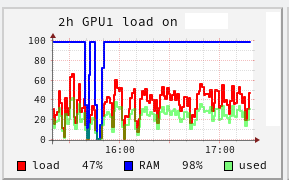
I restarted the process twice, therfore you can see in the screenshot the low RAM twice.
Does someone has the same issue or know what causes the issue?
 thepate94227
All 12 comments
I also have same problem. I use a server in my university and there are 48 cpus. when I train a model, then use all 48 cpus. Although I set the number of workers = 1, multiprocessing=False, but still cpu threads too much.
Did you fix it?
 hyoje42
on 29 May 2019
hyoje42
on 29 May 2019
Yes, i did solve that problem. I am unfortunately not in my university, so therfore i can't show you my exact solution, but the key is to limit Keras. So you have to use a limitation like this:
from keras import backend as K
K.set_session(K.tf.Session(config=K.tf.ConfigProto(intra_op_parallelism_threads=32, inter_op_parallelism_threads=32)))
I hope this helps. When i am back to my university, i show you my code.
thepate94227
on 30 May 2019
@thepate94227 Thanks for your kind reply! However, I tried that code, but I failed. Also I change the value 1 or 2, but it didn't work...
hyoje42
on 31 May 2019
@thepate94227 Thanks for your kind reply! However, I tried that code, but I failed. Also I change the value 1 or 2, but it didn't work...
You are welcome! If i remember correctly, at the beginning of my code i wrote this:
import os
os.environ["OMP_NUM_THREADS"] = "4"
import tensorflow as tf
config = tf.ConfigProto(intra_op_parallelism_threads=2, inter_op_parallelism_threads=2)
config.gpu_options.allow_growth = True
session = tf.Session(config=config)

from keras import backend as K
K.set_session(session)
And at the end of my code for training i wrote:
session.close()
I also used workers = 0, but I think i left multiprocessing = True.
I hope this will help!
thepate94227
on 31 May 2019
@thepate94227 I really appreciate you! I've tried your method but i doesn't work. But I also will use other code written by torch, and the code works well. I'm sad since I cannot use this code, but it's okay..
Anyway, I really thanks for your very kind help!
hyoje42
on 31 May 2019
You are welcome! Too bad it didn't help... I wish you good luck!
But are you sure that your code use the changes from your model.py? Or that the Keras limits are considered at all?
You can post your code, if you want.
thepate94227
on 31 May 2019
@thepate94227 Thanks for your kind reply! However, I tried that code, but I failed. Also I change the value 1 or 2, but it didn't work...
You are welcome! If i remember correctly, at the beginning of my code i wrote this:
import os
os.environ["OMP_NUM_THREADS"] = "4"
import tensorflow as tf
config = tf.ConfigProto(intra_op_parallelism_threads=2, inter_op_parallelism_threads=2)
config.gpu_options.allow_growth = True
session = tf.Session(config=config)

from keras import backend as K
K.set_session(session)
And at the end of my code for training i wrote:
session.close()I also used
workers = 0, but I think i leftmultiprocessing = True.
I hope this will help!
Hi, do you use these code inside your model.py? Where do you insert it? I've tried to add these code in def train( ), but it doesn't work. I'd really appreciate it if you can help me!
 luoweimeng
on 19 Jun 2019
luoweimeng
on 19 Jun 2019
Hi,
i used this in my training code. There are some examples of training code. I used the example from https://github.com/waspinator/deep-learning-explorer/tree/master/mask-rcnn, but changed it into a python file. So basically my code looks like this:
import os
os.environ["CUDA_VISIBLE_DEVICES"] = "3"
os.environ["OMP_NUM_THREADS"] = "4"
import tensorflow as tf

config = tf.ConfigProto(intra_op_parallelism_threads=2, inter_op_parallelism_threads=2)
config.gpu_options.allow_growth = True
session = tf.Session(config=config)

from keras import backend as K
K.set_session(session)

import sys
import random
import math
import re
import time
import numpy as np
import cv2
import matplotlib
import matplotlib.pyplot as plt

sys.path.insert(0, 'pathofmyproject/mask-rcnn/libraries') #files from waspinator, but updated files with matterport/mask-r-cnn
from mrcnn.config import Config
import mrcnn.utils as utils
import mrcnn.model as modellib
import mrcnn.visualize as visualize
from mrcnn.model import log
import mcoco.coco as coco
import mextra.utils as extra_utils
import imgaug

aug = False

#HOME_DIR = 'mypath/' #like in waspinator example
DATA_DIR = os.path.join(HOME_DIR, "data/knot")
WEIGHTS_DIR = os.path.join(HOME_DIR, "data/weights")
MODEL_DIR = os.path.join(DATA_DIR, "logs/all") #all means training all layers
#MODEL_DIR = os.path.join(DATA_DIR, "logs/heads")

# Local path to trained weights file
COCO_MODEL_PATH = os.path.join(WEIGHTS_DIR, "mask_rcnn_coco.h5")
# Download COCO trained weights from Releases if needed
if not os.path.exists(COCO_MODEL_PATH):
    utils.download_trained_weights(COCO_MODEL_PATH)

#loading my data, created with the tool from waspinator in COCO style
dataset_train = coco.CocoDataset()
dataset_train.load_coco(DATA_DIR, subset="train", year="2019")
dataset_train.prepare()

dataset_validate = coco.CocoDataset()
dataset_validate.load_coco(DATA_DIR, subset="val", year="2019")
dataset_validate.prepare()

dataset_test = coco.CocoDataset()
dataset_test.load_coco(DATA_DIR, subset="test", year="2019")
dataset_test.prepare()

image_size = 512
rpn_anchor_template = (1, 2, 4, 8, 16)  # anchor sizes in pixels
rpn_anchor_scales = tuple(i * (image_size // 16) for i in rpn_anchor_template)
#rpn_anchor_template = (32, 64, 128, 256, 512)  # anchor sizes in pixels
#print(rpn_anchor_template)
#print(rpn_anchor_scales)

class MyConfig(Config):
    """Configuration for training on the shapes dataset.
    """
    NAME = "myproject"

    # Train on 1 GPU and 2 images per GPU. Put multiple images on each
    # GPU if the images are small. Batch size is 2 (GPUs * images/GPU).
    GPU_COUNT = 1
    IMAGES_PER_GPU = 2

    # Number of classes (including background)
    NUM_CLASSES = 1 + 1  # background + 1 class in my case

    #BACKBONE = "resnet101"
    BACKBONE = "resnet50"

    # Use smaller images for faster training.
    IMAGE_MAX_DIM = image_size
    IMAGE_MIN_DIM = image_size

    # Use smaller anchors because our image and objects are small
    RPN_ANCHOR_SCALES = rpn_anchor_scales

    # Aim to allow ROI sampling to pick 33% positive ROIs.
    TRAIN_ROIS_PER_IMAGE = 200

    STEPS_PER_EPOCH = 2400

    VALIDATION_STEPS = STEPS_PER_EPOCH / 10

    # If enabled, resizes instance masks to a smaller size to reduce
    # memory load. Recommended when using high-resolution images.
    USE_MINI_MASK = True
    # MINI_MASK_SHAPE = (128, 128)  # (height, width) of the mini-mask

    MAX_GT_INSTANCES = 15
    DETECTION_MAX_INSTANCES = 15

    # Minimum probability value to accept a detected instance
    # ROIs below this threshold are skipped
    DETECTION_MIN_CONFIDENCE = 0.6
    # Non-maximum suppression threshold for detection
    DETECTION_NMS_THRESHOLD = 0.3

    # Learning rate and momentum
    # The Mask RCNN paper uses lr=0.02, but on TensorFlow it causes
    # weights to explode. Likely due to differences in optimizer
    # implementation.
    LEARNING_RATE = 0.001 / 100
    LEARNING_MOMENTUM = 0.9

    LOSS_WEIGHTS = {
        "rpn_class_loss": 1.,
        "rpn_bbox_loss": 1.,
        "mrcnn_class_loss": 1.,
        "mrcnn_bbox_loss": 1.,
        "mrcnn_mask_loss": 1.
    }


config = MyConfig()
config.display()

model = modellib.MaskRCNN(mode="training", config=config, model_dir=MODEL_DIR)

inititalize_weights_with = "coco"  # imagenet, coco, or last

if inititalize_weights_with == "imagenet":
    model.load_weights(model.get_imagenet_weights(), by_name=True)

elif inititalize_weights_with == "coco":
    model.load_weights(COCO_MODEL_PATH, by_name=True,
                       exclude=["mrcnn_class_logits", "mrcnn_bbox_fc",
                                "mrcnn_bbox", "mrcnn_mask"])

elif inititalize_weights_with == "last":
    # Load the last model you trained and continue training
    model.load_weights(model.find_last(), by_name=True)

if(aug == True):
    augmentation = imgaug.augmenters.Sometimes(0.5, [
        imgaug.augmenters.Fliplr(0.5),
        imgaug.augmenters.GaussianBlur(sigma=(0.0, 5.0))
    ])
    model.train(dataset_train, dataset_validate,
                learning_rate=config.LEARNING_RATE,
                epochs=300,  # starts from the previous epoch, so only 1 additional is trained
                layers="all",
                augmentation=augmentation)
else:
    model.train(dataset_train, dataset_validate,
                learning_rate=config.LEARNING_RATE,
                epochs=300,  # starts from the previous epoch, so only 1 additional is trained
                layers="all")

session.close()
I also have a load.py, where i load my testset and see how well my data was trained.
thepate94227
on 19 Jun 2019
Hi,
i used this in my training code. There are some examples of training code. I used the example from https://github.com/waspinator/deep-learning-explorer/tree/master/mask-rcnn, but changed it into a python file. So basically my code looks like this:import os os.environ["CUDA_VISIBLE_DEVICES"] = "3" os.environ["OMP_NUM_THREADS"] = "4" import tensorflow as tf config = tf.ConfigProto(intra_op_parallelism_threads=2, inter_op_parallelism_threads=2) config.gpu_options.allow_growth = True session = tf.Session(config=config) from keras import backend as K K.set_session(session) import sys import random import math import re import time import numpy as np import cv2 import matplotlib import matplotlib.pyplot as plt sys.path.insert(0, 'pathofmyproject/mask-rcnn/libraries') #files from waspinator, but updated files with matterport/mask-r-cnn from mrcnn.config import Config import mrcnn.utils as utils import mrcnn.model as modellib import mrcnn.visualize as visualize from mrcnn.model import log import mcoco.coco as coco import mextra.utils as extra_utils import imgaug aug = False #HOME_DIR = 'mypath/' #like in waspinator example DATA_DIR = os.path.join(HOME_DIR, "data/knot") WEIGHTS_DIR = os.path.join(HOME_DIR, "data/weights") MODEL_DIR = os.path.join(DATA_DIR, "logs/all") #all means training all layers #MODEL_DIR = os.path.join(DATA_DIR, "logs/heads") # Local path to trained weights file COCO_MODEL_PATH = os.path.join(WEIGHTS_DIR, "mask_rcnn_coco.h5") # Download COCO trained weights from Releases if needed if not os.path.exists(COCO_MODEL_PATH): utils.download_trained_weights(COCO_MODEL_PATH) #loading my data, created with the tool from waspinator in COCO style dataset_train = coco.CocoDataset() dataset_train.load_coco(DATA_DIR, subset="train", year="2019") dataset_train.prepare() dataset_validate = coco.CocoDataset() dataset_validate.load_coco(DATA_DIR, subset="val", year="2019") dataset_validate.prepare() dataset_test = coco.CocoDataset() dataset_test.load_coco(DATA_DIR, subset="test", year="2019") dataset_test.prepare() image_size = 512 rpn_anchor_template = (1, 2, 4, 8, 16) # anchor sizes in pixels rpn_anchor_scales = tuple(i * (image_size // 16) for i in rpn_anchor_template) #rpn_anchor_template = (32, 64, 128, 256, 512) # anchor sizes in pixels #print(rpn_anchor_template) #print(rpn_anchor_scales) class MyConfig(Config): """Configuration for training on the shapes dataset. """ NAME = "myproject" # Train on 1 GPU and 2 images per GPU. Put multiple images on each # GPU if the images are small. Batch size is 2 (GPUs * images/GPU). GPU_COUNT = 1 IMAGES_PER_GPU = 2 # Number of classes (including background) NUM_CLASSES = 1 + 1 # background + 1 class in my case #BACKBONE = "resnet101" BACKBONE = "resnet50" # Use smaller images for faster training. IMAGE_MAX_DIM = image_size IMAGE_MIN_DIM = image_size # Use smaller anchors because our image and objects are small RPN_ANCHOR_SCALES = rpn_anchor_scales # Aim to allow ROI sampling to pick 33% positive ROIs. TRAIN_ROIS_PER_IMAGE = 200 STEPS_PER_EPOCH = 2400 VALIDATION_STEPS = STEPS_PER_EPOCH / 10 # If enabled, resizes instance masks to a smaller size to reduce # memory load. Recommended when using high-resolution images. USE_MINI_MASK = True # MINI_MASK_SHAPE = (128, 128) # (height, width) of the mini-mask MAX_GT_INSTANCES = 15 DETECTION_MAX_INSTANCES = 15 # Minimum probability value to accept a detected instance # ROIs below this threshold are skipped DETECTION_MIN_CONFIDENCE = 0.6 # Non-maximum suppression threshold for detection DETECTION_NMS_THRESHOLD = 0.3 # Learning rate and momentum # The Mask RCNN paper uses lr=0.02, but on TensorFlow it causes # weights to explode. Likely due to differences in optimizer # implementation. LEARNING_RATE = 0.001 / 100 LEARNING_MOMENTUM = 0.9 LOSS_WEIGHTS = { "rpn_class_loss": 1., "rpn_bbox_loss": 1., "mrcnn_class_loss": 1., "mrcnn_bbox_loss": 1., "mrcnn_mask_loss": 1. } config = MyConfig() config.display() model = modellib.MaskRCNN(mode="training", config=config, model_dir=MODEL_DIR) inititalize_weights_with = "coco" # imagenet, coco, or last if inititalize_weights_with == "imagenet": model.load_weights(model.get_imagenet_weights(), by_name=True) elif inititalize_weights_with == "coco": model.load_weights(COCO_MODEL_PATH, by_name=True, exclude=["mrcnn_class_logits", "mrcnn_bbox_fc", "mrcnn_bbox", "mrcnn_mask"]) elif inititalize_weights_with == "last": # Load the last model you trained and continue training model.load_weights(model.find_last(), by_name=True) if(aug == True): augmentation = imgaug.augmenters.Sometimes(0.5, [ imgaug.augmenters.Fliplr(0.5), imgaug.augmenters.GaussianBlur(sigma=(0.0, 5.0)) ]) model.train(dataset_train, dataset_validate, learning_rate=config.LEARNING_RATE, epochs=300, # starts from the previous epoch, so only 1 additional is trained layers="all", augmentation=augmentation) else: model.train(dataset_train, dataset_validate, learning_rate=config.LEARNING_RATE, epochs=300, # starts from the previous epoch, so only 1 additional is trained layers="all") session.close()I also have a load.py, where i load my testset and see how well my data was trained.
Thank you for your quick answer! I have tried to add the code snippet into my training code, looks like it worked! The CPU threads occupation decreased from 42 to 10, but not 4. Do you have any ideas why is that?
luoweimeng
on 19 Jun 2019
You are welcome. What did you change in model.py regarding workers and use_multiprocessing? Unfortunately i don't know why the occupation is 10, not 4. In you case i would try different values for the line config = tf.ConfigProto(intra_op_parallelism_threads=2, inter_op_parallelism_threads=2) and workers and os.environ["OMP_NUM_THREADS"]. Maybe with one of these lines you can change the CPU threads to 4.
thepate94227
on 19 Jun 2019
You are welcome. What did you change in model.py regarding
workersanduse_multiprocessing? Unfortunately i don't know why the occupation is 10, not 4. In you case i would try different values for the lineconfig = tf.ConfigProto(intra_op_parallelism_threads=2, inter_op_parallelism_threads=2)andworkersandos.environ["OMP_NUM_THREADS"]. Maybe with one of these lines you can change the CPU threads to 4.
Thanks! I'll try that
luoweimeng
on 19 Jun 2019
Hi,
i used this in my training code. There are some examples of training code. I used the example from https://github.com/waspinator/deep-learning-explorer/tree/master/mask-rcnn, but changed it into a python file. So basically my code looks like this:import os os.environ["CUDA_VISIBLE_DEVICES"] = "3" os.environ["OMP_NUM_THREADS"] = "4" import tensorflow as tf config = tf.ConfigProto(intra_op_parallelism_threads=2, inter_op_parallelism_threads=2) config.gpu_options.allow_growth = True session = tf.Session(config=config) from keras import backend as K K.set_session(session) import sys import random import math import re import time import numpy as np import cv2 import matplotlib import matplotlib.pyplot as plt sys.path.insert(0, 'pathofmyproject/mask-rcnn/libraries') #files from waspinator, but updated files with matterport/mask-r-cnn from mrcnn.config import Config import mrcnn.utils as utils import mrcnn.model as modellib import mrcnn.visualize as visualize from mrcnn.model import log import mcoco.coco as coco import mextra.utils as extra_utils import imgaug aug = False #HOME_DIR = 'mypath/' #like in waspinator example DATA_DIR = os.path.join(HOME_DIR, "data/knot") WEIGHTS_DIR = os.path.join(HOME_DIR, "data/weights") MODEL_DIR = os.path.join(DATA_DIR, "logs/all") #all means training all layers #MODEL_DIR = os.path.join(DATA_DIR, "logs/heads") # Local path to trained weights file COCO_MODEL_PATH = os.path.join(WEIGHTS_DIR, "mask_rcnn_coco.h5") # Download COCO trained weights from Releases if needed if not os.path.exists(COCO_MODEL_PATH): utils.download_trained_weights(COCO_MODEL_PATH) #loading my data, created with the tool from waspinator in COCO style dataset_train = coco.CocoDataset() dataset_train.load_coco(DATA_DIR, subset="train", year="2019") dataset_train.prepare() dataset_validate = coco.CocoDataset() dataset_validate.load_coco(DATA_DIR, subset="val", year="2019") dataset_validate.prepare() dataset_test = coco.CocoDataset() dataset_test.load_coco(DATA_DIR, subset="test", year="2019") dataset_test.prepare() image_size = 512 rpn_anchor_template = (1, 2, 4, 8, 16) # anchor sizes in pixels rpn_anchor_scales = tuple(i * (image_size // 16) for i in rpn_anchor_template) #rpn_anchor_template = (32, 64, 128, 256, 512) # anchor sizes in pixels #print(rpn_anchor_template) #print(rpn_anchor_scales) class MyConfig(Config): """Configuration for training on the shapes dataset. """ NAME = "myproject" # Train on 1 GPU and 2 images per GPU. Put multiple images on each # GPU if the images are small. Batch size is 2 (GPUs * images/GPU). GPU_COUNT = 1 IMAGES_PER_GPU = 2 # Number of classes (including background) NUM_CLASSES = 1 + 1 # background + 1 class in my case #BACKBONE = "resnet101" BACKBONE = "resnet50" # Use smaller images for faster training. IMAGE_MAX_DIM = image_size IMAGE_MIN_DIM = image_size # Use smaller anchors because our image and objects are small RPN_ANCHOR_SCALES = rpn_anchor_scales # Aim to allow ROI sampling to pick 33% positive ROIs. TRAIN_ROIS_PER_IMAGE = 200 STEPS_PER_EPOCH = 2400 VALIDATION_STEPS = STEPS_PER_EPOCH / 10 # If enabled, resizes instance masks to a smaller size to reduce # memory load. Recommended when using high-resolution images. USE_MINI_MASK = True # MINI_MASK_SHAPE = (128, 128) # (height, width) of the mini-mask MAX_GT_INSTANCES = 15 DETECTION_MAX_INSTANCES = 15 # Minimum probability value to accept a detected instance # ROIs below this threshold are skipped DETECTION_MIN_CONFIDENCE = 0.6 # Non-maximum suppression threshold for detection DETECTION_NMS_THRESHOLD = 0.3 # Learning rate and momentum # The Mask RCNN paper uses lr=0.02, but on TensorFlow it causes # weights to explode. Likely due to differences in optimizer # implementation. LEARNING_RATE = 0.001 / 100 LEARNING_MOMENTUM = 0.9 LOSS_WEIGHTS = { "rpn_class_loss": 1., "rpn_bbox_loss": 1., "mrcnn_class_loss": 1., "mrcnn_bbox_loss": 1., "mrcnn_mask_loss": 1. } config = MyConfig() config.display() model = modellib.MaskRCNN(mode="training", config=config, model_dir=MODEL_DIR) inititalize_weights_with = "coco" # imagenet, coco, or last if inititalize_weights_with == "imagenet": model.load_weights(model.get_imagenet_weights(), by_name=True) elif inititalize_weights_with == "coco": model.load_weights(COCO_MODEL_PATH, by_name=True, exclude=["mrcnn_class_logits", "mrcnn_bbox_fc", "mrcnn_bbox", "mrcnn_mask"]) elif inititalize_weights_with == "last": # Load the last model you trained and continue training model.load_weights(model.find_last(), by_name=True) if(aug == True): augmentation = imgaug.augmenters.Sometimes(0.5, [ imgaug.augmenters.Fliplr(0.5), imgaug.augmenters.GaussianBlur(sigma=(0.0, 5.0)) ]) model.train(dataset_train, dataset_validate, learning_rate=config.LEARNING_RATE, epochs=300, # starts from the previous epoch, so only 1 additional is trained layers="all", augmentation=augmentation) else: model.train(dataset_train, dataset_validate, learning_rate=config.LEARNING_RATE, epochs=300, # starts from the previous epoch, so only 1 additional is trained layers="all") session.close()I also have a load.py, where i load my testset and see how well my data was trained.
Thanks @thepate94227 !!!
I realized that I had a big mistake! I could fix by using your method! It's too late but I really appreciate you!! Thanks!
hyoje42
on 23 Jul 2019
Related issues
 LifeBeyondExpectations
·
4Comments
LifeBeyondExpectations
·
4Comments
 taewookim
·
4Comments
taewookim
·
4Comments
 Mabinogiysk
·
3Comments
Mabinogiysk
·
3Comments
 chrispolo
·
4Comments
chrispolo
·
4Comments
 AndreaPi
·
3Comments
AndreaPi
·
3Comments
Most helpful comment
You are welcome! If i remember correctly, at the beginning of my code i wrote this:
And at the end of my code for training i wrote:
session.close()I also used
workers = 0, but I think i leftmultiprocessing = True.I hope this will help!