Mask_rcnn: Error while loading my own dataset(images) #KeyError: 'regions'
hi every body, i made a dataset, but has error when i load data
Traceback (most recent call last):
File "catvsdog.py", line 373, in
train(model)
File "catvsdog.py", line 196, in train
dataset_val.load_cat_dog(args.dataset, "val")
File "catvsdog.py", line 117, in load_cat_dog
annotations = [a for a in annotations if a['regions']]
File "catvsdog.py", line 117, in
annotations = [a for a in annotations if a['regions']]
KeyError: 'regions'
i reference https://github.com/matterport/Mask_RCNN/issues/1045
i try to editor my dataset code
{"1.jpeg4055": {"filename": "25.jpg","size": 22699,"regions":[{"shape_attributes":{"name":"rect","x":68,"y":23,"width":106,"height":156},"region_attributes": {"head": "head"}}],"file_attributes": {}}}
but error still had
 TwinkleStars1029
All 12 comments
hi @TwinkleStars1029 its lool like your JSON file doensn't the same formatting as the required. Did you try to change it?
it helped me
 flit86
on 30 May 2019
flit86
on 30 May 2019
Hi @flit86
Could you please share which part of your JSON did you change to match the formatting required by the code?
I am trying to utilize the Mask RCNN to identify buildings from images.
This is the error that keeps popping up:
2019-07-08 19:04:21.815598: W tensorflow/compiler/jit/mark_for_compilation_pass.cc:1412] (One-time warning): Not using XLA:CPU for cluster because envvar TF_XLA_FLAGS=--tf_xla_cpu_global_jit was not set. If you want XLA:CPU, either set that envvar, or use experimental_jit_scope to enable XLA:CPU. To confirm that XLA is active, pass --vmodule=xla_compilation_cache=1 (as a proper command-line flag, not via TF_XLA_FLAGS) or set the envvar XLA_FLAGS=--xla_hlo_profile.
Traceback (most recent call last):
File "dbuilding.py", line 358, in
train(model)
File "dbuilding.py", line 175, in train
dataset_train.load_dbuilding(args.dataset, "train")
File "dbuilding.py", line 109, in load_dbuilding
annotations = [a for a in annotations if a['regions']]
File "dbuilding.py", line 109, in
annotations = [a for a in annotations if a['regions']]
KeyError: 'regions'
Would really appreciate it if you could provide a detailed explanation of the changes that you made!
 zulfiqarbolt
on 8 Jul 2019
zulfiqarbolt
on 8 Jul 2019
hi @zulfiqarbolt,
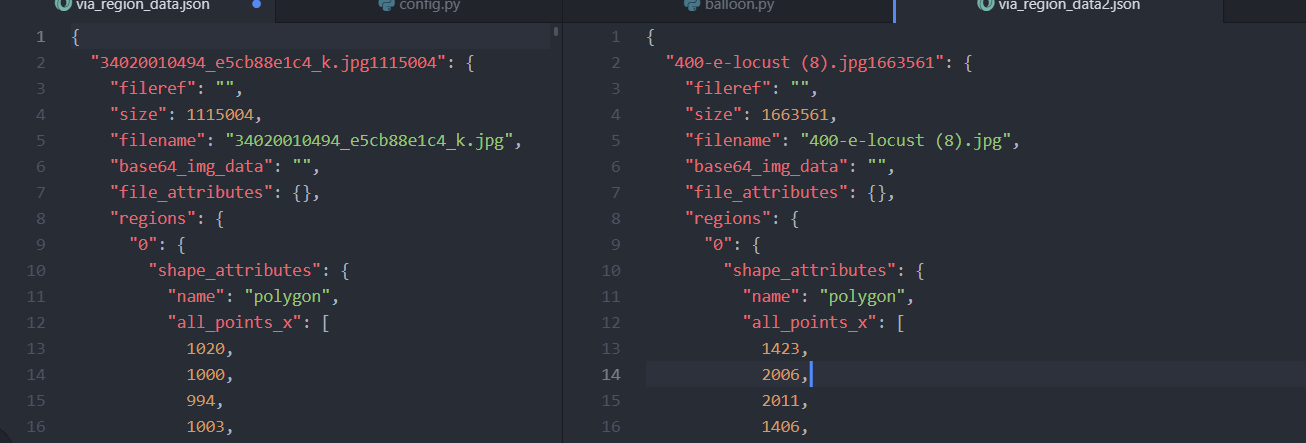
first, u need to check a program by which you annotate, because in VIA 2.0, regions was changed from a dict to a list!!
second, try to modify your JSON file, ex. delete this part:
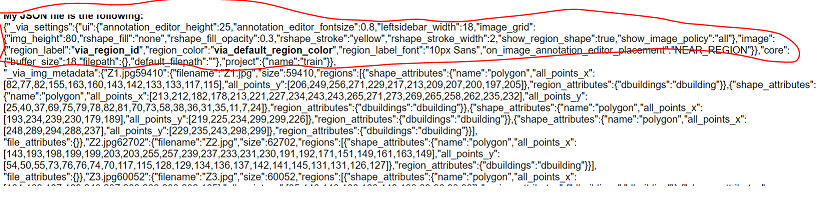
im not sure, but my file and file @waleedka has this format:
flit86
on 9 Jul 2019
hi @zulfiqarbolt,
first, u need to check a program by which you annotate, because in VIA 2.0, regions was changed from a dict to a list!!
second, try to modify your JSON file, ex. delete this part:
im not sure, but my file and file @waleedka has this format:
Thanks @flit86. I shifted to the VIA annotation tool version 1 for annotating the images in JSON format and now the model works perfectly fine!
However, I observed in the balloon.py file, that the load_Balloon( ) function actually converts the JSON dictionary file into a list eventually. If it eventually converts it into a list, then why doesn't the JSON file annotated from VIA version 2.0 (which changes the regions from a dictionary to a list) work with the model?
Although the model is working fine, this particular segment in the code perplexes me a bit.
zulfiqarbolt
on 9 Jul 2019
hi @zulfiqarbolt
i don't clarity understand where (the part) you have a problem with code.
can you send the photo or scrin???
flit86
on 10 Jul 2019
Hi,
I am also having this issue, as I annotated with via-2.0.8. Is there any way to modify the balloon.py code so that a via-2.x formatted JSON file can be read in? I don't know enough about JSON parsing sadly.
Like @zulfiqarbolt I have also noticed that below the problem code (line 117) at lines 120-128 there is code for via-1.x and via-2.x formats. It seems this needs to also be done for line 117.
EDIT:
After playing around a bit, I believe this code will remove unlabelled images when the JSON has been formatted with via-2.x. Replace line 117 with the following:
via_1_check = annotations.get('regions')
via_2_check = annotations.get('_via_img_metadata')

# JSON is formatted with VIA-1.x
if via_1_check:
    annotations = list(annotations.values())
# JSON is formatted with VIA-2.x
elif via_2_check:
    annotations = list(annotations['_via_img_metadata'].values())
# Unknown JSON formatting
else:
    raise ValueError('The JSON provided is not in a recognised via-1.x or via-2.x format.')

annotations = [a for a in annotations if a['regions']]
Note this has not been tested on a VIA-1.x formatted file, this is just using the code from the balloon.py file as a reference for how they should be handled. Happy to make this a pull request if people want.
@flit86 this may help you?
 Trotts
on 15 Jul 2019
Trotts
on 15 Jul 2019
Hi,
@Trotts , thanks for your answer.
My problem was in the formatting and errors in the description of the annotation. Now I corrected it. Thank you very much for the advice!!!!! @Trotts
flit86
on 17 Jul 2019
@Trotts i think you should also remove 113 to sort this out.
 noamnav
on 29 Oct 2019
noamnav
on 29 Oct 2019
@Trotts Thank you! You should def make this a pull request!
 MwendaMugendi
on 3 Feb 2020
MwendaMugendi
on 3 Feb 2020
I was battling the Key Error for 4 days and finally found that the solution was simple.. The key error happens because of incorrect Annotation.
Suppose you have 3 classes (Pizza, Burger and Sandwich). in Annotation , where Pizza = 1, Burger =2 , Sandwich = 3
lets say your region attributes name is "Food .
When you load an image with say 2 pizzas and 1 burget, the Annotation should be of this format
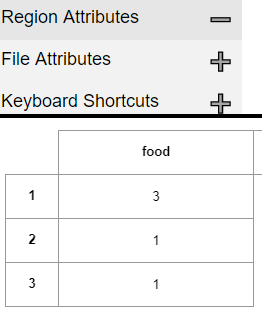
The mistake I initially made was :
Food
1 Pizza
2 Pizza
3 Burger
the correct Answer should be
Food
1 1
2 1
3 2
Another important point, if you have loaded an image that did not have annotation and you generated the Json file, it'll show as "regions" : {}. So ensure that you remove the entire line for image where ther is no annotation (by searching for "regions" : {}. and deleting the lines..
I had more than 10 pics without annotation and this was the reason why i had the error..
Hope my answer was clear :)
 hkmurali
on 25 Feb 2020
hkmurali
on 25 Feb 2020
Hi,
I am also having this issue, as I annotated with via-2.0.8. Is there any way to modify the balloon.py code so that a via-2.x formatted JSON file can be read in? I don't know enough about JSON parsing sadly.
Like @zulfiqarbolt I have also noticed that below the problem code (line 117) at lines 120-128 there is code for via-1.x and via-2.x formats. It seems this needs to also be done for line 117.
EDIT:
After playing around a bit, I believe this code will remove unlabelled images when the JSON has been formatted with via-2.x. Replace line 117 with the following:
via_1_check = annotations.get('regions')
via_2_check = annotations.get('_via_img_metadata')

# JSON is formatted with VIA-1.x
if via_1_check:
    annotations = list(annotations.values())
# JSON is formatted with VIA-2.x
elif via_2_check:
    annotations = list(annotations['_via_img_metadata'].values())
# Unknown JSON formatting
else:
    raise ValueError('The JSON provided is not in a recognised via-1.x or via-2.x format.')

annotations = [a for a in annotations if a['regions']]
Note this has not been tested on a VIA-1.x formatted file, this is just using the code from the balloon.py file as a reference for how they should be handled. Happy to make this a pull request if people want.
@flit86 this may help you?
got the error line 117, in load_nail
via_1_check = annotations.get('regions')
AttributeError: 'list' object has no attribute 'get'
 thief12318
on 14 Mar 2020
thief12318
on 14 Mar 2020
Hi, I have similar problem. KeyError: 'region_attributes'
But it happend on;y when I have more then one label. First I taged the images with one label only and it worked, but then when I added another label, it didn't worked.
 BAYBERS
on 10 Aug 2020
BAYBERS
on 10 Aug 2020
Related issues
 chrispolo
·
4Comments
chrispolo
·
4Comments
 Mabinogiysk
·
3Comments
Mabinogiysk
·
3Comments
 Jargon4072
·
3Comments
Jargon4072
·
3Comments
 apptech-evan-huang
·
3Comments
apptech-evan-huang
·
3Comments
 JonathanCMitchell
·
3Comments
JonathanCMitchell
·
3Comments
Most helpful comment
Hi,
I am also having this issue, as I annotated with via-2.0.8. Is there any way to modify the balloon.py code so that a via-2.x formatted JSON file can be read in? I don't know enough about JSON parsing sadly.
Like @zulfiqarbolt I have also noticed that below the problem code (line 117) at lines 120-128 there is code for via-1.x and via-2.x formats. It seems this needs to also be done for line 117.
EDIT:
After playing around a bit, I believe this code will remove unlabelled images when the JSON has been formatted with via-2.x. Replace line 117 with the following:
Note this has not been tested on a VIA-1.x formatted file, this is just using the code from the balloon.py file as a reference for how they should be handled. Happy to make this a pull request if people want.
@flit86 this may help you?