Mask_rcnn: mask_rcnn without mask
This has a very good explanation!!
Does any of you donne this without mask, I mean a new branch but with the mask remove just bouding boxes?
 fabioaraujopt
All 13 comments
def display_instances(image, boxes, masks, class_ids, class_names,
scores=None, title="",
figsize=(16, 16), ax=None,
show_mask=True, show_bbox=True,
colors=None, captions=None)
in visualize.py, if you change to show_mask = False, it might be show just bounding boxes
 JaeungHyun
on 19 Feb 2019
JaeungHyun
on 19 Feb 2019
but I want it to be faster! it takes 16s in colab for each image. is it normal?
fabioaraujopt
on 20 Feb 2019
@fabioaraujopt I'm also using on Colab but it takes 1s per 1 image.
Did you change runtime type to GPU?
JaeungHyun
on 21 Feb 2019
Can you show me your implementation?
fabioaraujopt
on 22 Feb 2019
@JaeungHyun thanks for you answer but still have the mask boundary like this
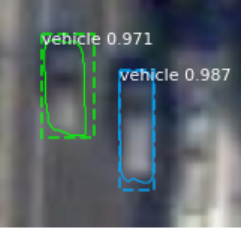
how to remove it ?
 amrbenattia
on 26 Feb 2019
amrbenattia
on 26 Feb 2019
@amrbenattia
`def display_instances(image, boxes, masks, class_ids, class_names,
scores=None, title="",
figsize=(16, 16), ax=None,
show_mask=True, show_bbox=True,
colors=None, captions=None):
"""
boxes: [num_instance, (y1, x1, y2, x2, class_id)] in image coordinates.
masks: [height, width, num_instances]
class_ids: [num_instances]
class_names: list of class names of the dataset
scores: (optional) confidence scores for each box
title: (optional) Figure title
show_mask, show_bbox: To show masks and bounding boxes or not
figsize: (optional) the size of the image
colors: (optional) An array or colors to use with each object
captions: (optional) A list of strings to use as captions for each object
"""
# Number of instances
N = boxes.shape[0]
if not N:
print("\n* No instances to display * \n")
else:
assert boxes.shape[0] == masks.shape[-1] == class_ids.shape[0]
# If no axis is passed, create one and automatically call show()
auto_show = False
if not ax:
    _, ax = plt.subplots(1, figsize=figsize)
    auto_show = True

# Generate random colors
colors = colors or random_colors(N)

# Show area outside image boundaries.
height, width = image.shape[:2]
ax.set_ylim(height + 10, -10)
ax.set_xlim(-10, width + 10)
ax.axis('off')
ax.set_title(title)

masked_image = image.astype(np.uint32).copy()
for i in range(N):
    color = colors[i]

    # Bounding box
    if not np.any(boxes[i]):
        # Skip this instance. Has no bbox. Likely lost in image cropping.
        continue
    y1, x1, y2, x2 = boxes[i]
    if show_bbox:
        p = patches.Rectangle((x1, y1), x2 - x1, y2 - y1, linewidth=2,
                            alpha=0.7, linestyle="dashed",
                            edgecolor=color, facecolor='none')
        ax.add_patch(p)

    # Label
    if not captions:
        class_id = class_ids[i]
        score = scores[i] if scores is not None else None
        label = class_names[class_id]
        x = random.randint(x1, (x1 + x2) // 2)
        caption = "{} {:.3f}".format(label, score) if score else label
    else:
        caption = captions[i]
    ax.text(x1, y1 + 8, caption,
            color='w', size=11, backgroundcolor="none")

    # Mask
    mask = masks[:, :, i]
    if show_mask:
        masked_image = apply_mask(masked_image, mask, color)

    # Mask Polygon
    # Pad to ensure proper polygons for masks that touch image edges.
    padded_mask = np.zeros(
        (mask.shape[0] + 2, mask.shape[1] + 2), dtype=np.uint8)
    padded_mask[1:-1, 1:-1] = mask
    contours = find_contours(padded_mask, 0.5)
    for verts in contours:
        # Subtract the padding and flip (y, x) to (x, y)
        verts = np.fliplr(verts) - 1
        p = Polygon(verts, facecolor="none", edgecolor=color)
        ax.add_patch(p)
ax.imshow(masked_image.astype(np.uint8))
if auto_show:
    plt.show()`
I guess
p = Polygon(verts, facecolor="none", edgecolor=color)
if you change edgecolor="none", then boundary line will be removed
JaeungHyun
on 28 Feb 2019
yes It works, thanks so much @JaeungHyun
amrbenattia
on 8 Mar 2019
if i want to expand the boundary of the mask,how can i do that?
 MavAlex
on 20 May 2019
MavAlex
on 20 May 2019
@MavAlex What do you mean to expand of the boundary?
JaeungHyun
on 20 May 2019
i want the boundary line to wrap up the whole object ,how can i do that ? thanks:)
MavAlex
on 20 May 2019
you can do it.
Just check display_instances function. It has lots of options
JaeungHyun
on 20 May 2019
def display_instances(image, boxes, masks, class_ids, class_names,
                      scores=None, title="",
                      figsize=(16, 16), ax=None,
                      show_mask=True, show_bbox=True,
                      colors=None, captions=None)
in visualize.py, if you change to show_mask = False, it might be show just bounding boxes
which visualize.py file? there are several of them? when I change that flag, it makes no difference
 traderandreas
on 15 Jul 2019
traderandreas
on 15 Jul 2019
@fabioaraujopt Did you solve the problem without mask?
 JOSHUAWENJZ
on 21 Aug 2019
JOSHUAWENJZ
on 21 Aug 2019
Related issues
 taewookim
·
4Comments
taewookim
·
4Comments
 PaulChongPeng
·
4Comments
PaulChongPeng
·
4Comments
 LifeBeyondExpectations
·
4Comments
LifeBeyondExpectations
·
4Comments
 AndreaPi
·
3Comments
AndreaPi
·
3Comments
 chrispolo
·
4Comments
chrispolo
·
4Comments
Most helpful comment
@amrbenattia
`def display_instances(image, boxes, masks, class_ids, class_names,
scores=None, title="",
figsize=(16, 16), ax=None,
show_mask=True, show_bbox=True,
colors=None, captions=None):
"""
boxes: [num_instance, (y1, x1, y2, x2, class_id)] in image coordinates.
masks: [height, width, num_instances]
class_ids: [num_instances]
class_names: list of class names of the dataset
scores: (optional) confidence scores for each box
title: (optional) Figure title
show_mask, show_bbox: To show masks and bounding boxes or not
figsize: (optional) the size of the image
colors: (optional) An array or colors to use with each object
captions: (optional) A list of strings to use as captions for each object
"""
# Number of instances
N = boxes.shape[0]
if not N:
print("\n* No instances to display * \n")
else:
assert boxes.shape[0] == masks.shape[-1] == class_ids.shape[0]
I guess
p = Polygon(verts, facecolor="none", edgecolor=color)
if you change edgecolor="none", then boundary line will be removed