Mask_rcnn: Uses memory on all GPUs when GPU_COUNT is 1
I'm using tensorflow-gpu 1.7.0 and when I run my training with GPU_COUNT=1 in my GeForce GTX 1080, it uses >90% memory on all 4 GPUs but utilises only one GPU.
Here's my configuration:

Here's the screenshot of GPU memory usage:
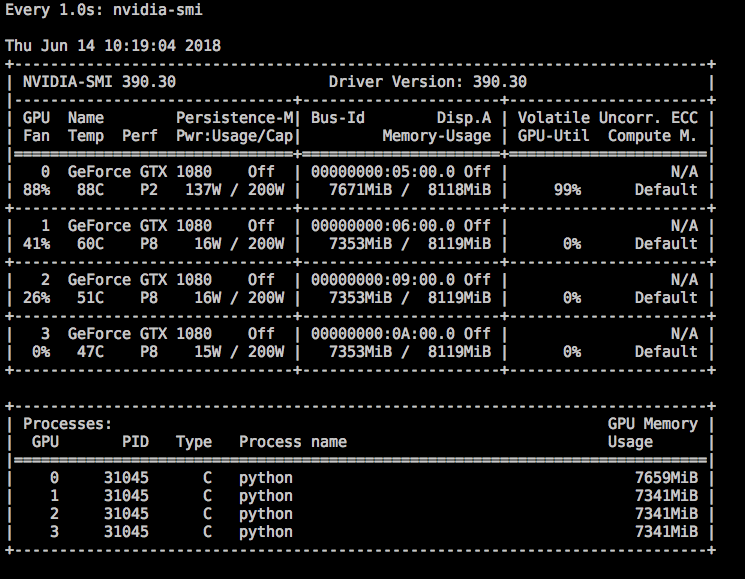
Any idea why its hogging memory on all GPUs?
 dil
dil
All 17 comments
@dil I think that is what Tensorflow GPU does by default. In order to prevent using all the GPU memory and only use one GPU try setting CUDA_VISIBLE_DEVICES=0 to your environment variables. You can do this as follows:
$ export CUDA_VISIBLE_DEVICES=0
This should only block one GPU. This way it will only use the first GPU or GPU0. Alternatively if you don't mind using all 4 GPUs since the memory is being blocked, you can try increasing the batch size or images per gpu setting in the code.
 kmh4321
on 19 Jun 2018
kmh4321
on 19 Jun 2018
@kmh4321 Thank you for CUDA_VISIBLE_DEVICES tips. I'll give that a go.
I'd like to utilise all 4GPUs but for some reason, setting either GPU_COUNT or IMAGES_PER_GPU config value to > 1 are slower! I ran the same training 3 times with different GPU_COUNT and the results are:
GPU_COUNT=1 took ~10mins per epoch
GPU_COUNT=2 took ~12mins per epoch
GPU_COUNT=4 took ~20mins per epoch
The GPUs did get utilised.
I saw similar degradation in speed when increasing IMAGES_PER_GPU.
dil
on 20 Jun 2018
I have exactly the same issue (#589) and so far I did not find a proper answer or fix. It drives me crazy that I have 4 GPUs that I cannot fully exploit...
 schmidje
on 20 Jun 2018
schmidje
on 20 Jun 2018
@schmidje @dil I experienced it as well. If I increased my GPU count from 1 to 2, there was quiet a bit of a slowdown, although there is 100% utilization of both memory and processor on both GPUs. Also any idea how STEPS_PER_EPOCH affects training time? According to the code comments, it only is supposed to change how often stats are logged etc but I see that training seems to have become slower when I increased it. Did either of you try changing that?
kmh4321
on 21 Jun 2018
Just to mention: when I used 2GPUs and 4 images per GPU, the speed is extremely slower, about 140s/step.
 zgxsin
on 21 Jun 2018
zgxsin
on 21 Jun 2018
I have the same gpu model than OP, i.e. GTX 1080. I wonder what are your specs? Can it be hardware or driver related?
schmidje
on 21 Jun 2018
I have the same type GPU as yours.
zgxsin
on 21 Jun 2018
@schmidje It is not hardware related. I am running on 2x Tesla P100 PCIe and found that using 2 GPUs is slower than using 1 GPU (3s per step vs 2s per step).
kmh4321
on 22 Jun 2018
@kmh4321 mmm....okay so maybe so combo of tf version, keras, cuda? Can you post yours (also the OS). Maybe we can find a pattern...
thx
schmidje
on 22 Jun 2018
Under TF1.7, KERAS 2.1.3, two GPU work and is faster than 1 GPU.
 YubinXie
on 22 Jun 2018
YubinXie
on 22 Jun 2018
TF1.7, Keras 2.1.6, CUDA 9.0, cuDNN 7.0.5, nVidia driver 396.26 running on centos 7.5.
kmh4321
on 22 Jun 2018
Very strange all of this. Cannot be tf version as @YubinXie is running 1.7 without any issues and both @kmh4321 and @dil experience issues with 1.7. Myself I am running Linux rhel 7, tf 1.8.0, python 3.6, cuda 9.2.88.1, cuDNN 7.1.4 and nvidia driver 396.26. I use the same OS-flavor as @kmh4321, what OS is running @dil ?
schmidje
on 23 Jun 2018
@schmidje I am running Ubuntu 16.04.3 LTS, tf 1.7.0, python 3.6, cuda 9.0.176, nvidia driver 390.30
dil
on 23 Jun 2018
Ok thanks. Maybe some linux performance issue?
@ericj974 proposed some code changes in my issue #589, I still have to try them, although in a recent issue a user mentioned that it was not unfortunately working. But let's have a try first, who knows it will work. In any case this is a very annoying behavior.
schmidje
on 23 Jun 2018
It is a default behaviour of tensorflow to grab all the memory it can get. No matter if it actually needs it or not. See here:
https://stackoverflow.com/questions/34199233/how-to-prevent-tensorflow-from-allocating-the-totality-of-a-gpu-memory
Concerning the multip GPU speed issue: I think we may have found the explanation in #875.
 maxfrei750
on 27 Aug 2018
maxfrei750
on 27 Aug 2018
training with multiple GPU's is slower because in this case it directly augment the number of images per epoch due to:
number of images per epoch = STEPS_PER_EPOCH * IMAGES_PER_GPU * GPU_COUNT
 cam4ani
on 7 Jan 2019
cam4ani
on 7 Jan 2019
Just to mention: when I used 2GPUs and 4 images per GPU, the speed is extremely slower, about 140s/step.
number of image per epoch should be changed by number of gpus.
model.train(dataset_train, dataset_val,
                    learning_rate=config.LEARNING_RATE,
                    epochs=40 / config.GPU_COUNT,
                    layers='heads',
                    augmentation=augmentation)
 yeshenlin
on 3 Apr 2019
yeshenlin
on 3 Apr 2019
Related issues
 mhasnat
·
49Comments
mhasnat
·
49Comments
 shikunyu8
·
37Comments
shikunyu8
·
37Comments
 lokinfey
·
32Comments
lokinfey
·
32Comments
 roburst2
·
31Comments
roburst2
·
31Comments
 keven4ever
·
98Comments
keven4ever
·
98Comments
Most helpful comment
training with multiple GPU's is slower because in this case it directly augment the number of images per epoch due to:
number of images per epoch = STEPS_PER_EPOCH * IMAGES_PER_GPU * GPU_COUNT