Marlin: [BUG] BLTouch not compensating
Bug Description
I used to have Ender 3 with v1.1.5 board and BL touch on marlin 1.1.8 and never had to level the bed, was always perfect thanks to bltouch.
Now, I have Ender with Bltouch again, but with V427 board with BLtouch plugged to Bl connector on the board.
No matter what I do, despite it looks all okay, BL touch is detecting bad level (bad visualisation) it's not compensating for bed level. I know I could level it manually, but that's not a case. And my level differences are minimal so Bltouch should easily compensate it. I do feel like Z axis is moving when moving around bed, but probably not enough.
I tried to find issues anywhere else, took printer apart , changed bed, changed filament, slicer everything ... but it's always same result.
I don't know how else I can debug it to make sure the compensation is right ?
My Configurations
Ender 3 + Creality BLTouch
Marlin.zip
Latest BugFix Marlin with latest config files (compiled 10 minutes ago from repo)
Expected behavior: Compensate for bed mesh detected by bltouch
Actual behavior: No compensation for unleveld bed regardless bltouch
 gbkwiatt
All 24 comments
Have you tried following this guide: https://www.youtube.com/watch?v=neS7lB7fCww ?
 shitcreek
on 21 Oct 2020
shitcreek
on 21 Oct 2020
Have you tried following this guide: https://www.youtube.com/watch?v=neS7lB7fCww ?
That's a guide for V2 and I have normal ender 3, besides I checked all guides and setups on the Internet for v427, you cant do much wrong with it. Also like i mentioned BLtouch works and bed visualisation proves that
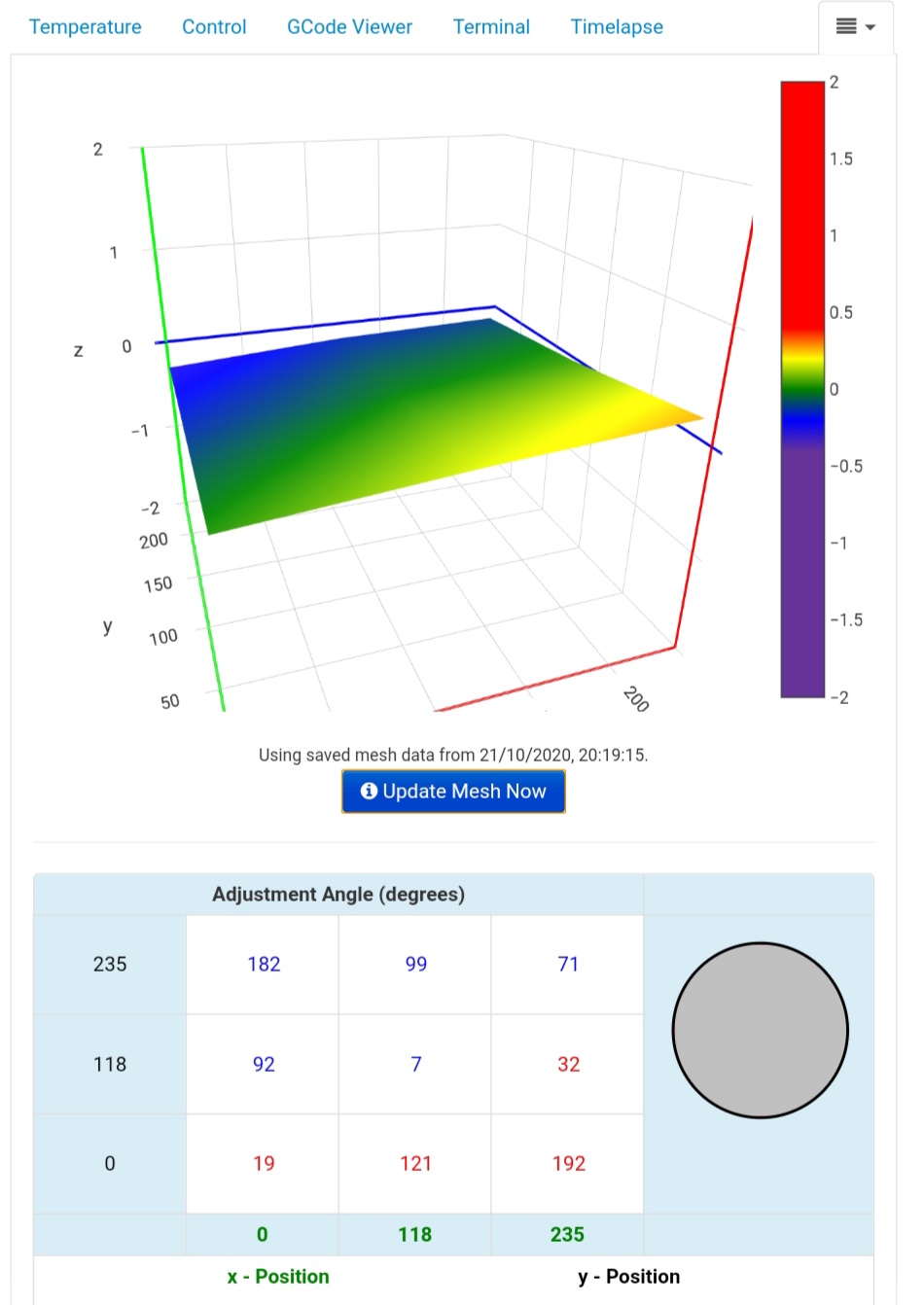
It's not big unevenness, BLtouch should easily compensate it, but it doesn't... When I set z offset for 1 corner nicely, it's not right for other corners.
gbkwiatt
on 22 Oct 2020
This probably isn't the issue, but are you using the Creality BLTouch or ANTCLABS BLTOUCH? Because you've got BLTOUCH enabled instead of CREALITY_TOUCH.
shitcreek
on 22 Oct 2020
Whenever there are homing or leveling issues, we now ask everyone to follow a standard procedure to gather more information so that we're not just taking stabs in the dark. Here is the boilerplate:
- Download Marlin
bugfix-2.0.xto test with the latest code. - Enable
DEBUG_LEVELING_FEATUREandM114_DETAILand re-flash the firmware. - Connect to your printer from host software such as Cura, Printrun or Repetier Host.
- Send
M502andM500to ensure your Configurations are applied. - Issue the command
M111 S247to enable maximum logging. - Perform a
G28to do your standard homing procedure. - Do a
G29to probe the bed. This will also enable bed leveling. - Do some of the moves that revealed problems before. Take notes.
- Copy the log output into a .TXT file and attach it to your next reply.
Repeat this procedure, if needed, to demonstrate inconsistencies. From these logs we should hopefully get a better idea of what's going on with your machine.
 ellensp
on 22 Oct 2020
ellensp
on 22 Oct 2020
I have the same issue. I have skr 1.4 Turbo with tmc 2130 and ANTCLABS BLTOUCH. Its home perfectly, after that I gave the g29 command and its probe on 9 points. And when prints start there is no compensation.
 Talha909
on 22 Oct 2020
Talha909
on 22 Oct 2020
@Talha909 without providing config files and logs saying "I have the same issue" is rather pointless.
ellensp
on 22 Oct 2020
This probably isn't the issue, but are you using the Creality BLTouch or ANTCLABS BLTOUCH? Because you've got
BLTOUCHenabled instead ofCREALITY_TOUCH.
I did see that and tried but with CREALITY_TOUCH my bltoch is not deploying at all. I have BLtouch from creality
gbkwiatt
on 22 Oct 2020
Whenever there are homing or leveling issues, we now ask everyone to follow a standard procedure to gather more information so that we're not just taking stabs in the dark. Here is the boilerplate:
Will do it and report, should I also do print with tha kgo enabled, as that's where I can only see a problem, during print
gbkwiatt
on 22 Oct 2020
CREALITY_TOUCH is for the hotend sensor used on the CR-6 SE. apparently a vaporware sensor from Creality.
You’d still use BLTOUCH.
 thisiskeithb
on 22 Oct 2020
thisiskeithb
on 22 Oct 2020
Is this a duplicate of https://github.com/MarlinFirmware/Marlin/issues/19845?
thisiskeithb
on 22 Oct 2020
Is this a duplicate of #19845?
No, that's not related to this issue. I am using BLTOUCH for that issue
gbkwiatt
on 22 Oct 2020
here is log:
octo_log.txt
And Full log
octo_log_full.txt
And I have notice something hmm weird ?
so that;s the final output of G29:
Recv:       0      1      2
Recv:  0 -0.025 +0.140 +0.237
Recv:  1 -0.160 -0.020 +0.033
Recv:  2 -0.290 -0.180 -0.158
Is 0:0 the 0x0 position of the bed? so in ended 3 case bottom left corner ?
if so 0:2 = -0.290 should be bottom right corner ?
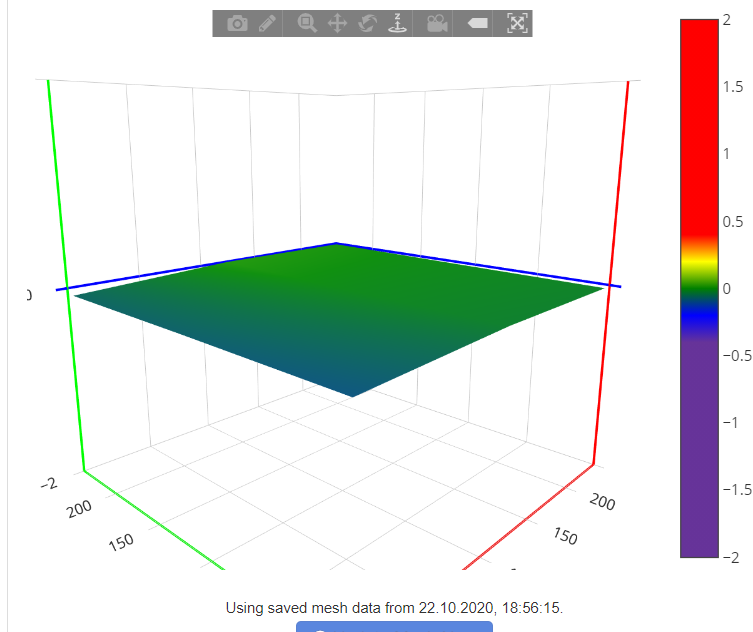
If yes, the this is wrong, because my bottom right corner according to bed visualiser is positive up, highest point which should be 0.237
Definitely does not compensate just lifted one corner
Recv:       0      1      2
Recv:  0 -0.155 +0.572 +1.230
Recv:  1 -0.710 -0.102 +0.447
Recv:  2 -1.243 -0.757 -0.342
+1.230 - bottom right corner. And during print nozzle scratched the bed.
I also tried to level bed perfectly manually, and somehow it still manages to print unevenly
gbkwiatt
on 22 Oct 2020
So I did test, and put my old 1.1.4 board to ender 3 with bltouch and with marlin from creality.
I super messed up with bed:
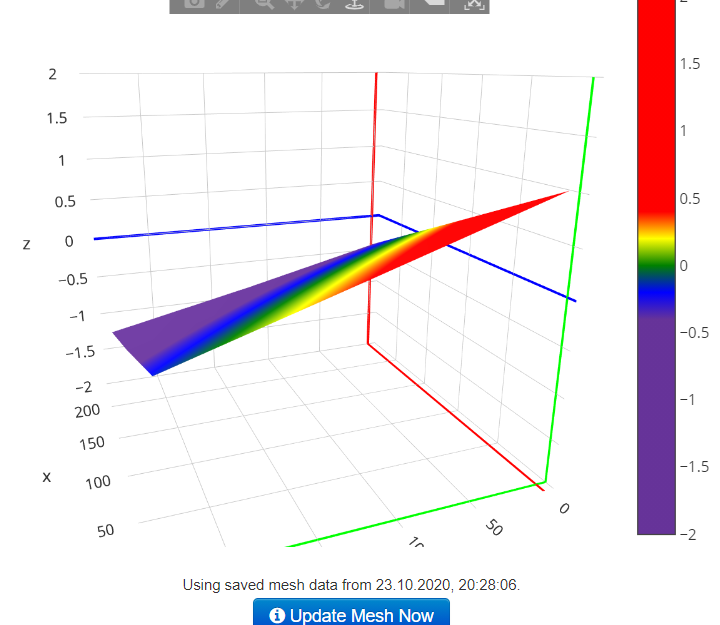
And it printed fine ... didn't even touch the bed.
So I must say problems with V427 are something with firmware well or the board itself ?
gbkwiatt
on 23 Oct 2020
I've testes everything throughly, and I can confirm that BLtouch works as intended on marlin 1.1.9, and hoard 1.1.4, but Unfrotunatley marlin 1.1.9 does not work on v427 board so can't test it, but seems like the issue is with marlin 2.
Is there any plans too look into that issue? I don't want to be stuck with old loud board
gbkwiatt
on 24 Oct 2020
Is this issue maybe related to #15450 even if the hardware is different?
Symptoms are the same, the bed is correctly checked but there is no compensation.
 Liger0
on 24 Oct 2020
Liger0
on 24 Oct 2020
It is same issue by the look of it.
gbkwiatt
on 25 Oct 2020
CREALITY_TOUCHis for the hotend sensor used on the CR-6 SE.You’d still use
BLTOUCH.
No, it is not the hot-end sensor of the CR-6. In fact, in the Creality firmware, CREALITY_TOUCH is not defined. If you define CREALITY_TOUCH, BLTOUCH is defined automatically for you.
 Sebazzz
on 26 Oct 2020
Sebazzz
on 26 Oct 2020
No, it is not the hot-end sensor of the CR-6. In fact, in the Creality firmware, CREALITY_TOUCH is not defined. If you define CREALITY_TOUCH, BLTOUCH is defined automatically for you.
It uses the BLTOUCH code, but it doesn't behave exactly the same. If you have something that looks like a BLTouch on your system, do not define CREALITY_TOUCH. It will not work properly.
It doesn't matter what Creality does in their own firmware. Vendors are notorious for changing all sorts of things, and you can't always directly compare their configurations to mainline Marlin.
If you want proof that they are not synonyms: (from bltouch.h)
#if ENABLED(CREALITY_TOUCH)
  #define STOW_ALARM         false
  #define BLTOUCH_DEPLOY       170
  #define BLTOUCH_STOW          20
#else
  #define STOW_ALARM          true
  #define BLTOUCH_DEPLOY        10
  #define BLTOUCH_STOW          90
#endif
Defining CREALITY_TOUCH uses completely different PWM pulse widths when comapred to BLTOUCH.
 sjasonsmith
on 26 Oct 2020
sjasonsmith
on 26 Oct 2020
That's out of scope that issue guys, it's been cleared that I should use BLtouch not creality touch, and problem still persists
gbkwiatt
on 26 Oct 2020
did you fine any solution
Talha909
on 31 Oct 2020
No, Spending nights and days on it and I can't make it work
gbkwiatt
on 31 Oct 2020
I have literally tried everything, took my printer apart couple of times, to makes sure everything is super correct. and it still does not compensate for not leveled bed. I can level it manually spot on and that's fine, but I want BLtouch to do it for me.
gbkwiatt
on 31 Oct 2020
Stupid question - but not mentioned here yet... Have you enabled the mesh via M420 S1 in your start gcode?
 CRCinAU
on 8 Nov 2020
CRCinAU
on 8 Nov 2020
No, but there is no need for that because G29 does it for you
gbkwiatt
on 8 Nov 2020
Related issues
 esenapaj
·
3Comments
esenapaj
·
3Comments
 jerryerry
·
4Comments
jerryerry
·
4Comments
 Glod76
·
3Comments
Glod76
·
3Comments
 Ciev
·
3Comments
Ciev
·
3Comments
 spanner888
·
4Comments
spanner888
·
4Comments
Most helpful comment
CREALITY_TOUCHisfor the hotend sensor used on the CR-6 SE.apparently a vaporware sensor from Creality.You’d still use
BLTOUCH.