Marlin: Degree Symbol not displayed
Bug Description
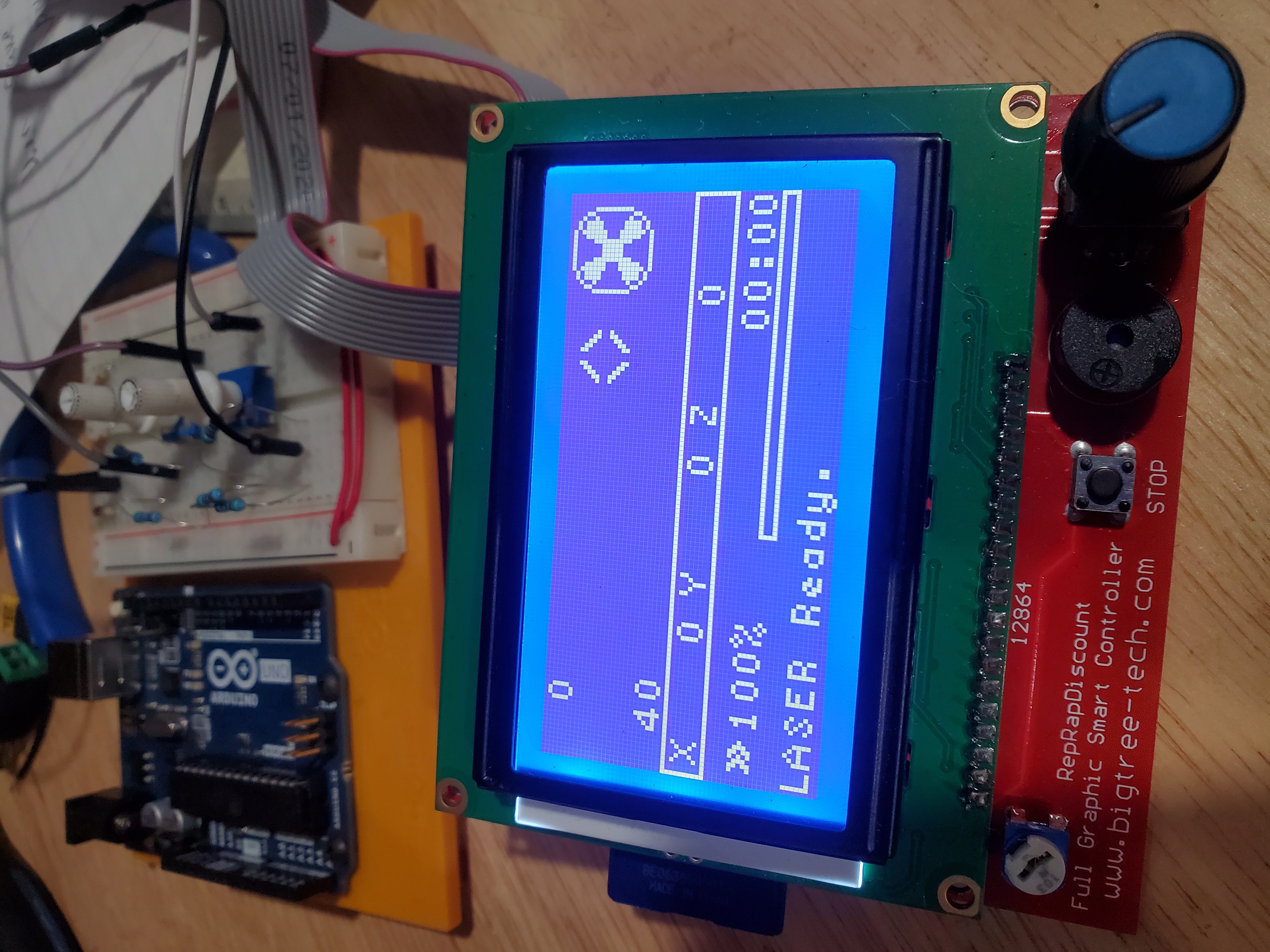
On info screen, Degree '°' symbol is NOT appearing next to any temps.
ie.lcd_put_wchar(LCD_STR_DEGREE[0]);
My Configurations
Steps to Reproduce
- Power on
- wait few seconds
- look at screen
Expected behavior:
Degree '°' symbol to show up next to temps
Actual behavior:
It does not
 buzkill420
All 25 comments
Are you going to be using both an extruder and a laser? I'm not sure how well Marlin can actually support such a combination.
 thinkyhead
on 6 Oct 2020
thinkyhead
on 6 Oct 2020
Are you going to be using both an extruder and a laser? I'm not sure how well Marlin can actually support such a combination.
Nope, fully Laser ONLY. In the progress of slowly converting Marlin to be laser specific....or trying :D

buzkill420
on 6 Oct 2020
picture is from my 1.1.9.1 version.
buzkill420
on 6 Oct 2020
Please test the bugfix-2.0.x branch to see where it stands. If the problem has been resolved then we can close this issue. If the issue isn't resolved yet, then we should investigate further.
thinkyhead
on 6 Oct 2020
That is what I'm currently using. JUST started porting over my work from 1.1.9.1 to 2.0.x and noticed that before i even started. Fresh install of the newest branch.
buzkill420
on 6 Oct 2020
If you remove #define USE_SMALL_INFOFONT the ° is there.
 ellensp
on 6 Oct 2020
ellensp
on 6 Oct 2020
If you remove #define USE_SMALL_INFOFONT the ° is there.
INTERESTING! i was gong to try that actually but you beat me to it. I wonder what makes the difference? To bad cuz i like the small font
Cheers!
buzkill420
on 6 Oct 2020
its probably just missing for the char set, still looking, don't give up so quickly!
ellensp
on 6 Oct 2020
himm, fontdata_6x9_marlin.h isn't created in normal way from actual bdf files.... where did it comes from...
ellensp
on 6 Oct 2020
You may need to look back at older Marlin 1.1.x to find the last instance with the font included separately.
thinkyhead
on 6 Oct 2020
himm, from the logs its looks like there used to be a dogm_font_data_Marlin_symbols and a dogm_font_data_6x9_marlin.h which was renamed as the fontdata_6x9_marlin.h we have today...
ellensp
on 6 Oct 2020
Yes, at some point the symbols were integrated into a composite font. Look for a glitch at the point when the small info font was integrated into the composite font. It's possible that the "°" character itself might now be printable in place of '\x09' even in the small font since we have better Unicode support these days.
thinkyhead
on 6 Oct 2020
Yes, at some point the symbols were integrated into a composite font. Look for a glitch at the point when the small info font was integrated into the composite font. It's possible that the "
°" character itself might now be printable in place of'\x09' even in the small font since we have better Unicode support these days.
I've tried the "°" character itself with no luck.
buzkill420
on 6 Oct 2020
The last change to the small info font data itself was in 0c7f7ebcfb49694c9432bf0d9654ae88d0084cf3 (October 2015).
thinkyhead
on 6 Oct 2020
looks like the only way to do this would be to generate a new bdf file from scratch and gen a fontdata_6x9_marlin.h from that.
I can confirm that the current fontdata_6x9_marlin.h only contains characters from 32-255 where the special charters are 1-9
ellensp
on 6 Oct 2020
looks like the only way to do this would be to generate a new bdf file from scratch and gen a fontdata_6x9_marlin.h from that.
I can confirm that the current fontdata_6x9_marlin.h only contains characters from 32-255 where the special charters are 1-9
Is this something a newbee could learn to do/figure out? I'm wanting to learn :D
buzkill420
on 6 Oct 2020
The last change to the small info font data itself was in 0c7f7eb (October 2015).
If that was the last change, why is it that it works in 1.1.9.1 but not 2.0.X? Ellensp confirmed that the current fontdata_6x9_marlin.h only contains characters from 32-255 where the special charters are 1-9...so how was it displayed before?
buzkill420
on 6 Oct 2020
in 1.1.9.1 it still has dogm_font_data_Marlin_symbols.h
ellensp
on 6 Oct 2020
in 1.1.9.1 it still has dogm_font_data_Marlin_symbols.h
OK! SO! I'm wanting to see if i can learn how to do this...seems simple enough just to add an extra character to that set...But, I'm actually wanting to use u8g_font_04b_03. So even if you guys end up fixing the small font, i'll still be stuck without the degree symbol. Any chance you could point me in the right direction...so far i've found this...not sure if im on the right track...thanks a ton for the help and fast replies!
const u8g_fntpgm_uint8_t u8g_font_04b_03[859] U8G_FONT_SECTION("u8g_font_04b_03") = {
  1,5,7,0,254,5,0,251,1,242,32,255,254,5,254,5,
  254,2,0,64,2,21,37,128,128,128,0,128,5,50,66,160,
  160,2,85,101,80,248,80,248,80,1,70,86,32,112,192,48,
  224,32,2,85,101,144,16,32,64,72,2,85,101,96,128,104,
  144,104,5,18,34,128,128,2,37,53,64,128,128,128,64,2,
  37,53,128,64,64,64,128,4,51,67,160,64,160,3,51,67,
  64,224,64,1,34,50,64,128,4,49,65,224,2,17,33,128,
  2,85,101,8,16,32,64,128,2,69,85,96,144,144,144,96,
  2,37,53,192,64,64,64,64,2,69,85,224,16,96,128,240,
  2,69,85,224,16,96,16,224,2,69,85,32,96,160,240,32,
  2,69,85,240,128,224,16,224,2,69,85,96,128,224,144,96,
  2,69,85,240,16,32,64,64,2,69,85,96,144,96,144,96,
  2,69,85,96,144,112,16,96,3,19,35,128,0,128,2,20,
  36,128,0,128,128,2,53,69,32,64,128,64,32,3,51,67,
  224,0,224,2,53,69,128,64,32,64,128,2,69,85,224,16,
  96,0,64,2,85,101,112,136,184,168,112,2,69,85,96,144,
  144,240,144,2,69,85,224,144,224,144,224,2,53,69,96,128,
  128,128,96,2,69,85,224,144,144,144,224,2,53,69,224,128,
  224,128,224,2,53,69,224,128,224,128,128,2,69,85,112,128,
  176,144,112,2,69,85,144,144,240,144,144,2,53,69,224,64,
  64,64,224,2,69,85,48,16,16,144,96,2,69,85,144,160,
  192,160,144,2,53,69,128,128,128,128,224,2,85,101,136,216,
  168,136,136,2,69,85,144,208,176,144,144,2,69,85,96,144,
  144,144,96,2,69,85,224,144,144,224,128,1,70,86,96,144,
  144,144,96,16,2,69,85,224,144,144,224,144,2,69,85,112,
  128,96,16,224,2,53,69,224,64,64,64,64,2,69,85,144,
  144,144,144,96,2,69,85,144,144,160,160,64,2,85,101,136,
  168,168,168,80,2,69,85,144,144,96,144,144,2,69,85,144,
  144,112,16,96,2,53,69,224,32,64,128,224,2,37,53,192,
  128,128,128,192,2,85,101,128,64,32,16,8,2,37,53,192,
  64,64,64,192,5,50,66,64,160,2,65,81,240,5,34,50,
  128,64,2,68,84,112,144,144,112,2,69,85,128,224,144,144,
  224,2,52,68,96,128,128,96,2,69,85,16,112,144,144,112,
  2,68,84,96,176,192,96,2,53,69,32,64,224,64,64,0,
  70,86,112,144,144,112,16,96,2,69,85,128,224,144,144,144,
  2,21,37,128,0,128,128,128,0,39,55,64,0,64,64,64,
  64,128,2,69,85,128,144,160,224,144,2,21,37,128,128,128,
  128,128,2,84,100,240,168,168,168,2,68,84,224,144,144,144,
  2,68,84,96,144,144,96,0,70,86,224,144,144,224,128,128,
  0,70,86,112,144,144,112,16,16,2,52,68,160,192,128,128,
  2,68,84,112,192,48,224,2,53,69,64,224,64,64,32,2,
  68,84,144,144,144,112,2,68,84,144,144,160,64,2,84,100,
  168,168,80,80,2,52,68,160,64,64,160,0,70,86,144,144,
  144,112,16,96,2,68,84,240,32,64,240,2,53,69,96,64,
  128,64,96,2,21,37,128,128,128,128,128,2,53,69,192,64,
  32,64,192,5,66,82,80,160,255,255,255,255,255,255,255,255,
  255,255,255,255,255,255,255,255,255,255,255,255,255,255,255,255,
  255,255,255,255,255,255,255,255,255,2,0,64,255,255,255,255,
  255,255,255,255,255,255,255,255,255,255,255,255,255,255,255,255,
  255,255,255,255,255,255,255,255,255,255,255,255,255,255,255,255,
  255,255,255,255,255,255,255,255,255,255,255,255,255,255,255,255,
  255,255,255,255,255,255,255,255,255,255,255,255,255,255,255,255,
  255,255,255,255,255,255,255,255,255,255,255,255,255,255,255,255,
  255,255,255,255,255,255,255,255,255,255,255
};
buzkill420
on 6 Oct 2020
fontdata_6x9_marlin.zip
new fontdata_6x9_marlin.h with symbols including a >> instead of a "FR"
How I did it, after a lot of searching I found the font is part of the original u8glib, 6x9.bfd from https://github.com/olikraus/u8glib/tree/master/tools/font/bdf
I also grabbed a copy of Marlin_symbols.fon https://github.com/MarlinFirmware/Marlin/tree/1.1.x/buildroot/share/fonts
I opened both of these with a font editor, I used fontforge on linux, and manually copied the bit information for characters 1-9 from Marlin_symbols.fon to 6x9.bfd, except for the FR character which I changed to the current >> character. I then exported the modified 6x9.bfd as u8g_font_6x9.bdf
I then used the marlin tool bdf2u8g to generate a new fontdata_6x9_marlin.h file
Ie bdf2u8g -b 1 -e 255 u8g_font_6x9.bdf u8g_font_6x9 fontdata_6x9_marlin.h
The resulting .h file wasn't quite the same as the original, so I added the marlin header and changed the main line to
And updated the U8G_SECTION decription to
const u8g_fntpgm_uint8_t u8g_font_6x9[2441] U8G_SECTION(".progmem.u8g_font_6x9") = {
Moved this to marlin, compiled, uploaded, didn't like the position of the ° so moved it up one pixel and tried again. Looks good now.
Ill generate a PR to fix the original issue tomorrow.
But im not sure this is correct way to go. its getting the >> from somewhere when it wasn't in the this fontdata.... where is it getting that from?
ellensp
on 6 Oct 2020
A bit of a play later if you edit Marlin/Marlin/src/lcd/dogm/status_screen_DOGM.cpp
find
lcd_put_wchar(LCD_STR_DEGREE[0]);
and change it to
  TERN_(USE_SMALL_INFOFONT,ui.set_font(FONT_MENU));
  lcd_put_wchar(LCD_STR_DEGREE[0]);
  TERN_(USE_SMALL_INFOFONT,ui.set_font(FONT_STATUSMENU));
It uses the ° from fontdata/fontdata_ISO10646_1.h so no need to add it to fontdata/fontdata_6x9_marlin.h (or your font of choice)
FR character >> also comes from fontdata_ISO10646_1
ellensp
on 6 Oct 2020
I don't mind having the character(s) existing in the small info font, since they are small, and it would be good to put these items into our "fonts" folder for future use. I expect to see more UI experimentation over the coming months, trying to improve the presentation and usability.
thinkyhead
on 7 Oct 2020
I don't mind having the character(s) existing in the small info font, since they are small, and it would be good to put these items into our "
fonts" folder for future use. I expect to see more UI experimentation over the coming months, trying to improve the presentation and usability.
Thanks a lot guys! Much appreciated.
buzkill420
on 7 Oct 2020
Since Thinkyhead has said he doesn't mind the slightly larger small info font, I have created the PR
This includes adding marlin-6x9.bdf so others can edit the bdf and generate their own fontdata_6x9_marlin.h
ellensp
on 7 Oct 2020
I don't mind having the character(s) existing in the small info font, since they are small, and it would be good to put these items into our "
fonts" folder for future use. I expect to see more UI experimentation over the coming months, trying to improve the presentation and usability.
I've been trying to do something like that with your older 1.1.9.1 version. Trying to port it over to 2.0.x now. Hope i have your blessing! :) please feel free to check it out...https://github.com/buzkill420/LaserShark... mind you, please note I'm no coder... I'm an OK bodger, but that's about it! You guys are responsible for all the heavy lifting. Thanks a ton for all the hard work.
buzkill420
on 7 Oct 2020
Related issues
 Ciev
·
3Comments
Ciev
·
3Comments
 ShadowOfTheDamn
·
3Comments
ShadowOfTheDamn
·
3Comments
 pubalan12
·
4Comments
pubalan12
·
4Comments
 jerryerry
·
4Comments
jerryerry
·
4Comments
 esenapaj
·
3Comments
esenapaj
·
3Comments
Most helpful comment
its probably just missing for the char set, still looking, don't give up so quickly!