Marlin: [FR] Dual X Carriage tool settings
Would it be possible to add settings in configuratin_adv in the #define DUAL_X_CARRIAGE section to determine which tool (extruder) is on X1 and X2?
e.g.
#define X1_CARRIAGE_TOOL {T0, T1} // extruder E0 , E1 .....
#define X2_CARRIAGE_TOOL {T2, T3} // extruder E2 , E3 .....
I would like to test a 4-material print.
 DrumClock
All 25 comments
This is on the list of things that have been discussed, with 3 tools on each for a max of 6 extruders in the works. We have hardware being worked up to develop with. So yes, but itll be awhile as hardware is still in development to work with. If a manufacturer is willing to contribute some to those of us working on it, it would speed things along greatly. Currently @Roxy-3D and myself are slowly chasing this with others looking at the board in development for other purposes as well.
 InsanityAutomation
on 27 Jun 2020
InsanityAutomation
on 27 Jun 2020
Hi, I'm not a manufacturer, but I can contribute a little.
I'll be happy if it moves my request forward.
How do I credit?
DrumClock
on 27 Jun 2020
Right now the primary constraint is the rest of the code for the board. Bootloader and HAL are in progress. Once that's done, we will need to go over mechanical design mounting a diamond hotend to a Trex 2+ carriage (the machine were both starting with) along with figuring out management for all 6 spools.
InsanityAutomation
on 27 Jun 2020
Hi, which board will you use for testing?
DrumClock
on 27 Jun 2020
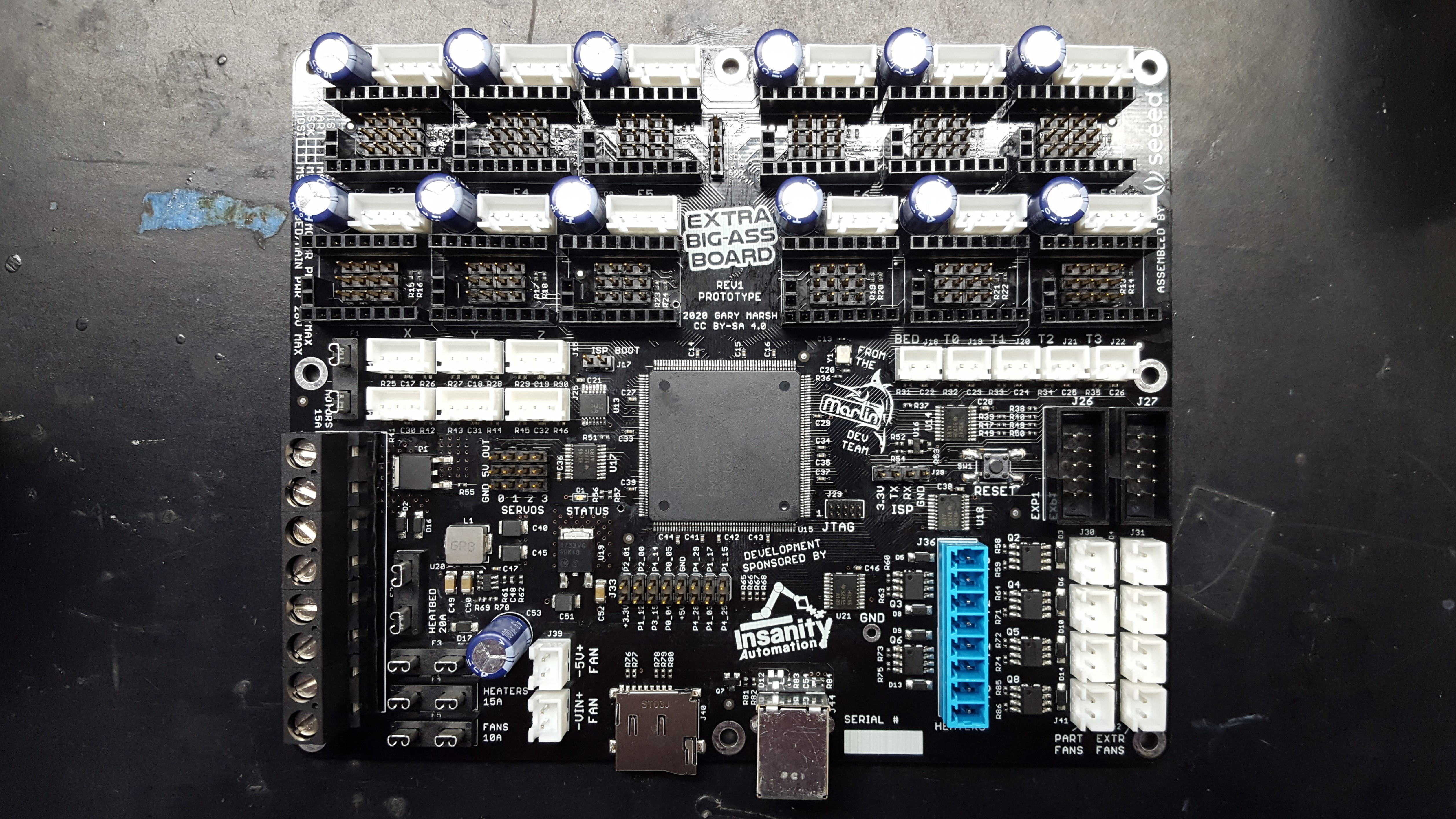
Custom design Gary Marsh did for us. We have 5 prototypes atm with LPC 4078 chips
InsanityAutomation
on 27 Jun 2020
I have a RUMBA board where I use all the HW.
( I am considering using BIGTREETECH GTR V1.0 Control Board 32Bit + M5 V1.0 Expansion board )
I use dual X carriage stepper X1 and X2 and two servos
which I use for switching extruders E0 and E1 including nozzles.
All I need is to assign tools T0 + T1 for carrier X1 and tools T2 + T3 for carrier X2, and unfortunately this is not possible in the current Marlin. If I can, I can start testing the IDEX and HOTEND_OFFSET_X tool settings
DrumClock
on 27 Jun 2020
What you want to do isn't very much code. But it is complicated enough that I don't want to attempt anything without having a machine to code against and test the changes. The good news is, what you want to do is a subset of what we plan on doing. What you want should fall out naturally. The bad news is, it will probably be 3 or 4 months before we have something you can use.
 Roxy-3D
on 28 Jun 2020
Roxy-3D
on 28 Jun 2020
I've got a GTR10 with expansion here and considered using it, but we all have alot of tasks going and efficiency in them is important! It'll get there, but unless there's financial incentive that portion isn't going to jump the queue.
InsanityAutomation
on 28 Jun 2020
Unless I am tripping, I think we have some sort of SINGLENOZZLE or Switching Nozzle support for Dual X Carriage at this time, which gets us most of the way, since I assume whatever is feeding each carriage is something like that.
 thinkyhead
on 28 Jun 2020
thinkyhead
on 28 Jun 2020
Not currently unfortunately. Toolchange isn't smart enough to split extruders from physical tools yet. It's been discussed a few times so it's something were definitely moving towards.
InsanityAutomation
on 28 Jun 2020
Hi,
The current Marlin can do the tool T0 to carrier X1 and T1 to X2.
Is it really a problem to insert the condition that T0 or T1 will be on X1 and the tool T2 or T3 will be on carrier X2?
My friend and I could try it out and give feedback.
DrumClock
on 28 Jun 2020
Hey! Ready for my machine to try this prompt. I was working on it and it's great to come across. I can try the software. His equipment is ready. I use 4 extruders and dualx systems. I tried to activate SINGLENOZZLE but I encountered an error. I want to try it soon. Yours.
 Ziyayildizz3
on 1 Jul 2020
Ziyayildizz3
on 1 Jul 2020
Thank you for your comments on the above feature. This closes the query.
DrumClock
on 2 Jul 2020
This is project 4 Extruders on IDEX
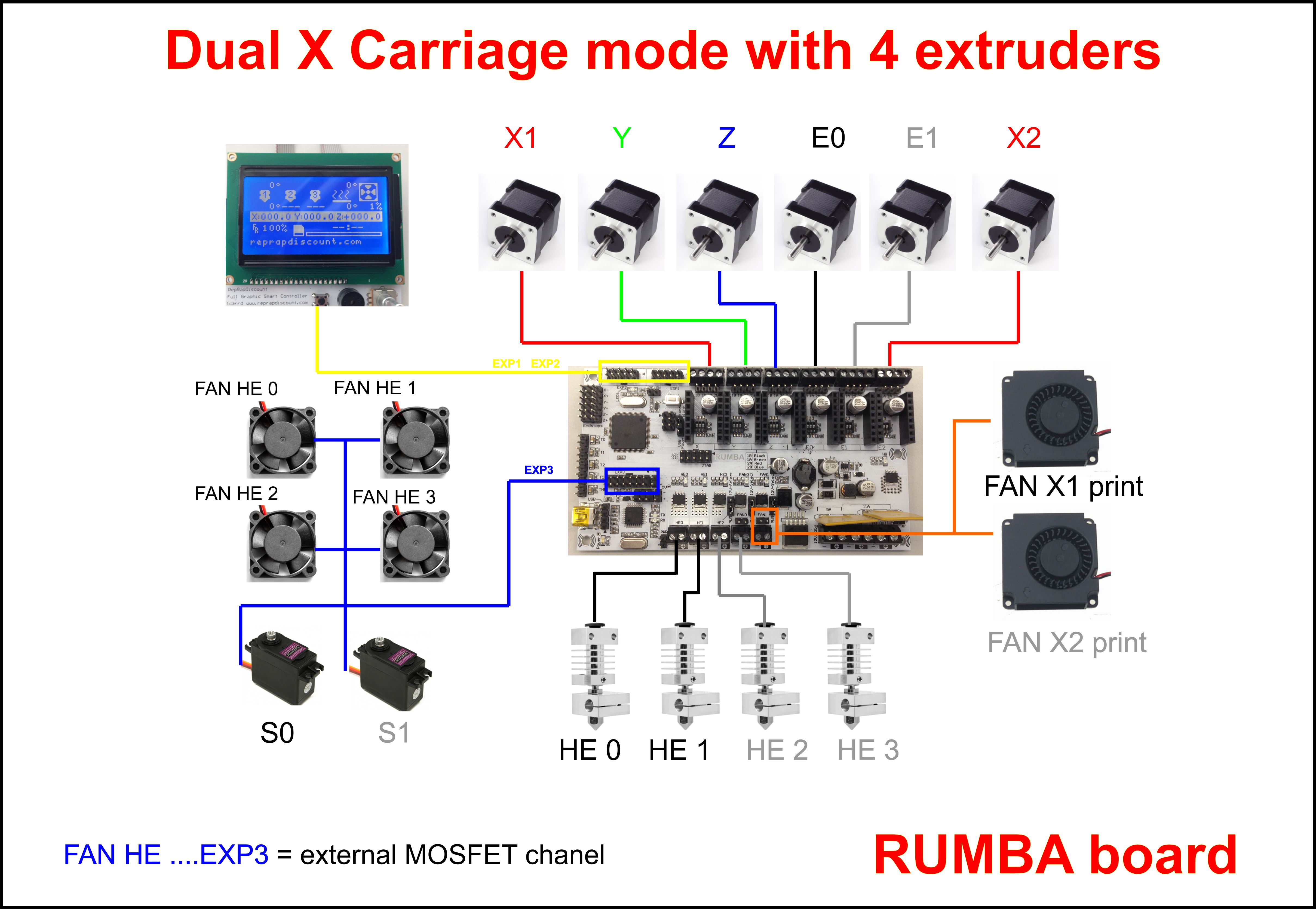
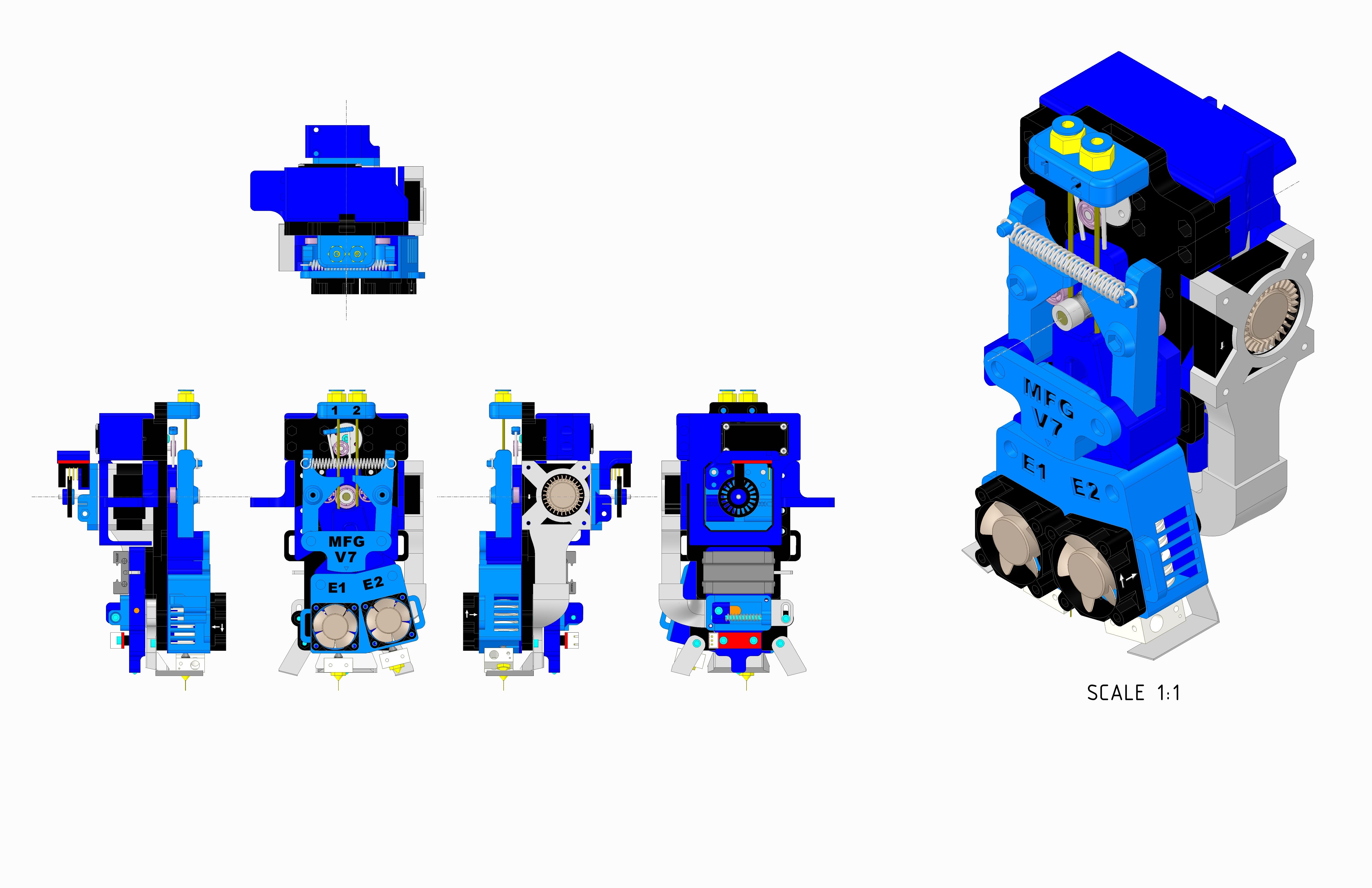
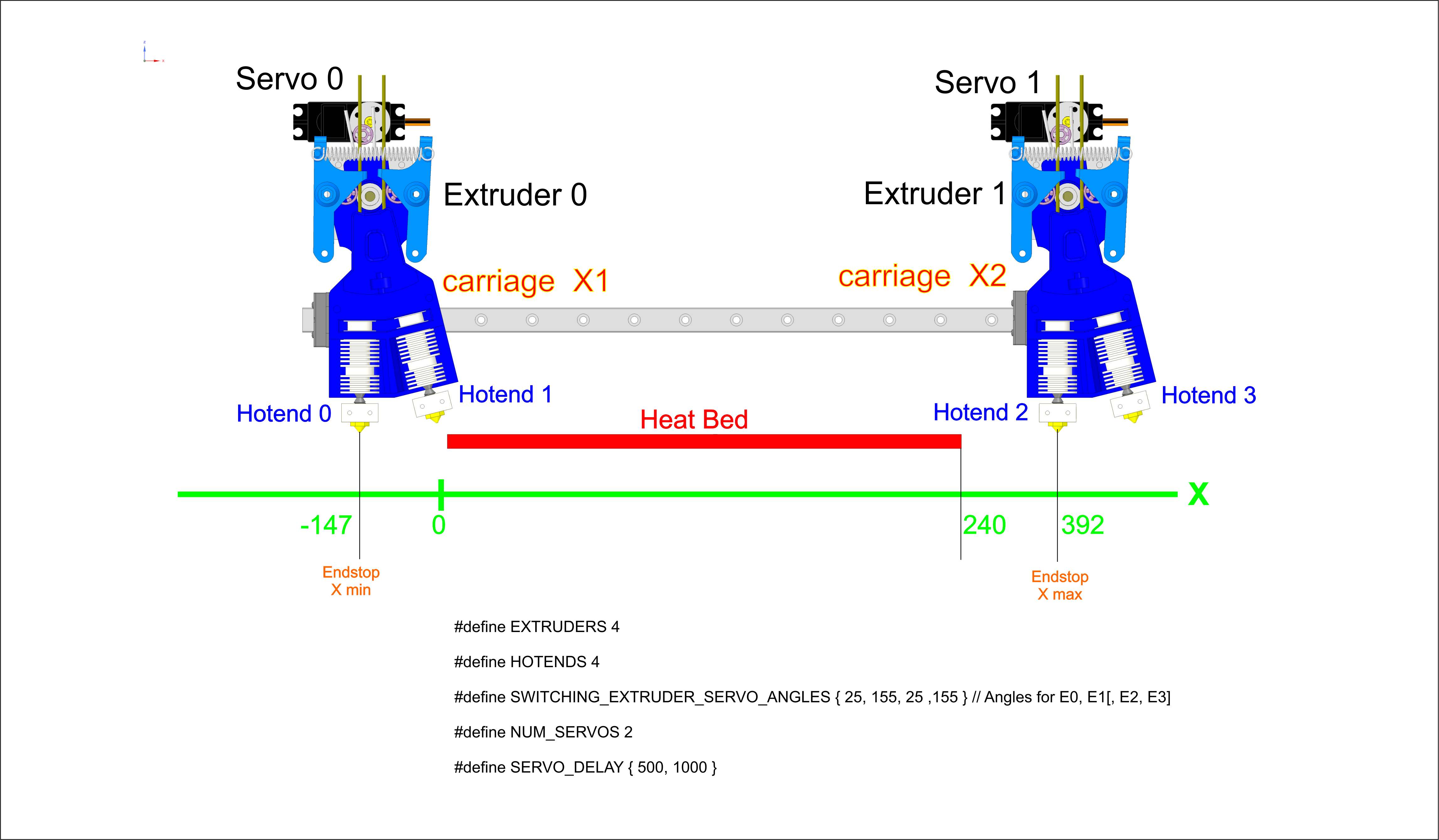
Edited by Marlin from Stephen's friend.
configuration.zip
To first test, we need to divide the tools into individual carriages
#define X1_CARRIAGE_TOOL {T0, T1} // extruder E0 , E1
#define X2_CARRIAGE_TOOL {T2, T3} // extruder E2 , E3
Demonstration of the V-extruder function.
https://www.youtube.com/watch?v=BOaIMiyzaks
https://www.youtube.com/watch?v=DsCdpfjLS2g
DrumClock
on 3 Jul 2020
That looks like a DUAL_X_CARRIAGE plus SWITCHING_EXTRUDER plus EXTRUDERS 4 setup. These options are intended to be usable together, but since that capability was first enabled we have not had a lot of testers and coders working on refining it.
thinkyhead
on 3 Jul 2020
Hi, The subroutines were edited by Stephen.
I'm not a programmer.
I just have HW here and I'm testing
DrumClock
on 3 Jul 2020
Hi this is Stephen. The changes made can probably be made by just comparing the original Marlin files over the ZIP DrumClock provided, however listing below for the sake of time or that somebody can spot something quickly.
SanityCheck.h
/**
 * A Dual Nozzle carriage with switching servo
 */
#if ENABLED(SWITCHING_NOZZLE)
  //#if ENABLED(DUAL_X_CARRIAGE)
  //  #error "SWITCHING_NOZZLE and DUAL_X_CARRIAGE are incompatible."
  //#elif ENABLED(SINGLENOZZLE)
#if ENABLED(SINGLENOZZLE)
    #error "SWITCHING_NOZZLE and SINGLENOZZLE are incompatible."
  #elif DISABLED(DUAL_X_CARRIAGE) && EXTRUDERS != 2
    #error "SWITCHING_NOZZLE requires exactly 2 EXTRUDERS."
  #elif DISABLED(DUAL_X_CARRIAGE) && NUM_SERVOS < 1
    #error "SWITCHING_NOZZLE requires NUM_SERVOS >= 1."
  #elif ENABLED(DUAL_X_CARRIAGE) && EXTRUDERS != 4
    #error "SWITCHING_NOZZLE along with DUAL_X_CARRIAGE requires exactly 4 EXTRUDERS."
  #elif ENABLED(DUAL_X_CARRIAGE) && NUM_SERVOS < 2
    #error "SWITCHING_NOZZLE along with DUAL_X_CARRIAGE requires NUM_SERVOS >= 2."
  #endif
tool_change.cpp and motion.cpp
I would continue to use the original Marlin source files here. No matter what changes I had attempted here, I could not map the tools to the carriages. T1 always gets assigned to the X2 carriage, no matter what code changes I attempted in these two files.
status_screen_DOGM.cpp
I was having issues in two methods with 4 tools/extruders so just got around the display portion of this and we used the serial port or OctoPrint for tool temp monitoring and switching.
 ElectroFlux-SS
on 5 Jul 2020
ElectroFlux-SS
on 5 Jul 2020
Hi! @ElectroFlux-SS and @Ziyayildizz3 👍👍
I'm glad there are more of us who are thinking about this mode. 😊😊
DrumClock
on 8 Jul 2020
As one of the ones who has been through nearly all the underlying IDEX code, there is no trivial method to do this currently. Im focused purely on projects that pay the bills right now so itll be quite awhile until this gets more attention. One of the big items is that active extruder is currently used everywhere for determining the X stepper to use and its position index. That will need to be broken up. And it needs to be done in a way that expands to Y for the quad carriage setup.
InsanityAutomation
on 14 Jul 2020
there is no trivial method to do this currently
This small change will allow for more extruders, where the odd ones are located on one of the X carriages and the even ones located on the other X-carriage:
- if (movement_extruder()) X2_DIR_WRITE(v); else X_DIR_WRITE(v); \
+ if (movement_extruder() & 1) X2_DIR_WRITE(v); else X_DIR_WRITE(v); \
I modified line 360 in ... src\module\stepper.cpp ... as follows:
else if (movement_extruder () & 1) X2_DIR_WRITE (v); else X_DIR_WRITE (v); \
Replacement of T0 and T1 will be successful.
When attempting to replace the T2 or T3, the X2 carriage constantly strikes the X-MAX endstop sensor.
Behaviour (pronterface terminal) :
M218
SENDING:M218
echo:Hotend offsets: 0.00,0.00,0.000 292.00,0.00,0.000 0.00,0.00,0.000 292.00,0.00,0.000
G28
SENDING:G28
echo:Active Extruder: 0
X1 = print position
X2 = parking position
T1
SENDING:T1
echo:Active Extruder: 1
X1 = move to parking osition
X2 = move to print position
T2
SENDING:T2
echo:Active Extruder: 2
X2 = move to parking osition
X2 = attempt to move through the X-MAX endstop
X1 = still in parking position
T3
SENDING:T3
echo:Active Extruder: 3
X2 = attempt to move through the X-MAX endstop
X1 = still in parking position
T0
SENDING:T0
echo:Active Extruder: 0
X2 = attempt to move through the X-MAX endstop
X1 = move to print position
DrumClock
on 19 Jul 2020
Please be able to set T0, T1 to carriage X1 and T2, T3 to carriage X2
DrumClock
on 19 Aug 2020
Hi,
Is anyone solving this question or should I close it?
Looks like there's no interest in it and nothing's happening.
This GitHub system is a bit strange.
I don't know if anyone is solving it or not or if it is already solved.
There is simply no feedback!
DrumClock
on 28 Sep 2020
Keep in mind that all the code here is contributed by unpaid volunteers who work on it in their free time.
I've added a Help Wanted label to hopefully attract attention of someone who has the hardware, interest, and ability to fix/implement the change.
At present, we have nearly 400 feature requests, and nearly 100 bug reports, so some patience is required.
 thisiskeithb
on 28 Sep 2020
thisiskeithb
on 28 Sep 2020
HI @thinkyhead @InsanityAutomation
I have a printer ready with IDEX and if possible,
I would like to try modified Marlin modules for the intended project.
So far, everything is functional except for the division of tools into individual carriages.
Setting tools on carriages:
X1 = T0, T1
X2 = T2, T3
Here is my settings: https://github.com/DrumClock/Marlin/tree/GTR-2xMFG-V7
I'm very happy to help with testing, but I can't modify the program.
DrumClock
on 9 Nov 2020
Related issues
 Bobsta6
·
3Comments
Bobsta6
·
3Comments
 spanner888
·
4Comments
spanner888
·
4Comments
 ShadowOfTheDamn
·
3Comments
ShadowOfTheDamn
·
3Comments
 ceturan
·
4Comments
ceturan
·
4Comments
 Anion-anion
·
3Comments
Anion-anion
·
3Comments