Marlin: [BUG] Bilinear leveling moves z axis only half of the required step
Bug Description
Auto bed leveling (bilinear) is moving Z axis only to the half of required distance
My Configurations
Required:
Marlin 2.0.5.3 (released)
BL touch 3
Configurations here
Marlin.zip
Custom build printer with dual Z steppers connected parallel to one drive (so motors move always the same, no software difference in between)
Z resolution calibrated to 0.01 accuracy
Glass bed with heater under. Glass bed is due to heat and pretension in the form of a bottom up bowl. This shape I would like to compensate
Recv: Bilinear Leveling Grid:
Recv: 0 1 2 3 4 5 6
Recv: 0 -0.241 -0.171 -0.121 -0.102 -0.098 -0.106 -0.132
Recv: 1 -0.138 -0.079 -0.047 -0.029 -0.037 -0.051 -0.082
Recv: 2 -0.080 -0.047 -0.016 -0.001 -0.015 -0.045 -0.086
Recv: 3 -0.095 -0.069 -0.045 -0.030 -0.052 -0.083 -0.137
Recv: 4 -0.146 -0.114 -0.092 -0.088 -0.114 -0.146 -0.214
Steps to Reproduce
- Home all axes
- Probe bed + save values with M500
- Activate bed leveling with M420 S1
- Move to center of the bed
- Adjust z to 0.1mm (thickness of the feeler gage I have)
- Move to the corners of the bed and check correction
Expected behavior: [What you expect to happen]
Correction made by bed leveling should keep the nozzle 0.1 mm above the bed
Actual behavior: [What actually happens]
Nozzle height above bed is not constant, varies between 0 (touching the bed) to 0.3mm
I did investigation with measuring the real height and checking of the value shown by M114 and the result it shows is that the Z axis is moving in the correct direction, however it moves only the half (almost exactly, based on calculation) of the expected step.
Example:
- I start at middle point with nozzle at 0.2 mm. ( checked with gauge).
Left upper corner is -0.2 against the middle point. With resolution of 3215 steps per mm this gives expected 643 steps to be made for compensation.
With M114 at left upper corner the Z tells it is at Z=0.2, but difference in raw steps value is only 320 steps. So the nozzle is physically at approx 0.3 (0.2 starting point minus (-)0.2 deviation = 0.4mm; 0.4 minus (320 steps / 3215steps/mm ))
Additional Information
I have tried to swith on and off ENABLE_LEVELING_FADE_HEIGHT - no difference
Mesh size (probing points) also makes no difference
 cicinovec
All 38 comments
Update: Marlin 1.1.9 with the same settings has the same behavior
cicinovec
on 29 May 2020
We have been fighting something like this for weeks.. There's a bug in bilinear for sure. I went UBL this morning and fine tuned my mesh.. My printer is printing the best first lay it ever has now. It's been completely unusable the past 2-3 weeks because of bilinear abl.
 txt4nk
on 29 May 2020
txt4nk
on 29 May 2020
I switched to UBL, after all the problems with bilinear.... and even UBL doesn't work correctly. probes until point 8, then runs probes 9-16 in the exact same place.
 JoePrints
on 31 May 2020
JoePrints
on 31 May 2020
Yeah it won't be able to probe every single point because the probe is offset. It will probe where it can and extrapolates the rest by using the G29 P3 command. You have to manually edit the mesh in those areas. I made a 200x200 single layer print and use that to see if there are any area's that need adjusting.
txt4nk
on 31 May 2020
I can confirm that something is wrong with bilinear on my Tronxy X3A, I was never able to get good results with bilinear. Fortunately, I usually print small things.
Yesterday, I recompiled with UBL. I have never had a first layer this good before. It really does seem something is wrong with bilinear. I found the best balance, for me between accuracy and speed was to set UBL for 7 X 7. It only probes 13-17 points but the results are good.
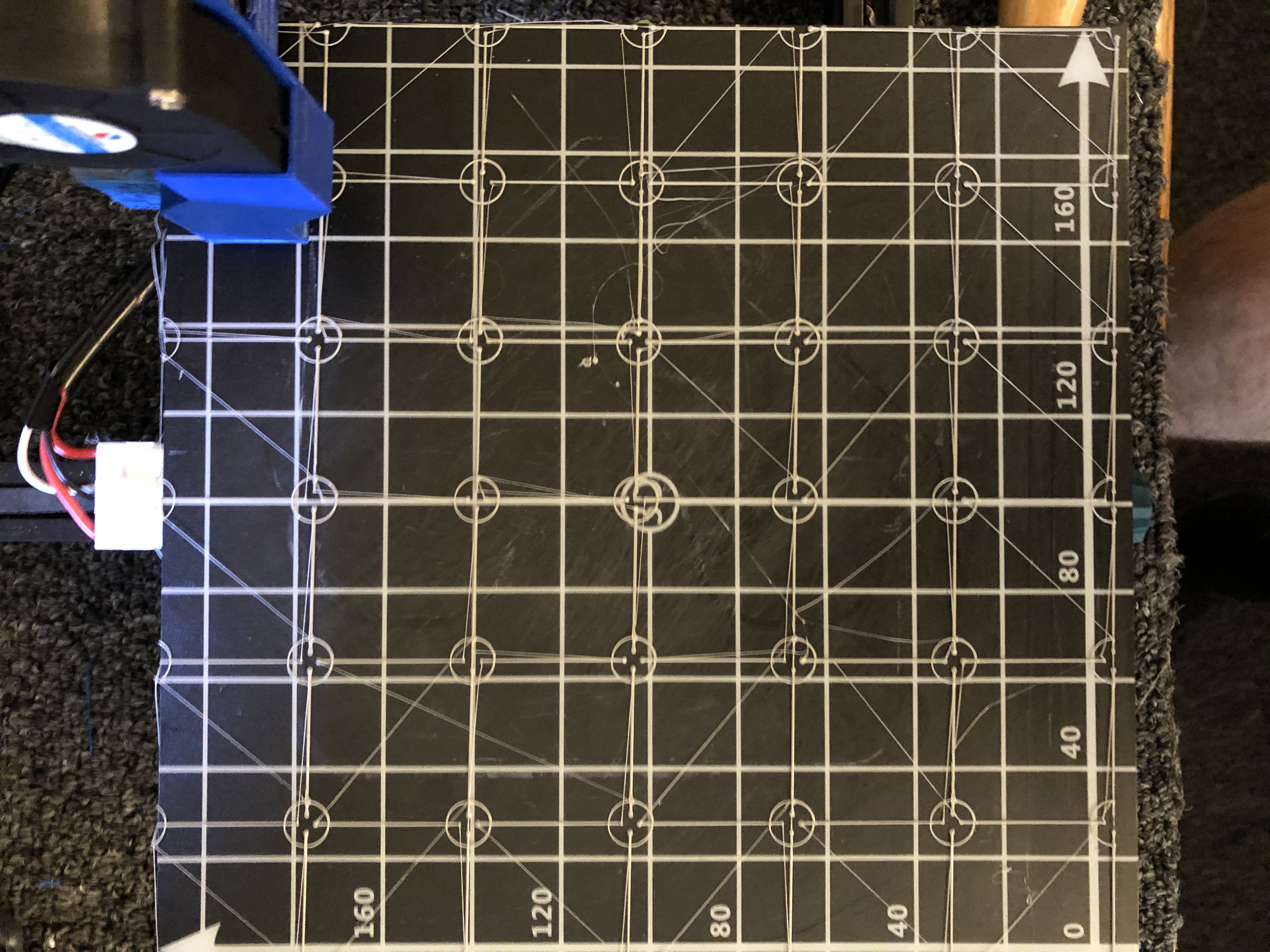
 bill-orange
on 1 Jun 2020
bill-orange
on 1 Jun 2020
I tried to reproduce bilinear issues yesterday using the latest state of bugfix-2.0.x, and it worked fine for me. I raised one edge of my bed by 2mm and it compensated for it just fine.
 sjasonsmith
on 1 Jun 2020
sjasonsmith
on 1 Jun 2020
What setup do you have jason? Maybe its related to a specific board or environment? I am on a BTT SKR E3 Mini, and have also tried two E3 DIP boards (one with 2208's and one with 2209's) on an ender 5 pro. I will say there is one thing thats kind of odd.. all online specs state that these boards come with RCT6 processors but all three of my SKR boards have RET6 processors.
txt4nk
on 1 Jun 2020
Seeing this on Ender 3 + SKR Mini E3 v1.2 + bilinear bed levelling. My son and I thought we were losing our minds having to constantly adjust Z offset every time.
 SidShetye
on 3 Jun 2020
SidShetye
on 3 Jun 2020
Please enable DEBUG_LEVELING_FEATURE and issue the command G29 Q (ABL Bilinear only!) to see what the leveling calculations are doing at the current point. Also enable M114_DETAIL so you can send M114 D to also get more detail about the current point and the leveling that is being applied. This will tell us whether there are logical errors happening at some point between the G-code and the stepper logic.
 thinkyhead
on 3 Jun 2020
thinkyhead
on 3 Jun 2020
For those who are using boards with built-in TMC2208 steppers, please try disabling stealthchop on the Z axis to see if it has any effect on behavior.
thinkyhead
on 3 Jun 2020
My Configurations
Required:
Marlin 2.0.5.3 (released)
@SidShetye — Please test the bugfix-2.0.x branch to see where it stands. If the problem has been resolved then we can close this issue. If the issue isn't resolved yet, then we should investigate further.
thinkyhead
on 3 Jun 2020
I'm going to get in on this as well @thinkyhead. Will post results shortly.
txt4nk
on 3 Jun 2020
I have a question. I've got an E3 Mini V1.2 and two E3 DIP v 1.1's. All three boards are advertised to come with RCT6 processors, but all three of my boards and a lot of other people I've talked to have RET6 processors. Do we still use STM32F103RC_btt_512K? On the DIP I don't see an issue using STM32F103RE_btt because looking at that environtment, it points to extra scripts for the E3 DIP. I'm not positive what all is in those extra scripts, so I'm not sure about using it on the E3 mini.
txt4nk
on 3 Jun 2020
Send: G29 Q
Recv: current_position= X220.00 Y212.00 Z14.20 : >>> G29
Recv: Machine Type: Cartesian
Recv: Probe: BLTOUCH
Recv: Probe Offset X-46.00 Y-2.00 Z-4.20 (Left-Front & Below Nozzle)
Recv: Auto Bed Leveling: BILINEAR (enabled)
Recv: Z Fade: 10.00
Recv: ABL Adjustment Z+0.131 ( 0.000)
Recv: ok
Send: M114 D
Recv: X:220.00 Y:212.00 Z:14.20 E:0.00 Count X:17600 Y:16960 Z:11360
Recv:
Recv: Logical: X: 220.000 Y: 212.000 Z: 14.200
Recv: Raw: X: 220.000 Y: 212.000 Z: 14.200
Recv: Leveled: X: 220.000 Y: 212.000 Z: 14.200
Recv: UnLevel: X: 220.000 Y: 212.000 Z: 14.200
Recv: Stepper: X:17600 Y:16960 Z:11360 E:0
Recv: FromStp: X: 220.000 Y: 212.000 Z: 14.200 E: 0.000
Recv: Diff: X: 0.000 Y: 0.000 Z: 0.000 E: 0.000
Recv: ok
txt4nk
on 3 Jun 2020
ABL is still not adjusting for bed deviations fully, I am getting spots where its too close to the bed and so far away that it doesn't even come close to sticking and ends up peeling up causing the print to fail.
Tried disabling stealthchop and my Z axis motor immediately started making horrible noises so I turned it back on and did not even attempt a print.
txt4nk
on 3 Jun 2020
decided to try stealthchop off, even though it sounds like my motor is going through absolute hell.
steps:
disabled stealth chop
starting gcode ran g28
starting gcode ran g29 (wanted a new mesh with stealthchop off)
sat and waited like a kid waiting for a candy store to open.. (running 9x9 for higher mesh resolution..)
result:
no change..
Decided to move the nozzle to a problem area, then move Z to 0 and then run G29 Q and M114D.
Send: G29 Q
Recv: current_position= X116.00 Y62.00 Z0.00 : >>> G29
Recv: Machine Type: Cartesian
Recv: Probe: BLTOUCH
Recv: Probe Offset X-46.00 Y-2.00 Z-4.22 (Left-Front & Below Nozzle)
Recv: Auto Bed Leveling: BILINEAR (enabled)
Recv: Z Fade: 10.00
Recv: ABL Adjustment Z+0.002 (+0.002)
Recv: ok
[...]
Send: M114 D
Recv: X:116.00 Y:62.00 Z:0.00 E:0.00 Count X:9280 Y:4960 Z:2
Recv:
Recv: Logical: X: 116.000 Y: 62.000 Z: 0.000
Recv: Raw: X: 116.000 Y: 62.000 Z: 0.000
Recv: Leveled: X: 116.000 Y: 62.000 Z: 0.002
Recv: UnLevel: X: 116.000 Y: 62.000 Z: 0.000
Recv: Stepper: X:9280 Y:4960 Z:2 E:0
Recv: FromStp: X: 116.000 Y: 62.000 Z: 0.002 E: 0.000
Recv: Diff: X: 0.000 Y: 0.000 Z: 0.001 E: 0.000
Recv: ok
If the ABL adjustment is 0.002, then why is there a diff of 0.001?
txt4nk
on 3 Jun 2020
Checked the last bugfix-2.0.x with bilinear and it unfortunately stil does not work.
What I dont quite understand what are the results I receive after M114 D
Mostly line Recv: Stepper: X:34437 Y:22424 Z:322 E:0
Is this absolute position of the stepper at that moment?
Because in the log I see there only the compensation value, but the start value is not there.
cicinovec
on 3 Jun 2020
Did some testing yesterday and today with following observations:
- neither bilinear neither UBL compensates the bed completely
- UBL without manual compensation has the same results as bilinear
- UBL with manual compensation works for 80% of the bed size
I have observed one issue that might be linked to this. When I try to compensate the most lower point of my bed (currently -0.196) it does not matter, what value I put into the mesh, the printer just dont go down.
I have tested it several times with always the same result = negative values added as compensation to UBL mesh point work until certain value of mesh boundary.
- Z axis is moving properly - no HW issue present
- measurement (probing) does the right measurement - OK
- created mesh is equal to what I measure manually at mesh point - no problem here
- calculation of compensation Z offset does not work properly for me
Can someone please provide me information where to find the background calculation for leveling (equations ideally) with parameters involved so I can do some extensive testing?
Thank you
cicinovec
on 5 Jun 2020
I had the same problem with ABL not compensating the bed mesh and after several tries with bilinear and UBL, along with the change of a BLtouch, I sorted out the problem increasing the Z_PROBE_LOW_POINT on the firmware.
The problem happened with every Marlin 2 version I tried. With the Z_PROBE_LOW_POINT set at 2 as it's default some of the probing points would fail. I raised it to 3 and although I was able to probe the 25 points on a 5x5 grid, the print seemed to not follow the mesh.
I went overboard and changed Z_PROBE_LOW_POINT to 15 and I now am able to probe the entire bed and it's been printing spot on over the entire bed, after adjusting my Z Probe offset correctly for the first layer.
As some people are having the same problem, I believe it is worth a try. I've had the printer rendered useless with ABL for almost 2 months and after this change I'm now able to print using ABL again.
If you'd like to try it out, let us know if this worked out for you.
 hitbyatruck
on 6 Jun 2020
hitbyatruck
on 6 Jun 2020
I had the same problem with ABL not compensating the bed mesh and after several tries with bilinear and UBL, along with the change of a BLtouch, I sorted out the problem increasing the Z_PROBE_LOW_POINT on the firmware.
The problem happened with every Marlin 2 version I tried. With the Z_PROBE_LOW_POINT set at 2 as it's default some of the probing points would fail. I raised it to 3 and although I was able to probe the 25 points on a 5x5 grid, the print seemed to not follow the mesh.
I went overboard and changed Z_PROBE_LOW_POINT to 15 and I now am able to probe the entire bed and it's been printing spot on over the entire bed, after adjusting my Z Probe offset correctly for the first layer.
As some people are having the same problem, I believe it is worth a try. I've had the printer rendered useless with ABL for almost 2 months and after this change I'm now able to print using ABL again.
If you'd like to try it out, let us know if this worked out for you.
Just tried this, and sadly it is not the fix for me. Still getting 100% failed prints due to this Z axis issue.
txt4nk
on 7 Jun 2020
I am having much better luck with UBL. However, I just started using UBL on a printer with a fairly poor bed, requiring about 0.25 mm correction. It does appear that even in UBL not enough correction is supplied. Rest assured, it is improved, but your report of only half the needed correction being supplied looks about right. The corner that is 0.25 mm low appears to be corrected to 0.1-0.15 mm low. This is with ver 2.0.5.3.
bill-orange
on 9 Jun 2020
I agree that UBL is slightly better, but that is after manually editing the mesh a lot.
txt4nk
on 9 Jun 2020
@txt4nk Any point in be testing with bugfix?
bill-orange
on 10 Jun 2020
Be testing?
txt4nk
on 10 Jun 2020
ver 2.0.5.3
bill-orange
on 10 Jun 2020
I test mine almost daily.. i watch for the bugfix go be updated and as soon as I see an update, I download it. This issue is present on the non bugfix as well.
txt4nk
on 10 Jun 2020
@txt4nk Sounds like there is no point in me testing the bugfix if you are already doing it.
bill-orange
on 10 Jun 2020
Never hurts to have more data. I would encourage it.
txt4nk
on 10 Jun 2020
@cicinovec still an issue?
 boelle
on 21 Jun 2020
boelle
on 21 Jun 2020
@boelle , yes, still an issue.
This morning tested with last bugfix. The behavior is now different, but UBL compensation still not OK.
See topography reports below:
Recv: Bed Topography Report:
Recv:
Recv:     ( 30,250)                                                              (400,250)
Recv:         0       1       2       3       4       5       6       7       8       9
Recv:  4 | -0.170  -0.162  -0.137  -0.118  -0.098  -0.095  -0.092  -0.085  -0.096  -0.095
Recv:  3 | -0.116  -0.111  -0.091  -0.064  -0.047  -0.035  -0.019  -0.023  +0.000  -0.000
Recv:  2 | -0.089  -0.072  -0.054  -0.018  -0.007  +0.023  +0.048  +0.050  +0.061  +0.080
Recv:  1 | -0.107  -0.088  -0.055  -0.015  +0.015  +0.042  +0.073  +0.089  +0.096  +0.110
Recv:  0 |[-0.107] -0.088  -0.055  -0.012  +0.037  +0.061  +0.097  +0.128  +0.132  +0.140
Recv:         0       1       2       3       4       5       6       7       8       9
Recv:     ( 30, 30)                                                              (400, 30)
I have measured the offset from ideal position
Recv: Bed Topography Report:
Recv:
Recv:     ( 30,250)                                                              (400,250)
Recv:         0       1       2       3       4       5       6       7       8       9
Recv:  4 | +0.04    +0.03  +0.01   XXXXXX  XXXXXX  XXXXXX  XXXXXX  XXXXXX  XXXXXX  -0.2
Recv:  3 | +0.02    +0.03  +0.01   XXXXXX  XXXXXX  XXXXXX  XXXXXX  XXXXXX  XXXXXX  -0.13
Recv:  2 | +0.03    +0.02  +0.01   XXXXXX  XXXXXX  XXXXXX  XXXXXX  XXXXXX  XXXXXX  -0.05
Recv:  1 | +0.01    +0.02  +0.00   XXXXXX  XXXXXX  XXXXXX  XXXXXX  XXXXXX  XXXXXX  -0.03
Recv:  0 | +0.000   +0.02  -0.02   XXXXXX  XXXXXX  XXXXXX  XXXXXX  XXXXXX  XXXXXX  -0.04
Recv:         0       1       2       3       4       5       6       7       8       9
Recv:     ( 30, 30)                                                              (400, 30)
Left side of the bed is quite linear with very small deviation
Right side of the bed (mostly right upper corner is far of from it. Even with compensation value the nozzle remains at the same height. It seems that there is a parameter within UBL that prevents moving below certain value.
*Parameters:
Marlin_UBL_issue.zip
*
Software limits were off for this testing and with relative movement I can go down on that position
cicinovec
on 21 Jun 2020
Perhaps you could make an artificial mesh with an obvious bump in the middle, and then make a G-code file that moves around over that bumpy area to see what happens each time you run the G-code. It's quite impossible to make out any clear picture using ordinary mesh data.
thinkyhead
on 21 Jun 2020
That is good idea. Just tested. When going very slowly the compensation works. As soon as the moment stops the Z axis jumps up
I have made a short movie, see last few seconds of the clip, the nozzle jumps up, no information on terminal
https://youtu.be/D5ho2PlNMFg
cicinovec
on 21 Jun 2020
Hi Guys, today I have tested the last night build and the issue still persists. As seen in the movie the compensation theoretically works, but somewhere there is a "jump" step added to the movement that makes the Z position wrong.
After a day of testing still cannot get good first layer. Anyone else any progress with testing?
cicinovec
on 28 Jun 2020
Hi,
I can confirm this bug.
My configuration is:
Marlin 2.0.5.4
Ender 5 pro
Creality control board v 1.1.5 with TMC2208
 JPR75
on 9 Jul 2020
JPR75
on 9 Jul 2020
Hi guys, can someone please confirm following issue/solution?
- Make UBL mesh, than G29 J (3 point tilt of mesh)
in my case the mesh is from 0.03 to even 1 milimeter off, difference between each G29 J step
Make UBL mesh, than G29 J3 (tilt mesh with more points)
- mesh is nice even, some points are about 0.02mm off (can be measurement error)
Thank you
cicinovec
on 14 Jul 2020
Fresh mesh:
0.197   0.157   0.160   0.102   0.147   0.100   0.232
0.130   0.095   0.087   0.062   0.085   0.070   0.215
0.117   0.080   0.058   0.015   0.043   0.025   0.140
0.070   0.045   0.045   0.000   0.032   0.010   0.137
0.115   0.092   0.075   0.040   0.055   0.010   0.125
0.117   0.087   0.055   0.012   0.048   0.017   0.140
0.207   0.175   0.130   0.077   0.107   0.065   0.183
After G29 J:
0.194   0.153   0.155   0.097   0.142   0.094   0.226
0.127   0.091   0.084   0.058   0.080   0.065   0.209
0.115   0.077   0.054   0.011   0.038   0.020   0.135
0.068   0.043   0.042   -0.003  0.029   0.006   0.133
0.114   0.091   0.073   0.037   0.052   0.007   0.121
0.117   0.086   0.054   0.011   0.045   0.015   0.137
0.207   0.175   0.129   0.076   0.106   0.063   0.180
New fresh mesh:
0.183   0.152   0.150   0.090   0.135   0.100   0.237
0.125   0.087   0.080   0.055   0.085   0.070   0.220
0.105   0.072   0.058   0.012   0.038   0.025   0.142
0.055   0.038   0.045   0.000   0.032   0.015   0.142
0.102   0.085   0.070   0.035   0.050   0.012   0.127
0.112   0.080   0.053   0.012   0.050   0.022   0.147
0.200   0.175   0.130   0.072   0.107   0.070   0.195
After G29 J3:
0.188   0.157   0.153   0.092   0.136   0.100   0.237
0.130   0.091   0.083   0.057   0.086   0.070   0.219
0.109   0.076   0.060   0.014   0.038   0.025   0.141
0.059   0.041   0.047   0.001   0.033   0.014   0.141
0.106   0.088   0.072   0.036   0.050   0.011   0.125
0.116   0.082   0.054   0.013   0.049   0.021   0.145
0.203   0.177   0.131   0.072   0.106   0.068   0.192
Standard Deviation: 0.001658
But isn't this issue is for AUTO_BED_LEVELING_BILINEAR?
 qwewer0
on 14 Jul 2020
qwewer0
on 14 Jul 2020
This issue is stale because it has been open 30 days with no activity. Remove stale label / comment or this will be closed in 5 days.
![github-actions[bot] picture](https://avatars2.githubusercontent.com/in/15368?v=4&s=40) github-actions[bot]
on 14 Aug 2020
github-actions[bot]
on 14 Aug 2020
This issue has been automatically locked since there has not been any recent activity after it was closed. Please open a new issue for related bugs.
github-actions[bot]
on 18 Oct 2020
Related issues
 jerryerry
·
4Comments
jerryerry
·
4Comments
 ShadowOfTheDamn
·
3Comments
ShadowOfTheDamn
·
3Comments
 esenapaj
·
3Comments
esenapaj
·
3Comments
 StefanBruens
·
4Comments
StefanBruens
·
4Comments
 otisczech
·
3Comments
otisczech
·
3Comments