Marlin: [BUG] M569 (Stealthchop) command are reversed
Bug Description
M569 (StealthChop) commands are reversed.
My Configurations
Marlin 2.0.5.3 with SKR Mini E3 configurations, mostly from
https://github.com/morningreis/Marlin-SKR-E3-Mini-1.2
Steps to Reproduce
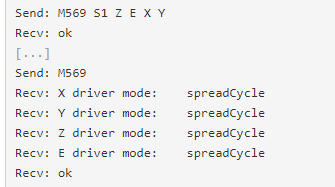
- Run M569 S1 Z E X Y to enable stealthcop
- Check M569 command - Shows that stealthchop is off
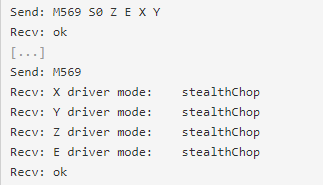
- Run M569 S0 Z E X Y to disable stealthchop
- Check M569 - shows stealthchop is on
Expected behavior:
The reverse of above
Actual behavior: [What actually happens]
Here are screens of the error
Additional Information
Seems like other people are experiencing similar. Here are 3 reddit posts about it.
https://www.reddit.com/r/ender3/comments/gdmn65/stealthchop_gets_disabled_every_time_i_reboot_my/
https://www.reddit.com/r/3Dprinting/comments/g8gu9s/marlin_20_skr_mini_e3_stealthchop_issue/
https://www.reddit.com/r/ender3/comments/gev9f7/installed_skr_mini_e3_v12_motors_got_louder/
 desertblade
All 8 comments
I used 2.0.5.3 on my SKR Mini E3 without issues.
Have you done a M502 to load the firmware default values, followed by a M500 to store them to EEPROM and a M503 to check them? I expect this is the issue.
If that doesn't fix it; are you using up to date configuration files (link provided in the firmware download)?
If you are, and still have the problem, please try current bugfix-2.0.x to check if you are still having the problem.
Firmware:
https://github.com/MarlinFirmware/Marlin/archive/bugfix-2.0.x.zip
Configuration Files:
https://github.com/MarlinFirmware/Configurations/archive/bugfix-2.0.x.zip
My output:
M569 S1 X Y Z
M569 S1 T0 E
And check:
SENDING:M569
X driver mode: stealthChop
Y driver mode: stealthChop
Z driver mode: stealthChop
E driver mode: stealthChop
 swilkens
on 8 May 2020
swilkens
on 8 May 2020
Built from Marlin bugfix-2.0.x branch. Copied over the official Bigtree configuration files, then modified them to work with the latest branch (attached).
Marlin.zip
Ran m502 then m500 then m503.
Still seeing the reverse effect of the M569 S1 Z E X Y command
I find it weird that the command is acting in reverse of what is expected. This is a brand new board just arrived a couple days ago from Amazon.
desertblade
on 8 May 2020
Which stepstick are you usign? TMC2209, 2208, 5130....
 GMagician
on 8 May 2020
GMagician
on 8 May 2020
@Bob-the-Kuhn as I can see 51xx and 220x use reversed function for same GCONF bit 2.....M569 send S value directly to function en_pwm_mode and I can't see any override to it.
GMagician
on 8 May 2020
Which stepstick are you usign? TMC2209, 2208, 5130....
It's the same btt skr mini that I have, uses 2209's. I have no issues, however.
I'm assuming it's a config file issue, as @desertblade indicates he is using "official" config files as a reference. So probably outdated.
Please try again with the config files from the marlin repository :) I'll have a closer look when I'm back at my pc
swilkens
on 8 May 2020
Which position is the SPREAD jumper (near the X driver) on the board? Try moving it to the opposite position.
 thisiskeithb
on 8 May 2020
thisiskeithb
on 8 May 2020
We have a winner! @thisiskeithb
Looked at this image:
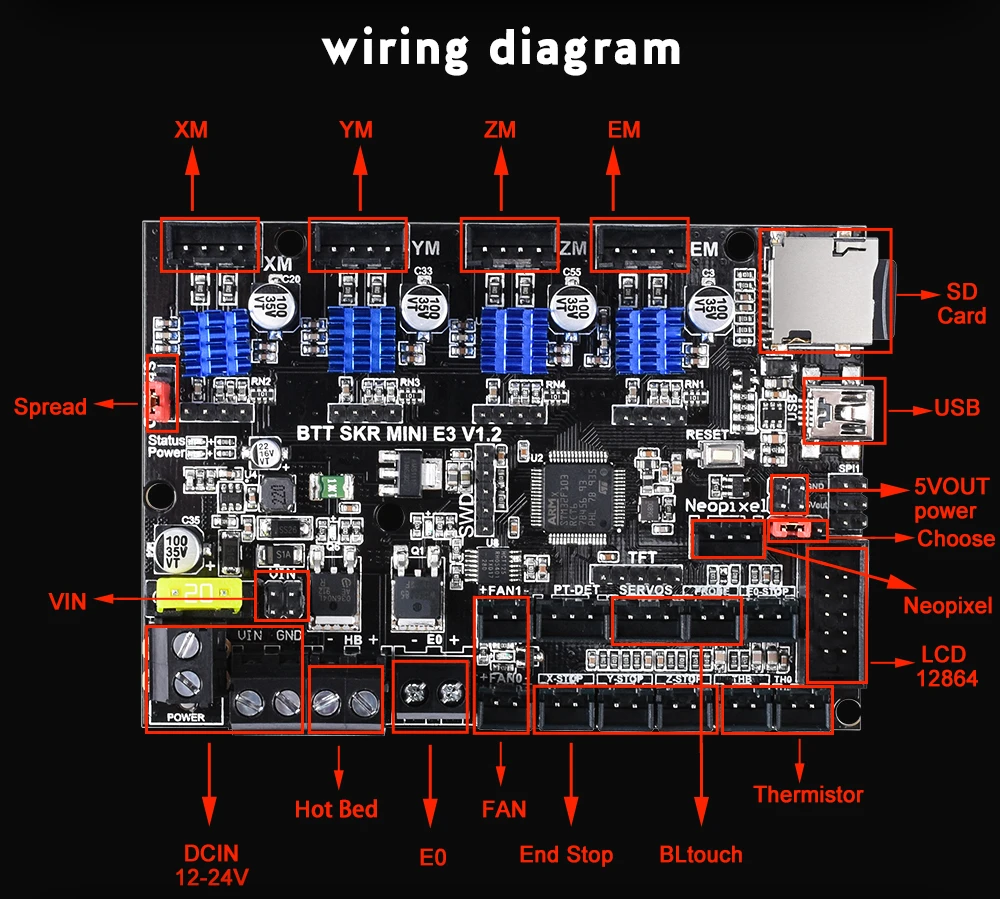
My Spread Jumper (red jumper) was in the opposite location. Switched it around and M569 command is working as expected.
Figured it might have something to do with recent batches of the board.
Big thank you to everyone. Hopefully this will help a few other people.
desertblade
on 8 May 2020
This issue has been automatically locked since there has not been any recent activity after it was closed. Please open a new issue for related bugs.
![github-actions[bot] picture](https://avatars2.githubusercontent.com/in/15368?v=4&s=40) github-actions[bot]
on 9 Jul 2020
github-actions[bot]
on 9 Jul 2020
Related issues
 Anion-anion
·
3Comments
Anion-anion
·
3Comments
 Matts-Hub
·
3Comments
Matts-Hub
·
3Comments
 jerryerry
·
4Comments
jerryerry
·
4Comments
 heming3501
·
4Comments
heming3501
·
4Comments
 Kaibob2
·
4Comments
Kaibob2
·
4Comments
Most helpful comment
We have a winner! @thisiskeithb
Looked at this image:
My Spread Jumper (red jumper) was in the opposite location. Switched it around and M569 command is working as expected.
Figured it might have something to do with recent batches of the board.
Big thank you to everyone. Hopefully this will help a few other people.