Marlin: [BUG] BTT GTR V1.0 I2C EEPROM can not wtite MARLIN 2.0.5.2
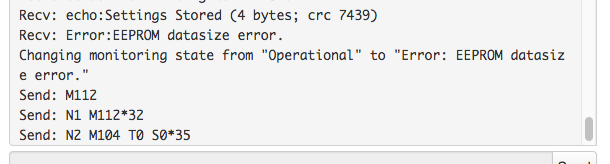
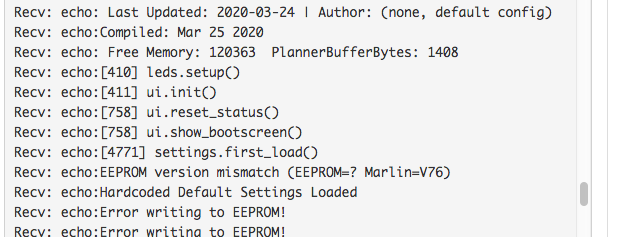
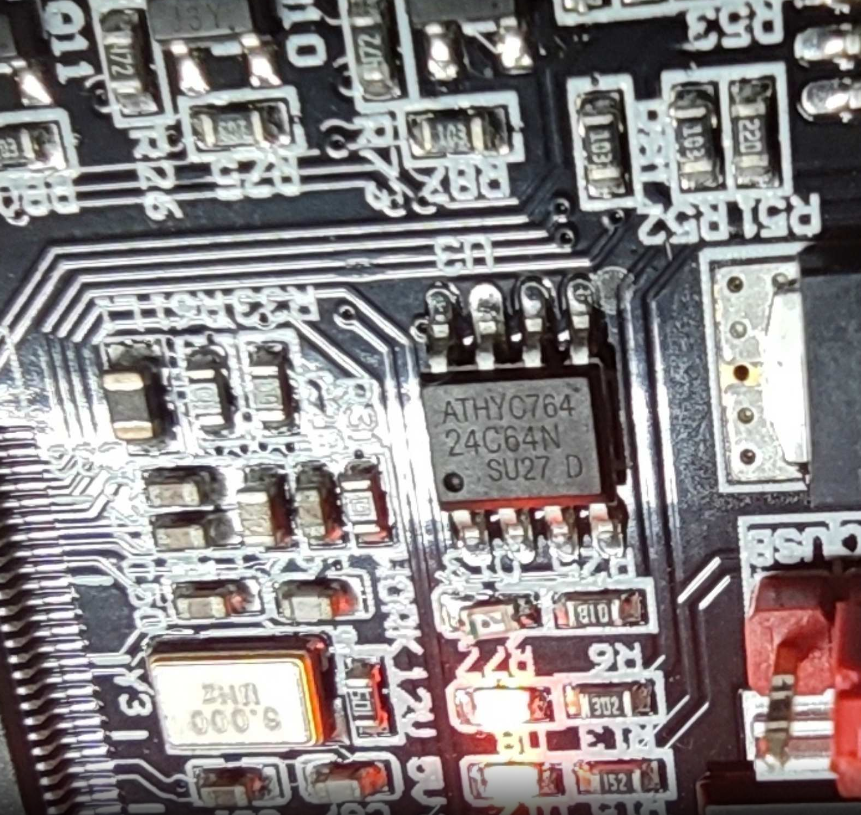
Onboard 24c64.
I tried this setting too:

Same issue.
Flash based eeprom emualtion work fine:

 DJDOUBLEG
All 10 comments
Have you tried doing a M502 then M500? Different versions sometimes change the stored data so you need to do this to correctly format the EEPROM.
 yavinmaster
on 26 Mar 2020
yavinmaster
on 26 Mar 2020
Have you tried doing a M502 then M500? Different versions sometimes change the stored data so you need to do this to correctly format the EEPROM.
Yes i tried it.
M500 and instant reboot.
DJDOUBLEG
on 28 Mar 2020
Confirmed reboot with 2.0.5.3 as well. Note per the schematics, the 24C64 is on PH4/PH5, and the expansion I2C (J65) is on PH7/PH8. Unclear, if the code is using these pins for an I2C EEPROM.
I tried an external EEPROM on J65 but no change. Every time a write command happens (EEPROM INT, or Save settings), the code stalls and then causes a board reboot.
 NAPCAL
on 3 Apr 2020
NAPCAL
on 3 Apr 2020
Sending a M500
SENT: M500
READ: echo:Error writing to EEPROM!
Error writing to EEPROM!
READ: echo:Error writing to EEPROM!
Error writing to EEPROM!
READ: echo:Error writing to EEPROM!
Error writing to EEPROM!
READ: echo:Error writing to EEPROM!
Error writing to EEPROM!
READ: echo:Error writing to EEPROM!
Error writing to EEPROM!
READ: echo:Error writing to EEPROM!
Error writing to EEPROM!
READ: echo:Error writing to EEPROM!
Error writing to EEPROM!
READ: echo:Error writing to EEPROM!
Error writing to EEPROM!
READ: echo:Error writing to EEPROM!
Error writing to EEPROM!
READ: echo:Error writing to EEPROM!
Error writing to EEPROM!
READ: echo:Error writing to EEPROM!
Error writing to EEPROM!
READ: echo:Error writing to EEPROM!
Error writing to EEPROM!
READ: echo:Error writing to EEPROM!
Error writing to EEPROM!
READ: echo:Error writing to EEPROM!
Error writing to EEPROM!
READ: echo:Error writing to EEPROM!
Error writing to EEPROM!
READ: echo:Error writing to EEPROM!
Error writing to EEPROM!
READ: echo:Error writing to EEPROM!
Error writing to EEPROM!
READ: echo:Error writing to EEPROM!
Error writing to EEPROM!
READ: echo:Error writing to EEPROM!
Error writing to EEPROM!
READ: echo:Error writing to EEPROM!
Error writing to EEPROM!
READ: echo:Error writing to EEPROM!
Error writing to EEPROM!
READ: echo:Error writing to EEPROM!
Error writing to EEPROM!
READ: echo:Error writing to EEPROM!
Error writing to EEPROM!
READ: echo:Error writing to EEPROM!
Error writing to EEPROM!
READ: echo:Error writing to EEPROM!
Error writing to EEPROM!
READ: echo:Error writing to EEPROM!
Error writing to EEPROM!
READ: echo:Error writing to EEPROM!
Error writing to EEPROM!
READ: echo:Error writing to EEPROM!
Error writing to EEPROM!
WARNING: Device unplugged while connected to port Disconnected.
Sending M501
SENT: M501
READ: echo:EEPROM version mismatch (EEPROM=? Marlin=V76)
EEPROM version mismatch (EEPROM=? Marlin=V76)
READ: echo:Hardcoded Default Settings Loaded
Hardcoded Default Settings Loaded
Sending M502
SENT: M502
READ: echo:Hardcoded Default Settings Loaded
Hardcoded Default Settings Loaded
When sending an M500 only errors until it reboots,
NAPCAL
on 3 Apr 2020
Found the correction, the assigned pins for the on-board I2C EEPROM are not correct. When checking the Demo Marlin provided by BTT the buildrootsharePlatformIOvariantsBIGTREE_SKR_PRO_1v1variant.h file has the correct pin assignments
// I2C Definitions
#define PIN_WIRE_SDA            PH5
#define PIN_WIRE_SCL            PH4

and the others do not.
 // I2C Definitions
#define PIN_WIRE_SDA            PB7
#define PIN_WIRE_SCL            PB6
As a test on my Marlin 2.0.5.3, I made these changes in the
\buildroot\share\PlatformIO\variants\BIGTREE_SKR_PRO_1v1\variant.h
// I2C Definitions
#if STM32F4X_PIN_NUM >= 176
  #define PIN_WIRE_SDA            PH5
  #define PIN_WIRE_SCL            PH4
#else
  #define PIN_WIRE_SDA            PB7
  #define PIN_WIRE_SCL            PB6
#endif
Works with M500-M504 commands, Initialize EEPROM, Store Settings, Load Settings, Restore Defaults from the display.
NAPCAL
on 4 Apr 2020
Thank you! I try this.
DJDOUBLEG
on 4 Apr 2020
It's Confirmed.
This settings is working.
Thx.
DJDOUBLEG
on 4 Apr 2020
I suggest leaving this open until the code is updated. This will be important to fix for other GTR users also.
 sjasonsmith
on 4 Apr 2020
sjasonsmith
on 4 Apr 2020
Found it anyway…
 thinkyhead
on 27 Apr 2020
thinkyhead
on 27 Apr 2020
This issue has been automatically locked since there has not been any recent activity after it was closed. Please open a new issue for related bugs.
![github-actions[bot] picture](https://avatars2.githubusercontent.com/in/15368?v=4&s=40) github-actions[bot]
on 2 Jul 2020
github-actions[bot]
on 2 Jul 2020
Related issues
 modem7
·
3Comments
modem7
·
3Comments
 Kaibob2
·
4Comments
Kaibob2
·
4Comments
 manianac
·
4Comments
manianac
·
4Comments
 Glod76
·
3Comments
Glod76
·
3Comments
 W8KDB
·
4Comments
W8KDB
·
4Comments
Most helpful comment
I suggest leaving this open until the code is updated. This will be important to fix for other GTR users also.