Marlin: [BUG + FIX] SKR 1.1 + LCD REPRAP_DISCOUNT_FULL_GRAPHIC_SMART_CONTROLLER = screen garbage
Configuration_current.zip
April2019working_Configuration.zip
Bug Description
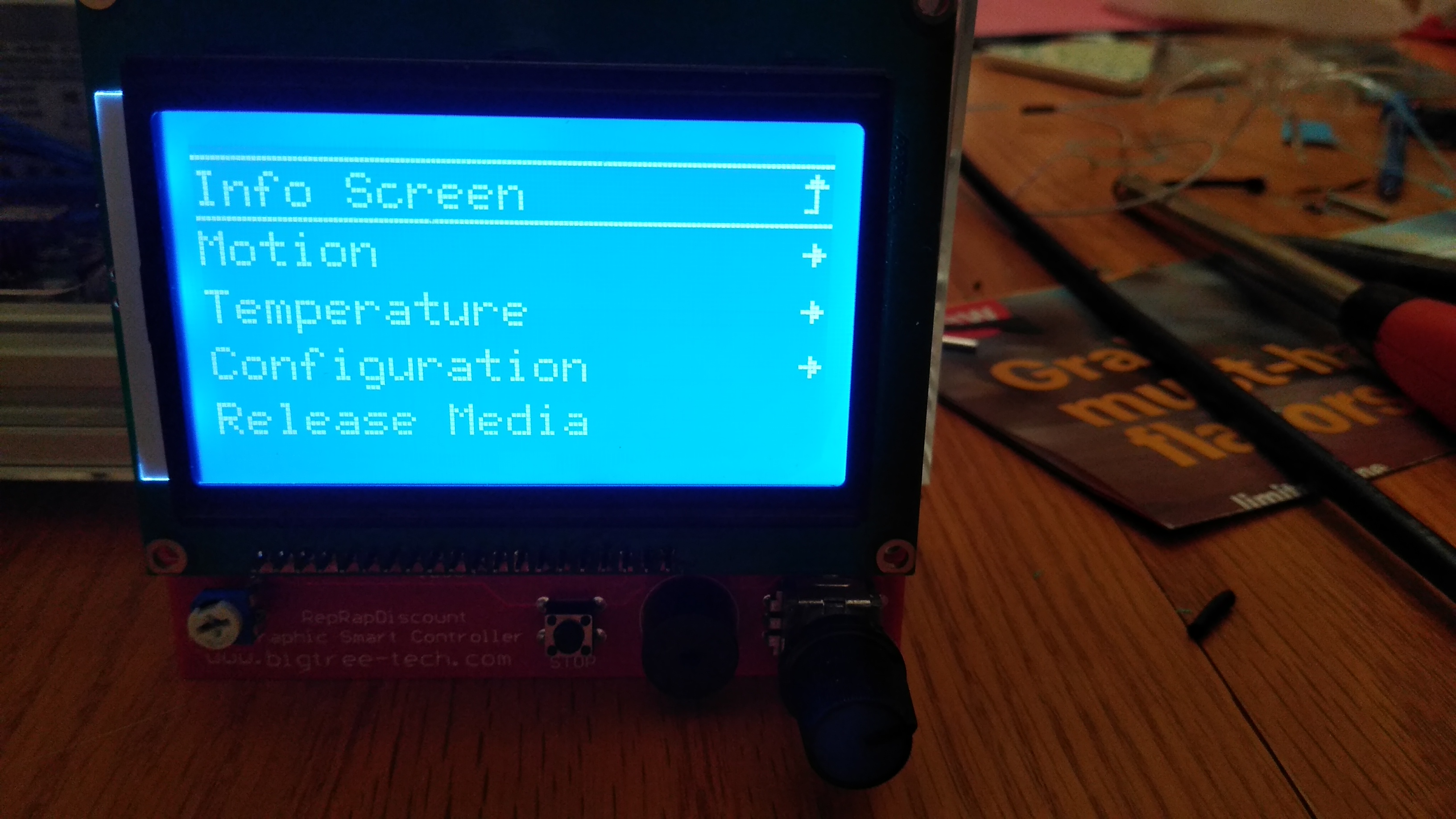
The problem is that I'm getting "garbage" on the LCD screen. This was working in a prior Marlin 2.0 version, but something changed in Marlin or the way Marlin is compiled?
Hardware:
- Marlin
- SKR 1.1
- Z-endstop inductive / BLTouch
- REPRAP_DISCOUNT_FULL_GRAPHIC_SMART_CONTROLLER
Timeline:
Prior to the April 2019 I was running Marlin 2.0 with inductive probe on the HEVO printer, bilinear bed leveling. LCD was working fine.
In April 2019 I switched to to a BL touch clone, recompiled Marlin with the necessary configurations. LCD was working fine
In November 2019 I decided to remove the BL touch and go back to the inductive probe. When I tried to recompile i was presented with re-compile problems because of a PlatformIO upgrade. Hence, I grabbed the latest copy of Marlin 2.0, updated the stock config to match my hardware, etc. I was able to compile, but was presented a issue with Bilinear bed leveling (stopped after probing 6 out of 9 points... was listed as a open issue at the time). Switched to another working bed leveling method that worked. Recompiled again. After running for several minutes the screen garbage appears and it's seems to be confined to the top section that shows the heater temp appears. To note, I have another printer with the same type of hardware setup, running the same marlin version with a re-arm board and it does not have this screen garbage issues. As a reminder this was working fine in a previous Marlin version on the printer in question. I'm also building a new printer with a new SKR 1.1. and same LCD that is also experiencing this issue, just so we can rule out the "hardware". I followed the recommendations to add/increase the delay, which seems to only delay the issue from appearing.
My Configurations
Required: Please include a ZIP file containing your Configuration.h and Configuration_adv.h files.
Steps to Reproduce
- Do a fresh git pull for Marlin
- compile with attached configuration.h
- install on SKR 1.1 board and REPRAP_DISCOUNT_FULL_GRAPHIC_SMART_CONTROLLER
Expected behavior: [What you expect to happen]
Screen should work like it did in a earlier version.
Actual behavior: [What actually happens]
Garbage appears on the LCD screen after a couple minutes of running.
Delay of 200:

Worst scenario:


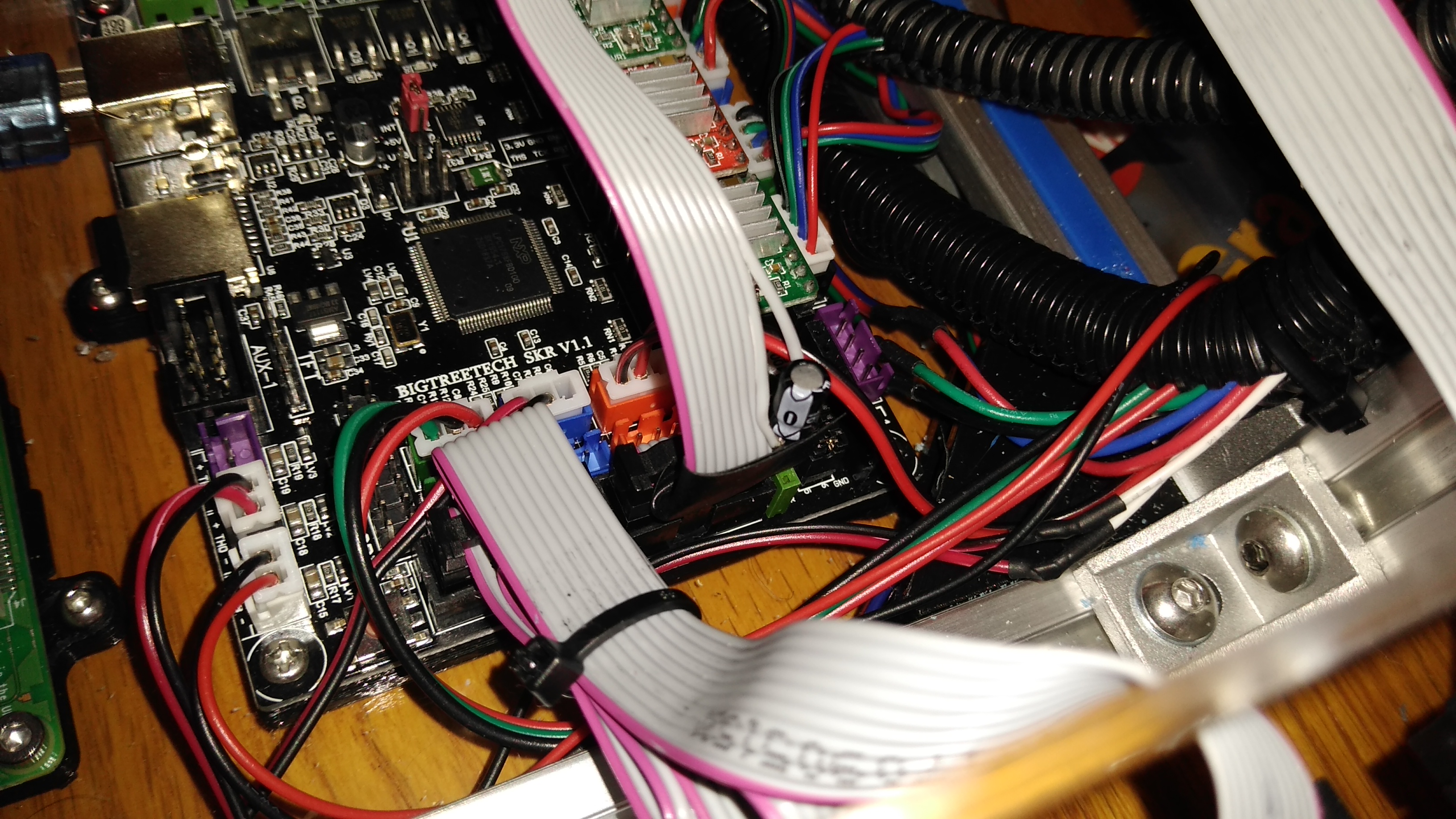
P.S. the pictures are from the new printer I'm building since it was more convenient to take them, but the LDC issue is identical on both printers.
Additional Information
- I can continue to play with the delays, but so far I'm at 450 and it still appears. The real question is what changed that caused the LCD to no longer work out-of-the-box?
 TriggerMeister
All 19 comments
Still not sure why this happened after a upgrade to two SKR v 1.1 boards, but I found certain references that seems that this happens more often:
/**
- LCD / Controller
* - As of 20 JAN 2019 only the REPRAP_DISCOUNT_FULL_GRAPHIC_SMART_CONTROLLER display has
- been tested with these settings. It can be connected to the SKR using standard cables
- via the EXP1 and EXP2 ports. Other displays may need a custom cable and/or changes to
- the pins defined below.
* - The SD card on the LCD controller uses the same SPI signals as the LCD, resulting in
- garbage/lines on the LCD display during SD card access. The LCD code mitigates this
- by redrawing the screen after SD card accesses.
*/
It also appears that certain pins are being reused for special purposes and folks reference additional noise on the pins:
// To minimize pin usage use the same clock pin as the display/SD card reader. (May generate LCD noise.)
#define TMC_SW_SCK P0_15
TriggerMeister
on 26 Dec 2019
Update: I was able to make the LCD work properly with just the regular USB power supply (changed the jumper). Anyone trying to duplicate this needs to use the internal power supply jumper setting. It appears that for whatever reason the 5V (I measured 4.8V actually) ended up being noisier post Marlin update. I know it will probably be dismissed as a hardware issue, but the board was running fine for long time with the same LCD. To add to the coincidences, I have another SKR v 1.1 board with the same LCD's that has the same problem. The LCD's have been verified on a Re-arm board and are working fine on it with the same Marlin version.
My solution to resolving the problem is to add a 100uF capacitor into the ribbon cable. This resolved the garbled screen issue. I still have to apply the same solution to the other board.

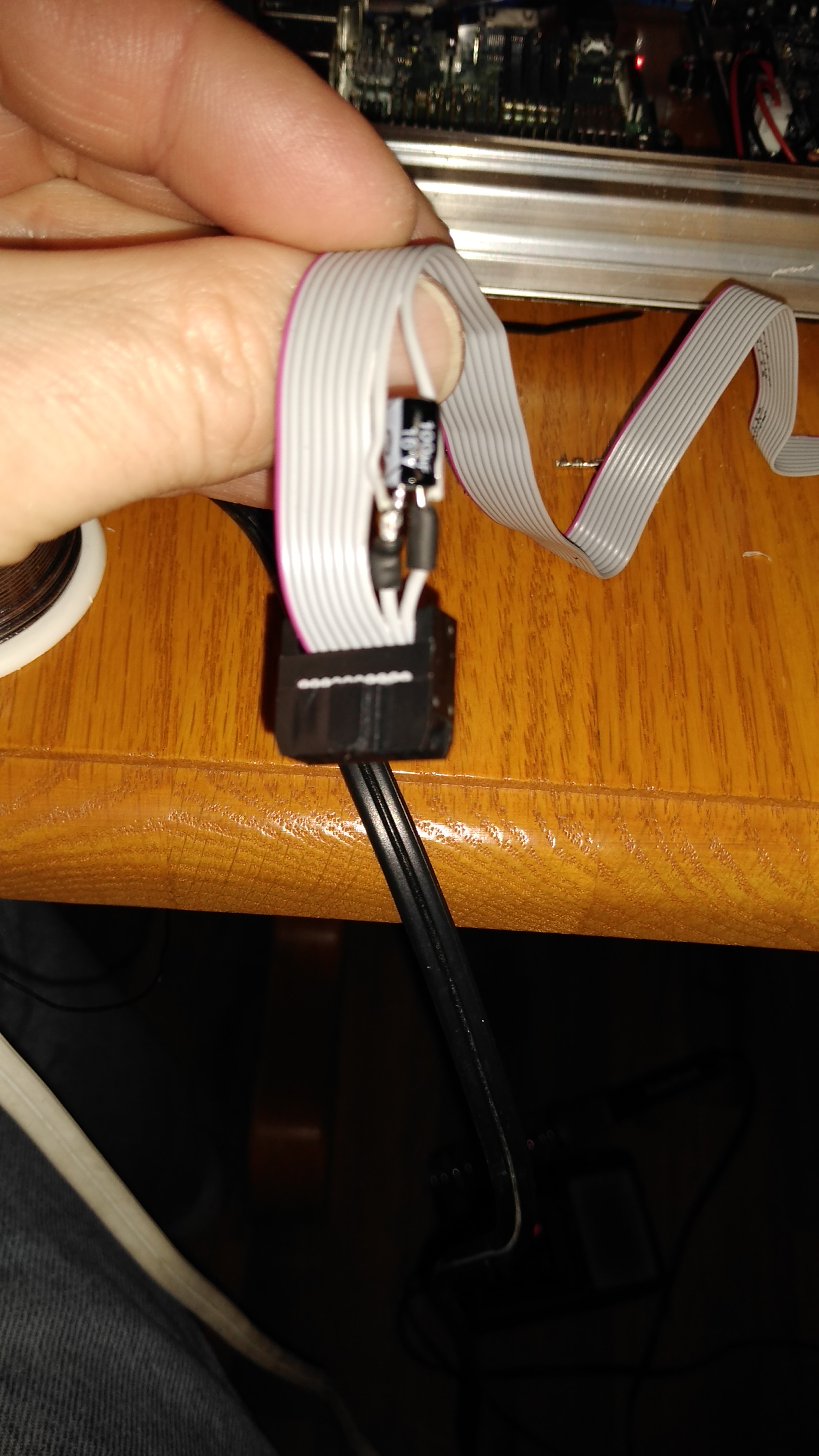
TriggerMeister
on 27 Dec 2019
Added a capacitor to the other printer today with the same setup. No screen garbage so far (yeah!) on either printer. I'm not sure why an updated/recompiled marlin after a PlatformIO update would cause more "noise" on the LCD. In a FB group someone suggested it may be caused by Intellisense and the way Marlin is compiled now after the update, which would make sense as I was not able to compile a working old version even after fixing the "upload_extra_script.py" of my previously working Marlin version.

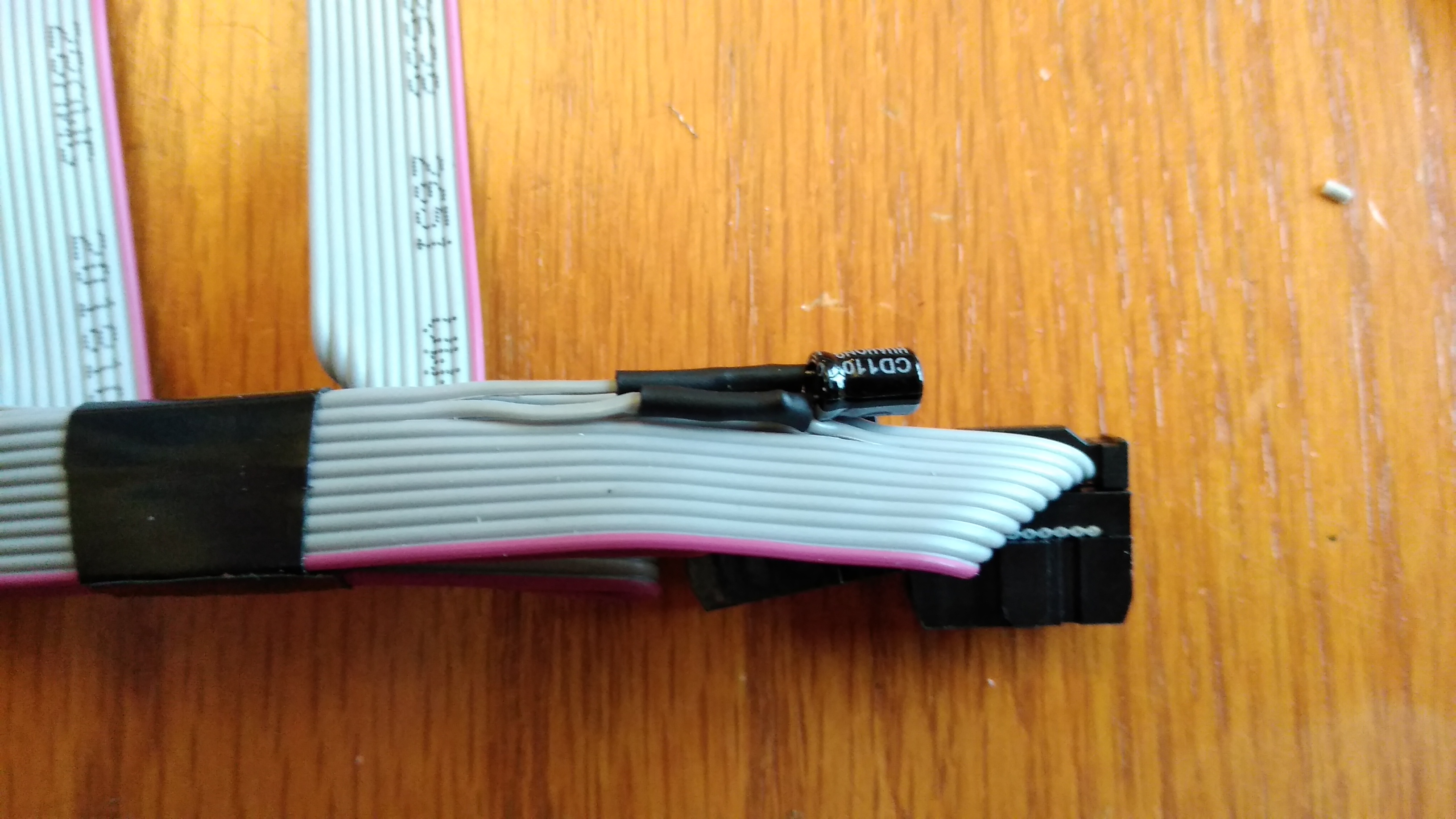
TriggerMeister
on 27 Dec 2019
Just wanted to add: I had the same issue when upgrading to 2.0, never had the issue before. Mine was able to be resolved in software by adding the following lines to config.h:
define ST7920_DELAY_1 DELAY_NS(0)
define ST7920_DELAY_2 DELAY_NS(250)
define ST7920_DELAY_3 DELAY_NS(250)
This seems to be a fix from older version of marlin, but I never had any problems before 2.0
also, my screen did not look quite as bad as yours, so maybe there is a hardware variable to it.
mine was (and always has been) compiled by sloeber, which I am pretty sure just uses the arduino compiler, but maybe not. I did upgrade sloeber recently, maybe that is what caused the screen glitch...
 mtraven
on 29 Dec 2019
mtraven
on 29 Dec 2019
One was worse than the other, but the capacitor solved it on both. The delay occasionally helped, but the longer the printer ran the more likely it was going to come back. Maybe the power converter to 5V is not as good as it is on other boards (e g. Re-arm). Just weird that it started after a upgrade....
TriggerMeister
on 29 Dec 2019
I am having other issues with 2.0 that led me to roll back to bugfix1.1.9. Interestingly, the screen problem came back. I guess I never flashed bugfix1.1.9, so I think the prev version I was running was just marlin 1.1.9. Meaning the problem (for me) started at bugfix1.1.9.
The cap is a clever fix, but what exactly is it doing? extending those delays in hardware?
also, what happens if they fix this is software, you would probably have to remove the caps, no?
it seems like, even though you have solved your problem, you still want to know what the root cause is? I am in the same boat, feels like a band aid at this point, really would like to know exactly what changed.
mtraven
on 30 Dec 2019
I do want to know what changed. Frankly I would have been better off buying the TFT instead of wasting days on this.
Here is what I know:
- I can't compile any old GitHub pulls and make it work like it used to.
- PlatformIO changed and that forced me to get a new pull, otherwise I had compile errors.
- If you use the USB power selection the LCD works fine.
- Adding a cap reduces the noise on the LCD power line and fixes the issue.
I KNOW it worked prior to this upgrade. I don't think Marlin changed something, but there is a dependency that changed and Marlin needs to ensure that dependency is met. I mean that the Platform IO is compiling differently and while it's fine for other boards the SKR seems to puke on the order possibly or how it is compiled. This may throw off the timing and the LCD.... Just guessing.
No, I will not remove the cap. There is no harm in keeping it even if Marlin is patched. It's cheap insurance.
TriggerMeister
on 30 Dec 2019
I had the same problem or at least a similar one. Mine display just worked fine if I unplugged it for a short time after marlin booted completely. For me the fix was to add the following lines to Configuration.h.
#define ST7920_DELAY_1 DELAY_NS(0)
#define ST7920_DELAY_2 DELAY_NS(0)
#define ST7920_DELAY_3 DELAY_NS(472)
The 472 are from the RepRap page. There is noted a 63 which is for a 16 MHz MCU. Since the SKR 1.3 (I'm using) has 120 MHz, I scaled it up accordingly. This is due to a slow LCD as the mentioned on the page.
I hope this helps some people. It may be a suitable fix to add a flag to the Configuration.h and then calculate the delay based on the MCU clock. Something like:
#define SLOW_LCD
 Kaiwol1990
on 6 Jan 2020
Kaiwol1990
on 6 Jan 2020
I had the same problem or at least a similar one. Mine display just worked fine if I unplugged it for a short time after marlin booted completely. For me the fix was to add the following lines to Configuration.h.
#define ST7920_DELAY_1 DELAY_NS(0)
#define ST7920_DELAY_2 DELAY_NS(0)
#define ST7920_DELAY_3 DELAY_NS(472)The 472 are from the RepRap page. There is noted a 63 which is for a 16 MHz MCU. Since the SKR 1.3 (I'm using) has 120 MHz, I scaled it up accordingly. This is due to a slow LCD as the mentioned on the page.
I hope this helps some people. It may be a suitable fix to add a flag to the Configuration.h and then calculate the delay based on the MCU clock. Something like:
#define SLOW_LCD
I think I went all the way up to 450, but then it ended coming back hours later. So maybe I just stopped short??? I do believe that there is something with the power applied and the clock speed, as the displays worked fine on USB power.
TriggerMeister
on 7 Jan 2020
@TriggerMeister so this one is not solved yet? i saw some hardware mods and wonder if its a hardware problem rather than a marlin one
 boelle
on 14 Jan 2020
boelle
on 14 Jan 2020
I don't have more time to burn on this, but I think is very weird that so many people experienced this issue after an upgrade. I guess nobody will try to figure out why this happened or try to trace it down. I think it's tied to a dependency and the issue may not be directly in Marlin. Thanks.
TriggerMeister
on 14 Jan 2020
I can confirm that i have experienced the same issue, but on another board (ramps 1.4), with the same firmware i have burned dozens of times, so i guess it might be some update to the u8glib library that messed something up. (arduino is the same, 1.8.10)
 italocjs
on 16 Jan 2020
italocjs
on 16 Jan 2020
what if vscode+platform.io extension is used?
arduino ide is filled with all sorts of options for errors
boelle
on 21 Jan 2020
@boelle i'll compile it with vscode to see if it persists without adding the delays. its a good guess
italocjs
on 21 Jan 2020
i also had all kind of problems with arduino ide, then i tried vscode and i have never looked back
boelle
on 21 Jan 2020
Hi
I changed the following data and my problem was resolved.
file:
Marlin-2.0.x\Marlin-2.0.x\Marlin\src\lcd\dogm\ultralcd_st7920_u8glib_rrd_AVR.h
line 44,45,46 :
define ST7920_DELAY_1 DELAY_NS(0)
define ST7920_DELAY_2 DELAY_NS(250)
define ST7920_DELAY_3 DELAY_NS(250)
Good luck
 SajjadShooshtari
on 31 Jan 2020
SajjadShooshtari
on 31 Jan 2020
@TriggerMeister
Please test the bugfix-2.0.x branch to see where it stands.
boelle
on 23 Jun 2020
Given the change that has occurred in Marlin since the last time this was active, I think it would be irresponsible to blindly apply new timings without having the hardware to test it.
Certainly many people are using these screens with new SKR (1.3 + 1.4) boards. If there is still a problem unique to SKR 1.1 boards, we'll need someone with the hardware to volunteer a bit of time to test a fix.
Given the silence and age of this issue, I'm going to close the issue. If you are still having to employ workarounds for this, please reply and we can re-open the issue and figure out an appropriate change to fix it.
 sjasonsmith
on 4 Jul 2020
sjasonsmith
on 4 Jul 2020
This issue has been automatically locked since there has not been any recent activity after it was closed. Please open a new issue for related bugs.
![github-actions[bot] picture](https://avatars2.githubusercontent.com/in/15368?v=4&s=40) github-actions[bot]
on 21 Sep 2020
github-actions[bot]
on 21 Sep 2020
Related issues
 Anion-anion
·
3Comments
Anion-anion
·
3Comments
 spanner888
·
4Comments
spanner888
·
4Comments
 Bobsta6
·
3Comments
Bobsta6
·
3Comments
 ceturan
·
4Comments
ceturan
·
4Comments
 modem7
·
3Comments
modem7
·
3Comments
Most helpful comment
Just wanted to add: I had the same issue when upgrading to 2.0, never had the issue before. Mine was able to be resolved in software by adding the following lines to config.h:
define ST7920_DELAY_1 DELAY_NS(0)
define ST7920_DELAY_2 DELAY_NS(250)
define ST7920_DELAY_3 DELAY_NS(250)
This seems to be a fix from older version of marlin, but I never had any problems before 2.0
also, my screen did not look quite as bad as yours, so maybe there is a hardware variable to it.
mine was (and always has been) compiled by sloeber, which I am pretty sure just uses the arduino compiler, but maybe not. I did upgrade sloeber recently, maybe that is what caused the screen glitch...