Marlin: [BUG] TMC2209 Sensorless Homing not working
Description
I installed TMC2209 from Fysetc on my SKR 1.3 of my CoreXY and tried to get sensorless homing to work. UART connection works fine, but X and Y endstops always show as "TRIGGERED".
Jumpers on the SKR are closed any I ensured that there is an electrical connection between the DIAG pin and the endstop.
I varied sensitivity from 0 to 250, but nothing changed.
Steps to Reproduce
Most recent Marlin 2.x bugfix
G28 XY
Expected behavior: Axis home
Actual behavior: Axis don't move, X/Y endstops are triggered
Additional Information
 TheNitek
All 120 comments
try reversing * _ENDSTOP_INVERTING
 Ludy87
on 1 Jul 2019
Ludy87
on 1 Jul 2019
I tried, but the sanity check won't let me:
"SENSORLESS_HOMING requires X_MIN_ENDSTOP_INVERTING and ENDSTOPPULLUP_XMIN when homing to X_MIN."
TheNitek
on 1 Jul 2019
maybe @teemuatlut can say something, why the behavior does not correspond to the TMC2130
Ludy87
on 1 Jul 2019
In SanityCheck.h it says
  // Stall detection DIAG = HIGH : TMC2209
  // Stall detection DIAG = LOW  : TMC2130/TMC2160/TMC2660/TMC5130/TMC5160
  #define X_ENDSTOP_INVERTING !AXIS_DRIVER_TYPE(X,TMC2209)
so I guess this is as intended. TMC2209 says HIGH is triggered, so I guess the above should be correct
TheNitek
on 1 Jul 2019
Does it work with sensorless homing uncommented in the config? Someone else on a BigTreeTech FB group was having issues with a CoreXY too.
 BioGeekJoey
on 1 Jul 2019
BioGeekJoey
on 1 Jul 2019
Just tried again and now the printer moves (not having a good sensitivity yet). I wonder if a power cycle was necessary. I'll try to investigate further ...
TheNitek
on 2 Jul 2019
Interesting: Resetting the SKR (via the reset button) does NOT reset the TRIGGER state of the TMCs. Right now my Y-Stepper is triggered forever
TheNitek
on 2 Jul 2019
Maybe this is similar to #8890 ?
TheNitek
on 2 Jul 2019
I noticed that after a power cycle (actual unplug, not the reset button) all (any all everything, not just TMC driver settings) are set to 0 even though the correct values are stored in eeprom and loading the eeprom manually (M501 or via lcd) will fix it.
BioGeekJoey
on 2 Jul 2019
I don‘t think this issue is related. After power on my settings are just fine.this is only about the TMCs
TheNitek
on 3 Jul 2019
It's possible that the stepper init for 2209 is still missing a step. We'll have to see whether it's a problem with TMCStepper or within tmc_util.* in Marlin.
 thinkyhead
on 3 Jul 2019
thinkyhead
on 3 Jul 2019
Hey, im having exactly the same issue except my endstops are now reading "open" on X/Y but the motor just stutters as if its sensitivity to sensorless homing is very low?
I have adjusted sensitivity from 0-255 and even taken the belt off my XY but the motor still just turns maybe 2/5mm before stopping on a home command?
this is very bizzare as i can read positive voltage from TMC2209 DIAG1 to Xmin signal pin?
running SKR 1.3 /TMC2209/ COREXY just as OP
heres my M122
14:29:08.452 : X Y E
14:29:08.452 : Address  1 1 1
14:29:08.452 : Enabled  false false false
14:29:08.452 : Set current 800 800 900
14:29:08.561 : RMS current 795 795 887
14:29:08.561 : MAX current 1121 1121 1251
14:29:08.561 : Run current 25/31 25/31 28/31
14:29:08.561 : Hold current 12/31 12/31 14/31
14:29:08.561 : CS actual  12/31 12/31 14/31
14:29:08.671 : PWM scale 35 31 16
14:29:08.671 : vsense  1=.18 1=.18 1=.18
14:29:08.671 : stealthChop true true false
14:29:08.671 : msteps  16 16 16
14:29:08.782 : tstep  max max max
14:29:08.782 : pwm
14:29:08.782 : threshold  29 29 271
14:29:08.782 : [mm/s]  123 123 30
14:29:08.782 : OT prewarn false false false
14:29:08.782 : OT prewarn has
14:29:08.782 : been triggered false false false
14:29:08.782 : off time  4 4 4
14:29:08.891 : blank time 24 24 24
14:29:08.891 : hysteresis
14:29:08.892 : -end  2 2 2
14:29:08.892 : -start  1 1 1
14:29:08.892 : Stallguard thrs 3 4 0
14:29:08.892 : DRVSTATUS X Y E
14:29:08.892 : stst  * * *
14:29:09.000 : olb
14:29:09.000 : ola
14:29:09.000 : s2gb
14:29:09.111 : s2ga
14:29:09.111 : otpw
14:29:09.111 : ot
14:29:09.111 : 157C
14:29:09.222 : 150C
14:29:09.222 : 143C
14:29:09.222 : 120C
14:29:09.222 : s2vsa
14:29:09.222 : s2vsb
14:29:09.222 : Driver registers:
14:29:09.222 : X 0xC0:0C:00:00
14:29:09.222 : Y 0xC0:0C:00:00
14:29:09.223 : E 0x80:0E:00:00
14:29:09.223 : Testing X connection... OK
14:29:09.331 : Testing Y connection... OK
14:29:09.331 : Testing E connection... OK
14:29:09.331 : ok
any help would be appreciated!
 VOIDREP
on 3 Jul 2019
VOIDREP
on 3 Jul 2019
Interesting, even with a manual switch endstop override im only getting "Open" status, can somebody explain the need for enabling "#define SENSORLESS_HOMING"?
im assuming this is only necessary for the TMC drivers themselves? and does not influence the actual endstop configuration in any way? - i say this because when hooking up a z probe in Z-min for example no software change is necessary?
thanks!
VOIDREP
on 3 Jul 2019
Ok that's strange (CODEPENDENT_XY_HOMING off for now):
G1 X1
ok
M119
Reporting endstop status

x_min: open
y_min: TRIGGERED
z_min: open
ok
G1 X1
ok
M119
Reporting endstop status
x_min: open
y_min: open
z_min: open
ok
G1 X-1
ok
M119
Reporting endstop status
x_min: open
y_min: TRIGGERED
z_min: open
ok
G1 X-1
ok
M119
Reporting endstop status
x_min: open
y_min: open
z_min: open
ok
Next observation:
I did
G1 Y1
M119
a few times (in relative mode) and that's what I got:
ok
Reporting endstop status
x_min: open
y_min: open
z_min: open
ok
ok
Reporting endstop status
x_min: TRIGGERED
y_min: open
z_min: open
ok
ok
Reporting endstop status
x_min: open
y_min: open
z_min: open
ok
ok
Reporting endstop status
x_min: open
y_min: open
z_min: open
ok
ok
Reporting endstop status
x_min: open
y_min: TRIGGERED
z_min: open
ok
ok
Reporting endstop status
x_min: open
y_min: open
z_min: open
ok
ok
Reporting endstop status
x_min: TRIGGERED
y_min: open
z_min: open
ok
ok
Reporting endstop status
x_min: open
y_min: open
z_min: open
ok
ok
Reporting endstop status
x_min: open
y_min: TRIGGERED
z_min: open
ok
I tried to reflash and I got USB not recognised so in the end I returned the board and now have a replacement, I'll check to see if behaviour is the same tomorrow hopefully
VOIDREP
on 5 Jul 2019
Getting same problem, tried many things but it's always TRIGGERED. However if i return to mechanical endstops it works. If // Stall detection DIAG = HIGH : TMC2209, the pullup doesnt make sense.
Also the TMC2209 on E not working with LIN_ADVANCE ON and SQUARE_WAVE_STEPPING OFF
 sn4k3
on 6 Jul 2019
sn4k3
on 6 Jul 2019
I set up a bench test today with the new SKR 1.3, going to check these, i also have a new revision of TMC2209's (FYSETC V2.1) they seem to be setup differently to my FYSETC V2.0 so ill give them a whirl as well
VOIDREP
on 8 Jul 2019
Can you post pictures of V2 and V2.1 so I can compare?
TheNitek
on 8 Jul 2019
So please forgive my potato vision camera: https://imgur.com/a/cGOylQL
the only difference i can see visually on the V2.1 is the two 0 Ohm resistors across the PDN Line jumper pads instead of the single one on the V2.0
However, looking at the IC itself they have done a much better job soldering it on the V2.1 boards i have recieved with the markings clearly visible compared to the V2.0 - i hope they didnt wash these boards lol
also i found latest Marlin 2.0 sometimes when flashed with Platform.io bricks the SKR 1.3 - had to reflash Smoothie binary included in the bigtreetech github folder back to the flash storage and recompile fresh version of marlin 2.0 one setting at a time, not sure if its an actual setting within Marlin yet. kept coming up with unrecognised USB device and i triple checked the serial settings?
VOIDREP
on 8 Jul 2019
ok so I think I narrowed it down to #define PIDTEMPBED, enabling this stops my SKR from working? im sure i had it enabled before though.
VOIDREP
on 8 Jul 2019
Ok it just gets weirder and weirder, got the V2.1 TMC2209 drivers installed and got no UART on any of them, replaced it with a known good V2.0 and got UART...so I buzzed out the 0 OHM resistors... nothing... no circuit.
solder bridged over the 0 Ohm resistor...all working fine on UART!
id inspect the jumper 0 ohm resistors on the FYSETC TMC2209 boards if your having UART issues
i would check the DIAG resistors/links but its pretty late, If my sensorless endstops still dont work thats the next thing im going to inspect.
VOIDREP
on 8 Jul 2019
I kinda have the same sort of problem.
I don't want to use stallguard yet so i have my default ender3 endstops.
The endstops only work when i remove the tmc2209 from my skr1.3
If i hold the endstop, press m119 i see triggered, if i let go it says open, all good
When i add my tmc2209 to the board, do the same thing, the endstop status allways stays open
Stallguard is disabled i guess?
m122: Stallguard thrs 0 0 0 0
 spazwart
on 10 Jul 2019
spazwart
on 10 Jul 2019
Pull out the diag jumpers.
 teemuatlut
on 10 Jul 2019
teemuatlut
on 10 Jul 2019
Pull out the diag jumpers.
Thank you so much!
This solved all my problems, I feel so dumb!
Thanks again!!
spazwart
on 10 Jul 2019
@spazwart What board you use? I have SKR1.3 + ender3 and endstops work without remove diag jumpers. While i have sensorless home ON they don't work and printer react to mechanical endstops. If i remove endstop cable it's always triggering
sn4k3
on 11 Jul 2019
@sn4k3 I have the SKR1.3, I have my config in github.
I put the endstop cables on the SKR in the G and S pins in the endstop min pins.
spazwart
on 11 Jul 2019
Please create another issue if you have mechanical endstops. This issue is about sensorless homing issues with additional endstops.
TheNitek
on 11 Jul 2019
I am having the same issue on RAMPS 1.4. Reading 5V all the time from DIAG1 pin and when I hit Homing on X or Y the motor moves in opposite direction (normal if the home is TRIGGERED, as it is).
I have tmc2209 on X and Y and tmc2208 on Z and E0 using RAMPS 1.4 with arduino mega 2256.
I have servo motor with endstop button mount for mesh bed leveling and it is switching from open to triggered without touching anything and the servo is flickering. Can it be the signal waves or something else? I don't know...
before it was fine - Marlin 1.1.9 and tmc2208 on X and Y and drv8825 on Z and E0
 bgutsev
on 12 Jul 2019
bgutsev
on 12 Jul 2019
I've solved the problem with tmc2209 from Fysetc on an SKR 1.3 board with sensorless homing. You only have to set one jumper under the driver board vertikal. Looking to the SKR 1.3 board from usb side you can see under the drivers 12 pins. I use the X and Y driver. Begin counting down left.
10 11 12
07 08 09
04 05 06
01 02 03
For adressing the tmc2209 uart at 0 set no jumper. To use uart on SKR 1.3 set the jumper vertikal between 02 and 05. Now sensorless homing is running well. Please look at the sensibility value. 255 is the highest sensibility and 0 is no sensibility. A good value for testing is 150. In this way I can stop the x and y axis by while homing. It runs! thanks to Borg on the 3d-drucker community & forum. He tested the watterott drivers but the have an other layout and the driver isn' t running with sensorless homing in my constellation. Good luck while testing.
 BenneGehl
on 25 Jul 2019
BenneGehl
on 25 Jul 2019
How did you solder the pads on the TMC2209? Did you have to set to jumper for sensorless homing or did your UART connection also not work without the jumper?
TheNitek
on 25 Jul 2019
All the pads are looking down. I've used the diagnotic pin too and I've jumpered this pin to the endstop. If the jumper from my last Post isn't set the uart is not running. Von meinem Samsung
BenneGehl
on 25 Jul 2019
Did you solder anything on your tmc2209? I don‘t think this solves my sensorless homing issue, since UART is working fine for me already. I just soldered the tripple pad on the bottom to enable it - no jumpers needed.
TheNitek
on 25 Jul 2019
Only the diagnotic pin and the pin near him. All the pins used from skr 1.3 are connected. You Know-how I used Fysetc driver not Watterott.Von meinem Samsung Galaxy Smartphone gesendet.
BenneGehl
on 25 Jul 2019
Ok, since I seem to be the only one having these problems and this issue doesn't progress anywhere I'm closing this. By now I suspect mechanical issues, so maybe this is unrelated to the TMCs.
TheNitek
on 28 Jul 2019
Just stumbled upon this thread. Too bad you've already closed it, since I do seem to have the same problem with my MKS TMC2209s on a MKS SGEN_L Board. Whatever I try, axis will only move couple mm, if any, and trigger the endstop.
I've also disabled the sanitycheck and tried inverting X and Y endstops or disabling pullups. But nothing has worked so far.
 3D-DIYde
on 3 Aug 2019
3D-DIYde
on 3 Aug 2019
Just stumbled upon this thread. Too bad you've already closed it, since I do seem to have the same problem with my MKS TMC2209s on a MKS SGEN_L Board. Whatever I try, axis will only move couple mm, if any, and trigger the endstop.
I've also disabled the sanitycheck and tried inverting X and Y endstops or disabling pullups. But nothing has worked so far.
Just like me, sensorless home doesn't work whatever i try. UART works ok and have jumper on XDIAG and YDIAG. With correct continuty from TMC DIAG to X_MIN and Y_MIN so connections are all ok
sn4k3
on 3 Aug 2019
I find if i set stealthchop the sensorless home works. But not in spread mode. The sensorless home only works on stealthchop ?
sn4k3
on 6 Aug 2019
As per the TMC2209 data sheet

 Christopher-Dom
on 8 Aug 2019
Christopher-Dom
on 8 Aug 2019
sanity scheck should be added or a comment near SENSORLESS_HOME to avoid similar trouble.
Same for Z probe with DIAG or damage will occur in spread mode
sn4k3
on 8 Aug 2019
Agreed. I have set up my SKR 1.3 with Fysetc TMC 2209 v2.0. Tried running sensorless homing and it seems to have stuffed up my X_MIN signal. Can't run mechanical endstops on this anymore it always stays in one state either "TRIGGERED" or "open". Measured all voltages from the 1K, 10K, and sensor wire and the voltages change. So I can only assume that the LPC1768 is stuffed.
Christopher-Dom
on 8 Aug 2019
Can't run mechanical endstops on this anymore it always stays in one state either "TRIGGERED" or "open". Measured all voltages from the 1K, 10K, and sensor wire and the voltages change. So I can only assume that the LPC1768 is stuffed.
To use the mechanical again, you need to remove the DIAG jumper from motherboard
sn4k3
on 8 Aug 2019
Yep removed them still no change to the state even though the voltage still toggles between 4.6V and 0.07V on the signal terminal.
Christopher-Dom
on 8 Aug 2019
Yep removed them still no change to the state even though the voltage still toggles between 4.6V and 0.07V on the signal terminal.
Looking at datasheet you should never have 4.6V, They have a pullup from 3.3V, so should be 3.3V when open, and 0V when closed, check if wiring is correct and good. Also check if the 1K resistor still good. Other than that damage a CPU port without affect other stuff seens hard to happen, they are also 5V tolerant.
On Marlin you also should have PULLUPS and inverting to false
sn4k3
on 8 Aug 2019
Thank you for the advice :)
On the sensor pin side of the 10K resistor it is 4.6V (power coming from the endstops circuit board). On the CPU side of the 10K pin is 3.3V. I will change the Pullups now and check to see if toggeling them works. From my understanding the board has 10K pullup resistors so changing the marlin code does not change anything. Is this correct?
Christopher-Dom
on 8 Aug 2019
Changed the pullups and still stays in the same state. Will have to buy a new board and test it. The funny thing is they worked when I had TMC2100's in.
Christopher-Dom
on 8 Aug 2019
I might even try resoldering the 1k resistors see if that fixes it.
Christopher-Dom
on 8 Aug 2019
No, don't remove resistor.
Do basic test first.
With multimeter on beep mode put the probes on each pin of the sensor cable, press switch, it must beep = ok, otherwise switch is damaged.
If ok put in ohm mode and probe the ends of the 1k resistor. It must give you a 1k reading. If open or huge value then resistor is bad.
Do that with power off
sn4k3
on 8 Aug 2019
I had the same issue with my Watterott TMC2209. Their Diag pin is incompatible with the Skr 1.3. I used some Jumper wire to bridge the pin to the endstop.
 MStorm90
on 8 Aug 2019
MStorm90
on 8 Aug 2019
Changed the pullups no love there, put a diode in revers on the signal so no current can flow from the endstop to the board, no love there, activated pulldown resistors no love.
Did the beep test with switch on and off and kept one probe on the switch end of the signal wire and the other probe on the plug side of the resistors 10K, 1k, 1uF cap all beeped.
The 1k resistor is 1k.
Attaching the Diag to the endstop signal pin directly leaves the endstops "TRIGGERED".
Another point is that I changed the pin numbers in marlin so my x_min was set to the x_max plug and the endstops behaved normally when plugged into the x_max plug.
Christopher-Dom
on 9 Aug 2019
I am having a very similar issue with the Fysetc 2209 and the Fysetc F6 board.
1) UART is communicating with the 2209
2) DIAG is connected properly (checked with multimeter)
3) Stepper motor moves properly
Upon startup:
M119 shows open on Y axis.
Upon Homing:
Y doesn't move toward the min at all and bounces like it hit the endstop, shows "TRIGGERED" on M119.
Then, no matter what I do with Y after that or what sensitivity is set (0 -250), Y endstop is ALWAYS triggered and the Diag pin is putting out 5V. I have verified that it puts out 0V on startup. Looks like its stuck upon homing call?
Also, during M122, SG_result is blank - not even zero
 paulpenney
on 14 Aug 2019
paulpenney
on 14 Aug 2019
@paulpenney are you in stealchop mode on XY?
sn4k3
on 14 Aug 2019
Yes I have stealthchop enabled on both.
On Wed, Aug 14, 2019 at 10:46 AM Tiago Conceição notifications@github.com
wrote:
@paulpenney https://github.com/paulpenney are you in stealchop mode on
XY?—
You are receiving this because you were mentioned.
Reply to this email directly, view it on GitHub
https://github.com/MarlinFirmware/Marlin/issues/14464?email_source=notifications&email_token=AFH7FWOQB5ZEJ2UI33XTAZDQEQLCTA5CNFSM4H4UI2K2YY3PNVWWK3TUL52HS4DFVREXG43VMVBW63LNMVXHJKTDN5WW2ZLOORPWSZGOD4JA32A#issuecomment-521276904,
or mute the thread
https://github.com/notifications/unsubscribe-auth/AFH7FWNKT4WHU27CNPTHWNDQEQLCTANCNFSM4H4UI2KQ
.
paulpenney
on 14 Aug 2019
@paulpenney You removed old endstops? Also DIAG pin reach X MIN and Y MIN? SENSORLESS_HOME activated on firmware?
About sensivity start with 110, verify that sensivity is set because if you just change on firmware it will not change since value is written at EEPROM once and read every time you boot. Use M914 X110 Y110 and M500 to fix the value
sn4k3
on 14 Aug 2019
Old endstops never existed - I was running 2130s with sensorless before. Diag is confirmed to reach the pins confirmed with a multimeter from the driver itself. I have tried sensitivities 20, 50, 80, 120, 150, 200, 230, 250 with the same behavior, and I have I have refreshed the eeprom and checked M914 before every test.
paulpenney
on 14 Aug 2019
Also you updated marlin to lastest master? 2130s require inverted logic compared with 2209
sn4k3
on 14 Aug 2019
I finally received my BQ TMC2209 and sensorless homing just works. So I am quite sure now this an issue with the Fysetc drivers
TheNitek
on 15 Aug 2019
Mine are bought from watterott. And I am using ramps. Shall I connect DIAG pin through a resistor to the endstop? And what resistor I have to use that way??
bgutsev
on 15 Aug 2019
Mine are bought from watterott. And I am using ramps. Shall I connect DIAG pin through a resistor to the endstop? And what resistor I have to use that way??
You don't necessary need the resistor. But 1K is OK
sn4k3
on 15 Aug 2019
I finally received my BQ TMC2209 and sensorless homing just works. So I am quite sure now this an issue with the Fysetc drivers
As you have both you can probe them. See if Fysetc 2209 ic diag pin goes to DIAG jumper
sn4k3
on 15 Aug 2019
@TheNitek I received them also today. You might have a documentation for me, I'm using the SKR 1.3 and getting always triggered. If I invert logic I receive
#error "SENSORLESS_HOMING requires X_MIN_ENDSTOP_INVERTING and ENDSTOPPULLUP_XMIN when homing to X_MIN."
 d3dx9
on 15 Aug 2019
d3dx9
on 15 Aug 2019
@TheNitek I received them also today. You might have a documentation for me, I'm using the SKR 1.3 and getting always triggered. If I invert logic I receive
#error "SENSORLESS_HOMING requires X_MIN_ENDSTOP_INVERTING and ENDSTOPPULLUP_XMIN when homing to X_MIN."
You can't invert logic.
Read last part: https://github.com/MarlinFirmware/Marlin/issues/14464#issuecomment-521299682
sn4k3
on 15 Aug 2019
Okay, thank you @sn4k3 - I will try it.
d3dx9
on 15 Aug 2019
@sn4k3 - got it running. Thanks. :)
d3dx9
on 15 Aug 2019
Also you updated marlin to lastest master? 2130s require inverted logic compared with 2209
I finally received my BQ TMC2209 and sensorless homing just works. So I am quite sure now this an issue with the Fysetc drivers
As you have both you can probe them. See if Fysetc 2209 ic diag pin goes to DIAG jumper
I tried it with the latest marlin and the same result. Logic was inverted properly (set to false or else it errors out like d3dx9 posted).
I measured the following connections with a multimeter:
1) Diag pin to diag port on the back of the chip - check
2) Diag pin to X endstop - check
3) Voltage at startup - 0, check
4) Voltage after homing (doesn't home properly though) - 5v
Then the voltage just stays stuck at 5v. FYSETC TMC2209 V2.0. I am recieving an OK connection from the axis as well and M122 seems normal besides the absence of any stallguard reading (two other TMC2130's show stallguard as 0, the 2209 is blank).
paulpenney
on 15 Aug 2019
I am tempted to just try it with a normal MKS gen and hand wiring it and seeing if that solves the problem. On the Fysetc F6, the 2208 /2209 RX and TX lines join together, but only the TX like has a 1K resistor - the RX line does not. Would this have something to do with it? Does the chip need to receive instructions to reset it's state after sensorless homing is complete and maybe that signal is not getting through?
paulpenney
on 16 Aug 2019
I am tempted to just try it with a normal MKS gen and hand wiring it and seeing if that solves the problem. On the Fysetc F6, the 2208 /2209 RX and TX lines join together, but only the TX like has a 1K resistor - the RX line does not. Would this have something to do with it? Does the chip need to receive instructions to reset it's state after sensorless homing is complete and maybe that signal is not getting through?
That's the way UART connection is made, but sensorless doesn't depend on UART. On 2209 PCB diag pin should directly connect to diag jumper without any resistor on it own pcb. You can try with MKS, you can directly tie diag to X endtop signal, no resistor required to test that
sn4k3
on 16 Aug 2019
Hello
Did you solve this problem?
I'm waiting for TMC2209 and the SKR 1.3
I want to make parking on the X and Y axes.
 rusnob
on 17 Aug 2019
rusnob
on 17 Aug 2019
Anyone had success here ? Using TMC2209 and SKR 1.3
 saikek
on 29 Aug 2019
saikek
on 29 Aug 2019
Not here. I gave up after damaging 3 endstop circuits. UART and 2 A are good enough features for me. Will wait for Bigtree tech’s 2209’s to come back in stock
Christopher-Dom
on 29 Aug 2019
Me neither. But I have not given up yet. I just had some other projects to complete.
I do now have MKS 2209 drivers as well as two by Watterott. First thing I noticed: Watterott has switched to V2 Layout. This means the DIAG Pin is now in a different position. So direct attachment to endstops, like in SKR or in my case MKS SGEN_L will not work.
Also Watterott V2 drivers use MS3 Pin as SPRD, meaning that you will propably not be able to use the onboard UART of your board, but will instead have to go with manual wiring again - bummer.
3D-DIYde
on 29 Aug 2019
I've received TCM2209 v1.1 and v1.2 from Fystek and another two from BigTreeTech.
So the issues that you are experiencing is related to hardware pinout (TMC2208 <-> SKR v1.3) or rather software (Marlin 2.0 or TMC220* library) ?
saikek
on 29 Aug 2019
Just wanted to drop that information regarding pinout for everybody, who might stumble across it.
I still think my problem might be software related. Since I have an MKS Mainboard and MKS drivers, made for that board, one should think they fit - hardware wise. And apparently they do, since UART is not an issue for me. Communication with drivers seems to work fine, M122 reports no errors.
It's only that sensorless homing won't trigger correctly
3D-DIYde
on 29 Aug 2019
That’s what I got up too. After putting the Fysetc and trying sensorless homing on my SKR1.3 the endstop sense pins are now stuck in a permanent state. Even though the voltage changes on the input. But UART works so that’s nice.
Christopher-Dom
on 29 Aug 2019
I just wanted to add that I am also having issues with sensorless homing not working using genuine Watterott 2209s on an SKR 1.3. I even tried jumping the diag pin directly to the corresponding endstop pins with no luck.
I've tried sensitivity values from 0-255 and endstops are triggered almost immediately no matter what sensitivity I set (M502/M500 is ran after each flash, though the issue still persists when using the TMC Drivers menu to tune on the fly).
Is sensorless homing just not compatible with the Watterortt 2209/SKR 1.3 combo? I've ran genuine Watterott 5160s with sensorless homing on the same hardware for the last four months without a hitch.
 thisiskeithb
on 29 Aug 2019
thisiskeithb
on 29 Aug 2019
@thisiskeithb have you tried the other pin on the side of the driver? I also didn't notice, they changed pins and soldered everything as i was used to. But upon closer inspection on their github I've noticed, DIAG is now another pin
3D-DIYde
on 29 Aug 2019
@3D-DIYde: I think you're on to something. I looked at the Watterott 2209 schematic/board layout again and the diag pin is moved from where the SKR 1.3's diag input is located.
Why oh why did Watterott have to move the diag pin location?!
So what I have is the index pin soldered on the 2209 instead of the diag pin. I'll so some desoldering and report back :)
thisiskeithb
on 29 Aug 2019
But upon closer inspection on their github I've noticed, DIAG is now another pin
Yep. That was the issue. I was staring at the schematic/drawing for too long apparently.
You'll have to run a jumper wire from the from the diag pin (closest to the EN pin) on Watterott 2209 V2s to the endstop pin.
Edit:
Looking at the SKR 1.3/testing the two pins on the red header below the driver sockets, it appears that the outside pin (closest to the EN pin on the driver socket/colored blue in the diagram below) is not connected to anything, so you could probably jump the two pins (circled red & blue below) via solder bridge on the bottom of the board to retain the original function of sensorless homing jumpers with no ill effects and no extra wires (assuming you only use ONE pin from the correct diag pin on each driver instead of both). I'll test this out shortly and report back.

Edit-edit:
Jumping the two pins outlined in the graphic above on the bottom of the SKR 1.3 and only using a single pin off the diag spot on the Watterott TMC2209 V2 allows sensorless homing to work!
No extra wires required, but you have to be careful if swapping drivers in the future to make sure only a single pin is used for diag/sensorless homing so you don't short anything out.

thisiskeithb
on 29 Aug 2019
The INDEX Pin gives a short pulse every full step, as far as I know.
I’ve had a chat with the CEO of Watterott about the new layout and he told me they will be implementing this V2.0 layout into all their StepSticks soon. Don’t know why, maybe to annoy all the Chinese copycats who profit from Watterotts work?!
3D-DIYde
on 29 Aug 2019
Don’t know why, maybe to annoy all the Chinese copycats who profit from Watterotts work?!
I don't know, but they made their stepsticks open source, right? Not that it would stop anyone from reverse engineering their boards.
thisiskeithb
on 29 Aug 2019
I don't know, but they made their stepsticks open source, right?
Yes, they did. But I think the specific CC License they chose at least requires any derivate to attribute the author.
3D-DIYde
on 29 Aug 2019
OK @thisiskeithb
I just accidentally did just what you described in your photos above :D And it worked!
3D-DIYde
on 29 Aug 2019
I just accidentally did just what you described in your photos above :D And it worked!
Good, because I am not responsible for any damage to your board/drivers/printer 🤣
thisiskeithb
on 29 Aug 2019
Hi,
@TheNitek , did solution proposed by @thisiskeithb is working for you?
I have exactly the same issue, SKR1.3, TMC2209 V2.0 from Fysetc.
I am not sure the TMC2209 from Watterott and Fysetc are the same.
Thanks for your help, you are doing a great job.
BR
LC
 miserovitch
on 5 Sep 2019
miserovitch
on 5 Sep 2019
I am not sure the TMC2209 from Watterott and Fysetc are the same.
You'll have to track that down to confirm if you need to mod your board like I did.
Edit: Here's a post from Fysetc's forum and the user just had to solder some pads on the driver to get them working on the SKR 1.3.
thisiskeithb
on 5 Sep 2019
@thisiskeithb I can confirm that this doesnt work, since the issue is still present on the v2.1 version of the fystec 2209s
 michaelduffy123
on 5 Sep 2019
michaelduffy123
on 5 Sep 2019
Arg! Thanks for the feedback.
In the meanwhile I will put back all endstops on my printer...
miserovitch
on 6 Sep 2019
From the comments here I seem to conclude that when using sensorless homing, one should connect the DIAG pin of the TMC2209 to the endstop pin of the relevant axis, is that correct?
I was trying to get this working on my SKR Mini E3 board, but didn't yet change my hardware connection. I thought MarlinFW would just poll the UART to see if an axis had stalled, and trigger endstop that way.
 vyruz1986
on 9 Sep 2019
vyruz1986
on 9 Sep 2019
@vyruz1986 For clarification use this for what you propose.

michaelduffy123
on 10 Sep 2019
Ok So I have checked for Ω, There seems to be no continuity on my board between the diag pin and the jumper as shown , I think that has solved my issue, I will report back
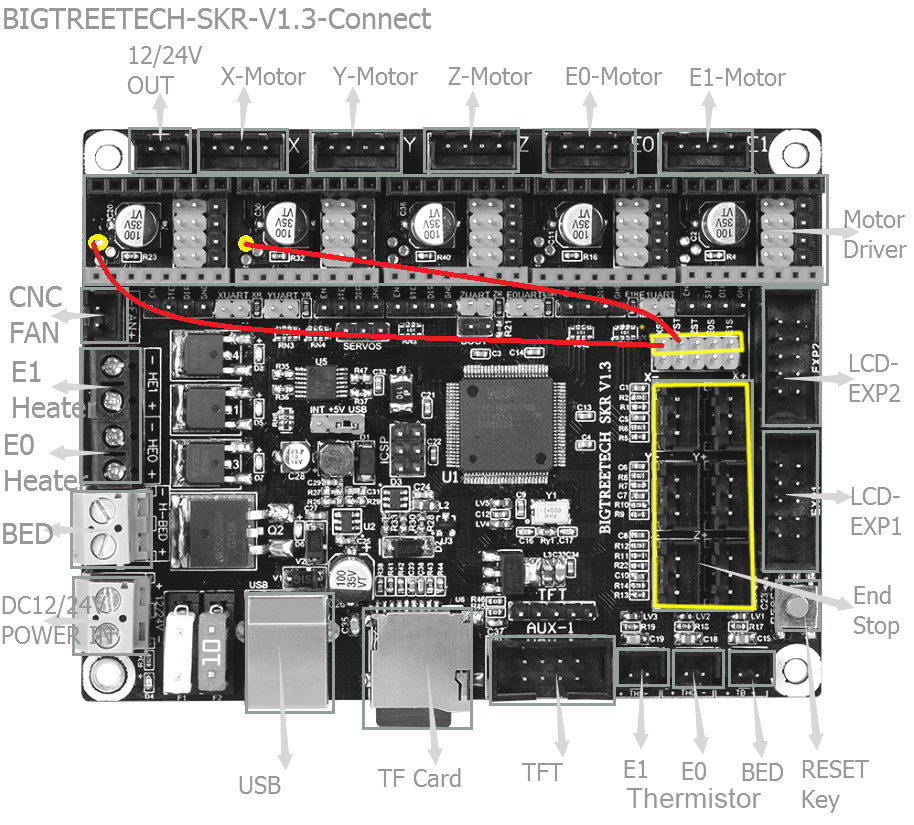
michaelduffy123
on 10 Sep 2019

The Red boxes represent the header jumpers to be fitted for X and Y homing
The Orange lines are where they are wired to on board.
I just checked on my SKR1.3
 Grogyan
on 11 Sep 2019
Grogyan
on 11 Sep 2019
Any progress in fixing this?
 Sjoerd
on 22 Sep 2019
Sjoerd
on 22 Sep 2019
Well, I got an email directly from Fysetc saying that 2.0 2209’s don’t have sensorless homing working properly, and neither do the 2.1’s – but the 2.1s have UART working. Lol.
Sent from Mail for Windows 10
From: Sjoerd
Sent: September 22, 2019 11:59 AM
To: MarlinFirmware/Marlin
Cc: paulpenney; Mention
Subject: Re: [MarlinFirmware/Marlin] [BUG] TMC2209 Sensorless Homing notworking (#14464)
Any progress in fixing this?
—
You are receiving this because you were mentioned.
Reply to this email directly, view it on GitHub, or mute the thread.
paulpenney
on 22 Sep 2019
I fixed the board issue with my skr 1.3. I got sensorless homing working for a while then it stopped working ! I did however have to disable hybrid threshold, Ive subsequently changed around the settings and have toggled it, back to the state where I had previously made it to work, and now its not working. So I can both confirm that it should work, but its not working, and its not in a state where it should work either. I think the issue lies in the firmware as its not reliable at all on the skr 1.3.
michaelduffy123
on 23 Sep 2019
@paulpenney I think the fystec rep that was onto you is misinformed, My v2.1s required me to solder a solder connection between the TX and RX pins to get UART working.
michaelduffy123
on 23 Sep 2019
If I remember correctl the hybrid threshold is set to 0 during (sensorless) homing anyway.
I don‘t think it is the SKRs fault, since sensorless homing works just fine using the Bigtreetech TMC2209. My guess would a (design) problem on the Fysetc drivers.
TheNitek
on 23 Sep 2019
I can confirm that the Hack suggested by @thisiskeithb works perfectly fine on my MKS SGEN_L with Watterott V2.0 drivers. But I could not manage to get sensorless homing working with the MKS 2209 drivers, no matter what I tried. So I ended up with Watterott drivers on X and Y and MKS drivers on Z and E. UART is no issue on either of the drivers.
Also in the meantime I got a statement from a Makerbase Rep on this issue:
2209 seems to be unable to achieve senorless homing normally. Because before this was only tmc2130 normal function. However, the latest version of marlin2.0 confirmed the option to add 2209 senorless homing. However, after our tests, it seems that this function can not be implemented normally, and some parts may not be able to be implemented normally. After all, the 2209 chip has just been released for several months. We have feedback with marlin, and we are thinking of ways.
3D-DIYde
on 23 Sep 2019
If I remember correctl the hybrid threshold is set to 0 during (sensorless) homing anyway.
I don‘t think it is the SKRs fault, since sensorless homing works just fine using the Bigtreetech TMC2209. My guess would a (design) problem on the Fysetc drivers.
I bought BTT's TMC2209 drivers, will try it later this week :)
Sjoerd
on 23 Sep 2019
If it was a hardware issue it would either work or not work, The fact that I got my Fystec v2.1 to work for a while before reuploading the exact same firmware and it breaking, that would indicate that the issue is an issue in the code, Specificly in the implementation of the Stallguard4 version
michaelduffy123
on 24 Sep 2019
The Red boxes represent the header jumpers to be fitted for X and Y homing
The Orange lines are where they are wired to onboard.I just checked on my SKR1.3
So thanks to your picture and video I watch I've figured That by soldering 1 pin to the drivers it should work
[


I have watched this video https://www.youtube.com/watch?v=dOJbSrWVu_Q configure everything as he has set the sensitivity to 50 now it works.
](url)
 RABZY88
on 28 Sep 2019
RABZY88
on 28 Sep 2019
Nope, did that, did not work. That‘s just the normal setup you have to do for the SKR and that‘s exactly the setup which doesn‘t work.
TheNitek
on 28 Sep 2019
Mine is working I am just setting the right sensitivity now
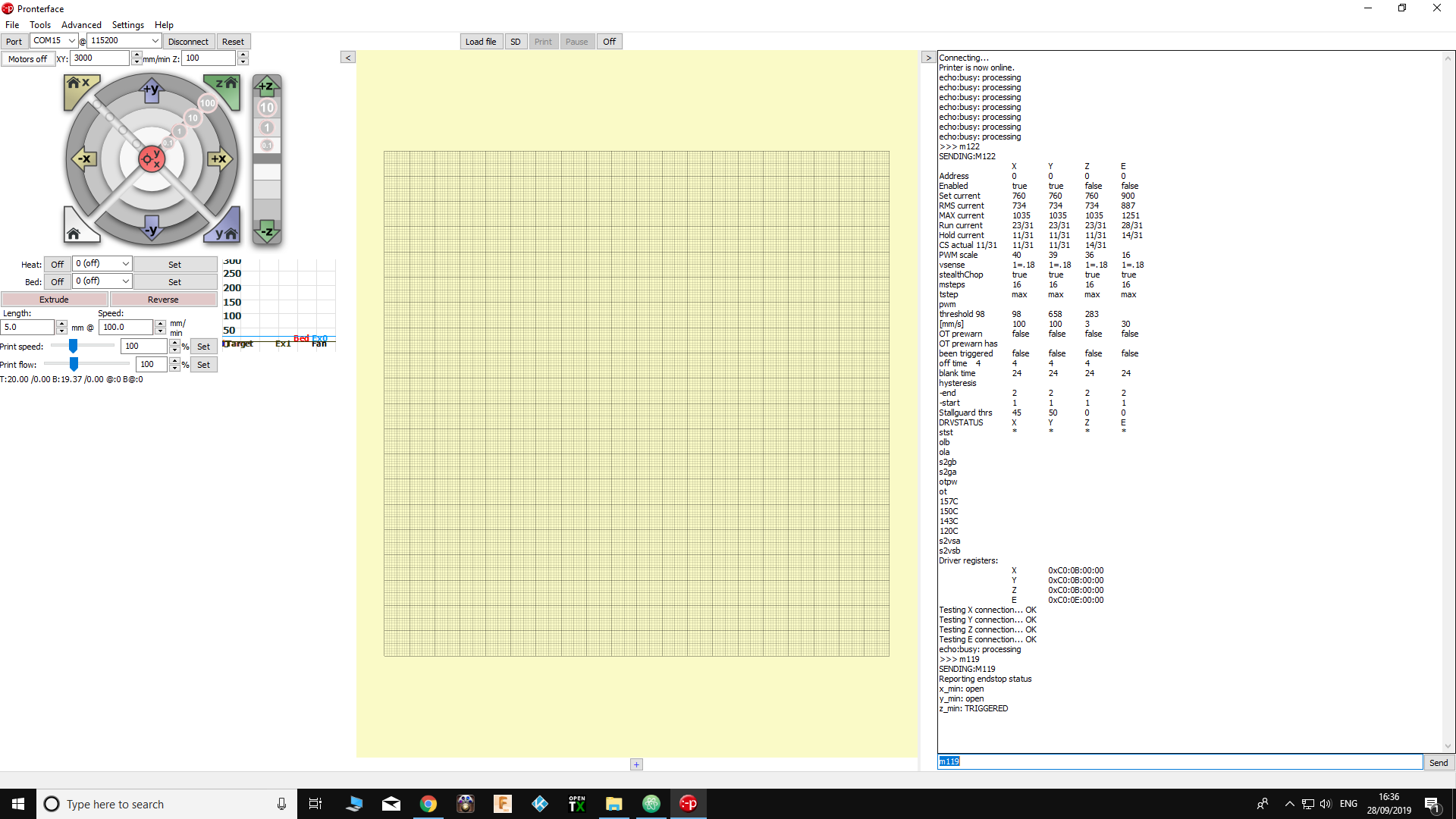
RABZY88
on 28 Sep 2019
Can anyone confirm that it works when hybrid threshold is set to 0?
michaelduffy123
on 6 Oct 2019
@TheNitek can you enable hybrid threshold for x and y and set them both to 0 then play around with sensorless homing sensitivity. I have mine working around ~65.
michaelduffy123
on 7 Oct 2019
@TheNitek still having issues?
 boelle
on 24 Oct 2019
boelle
on 24 Oct 2019
I don't know - I switched to Bigtreetech Drivers instead of the Fysetc and it worked. I don't plan to invest more time in crappy drivers.
TheNitek
on 24 Oct 2019
so that was the only change? ie the driver itself, what changes in config if any?
boelle
on 24 Oct 2019
@TheNitek will close this one as it seems mostly to be bad hardware
we can always reopen if there is an issue we can figurre out
boelle
on 30 Oct 2019
@boelle Can you figure out why the sensorless homing will work for me when hybrid threshold is set to 0 only? As Id like to have sensorless homing working and also have hybrid threshold be a thing
michaelduffy123
on 31 Oct 2019
@michaelduffy123 doesn't work for me..
Sjoerd
on 1 Nov 2019
It is working for me (FINALY): The problem was that everywhere it is written to connect Drivers DIAG1 to end stop pin. I have tried DIAG0 (nearest to EN - as advised above https://github.com/MarlinFirmware/Marlin/issues/14464#issuecomment-526239280) and it is working!!! Happy!
Watterott tmc2209 (on X and Y) with RAMPS 1.4.
Configuration.h
#define ENDSTOPPULLUPS

#define X_MIN_ENDSTOP_INVERTING false
#define Y_MIN_ENDSTOP_INVERTING false

#define X_HOME_DIR -1
#define Y_HOME_DIR -1
Configuration_adv.h
#define STEALTHCHOP_XY
#define STEALTHCHOP_Z
#define STEALTHCHOP_E

#define SENSORLESS_HOMING

  //#define HOME_USING_SPREADCYCLE
#define IMPROVE_HOMING_RELIABILITY
Hi, I have read this thread & stupidly thought that my TMC2209 from Fystec were the same as mentioned above & tried joining a couple of the pins etc... turns out I have been sent Fystec v3.0 and trying to get them to even work on the BTT SKR 1.3 board.
https://wiki.fysetc.com/Silent2209/
It appears the pins have moved around on the new step drivers:
V2.1:
Pin 3 = NC
Pin 5 = TX
Now it appears to be
V3.0:
Pin 3 = TX - Or UART according to the wiki
Pin 5 = SpreadCycle
The new sticks do come with up & down pins pre-solder :
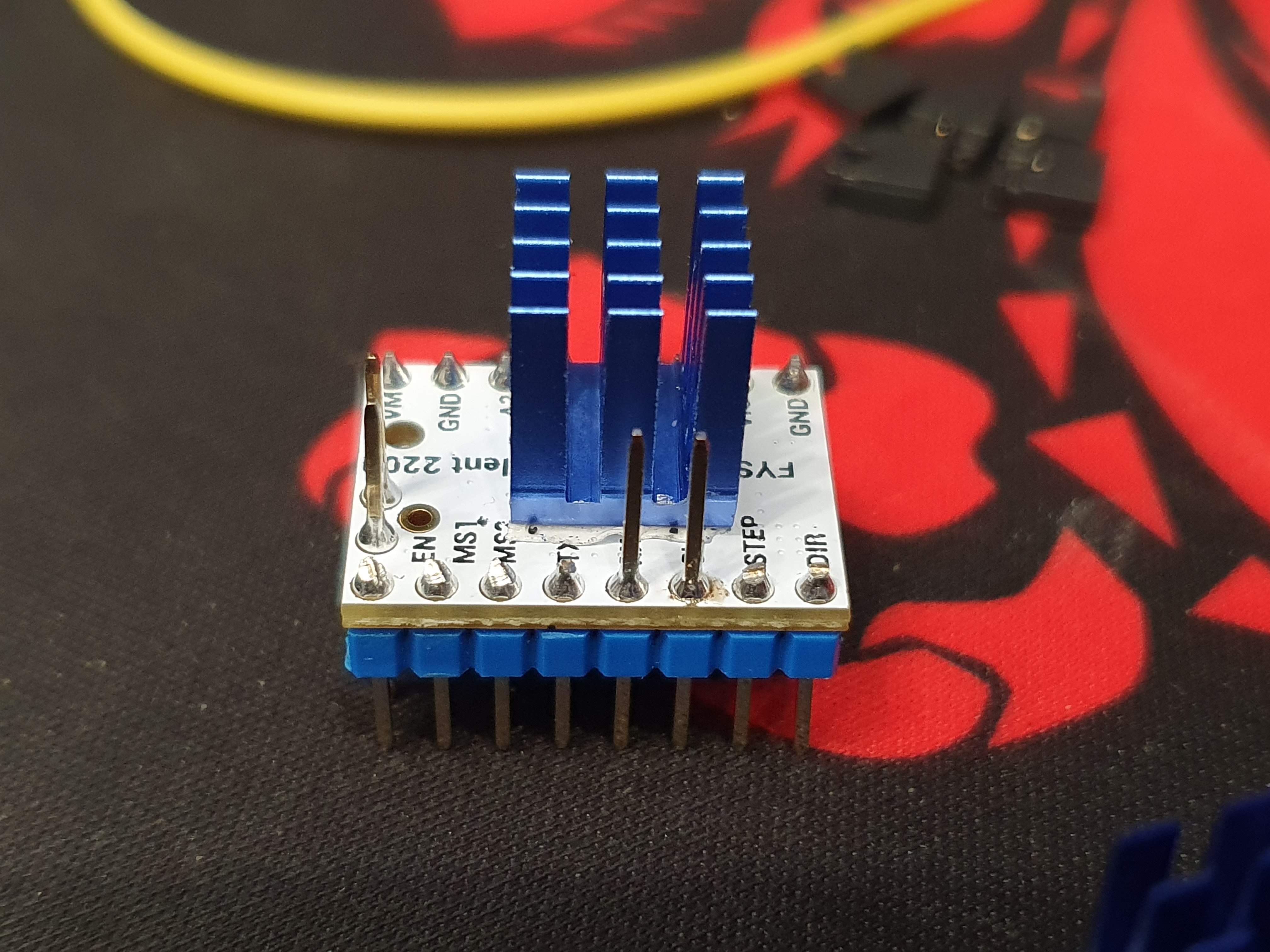
So far I have tracked the voltages of each pin and have:
EN: 3V
MS1: 0V
MS2: 0V
SpreadCycle : 3V (when the UART pin is connected on the jumper) - 0V otherwise
RX: 0V
TX: 0V
Step: 0.2V
DIR : 3V
Jumpers I have in place so far:

I'm kind of stumped as to how to get these connected to the SKR 1.3 board & working with UART as that was the reason I brought them (well I ordered the v2.1 versions).
I know this thread is about sensorless homing on the TMC2209, but was hoping someone with skill can help me at all :)
 pbathuk
on 18 Dec 2019
pbathuk
on 18 Dec 2019
Just to close the above : for v3.0 of fystec drivers you have to follow the jumpers mentioned here to even get them to work:
https://github.com/MarlinFirmware/Marlin/issues/16220
pbathuk
on 19 Dec 2019
I have the SKR 1.3 board and Fysetc TMC2209 V2.1 driver boards. I have spent all day going round in circles...
I was able to get UART to work correctly by placing a jumper between the Rx and Txpins however sensorless homing didn't work so the motors did not move during homing and M119 showed the two ends stops triggered constantly.
On the Fysetc TMC2209 V2.1 the diag pin is connected to the top of the board and there is no physical connection from the diag pin on the driver board to the header on the SKR board which is connected for senseless homing. The second part of RABZY88's solution above: https://github.com/MarlinFirmware/Marlin/issues/14464#issuecomment-536198330 works for the Fysetc TMC2209 V2.1 driver:
I had to desolder the diag pin and invert it on the driver board. This way it now connects the driver board to the SKR board and sensorless homing works correctly.


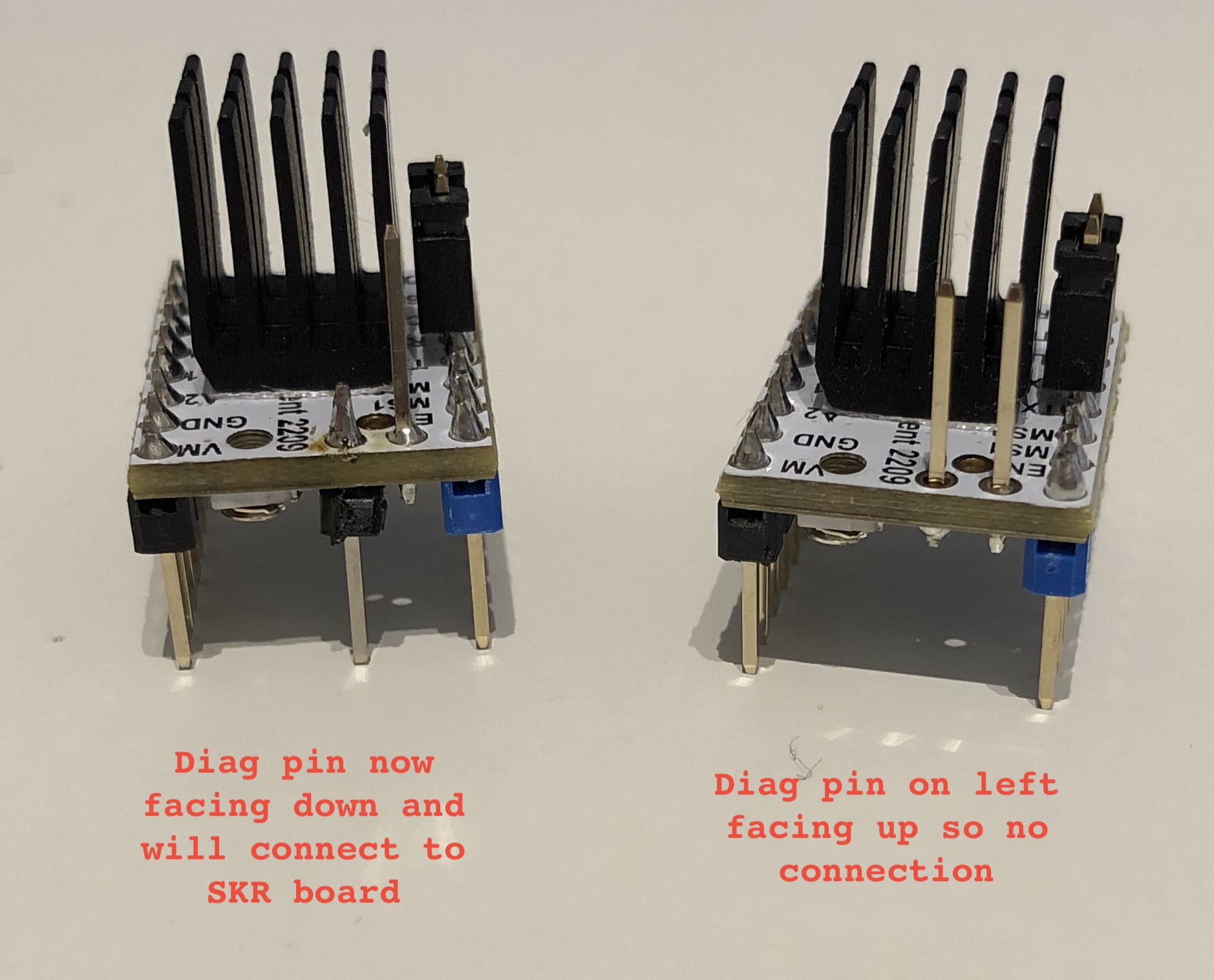
 m24andrew
on 28 Dec 2019
m24andrew
on 28 Dec 2019
Yep, I have the same problem with MKS TMC 2209 on MKS SGEN_L. X and Y always triggered.
When I replace it with BTT TMC 2209 all works fine.
 MinSoeVertex
on 7 Jan 2020
MinSoeVertex
on 7 Jan 2020
I am really confused, because with my SKR 1.3 and BTT TMC2209 V1.2 sensoress homing won't work, regardless of what setting i choose. I have Jumper on XST and YST. Printer moves korrekt, but even software endstops won't work. I'm frustrated. This issue cannot be closed. Obviously there are many people with problems using TMC2209 with sensorless homing. Configuring Marlin is very simple, so there is not much magic to get sensorless homing to work.
 tpre
on 16 Jan 2020
tpre
on 16 Jan 2020
I am really confused, because with my SKR 1.3 and BTT TMC2209 V1.2 sensoress homing won't work, regardless of what setting i choose. I have Jumper on XST and YST. Printer moves korrekt, but even software endstops won't work. I'm frustrated. This issue cannot be closed. Obviously there are many people with problems using TMC2209 with sensorless homing. Configuring Marlin is very simple, so there is not much magic to get sensorless homing to work.
Same setup here SKR 1.3, and BTT TMC2209 v1.2, was having the same problem using source from BTT repositories, my situation was trying to home to XMax and YMax, found 2 possible solution
- put a jumper cable directly from diag pin X and Y driver to the Xmax and Ymax endstop pin, because the XST/YST jumper pin only connect diag pin to the Xmin and Ymin!
- with jumper pin still in XST and YST, download the source from Marlin main repo, adjust the config accordingly and compile from there.. seems the BTT repo is outdated, no cable jumper required here..
 slackdna
on 31 Jan 2020
slackdna
on 31 Jan 2020
This issue is closed, since it was caused by a hardware issue (PINs are differnt on the Fysetc vs. BTT TMC2209), so it was not a Marlin issue. Using the correct PIN sensorless homing works in general. If you have different problems then open a different issue providing all information needed for it to be debugged.
TheNitek
on 1 Feb 2020
Yep, I have the same problem with MKS TMC 2209 on MKS SGEN_L. X and Y always triggered.
When I replace it with BTT TMC 2209 all works fine.
i am trying to build my mks sgen l bored with tmc2209 v3 from fysetc and i am getting error low
did you find a solution for it
 coolt5
on 14 Apr 2020
coolt5
on 14 Apr 2020
This issue has been automatically locked since there has not been any recent activity after it was closed. Please open a new issue for related bugs.
![github-actions[bot] picture](https://avatars2.githubusercontent.com/in/15368?v=4&s=40) github-actions[bot]
on 3 Jul 2020
github-actions[bot]
on 3 Jul 2020
Related issues
 Glod76
·
3Comments
Glod76
·
3Comments
 ShadowOfTheDamn
·
3Comments
ShadowOfTheDamn
·
3Comments
 Bobsta6
·
3Comments
Bobsta6
·
3Comments
 Matts-Hub
·
3Comments
Matts-Hub
·
3Comments
 otisczech
·
3Comments
otisczech
·
3Comments