Marlin: [BUG] TMC2209 is stepping half of what is commanded
Description
When swapping TMC2208 UART for TMC2209 UART with the exact same hardware setup and software (Marlin bugfix-2.0.x branch commit eeaef2410ac80b7bfa21fbec98abd00003ff83f8), the steps taken are half that of when I was using the TMC2208's. The hardware I'm swapping from is mostly irrelevant, but it does indicate that I already have a working UART setup. Doubling steps or switching to 1/8 works around the issue.
Steps to Reproduce
- Install TMC2209 onto board (SKR v1.3 in my case)
- Configure driver types in Configuration.h to point to 'TMC2209'
- Issue a command to move any of the axis to X known position
Expected behavior: [What you expect to happen]
I expect the position on the axis to now be X
Actual behavior: [What actually happens]
The position of the axis is half that of what's expected
Additional Information
Switching back to TMC2208 and re-pointing the drivers types to be 'TMC2208' fixes the problem.
 drewzh
All 18 comments
Post your M503, M122 X, M122 VX and Config files.
 teemuatlut
on 22 Jun 2019
teemuatlut
on 22 Jun 2019
My assumption is that you've enabled SQUARE_WAVE_STEPPING.
The TMC2209 section has a bug where the corresponding bit isn't enabled and so the feature isn't fully supported on this driver like it should be.
Disable square stepping mode or add stepperX.dedge(true) to your TMC_ADV.
teemuatlut
on 22 Jun 2019
I have indeed enabled square waves - and knowing what a square wave looks like - that's definitely a "ah hah!" moment - though I maybe naively thought that square waves would somehow make the rest of the firmware account for the low signal sections? I guess not.
I enabled square waves to allow me to use linear advance with TMC2208/TMC2209. Searching now, I can't seem to find reference to this limitation, but it was my assumption that I couldn't use it without the square wave feature?
I track my own personal Marlin changes here:
https://github.com/drewzh/Marlin/blob/bugfix-2.0.x/Marlin/Configuration.h
https://github.com/drewzh/Marlin/blob/bugfix-2.0.x/Marlin/Configuration_adv.h
Send: M503
Recv:   G21    ; Units in mm (mm)
Recv:   M149 C ; Units in Celsius
Recv:
Recv:   M200 D1.75
Recv:   M200 D0
Recv:   M92 X80.00 Y80.00 Z400.00 E95.30
Recv:   M203 X500.00 Y500.00 Z5.00 E25.00
Recv:   M201 X3000.00 Y3000.00 Z100.00 E10000.00
Recv:   M204 P2000.00 R2000.00 T2000.00
Recv:   M205 B20000.00 S0.00 T0.00 X10.00 Y10.00 Z0.30 E5.00
Recv:   M206 X0.00 Y0.00 Z0.00
Recv:   M420 S0 Z0.00
Recv:   G29 W I0 J0 Z-0.00250
Recv:   G29 W I1 J0 Z0.01500
Recv:   G29 W I2 J0 Z0.02500
Recv:   G29 W I0 J1 Z-0.02750
Recv:   G29 W I1 J1 Z0.00250
Recv:   G29 W I2 J1 Z0.05500
Recv:   G29 W I0 J2 Z0.00750
Recv:   G29 W I1 J2 Znan
Recv:   G29 W I2 J2 Znan
Recv:   M145 S0 H200 B60 F0
Recv:   M145 S1 H230 B70 F0
Recv:   M301 P16.68 I0.97 D71.81
Recv:   M304 P259.28 I47.61 D352.98
Recv:   M851 Z-1.75
Recv:   M906 X800 Y800 Z800
Recv:   M906 T0 E800
Recv:
Recv:   M569 S1 X Y Z
Recv:   M900 K0.55
Recv:   M603 L0.00 U100.00
Recv: ok

Send: M122 X
Recv: Testing X connection... OK
Recv: ok
Send: M122 VX
Recv: Testing X connection... OK
Recv: ok
I maybe naively thought that square waves would somehow make the rest of the firmware account for the low signal sections? I guess not.
The TMC2209 section has a bug
Disable square stepping mode or (manually) add
stepperX.dedge(true)to your TMC_ADV.
Linear advance does not rely on square step mode just as much as it doesn't require TMC drivers.
The issue is that with TMC drivers there is no defined min pulse time and so the pulse is too short.
teemuatlut
on 22 Jun 2019
I understand the indirect relationship between the features. So the solution, to be clear, is to switch back to TMC2208 for now (I need a functioning printer) or disable square stepping mode (and as an indirect consequent, disable linear advance), yes?
drewzh
on 22 Jun 2019
I also assume this is a (direct or indirect) result of using square_stepping? Looks like some sort of rounding issue perhaps between layers?
This meant to be a square - it seems I can print 1 copy but then as soon as I print another, it's completely skewed. I've tried numerous models - same result.
Is this worth reporting anywhere?
drewzh
on 22 Jun 2019
I have the same problem with the TMC2209 and skr 1.3, all my parts have layer shift on X, Y or both
 Gerggg
on 22 Jun 2019
Gerggg
on 22 Jun 2019
Yes exactly the same problem ... I dismounted the engines, pulley, modify the vref and the current before seeing your post. I will therefore cry while waiting for a future correction.
Gerggg
on 22 Jun 2019
I don't want to spam up the conversation with images - but I'm not sure if it'll help add context to the issues we're having. This is a similar model that I printed only minutes before the above, with no firmware or slicer changes.
drewzh
on 22 Jun 2019
For the time being, I'm going to switch back to my TMC2208 and not waste anymore time, as I need to get a few things printed. I imagine the issue we're facing, to the correct mind, will be fairly obvious. I'll just sit tight and provide any feedback/support if necessary.
drewzh
on 22 Jun 2019
I rebuild my printer and disable the "SQUARE WAVE STEPPING" to retest
Gerggg
on 22 Jun 2019
So, I have a SKR 1.3 card with TMC2209 in UART on 0.9 ° motor with "linear advance" enabled and "SQUARE WAVE STEPPING" disabled. After 2:30 of printing, everything goes well for the moment.
You can find me config here :
https://github.com/Gerggg/Marlin-for-my-printer
Gerggg
on 22 Jun 2019
I can confirm that adding stepperX.dedge(true) to TMC_ADV macro makes it possible to use "SQUARE WAVE STEPPING" and still have correct amount of micro steps.
I used the following:
  #define TMC_ADV() { \
    stepperX.dedge(true); \
    stepperY.dedge(true); \
    stepperZ.dedge(true); \
    stepperE0.dedge(true); \
   }
Or use below PR (https://github.com/MarlinFirmware/Marlin/pull/14370) this also works.
 oechslein
on 22 Jun 2019
oechslein
on 22 Jun 2019
Great work @oechslein - I'm going to merge latest changes and test again
drewzh
on 23 Jun 2019
It does appear that this issue has been fixed with the commits referenced above. I believe this issue can now be closed. Thanks 👌
drewzh
on 24 Jun 2019
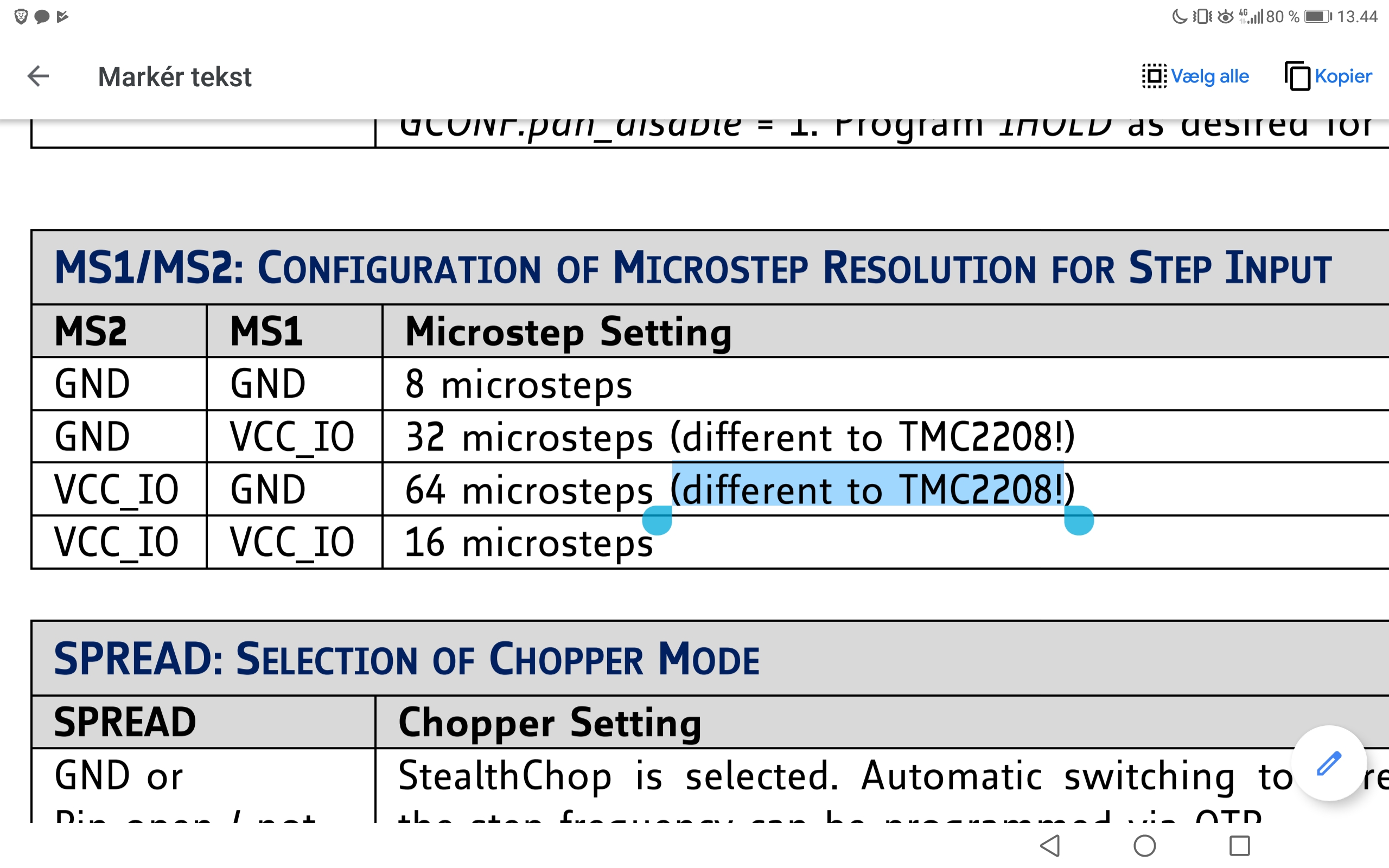
Is this relevant?
 AnotherPatternInTheWall
on 10 Nov 2019
AnotherPatternInTheWall
on 10 Nov 2019
This issue has been automatically locked since there has not been any recent activity after it was closed. Please open a new issue for related bugs.
![github-actions[bot] picture](https://avatars2.githubusercontent.com/in/15368?v=4&s=40) github-actions[bot]
on 4 Jul 2020
github-actions[bot]
on 4 Jul 2020
Related issues
 W8KDB
·
4Comments
W8KDB
·
4Comments
 jerryerry
·
4Comments
jerryerry
·
4Comments
 Bobsta6
·
3Comments
Bobsta6
·
3Comments
 pubalan12
·
4Comments
pubalan12
·
4Comments
 spanner888
·
4Comments
spanner888
·
4Comments
Most helpful comment
So, I have a SKR 1.3 card with TMC2209 in UART on 0.9 ° motor with "linear advance" enabled and "SQUARE WAVE STEPPING" disabled. After 2:30 of printing, everything goes well for the moment.
You can find me config here :
https://github.com/Gerggg/Marlin-for-my-printer