Marlin: No reprap discount or full graphic lcd display
Hello I am trying to get a Arduino 2560 with ramps v1.4 working. I have Marlin 1.1.9 but I get no display on a reprap discount smart controller or a reprap full graphic smart controller. The marlin seems to compile and upload ok but no response on the lcd. I change lcd in the fw each time but no joy. There seems to be some issues showing in the panel at the bottom of the ide.


 curnowdj
All 38 comments
Please attach your config files, and also attach a photo of your LCD
 psavva
on 1 Apr 2019
psavva
on 1 Apr 2019
 curnowdj
on 2 Apr 2019
curnowdj
on 2 Apr 2019
There are two version of display connectors, please attach a photo of displays' backs.
Is display's backlight lit when display is connected?
 jmz52
on 2 Apr 2019
jmz52
on 2 Apr 2019
Try turn the cable. But first you have to grind the black connector so you can plug it upside down.
 robbycandra
on 3 Apr 2019
robbycandra
on 3 Apr 2019
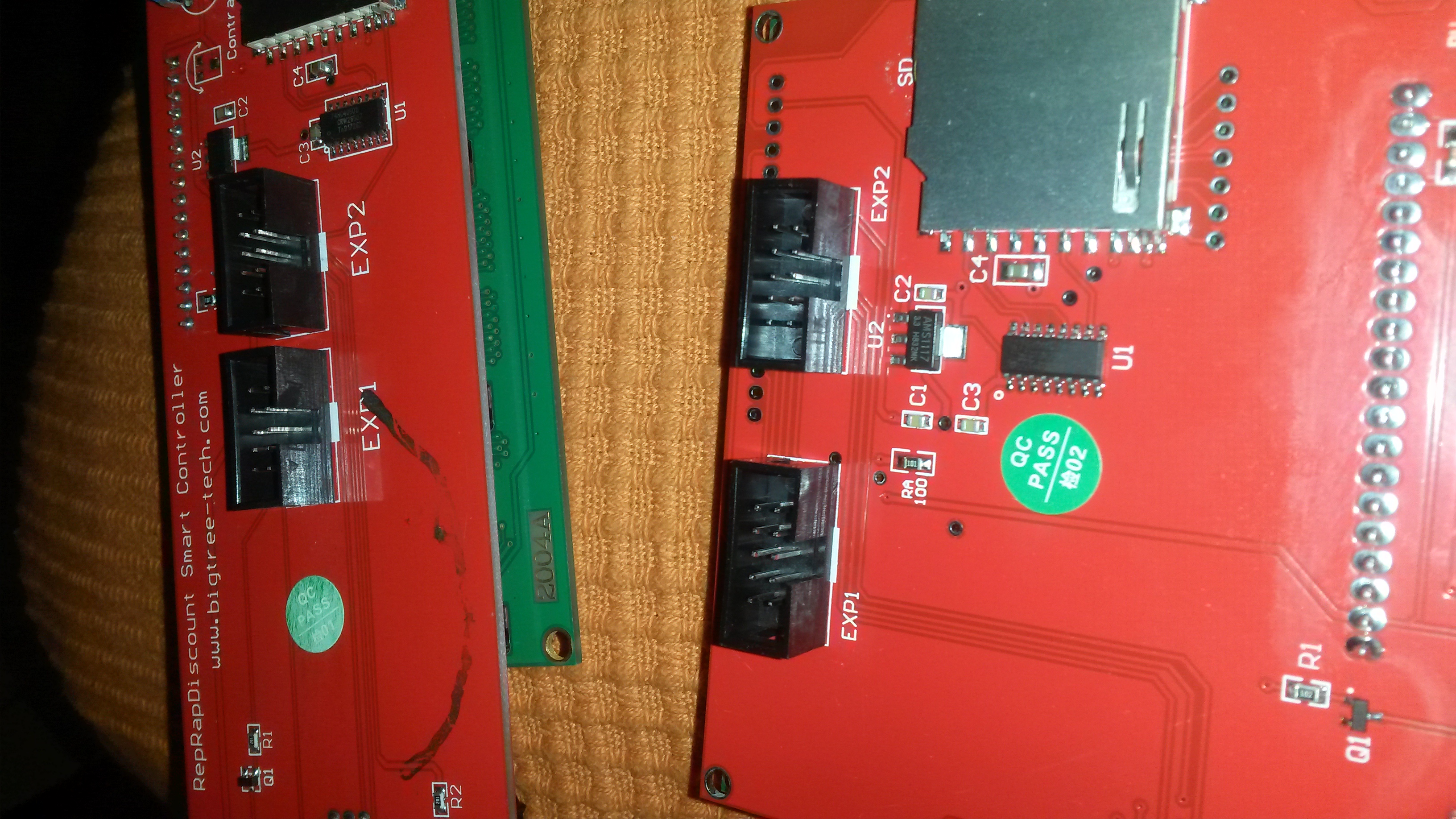
curnowdj
on 3 Apr 2019
or you can pull those black plastic pieces off the connectors. Then no shaving required
 cdedwards
on 3 Apr 2019
cdedwards
on 3 Apr 2019
Is this a common issue? I have trouble believing these cables are wrong.
curnowdj
on 3 Apr 2019
Makerbase (MKS) boards and displays have EXP1/EXP2 connectors turned by 180 degrees.
This results in two versions on EXP1/EXP2 connections - RepRap and MKS.
I might be mistaken, but your controllers look like a RepRap version, so they should be working with RAMPS.
There is a simple test for boards and smart controller compatibility - if backlight in off when display is connected to board and board is powered, then your display and board are from different flocks and you need to turn connectors.
jmz52
on 3 Apr 2019
Also, it’s easy to end up connecting EXP1 to EXP2 or vice versa by mistake - I know I’ve done it more than once.
 ManuelMcLure
on 3 Apr 2019
ManuelMcLure
on 3 Apr 2019
Yes they are both Reprap lcds. I have tried changing exp1 and exp2 cables around and when I do this the beeper sounds so I assume that is the wrong way.
curnowdj
on 3 Apr 2019
Both lcds have www.bigtree-tech.com web site as well.
curnowdj
on 3 Apr 2019
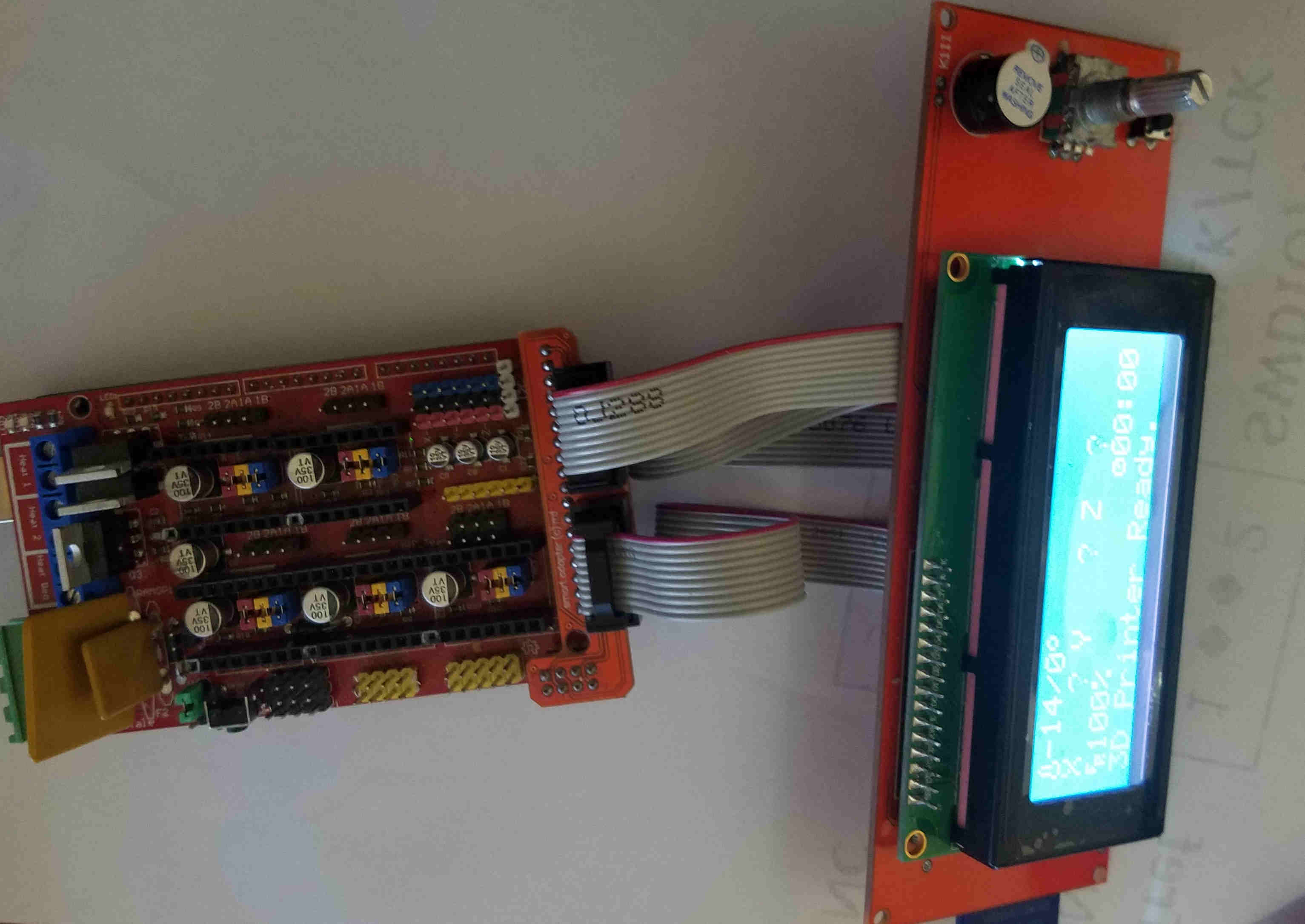
Here's pictures of 2560 + Ramps + the two LCDs. Notice that the cables go straight across and that pin 1 of the cables is always to the top of the picture.
I dropped your config file onto Marlin 1.1.9 and then downloaded it to a 2560 + RAMPs system. The RepRap graphics LCD worked correctly.

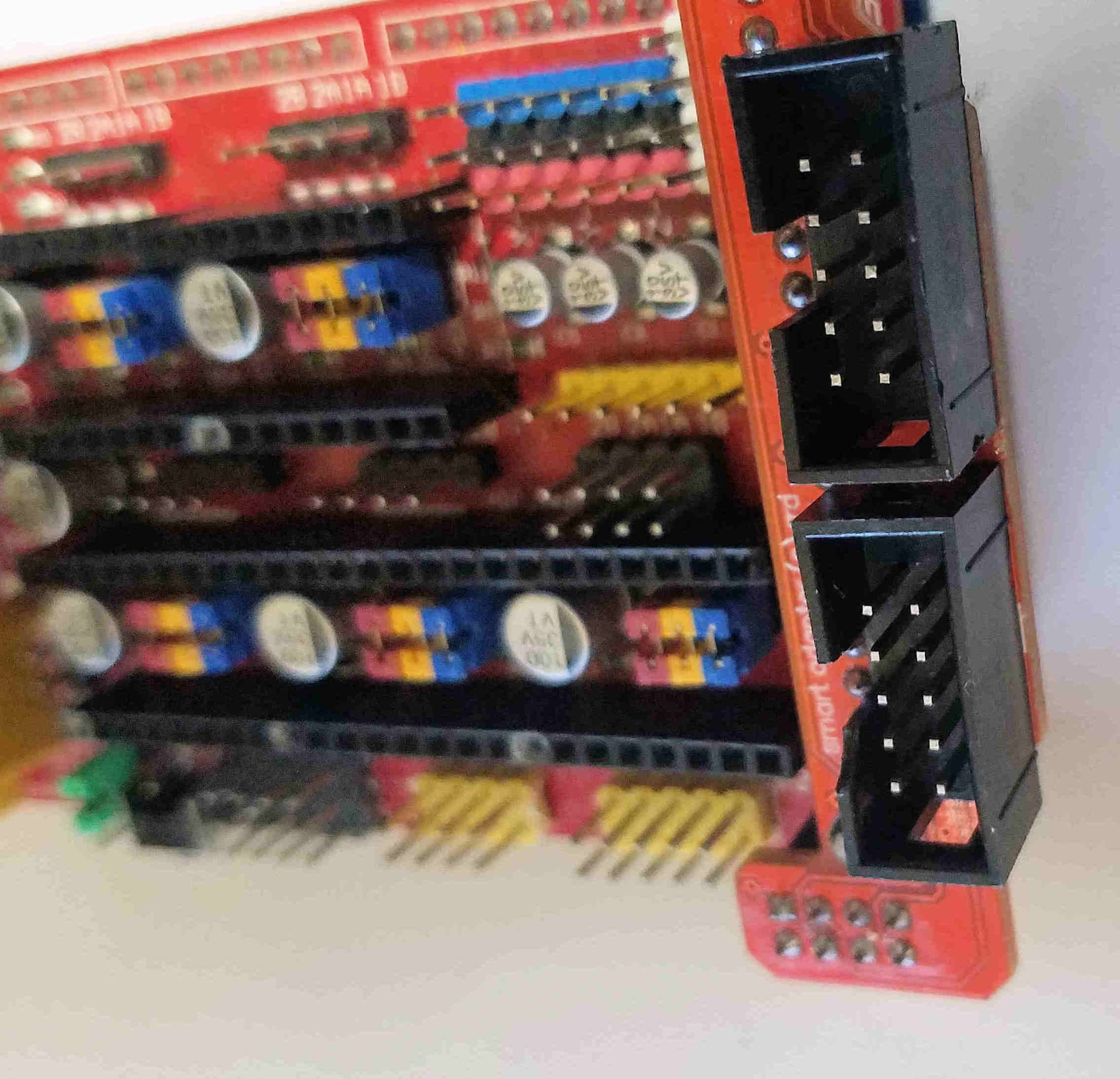
The shrouds on EXP1 & EXP2 in the pictures of the LCDs posted early in this thread are correct. Just in case .. here's a picture showing the correct orientation of the shrouds on EXP1 & 2 on the LCD adapter.
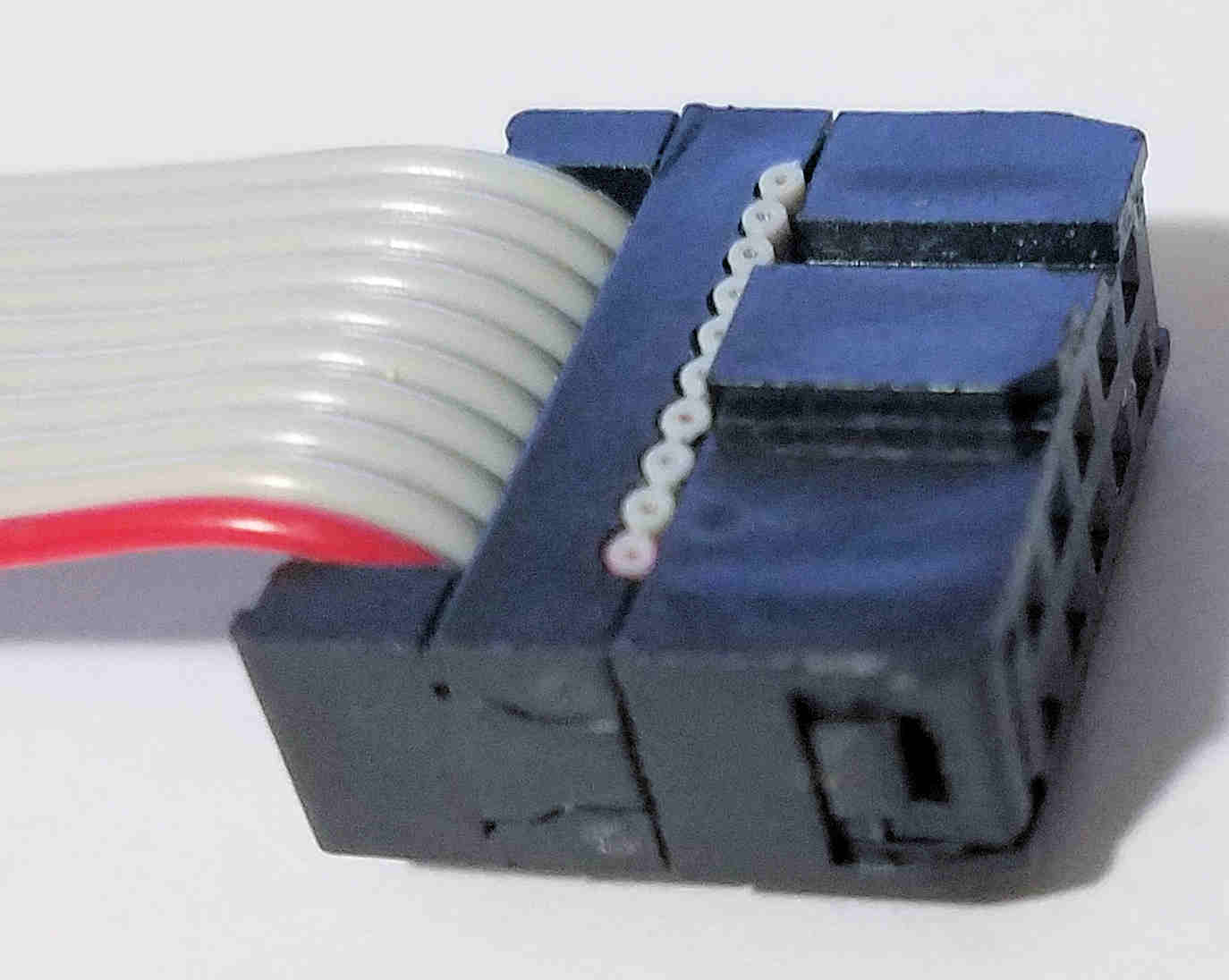
Another possibility is the cables being built inconsistently. Here's a picture of the usual orientation of pin 1 of the cable to the raised keying plug on the connector. Doesn't matter if the red stripe is above or below the connector.
 Bob-the-Kuhn
on 3 Apr 2019
Bob-the-Kuhn
on 3 Apr 2019
OK so I am looking at some hardware failure. I will need to find out what has failed. I will have to think about where to start with that.
curnowdj
on 4 Apr 2019
What are your symptoms?
Bob-the-Kuhn
on 4 Apr 2019
You said in the original post "The marlin seems to compile and upload ok" - have you confirmed this by connecting with a printer host such as Pronterface and making sure that you can communicate with the installed Marlin? This could be a more basic problem where Marlin isn't starting on the Mega. Make sure you can send something like an M119 (report endstops) and get back something.
One other thought - it seems like it might be possible to install the smart adapter (the little l-shaped board that plugs into the RAMPS and has the EXP1 and EXP2 connectors) shifted by one pin - that would definitely show a problem.
Does even the backlight on the LCD come on?
ManuelMcLure
on 4 Apr 2019
Yes Back light comes on and There is a response to a M119 instruction

curnowdj
on 4 Apr 2019
It does seem to be a hardware issue. You might want to take a magnifying glass and check the solder joints on the RAMPS, the Smart Adapter, and even the Arduino Mega. Given that neither display works, it's more likely that the problem is on that end.
ManuelMcLure
on 4 Apr 2019
One more thing - have you tried to adjust contrast on your displays?
There is an adjustable resistor at the back side of display.
jmz52
on 4 Apr 2019
On the Bigtree-Tech Full Graphic Controller clones the resistor is on the front - it's the blue and white gizmo on the bottom left.
ManuelMcLure
on 4 Apr 2019
Yes I have turned the contrast pot and does not make any difference apart from darkening the display. I'll look more closely at the boards and see if I can spot something.
curnowdj
on 5 Apr 2019
Could these messages in the bottom panel be part of the trouble?
Sketch uses 107958 bytes (42%) of program storage space. Maximum is 253952 bytes.
Global variables use 4468 bytes (54%) of dynamic memory, leaving 3724 bytes for local variables. Maximum is 8192 bytes.
Invalid library found in /home/dennis/Arduino/libraries/ADC_SEQR: no headers files (.h) found in /home/dennis/Arduino/libraries/ADC_SEQR
Invalid library found in /home/dennis/Arduino/libraries/arduino_108850: no headers files (.h) found in /home/dennis/Arduino/libraries/arduino_108850
Invalid library found in /home/dennis/Arduino/libraries/ADC_SEQR: no headers files (.h) found in /home/dennis/Arduino/libraries/ADC_SEQR
Invalid library found in /home/dennis/Arduino/libraries/arduino_108850: no headers files (.h) found in /home/dennis/Arduino/libraries/arduino_108850
curnowdj
on 5 Apr 2019
I don't think so, although I don't know why you're getting them. It might make sense to reinstall Arduino and see if that helps.
As far as I can see the ADC_SEQR library is only used by the Arduino Due SAMx3, and I don't know what arduino_108850 is at all.
ManuelMcLure
on 5 Apr 2019
Personally, I like using PlatformIO to compile & upload. It literally takes only 3-4 mouse clicks to compile & upload. All the library selection & installation are done automatically in the background.
Instructions are here.
Bob-the-Kuhn
on 6 Apr 2019
Yes... PlatformIO is better
.
robbycandra
on 6 Apr 2019
PlatformIO is kind of nice. I do wish I could figure out why the "Autobuild" stuff stopped working for me, but it's easy enough to just use the standard PlatformIO options.
ManuelMcLure
on 6 Apr 2019
Please open another issue & we'll fix Auto Build.
Bob-the-Kuhn
on 6 Apr 2019
Done - see #13592
ManuelMcLure
on 6 Apr 2019
Still trying to work out Platformio. Please be aware I am not a programmer. I think this program is more suited to someone who knows their way around writing code.
curnowdj
on 6 Apr 2019
@curnowdj - if' you've been following the link I gave you then the instructions need to be improved.
What problems are you having? Screenshots of error messages and/or unexpected requests/questions are helpful.
Bob-the-Kuhn
on 8 Apr 2019
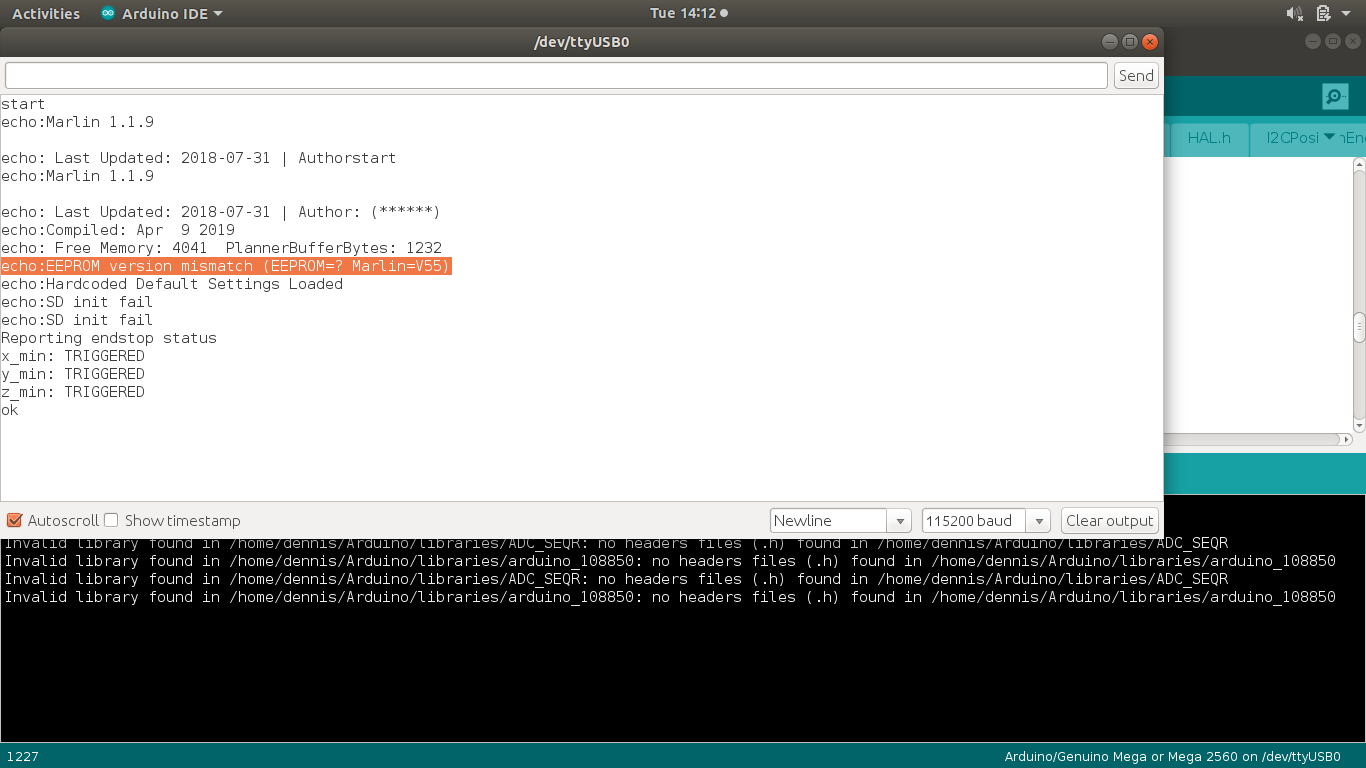
Is this EEPROM Mismatch part of the issue?
curnowdj
on 9 Apr 2019
In this case EEPROM Mismatch just means that you've never done the M502 followed by M500 command series.
I suggest turning off the EEPROM until after the display issue is solved. It can cause a lot of confusion when debugging.
Bob-the-Kuhn
on 9 Apr 2019
I don't see what the problem is. Time to start over.
Please ZIp and attach your current configuration.h file.
Bob-the-Kuhn
on 9 Apr 2019
Configuration.zip
I have not disabled the eeprom on this yet.
curnowdj
on 9 Apr 2019
I changed the LCD from REPRAP_DISCOUNT_SMART_CONTROLLER to REPRAP_DISCOUNT_FULL_GRAPHIC_SMART_CONTROLLER and was able to download via Arduino 1.8.9 after changing U8Glib to the older version 1.18.0.
It's running just fine now.
Bob-the-Kuhn
on 11 Apr 2019
I think it's time to start replacing the hardware. I believe something is defective. There's no way to determine what may be bad any other way.
Bob-the-Kuhn
on 11 Apr 2019
@curnowdj - you mentioned that you were having problems installing PlatformIO. I'm seriously thinking of putting out a YouTube video on this. You'd be doing me a big favor if you'd watch it, try to use it and give me feedback.
Marlin – easiest way to compile & upload (demo, installation & usage)
Here's the text that would accompany the video.
Marlin can be a pain to compile and upload due to fussing around with libraries or trying to figure out what compiler options to enable/disable. Marlin’s Auto Build script/extension reduces the process to two to four mouse clicks.
Auto Build is a python 2.7 script that uses information available within Marlin to setup and run PlatformIO. Access to this script is via menus that have been added to Atom, VScode and Sublime.
This video does a quick demo of how the Auto Build system works, goes through the process of installing all needed items on a new Windows 10 PC and then walks you through a very simple Marlin modification , compile and upload.
This video follows the Installing Marlin (PlatformIO) web page (link below). It is highly recommended that this page be read in conjunction with this video.
URLS:
Installing Marlin (PlatformIO) - http://marlinfw.org/docs/basics/install_platformio.html
Marlin docs web page - http://marlinfw.org
Marlin graphic - http://clipart-library.com/clipart/774742.htm
Bob-the-Kuhn
on 11 Apr 2019
Looks like a good complete tutorial in the works, and that's the kind of thing we should have embedded on the marlinfw site. I've added embedded videos for a couple of G-codes, so anytime we want to add videos to other types of pages I will have the hooks in place. For your 32-bit build tutorial, see if there are any pointers worth taking from Chris Riley's video https://www.youtube.com/watch?v=H-c8UTg-EMU
 thinkyhead
on 11 Apr 2019
thinkyhead
on 11 Apr 2019
This issue has been automatically locked since there has not been any recent activity after it was closed. Please open a new issue for related bugs.
![github-actions[bot] picture](https://avatars2.githubusercontent.com/in/15368?v=4&s=40) github-actions[bot]
on 13 Jul 2020
github-actions[bot]
on 13 Jul 2020
Related issues
 jerryerry
·
4Comments
jerryerry
·
4Comments
 Glod76
·
3Comments
Glod76
·
3Comments
 ahsnuet09
·
3Comments
ahsnuet09
·
3Comments
 esenapaj
·
3Comments
esenapaj
·
3Comments
 otisczech
·
3Comments
otisczech
·
3Comments
Most helpful comment
or you can pull those black plastic pieces off the connectors. Then no shaving required