Marlin: [BUG] delta xyz motion slow and jerky xy with junction deviation
Description
junction deviation on causes XY to move very slowly and jerky. They reach the proper location.
z is jerky with or without junction deviation. This was all working fine with 2/24 code.
Steps to Reproduce
- compile with junction deviation enabled
- load defaults (otherwise, old jerk settings remain)
- move axis manually, note slow, jerky, movement.
- if you then enter jerk settings above 0 in config->advanced->motion for the three steppers, xy movement is normal, but z remain jerky
Configuration.zip
Expected behavior: [What you expect to happen]
Actual behavior: [What actually happens]
Additional Information
- Include a ZIP file containing your
Configuration.handConfiguration_adv.hfiles. - Provide pictures or links to videos that clearly demonstrate the issue.
- See How Can I Contribute for additional guidelines.
 jmdearras
All 40 comments
reverted to 2/24 code, and all is well.
jmdearras
on 2 Mar 2019
on cause XY
do you mean core xy ?
 boelle
on 2 Mar 2019
boelle
on 2 Mar 2019
Can you confirm that with platformio up to date (using lpc176x framework 0.1.0), you have no issue with a build using Marlin from 24th feb but a build from today has problems.
 p3p
on 2 Mar 2019
p3p
on 2 Mar 2019
@p3p a build from today is his problem, but a build with code from 24/2-2019 does work
boelle
on 2 Mar 2019
same discovery in https://github.com/MarlinFirmware/Marlin/issues/13287
24/2 works but not the code as of today, but in https://github.com/MarlinFirmware/Marlin/issues/13287 a PR is waiting to be merged
boelle
on 2 Mar 2019
on cause XY
do you mean core xy ?
sorry, "causes x and y"
jmdearras
on 2 Mar 2019
lpc176x framework 0.1.0
how would I check the version in platformio? I believe I am current.
jmdearras
on 2 Mar 2019
how to check version
click 2nd last icon to the left

boelle
on 2 Mar 2019
if you click the small gear wheel you get an option that say install other version, that brings up a list of versions and 1.6.0 is on top and in () it says current version meaning there is nothing never than 1.6.0
boelle
on 2 Mar 2019
same with c/c++ current version is 0.21.0
boelle
on 2 Mar 2019
framework-arduino-lpc176x | framework | | >=0.0.2 | 0.1.0
jmdearras
on 2 Mar 2019
in general it updates automatic but it can never hurt to check
boelle
on 2 Mar 2019
framework-arduino-lpc176x | framework | | >=0.0.2 | 0.1.0
what does this mean? just a bit confused here
boelle
on 2 Mar 2019
same discovery in #13287
24/2 works but not the code as of today, but in #13287 a PR is waiting to be merged
this is a different issue than the heat issue.
framework-arduino-lpc176x | framework | | >=0.0.2 | 0.1.0
what does this mean? just a bit confused here
copy-paste of the version. lpc176x is 0.1.0
jmdearras
on 2 Mar 2019
this is a different issue than the heat issue.
yes but they have a thing in common :-D
boelle
on 2 Mar 2019
this is a different issue than the heat issue.
yes but they have a thing in common :-D
what? I looked at the heat fix. How would it affect this? I don't doubt you, but I don't see the connection.
jmdearras
on 2 Mar 2019
the thing in common is that version from 24/2-2019 works and todays code dont work, that is the thing in common
boelle
on 2 Mar 2019
how is that we find framework version? i cant find it and want to check so i'm also updated
boelle
on 2 Mar 2019
I just type pio update but from inside Visual Studio Code you click on the alien head and then Update All
Thanks for checking I wanted to make sure my framework release from yesterday wasn't having any side effects, but if 24th feb works with the new framework it's not that.
p3p
on 2 Mar 2019
update of platform io core

click the alien icon and then upgrade io core (last item)
boelle
on 3 Mar 2019
frame work does not change, (or it should not) i think its something in the code... just as with the other issue you opened
boelle
on 3 Mar 2019
from inside Visual Studio Code you click on the alien head and then Update All
thanks :-D worked just fine and yes i was not fully updated

boelle
on 3 Mar 2019
To find the installed framework version in PlatformIO, you have to dig through the menus.
Click on the alien head
then on

scroll down to NXP arduino LPC176X
and click on this (right side)

then click on the Packages tab
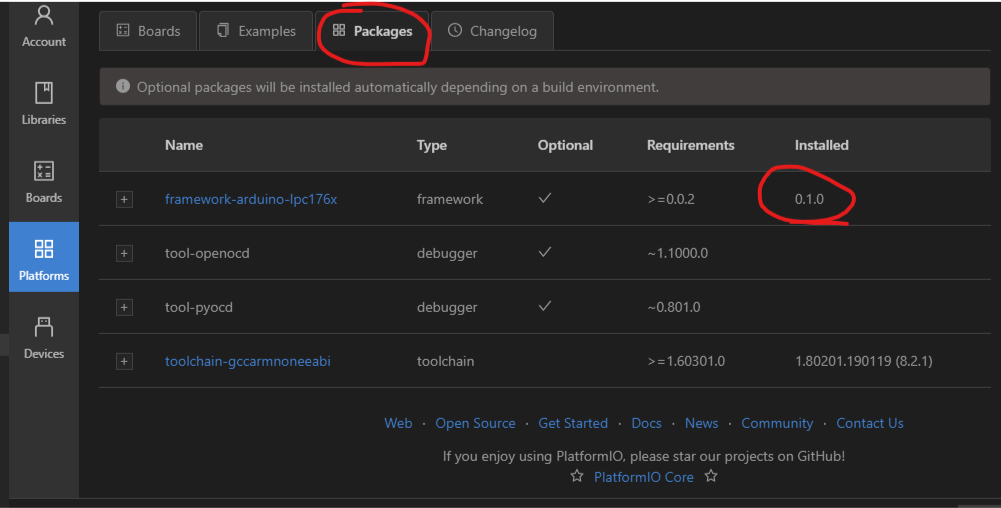
 kAdonis
on 3 Mar 2019
kAdonis
on 3 Mar 2019
@jmdearras can you close in on the day / commit where the problem starts happening, I don't see anything in the commit history that could directly cause a problem in this area.
p3p
on 3 Mar 2019
@jmdearras can you close in on the day / commit where the problem starts happening, I don't see anything in the commit history that could directly cause a problem in this area.
OK, it'll take a few days, busy with my job.
jmdearras
on 3 Mar 2019
I think this did it, I will verify when I get home.
https://github.com/MarlinFirmware/Marlin/commit/3c9a7926c22141fbae6e5c6c8538a4894bd15163
I do not always clear eeprom with updates, unless it looks big, recalibration takes a while. But I did notice the jerks were 0 in the LCD, and when I changed them, it fixed x and y. Perhaps something else uses the jerk numbers.
jmdearras
on 4 Mar 2019
hope we got another issue sorted here :-)
boelle
on 6 Mar 2019
Will confirm this weekend, busy week.
jmdearras
on 9 Mar 2019
Yes, the '0' jerk starting in line 2002 in configuration_store.cpp is the issue
#if HAS_CLASSIC_JERK
#ifndef DEFAULT_XJERK
#define DEFAULT_XJERK 0
#endif
#ifndef DEFAULT_YJERK
#define DEFAULT_YJERK 0
#endif
#ifndef DEFAULT_ZJERK
#define DEFAULT_ZJERK 0
#endif
planner.max_jerk[X_AXIS] = DEFAULT_XJERK;
planner.max_jerk[Y_AXIS] = DEFAULT_YJERK;
planner.max_jerk[Z_AXIS] = DEFAULT_ZJERK;
#if DISABLED(JUNCTION_DEVIATION) || DISABLED(LIN_ADVANCE)
planner.max_jerk[E_AXIS] = DEFAULT_EJERK;
#endif
#endif
I changed them to '5' and the slow, jerky movement went away.
This can also be fixed in the configuration.com by removing the IF/END IF around
if DISABLED(JUNCTION_DEVIATION)
#define DEFAULT_XJERK 5.0
#define DEFAULT_YJERK DEFAULT_XJERK
#define DEFAULT_ZJERK DEFAULT_XJERK // Must be same as XY for delta
endif
I am not set up to do a pull request at present.
jmdearras
on 9 Mar 2019
I forgot to mention, this was with a morning pull of the code base on 3/8
jmdearras
on 9 Mar 2019
i am a bit confused. i thought junction deviation was supposed to replace jerk. why are the jerk settings still used when junction deviation is turned on
 b0ssman
on 10 Mar 2019
b0ssman
on 10 Mar 2019
i am a bit confused. i thought junction deviation was supposed to replace jerk. why are the jerk settings still used when junction deviation is turned on
Me too, but it is definitely an issue with Deltas.
jmdearras
on 11 Mar 2019
Here's the issue:
in conditionals_post line 56:
define HAS_CLASSIC_JERK (IS_KINEMATIC || DISABLED(JUNCTION_DEVIATION))
sets HAS_CLASSIC_JERK if a delta.
jmdearras
on 12 Mar 2019
The mathematical idea where 'junction deviation' is based on assumes independent and perpendicular (to each other) motor axes. In a DELTA non of this is true. During implementation of 'junction deviation' we talked about that. None was convinced it could work despite of that and we had no one able or willing to test on a DELTA. So this limitation is not a bug, but a designed in restriction.
However. If you remove the restrictions and it works well for you, for sure, we will make that available for all.
 AnHardt
on 12 Mar 2019
AnHardt
on 12 Mar 2019
The actual compile bug was earlier in this thread. If it is not supported there should be a sanity check saying so. If I remove that one restriction, how could I then test it? In researching junction deviation in general, other systems support deltas, so I just assumed this one did.
jmdearras
on 12 Mar 2019
The mathematical idea where 'junction deviation' is based on assumes independent and perpendicular (to each other) motor axes. In a DELTA non of this is true. During implementation of 'junction deviation' we talked about that. None was convinced it could work despite of that and we had no one able or willing to test on a DELTA. So this limitation is not a bug, but a designed in restriction.
However. If you remove the restrictions and it works well for you, for sure, we will make that available for all.
@AnHardt , I have complied my delta for junction deviation, how can I test?
jmdearras
on 13 Mar 2019
Use it. Print. Try to stretch the limits. Try different adjustments.
Will the printer run as smooth an fast as with conventional jerk, or even better, quieter, smoother, faster? How about artifacts like ringing, blobs in the corners, ... .
Do you want to stay with the new option - than it's good enough for you.
AnHardt
on 13 Mar 2019
Use it. Print. Try to stretch the limits. Try different adjustments.
Will the printer run as smooth an fast as with conventional jerk, or even better, quieter, smoother, faster? How about artifacts like ringing, blobs in the corners, ... .
Do you want to stay with the new option - than it's good enough for you.
OK, I'll try. But the delta configs and conditionals_post line 56 need to either allow it, or deny it. It's halfway, now with a patch to the eeprom store function to prevent a compile error that should not be needed if junction deviation is selected in the delta config, but does not take effect.
jmdearras
on 13 Mar 2019
i enabled junction deviation by removing the line. so far no layer shift and the motion is faster than before.
b0ssman
on 17 Mar 2019
This issue has been automatically locked since there has not been any recent activity after it was closed. Please open a new issue for related bugs.
![github-actions[bot] picture](https://avatars2.githubusercontent.com/in/15368?v=4&s=40) github-actions[bot]
on 6 Jul 2020
github-actions[bot]
on 6 Jul 2020
Related issues
 Glod76
·
3Comments
Glod76
·
3Comments
 manianac
·
4Comments
manianac
·
4Comments
 ShadowOfTheDamn
·
3Comments
ShadowOfTheDamn
·
3Comments
 Tamonir
·
3Comments
Tamonir
·
3Comments
 spanner888
·
4Comments
spanner888
·
4Comments