Marlin: Layershift/missing steps with MKS SBASE
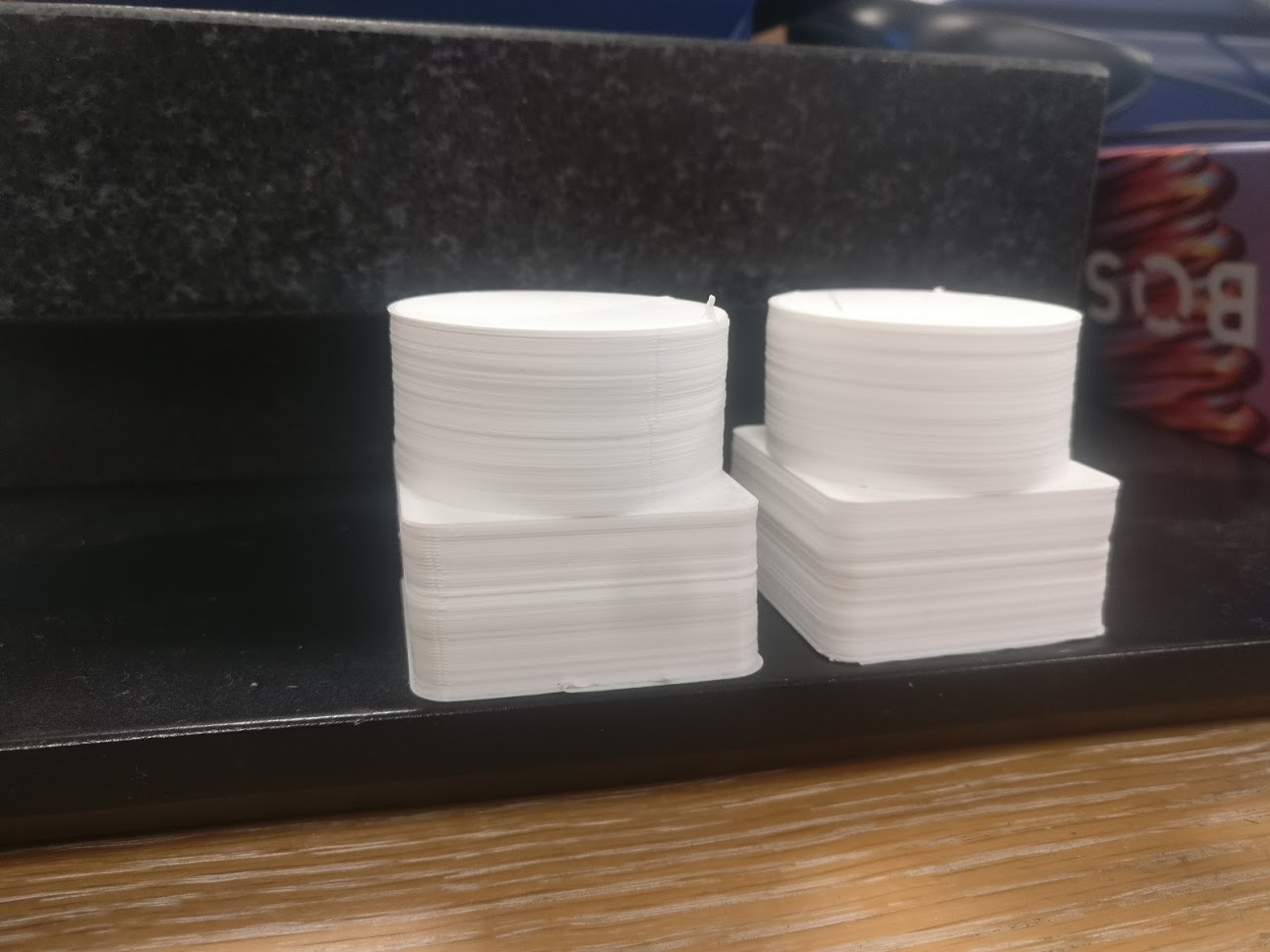
When running Marlin 2.0 (downloadet 3dec) on a MKS SBASE i see layershifts/missing steps on my print (see pictures) from my Tronxy X5s (CoreXY printer).
In this video you can clearly hear it losing steps (around 10 seconds and 25 seconds in the video):
https://www.youtube.com/watch?v=6rsMBklIbGw
As also seen from video this results in skewed prints.
What i have checked:
- All mechanical are perfect, this is not induced from mechanical resistance (or the nozzle hitting the object). I know that the picture shows to identical prints with layershifts in the exact same spot, which seems to indicate a z-axis fault. So i moved the z-axis 20mm, but the layershifts came at exactly the same spot.
- different models and slicer used, same problem, but different places the layer shifts are happening (supporting that it is not mechanical!).
- Checked with stepperdriver on the MKS Board and external stepperdriver (Leadshine DM422 current install seen on the video on X & Y motors). Same behaviour, although more pronounced with external stepperdriver.
- Tronxy s5x config profile have been used, but acceleration, speed and jerk values have been dialed down by roughly half to see if this helped, it did not).
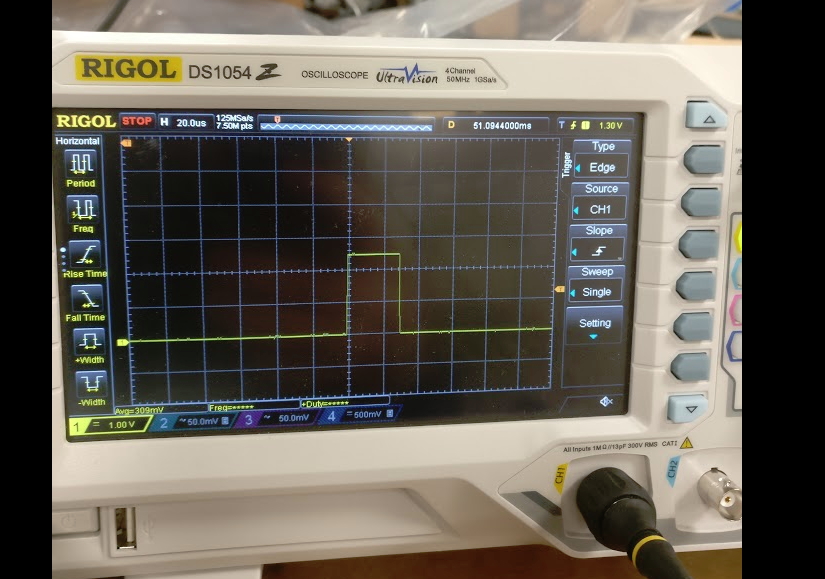
- Pulse width set to 20 us for external steppers (minimum of 7.5 us required). Checked with scope (time of picture it was set to 30 us!):
- All changed i have made in config files have been marked with KPS
Configuration_Files.zip
 palmhoej
All 10 comments
Update: Dialed the stepper drivers up to 2.2A (fortunately it is detached to a 5mm aluplate, so only get about 40 degress celcius).
The clunk heard in the video disappeared, but the layershift is still there and very consistent. Tried to dial down the speed and acceleration even more, but the results are the same:
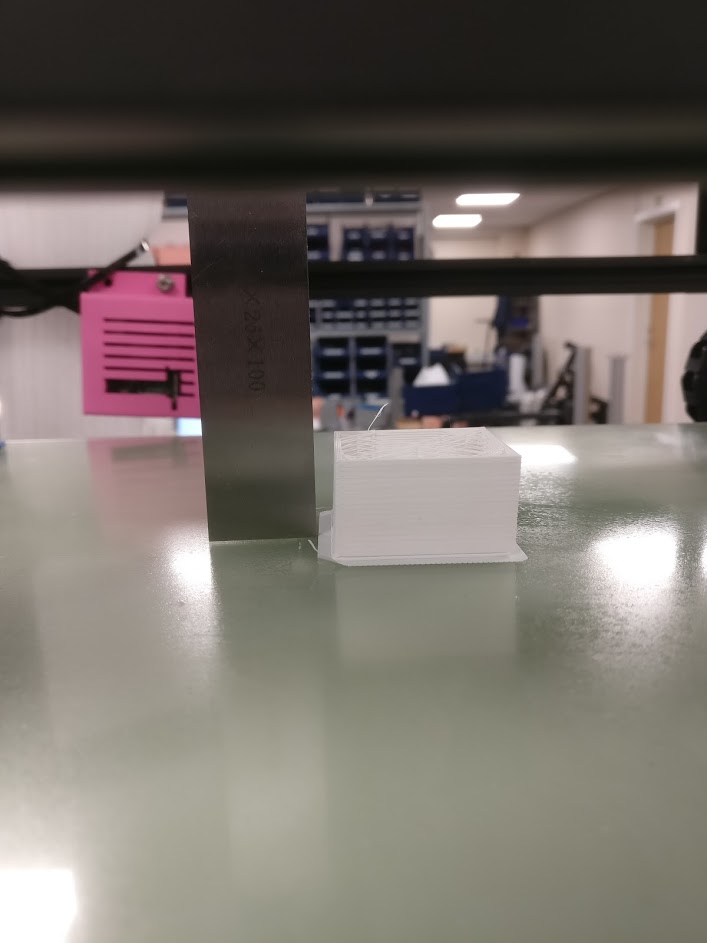
I think i will try to install smoothieware to see if i can get it to print straight with that, but still keeping the Marlin SD so i will be happy to keep investigating, if anyone has any ideas how to fix this?
Best regards
palmhoej
on 19 Dec 2018
This was reported already. It seems there is no final solution yet. Find more information here (#11577) and there (#12403).
 mgrl
on 19 Dec 2018
mgrl
on 19 Dec 2018
I suggest you re-load your firmware with a snap shot of the code from Sept. 1st 2018. Most likely, your layer shift problem will disappear.
 Roxy-3D
on 20 Dec 2018
Roxy-3D
on 20 Dec 2018
I have the same issue, how can I get a 1st Sept snap shot to test? Thanks.
 Knives79
on 21 Dec 2018
Knives79
on 21 Dec 2018
checking your configs.
If you use the on board DRV8825
you need to uncomment
define X_DRIVER_TYPE DRV8825
define Y_DRIVER_TYPE DRV8825
define Z_DRIVER_TYPE DRV8825
define DIGIPOT_I2C
change 8 to 5 #define DIGIPOT_I2C_NUM_CHANNELS 5 //MKS SBASE: 5
define DIGIPOT_I2C_MOTOR_CURRENTS { 1.0, 1.0, 1.0, 1.0, 1.0 } //MKS SBASE I use xyz 1.2 E 1.1
define MINIMUM_STEPPER_DIR_DELAY 650
define MINIMUM_STEPPER_PULSE 20 //KPS uncommented //I change the 2 by 4 and solve the problem
define MAXIMUM_STEPPER_RATE 250000
And if you set the new backlash, all things will go better.
 hectori4502
on 21 Dec 2018
hectori4502
on 21 Dec 2018
I used to have similar issues on my Tronxy X5S.
#define MINIMUM_STEPPER_PULSE 4 in addition to setting XYZE DRIVER_TYPE DRV8825 resolved it for me.
 MoellerDi
on 29 Dec 2018
MoellerDi
on 29 Dec 2018
@palmhoej problem fixed?
 boelle
on 21 Feb 2019
boelle
on 21 Feb 2019
Same issue on SKR 1.3 w/ TMC 2209 drivers. Some combination of MINIMUM_STEPPER_PRE_DIR_DELAY, MINIMUM_STEPPER_POST_DIR_DELAY, MINIMUM_STEPPER_PULSE fixed it for me too. 👍
 rally25rs
on 17 Feb 2020
rally25rs
on 17 Feb 2020
I got interesting layer shifts with 2.01.
In CoreXY left motor had pushed the head 18mm towards right front corner.
15 layers later left motor pulled the layer back 20mm towards left back corner.
Cura (4.5) simulation looks OK, hopefully 2.0.4.4 works.
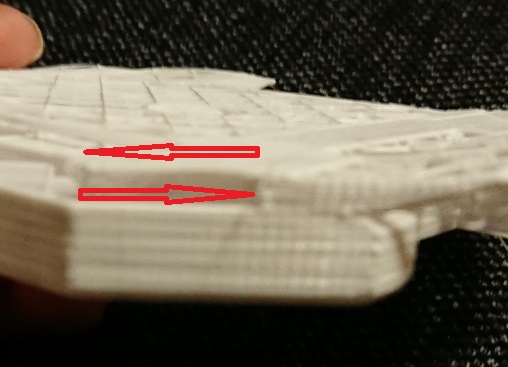
I was making the draft print with 100m/s + 150% speed.
 J-PN
on 2 Mar 2020
J-PN
on 2 Mar 2020
This issue has been automatically locked since there has not been any recent activity after it was closed. Please open a new issue for related bugs.
![github-actions[bot] picture](https://avatars2.githubusercontent.com/in/15368?v=4&s=40) github-actions[bot]
on 3 Jul 2020
github-actions[bot]
on 3 Jul 2020
Related issues
 manianac
·
4Comments
manianac
·
4Comments
 esenapaj
·
3Comments
esenapaj
·
3Comments
 Glod76
·
3Comments
Glod76
·
3Comments
 W8KDB
·
4Comments
W8KDB
·
4Comments
 spanner888
·
4Comments
spanner888
·
4Comments
Most helpful comment
I used to have similar issues on my Tronxy X5S.
#define MINIMUM_STEPPER_PULSE 4in addition to setting XYZEDRIVER_TYPE DRV8825resolved it for me.