Marlin: S-Curve Acceleration -> Layer shifting
I am running the current bugfix-2.0.x branch on my Anycubic I3 Mega (pulled a few minutes ago) and there is severe layer shifting on the Y-Axis when I have S-Curve Acceleration enabled (everything is OK when it is disabled, all other settings exactly the same).
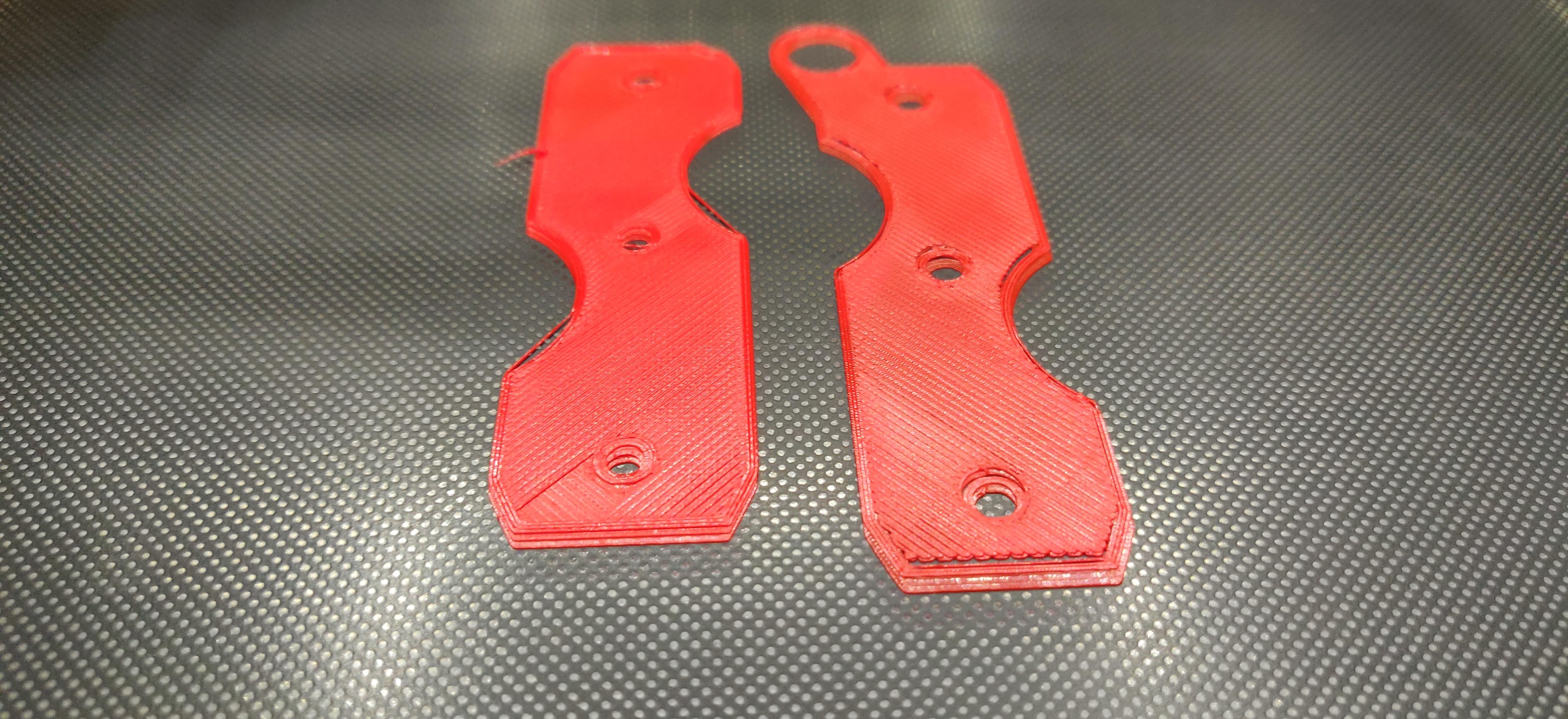
I started printing the Proteus Key holder from thingiverse and, as you can see in the attached photo, each layer would shift about 1mm on the Y-Axis (I stopped it at layer 3-4).
I had layer shifting problems with S-Curve Acceleration in the past (with the bugfix-1.9.x branch), but it was different, there would be just 1 layer shift (though quite big, around 2-3mm) during the whole print, not on every layer.
It makes me wonder, though, as I made 2 prints right before the problematic one and they were fine. The only difference in slicer settings is that on the successful prints I used 0.2 layer height, whereas on the problematic one I used 0.2 for the first layer and 0.15 for the normal layers.
Also, the only other "interesting" setting in my configuration is that I have different X/Y jerk values, X being 10 and Y being 8.
Any ideas?
 nemphys
All 24 comments
I've been looking at some layer shift issues lately that seem to be idex specific as I did not see them in the non idex snapshot based on the same time frame on a different machine. Now that I go and look the S curve acceleration is another difference between the two so this may be worth chasing into a good bit deeper. I'll try switching that off on the idex machine and see if it makes a difference, as we may be looking at the same issue.
 InsanityAutomation
on 11 Nov 2018
InsanityAutomation
on 11 Nov 2018
Some things to try...
- Try adjusting your jerk settings so that X and Y are both 8. Out of interest what made you decide to use different settings for X and Y?
- If possible try increasing motor current for axis that is losing steps.
- Try and determine if using a different first layer height really is making a difference.
- Try lowering the jerk settings and perhaps lowering the acceleration settings.
Do you have different speed settings for the first layer?
Typically missed steps are caused by the motors being unable to handle the requested move. It may be that your printer is just on the edge and that changing to S-Curve just pushes it over. Increasing the current may help as may lowering the jerk/acceleration values. The fact that using a lower 2nd layer height may be part of the problem may point to this. It is likely that the smaller 2nd layer height results in more drag as the printer creates those thinner layers, this may push things over the edge. Normally using S-Curve will produce a better acceleration curve and will make it less likely to hit issues like this, but who knows!
How many test prints did you do with and without S-Curve (but all other settings the same)? How many turned out bad? I'm trying to understand how repeatable the problem is for you.
 gloomyandy
on 11 Nov 2018
gloomyandy
on 11 Nov 2018
I doubt it is the stepper current setting, since I tuned it right after I installed the TMC2208's a few months ago and never had an issue with missed steps whatsoever.
I made a few successful prints at 0.2 (can't remember how many) and thought that I could finally use the S-Curve acceleration reliably (has layer shifting with 1.9.x but I just started playing with 2.0.x and thought that whatever problem was there it was not solved).
The fact that disabling S-Curve Acceleration immediately solved the problem means that it is definitely related, but I don't know if it is repeatable or if it has anything to do with the uneven jerk setting or the layer height.
I will print some tests as soon as I find the time and report back.
@gloomyandy I am just experimenting with the jerk values because my bed makes much more noise than my X-carriage and I am a noise freak :-)
nemphys
on 11 Nov 2018
I also use TMC2208s and they are great and nice and quiet. However (especially in the quieter modes) for me they do seem to be more likely to miss steps than other drivers and require careful adjustment to get right.
Even though the current setting may be fine without S-Curve, it does not mean it is fine with it. If you want to use S_Curve you may need to re-tune things. If you can increase the drive current (without overheating) you may find it helps, as I said it could be that your settings are just on the edge and the different acceleration profile and/or layer height may be tipping it into a stall.
gloomyandy
on 11 Nov 2018
There may be something going on with layer shifts due to recent change, but we're only at the point of vague suspicion. Try downloading a bugfix-2.0.x from an earlier point in time like around October 15 and see if it behaves any better. I will ask around and see if contributors have any ideas.
 thinkyhead
on 12 Nov 2018
thinkyhead
on 12 Nov 2018
It occurs to me that some slicer settings might also be having bad interactions with Marlin, specifically those that do "jerk and acceleration control" or otherwise try to modify movement settings in the middle of a print job. Can you post the G-code you were trying to use? You may have to put it into a ZIP file or give it a .txt extension before GitHub will let you drop it on your reply.
thinkyhead
on 12 Nov 2018
@thinkyhead I am aware of that (see https://github.com/MarlinFirmware/Marlin/issues/12364) and this is why I have completely disabled acceleration/jerk control in Cura.
@gloomyandy As for the stepper current, I remember setting the potentiometer on the TMC2208s at 1V for X/Y/Z, which I think is already a little high compared to what other people do (around 0.8-0.9V). I can always try a higher setting, though, and see if it helps.
nemphys
on 12 Nov 2018
I have my X set at 0.8V but the Y I ended up raising to 1.1V to get things working well. It all depends on the type of stepper motor, the mass of the bed, how well it moves and how hard you are pushing things. The TMC2208 has a slightly higher current handling than the TMC2130 so it may be that the voltage range is slightly different. It also has a different version of Stealthchop (2 rather than 1), which may change the current requirements.
gloomyandy
on 12 Nov 2018
Also keep in mind electricians meters that place a light load on the line will read higher than what you actually have at low dc voltages. Using my Fluke 117, I get 1.1v, where a 113 gets 1.7v for the same setting.
InsanityAutomation
on 12 Nov 2018
OK, will try ramping up to 1.1V I guess and see what happens. I will do that only after I make sure the problem is reproducible with the current settings, though, since it is quite a fuss to open up the printer in order to adjust the voltage in my current setup.
nemphys
on 12 Nov 2018
I really wouldn't get too hung up on the current settings, unless things are getting too hot, if a higher value means no lost steps then use it.
gloomyandy
on 12 Nov 2018
Yes, that is not my issue; I am just tired of opening up my printer, since I have been fiddling around with quite a few things during the past 3 days :-)
Anyway, I think I will just have to do it, since I just started the same print and the shifting happened at the end of the first layer already, which means that the 0.15 layer height is definitely not the problem.
Will up the voltage a bit and report back, fingers crossed.
nemphys
on 12 Nov 2018
OK, opened it up, set Y stepper voltage to 1.1V. Tried the same print, got the same layer shifting right at the end of the first layer.
After that, I changed the Y-jerk value to 10 (was 8 with X-axis set to 10) and, voila, all seems fine (I am at layer 3 right now and no shifting is yet to be seen).
What do you make of that?
PS. Is 1.1V considered to be safe for the Y-axis, or should I open up the printer yet again to set it back to 1.0V? I have X/Z (dual) set to 1.0V and the E set to 1.26V
nemphys
on 12 Nov 2018
I don't see why you should have an issue with 1.1V if you are already operating E at 1.26V. But I guess it might be worth turning it down again once you are convinced that you have things working (I'd run a lot of prints myself to be sure).
I'm surprised that the higher jerk value helps, I would have expected that a lower jerk would put less "strain" on the system, perhaps someone more familiar with the motion code can comment.
gloomyandy
on 12 Nov 2018
Maybe it has something to do with the different jerk values between X/Y? I might try making a print with a jerk value of 8 for both axes and see if I get any shifting. That would definitely answer the question I think.
Will do it later tonight and report back.
nemphys
on 12 Nov 2018
Spoke too early, I just came back to find that there was 1 layer shift a few layers before the end of the print, which is exactly what was happening in the past (1.1.9 with S-Curve acceleration enabled).
nemphys
on 12 Nov 2018
I still think this looks a lot like your printer is just on the edge of skipping steps, I'd be tempted to up the current a little more if you can without the temps getting too high. Or just give up on S-Curve, after all one of the main points is that it is supposed to give smoother acceleration, but it looks like that might not be the case for you, it could be that the approximations needed to run on an 8 bit board are causing some of your problems.
gloomyandy
on 12 Nov 2018
Right, I think I'm done with S-Curve acceleration for now.
Thank you for your time.
nemphys
on 12 Nov 2018
We'll continue to diagnose layer shifting issues over on #12403 and close this.
thinkyhead
on 17 Nov 2018
i have the same issue on my creality cr 10 with the marlin 1.1.9 i try three times to complete a model and layer shifting appears, so i back to the stock firmware of the cr 10 and the problem resolved, some tip to make it works on 1.1.9?
 johanmga
on 2 Dec 2018
johanmga
on 2 Dec 2018
@johanmga — Try using JUNCTION_DEVIATION.
thinkyhead
on 3 Dec 2018
I replaced the traditional jerk for junction deviation yesterday and the problem was solved, thanks!!
johanmga
on 3 Dec 2018
It is only for cartesians. How about deltas?
 karabas2011
on 6 Oct 2019
karabas2011
on 6 Oct 2019
This issue has been automatically locked since there has not been any recent activity after it was closed. Please open a new issue for related bugs.
![github-actions[bot] picture](https://avatars2.githubusercontent.com/in/15368?v=4&s=40) github-actions[bot]
on 4 Jul 2020
github-actions[bot]
on 4 Jul 2020
Related issues
 ShadowOfTheDamn
·
3Comments
ShadowOfTheDamn
·
3Comments
 manianac
·
4Comments
manianac
·
4Comments
 otisczech
·
3Comments
otisczech
·
3Comments
 pubalan12
·
4Comments
pubalan12
·
4Comments
 ahsnuet09
·
3Comments
ahsnuet09
·
3Comments