Marlin: Mesh Bed Levelling Offset problem
Hey guys, i just installed Marlin 1.1.9 firmware of a shelfmade Vulcanus V1. My problem is that the xy home is out the bed limits, to be precise 40mm in x and 10mm in y axis. When i set the mesh bed levelling and i want to level the bed by LCD it starts near my home position. How can i define by firmware that offset?
 JOAQUINPICCI
All 4 comments
To be sure:
Your bed 0, 0 position is offset by 40 and 10 mm from the endstops? In that case you can tell the firmware to offset your home position in two ways:
- With gcode
M206(http://marlinfw.org/docs/gcode/M206.html)
Be careful with negative and positive here, read the doc.
- Configure the offset in the source code: (https://github.com/MarlinFirmware/Marlin/blob/1.1.x/Marlin/Configuration.h#L885)
#define X_MIN_POS 0
#define Y_MIN_POS 0
This issue tracker is typically for bugs and issues with the Marlin source code. Help with configuration can usually be found in forums or the Marlin facebook group:
 swilkens
on 25 Oct 2018
swilkens
on 25 Oct 2018
To be sure:
Your bed 0, 0 position is offset by 40 and 10 mm from the endstops? In that case you can tell the firmware to offset your home position in two ways:
- With gcode
M206(http://marlinfw.org/docs/gcode/M206.html)Be careful with negative and positive here, read the doc.
- Configure the offset in the source code: (https://github.com/MarlinFirmware/Marlin/blob/1.1.x/Marlin/Configuration.h#L885)
#define X_MIN_POS 0 #define Y_MIN_POS 0This issue tracker is typically for bugs and issues with the Marlin source code. Help with configuration can usually be found in forums or the Marlin facebook group:
Just to avoid any mistake. Here is a pic of the situation:
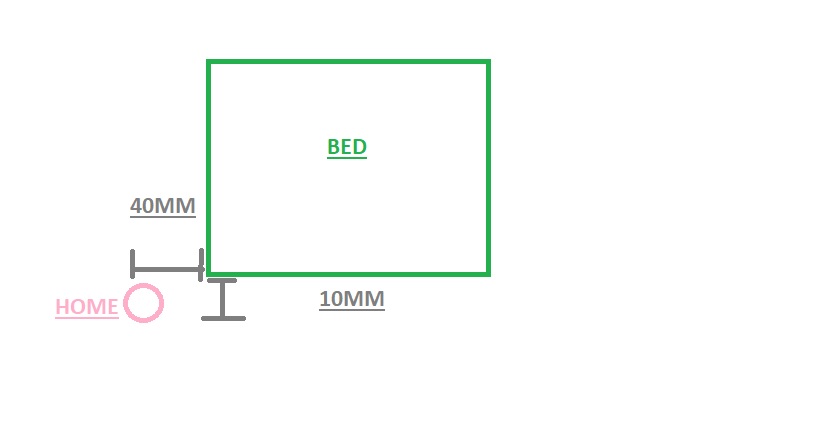
I should tel the firmware this:
#define X_MIN_POS -40
#define Y_MIN_POS -10
is that ok? I should remove the offset from simplify 3D or any slicer i use so i dont duplicate it ?
JOAQUINPICCI
on 25 Oct 2018
Ah, I see what you mean now. The hints in the source code are a little confusing, but that seems right to me - yes. The X_MIN_POS and Y_MIN_POS values define the physical limits of the machine. You are effectively telling your firmware that the endstops are at -40, -10 relative to where 0, 0 is (the corner of your print bed).
You are moving the origin of the Cartesian axis system from the pink circle to the lower left corner of your green bed.
Yes, remove the offsets in your slicer software.
Make sure you also verify your bed size, as the bed size will determine the maximum positions the nozzle can travel to.
// The size of the print bed
define X_BED_SIZE 200
define Y_BED_SIZE 200
I've just tested this on my machine to verify that I'm not confused about the source code comments, and it worked properly for me in combination with MESH_BED_LEVELING. I remember this broke a few times in the past but it seems fine in current bugfix-2.0.x.
Remember also that MESH_BED_LEVELING by default has a 10 mm inset, so the first point it probes will be 10 mm inset on your physical bed.
The consequence of this will also be that you can tell your printer to move to X-40 or Y-10.
swilkens
on 25 Oct 2018
This issue has been automatically locked since there has not been any recent activity after it was closed. Please open a new issue for related bugs.
![github-actions[bot] picture](https://avatars2.githubusercontent.com/in/15368?v=4&s=40) github-actions[bot]
on 6 Aug 2020
github-actions[bot]
on 6 Aug 2020
Related issues
 otisczech
·
3Comments
otisczech
·
3Comments
 ceturan
·
4Comments
ceturan
·
4Comments
 Glod76
·
3Comments
Glod76
·
3Comments
 StefanBruens
·
4Comments
StefanBruens
·
4Comments
 spanner888
·
4Comments
spanner888
·
4Comments
Most helpful comment
Just to avoid any mistake. Here is a pic of the situation:
I should tel the firmware this:
is that ok? I should remove the offset from simplify 3D or any slicer i use so i dont duplicate it ?