Marlin: [1.1.9] RRD Full Graphics Smat Display shifted
This is related to issue #5703 described by @lukeskymuh.
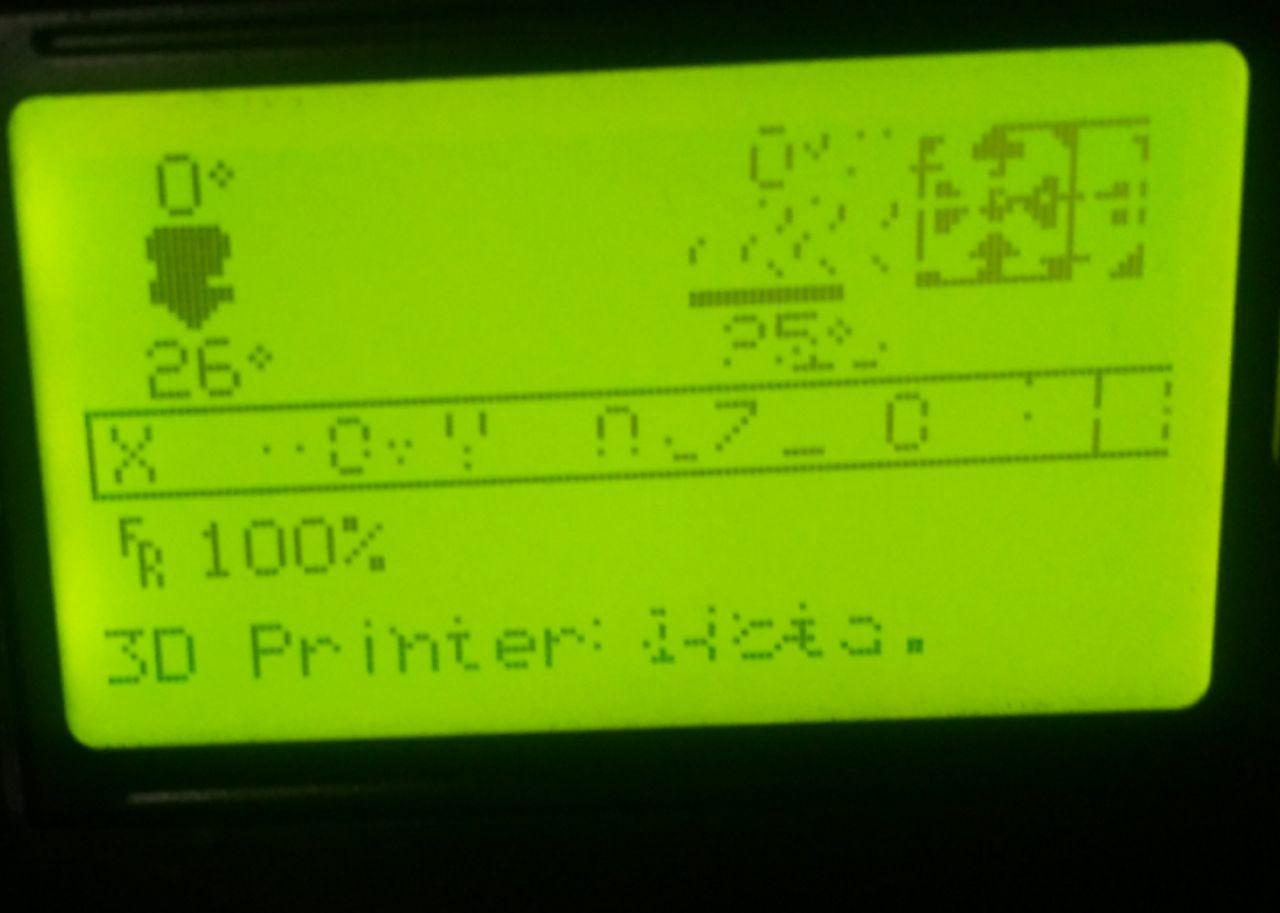
On 1.1.9 the display shows a shifted and/or random pixels. Even using the new LIGHTWEIGHT_UI feature.
On 1.1.8 the LCD works perfect.
This was tested on 2 different LCD modules from different manufacturers (some mirno PCB changes between them). Both of them works perfectly on 1.1.8 and present the same issue on 1.1.9.
I have no luck playing with the delays :(
Controller: RUMBA
LCD: RRD Full Graphics Smat Display
 epoxi
epoxi
All 4 comments
I had same issue with marlin 1.1.9 , and I fixed it!
My display is #define REPRAP_DISCOUNT_FULL_GRAPHIC_SMART_CONTROLLER
Same problem:
Compile&upload 1.1.8 TFT OK
Compile&upload 1.1.9 TFT bad.
I tried several versions of U8glib, and clear all arduino cache libraries folder several times. i tried several arduino IDE versions.
At the end..
i edited my ultralcd_st7920_u8glib_rrd.h and edit delay times for lcd.
my current file has (lines 43 to 75)
// If you want you can define your own set of delays in Configuration.h
#define ST7920_DELAY_1 DELAY_NS(50)
#define ST7920_DELAY_2 DELAY_NS(188)
#define ST7920_DELAY_3 DELAY_NS(50)
// comented all IF
//#if F_CPU >= 20000000
//  #define CPU_ST7920_DELAY_1 DELAY_NS(0)
//  #define CPU_ST7920_DELAY_2 DELAY_NS(0)
//  #define CPU_ST7920_DELAY_3 DELAY_NS(50)
//#elif MB(3DRAG) || MB(K8200) || MB(K8400) || MB(SILVER_GATE)
//  #define CPU_ST7920_DELAY_1 DELAY_NS(0)
//  #define CPU_ST7920_DELAY_2 DELAY_NS(188)
//  #define CPU_ST7920_DELAY_3 DELAY_NS(0)
//#elif MB(MINIRAMBO)
//  #define CPU_ST7920_DELAY_1 DELAY_NS(0)
//  #define CPU_ST7920_DELAY_2 DELAY_NS(250)
//  #define CPU_ST7920_DELAY_3 DELAY_NS(0)
//#elif MB(RAMBO)
//  #define CPU_ST7920_DELAY_1 DELAY_NS(0)
//  #define CPU_ST7920_DELAY_2 DELAY_NS(0)
//  #define CPU_ST7920_DELAY_3 DELAY_NS(0)
//#elif MB(BQ_ZUM_MEGA_3D)
//  #define CPU_ST7920_DELAY_1 DELAY_NS(0)
//  #define CPU_ST7920_DELAY_2 DELAY_NS(0)
//  #define CPU_ST7920_DELAY_3 DELAY_NS(189)
//#elif F_CPU == 16000000
//  #define CPU_ST7920_DELAY_1 DELAY_NS(0)
//  #define CPU_ST7920_DELAY_2 DELAY_NS(0)
//  #define CPU_ST7920_DELAY_3 DELAY_NS(63)
//#else
//  #error "No valid condition for delays in 'ultralcd_st7920_u8glib_rrd.h'"
//#endif
Maybe your LCD need another delays.
( I saw the solution in #4994 )
 lokus77
on 21 Aug 2018
lokus77
on 21 Aug 2018
Once you find some delay times that work, please close this issue.
 thinkyhead
on 21 Aug 2018
thinkyhead
on 21 Aug 2018
Thank @lokus77 !!!
Those worked perfectly :D
@thinkyhead please continue closing this issue.
epoxi
on 8 Sep 2018
This issue has been automatically locked since there has not been any recent activity after it was closed. Please open a new issue for related bugs.
![github-actions[bot] picture](https://avatars2.githubusercontent.com/in/15368?v=4&s=40) github-actions[bot]
on 10 Aug 2020
github-actions[bot]
on 10 Aug 2020
Related issues
 jerryerry
·
4Comments
jerryerry
·
4Comments
 modem7
·
3Comments
modem7
·
3Comments
 Anion-anion
·
3Comments
Anion-anion
·
3Comments
 Kaibob2
·
4Comments
Kaibob2
·
4Comments
 Ciev
·
3Comments
Ciev
·
3Comments
Most helpful comment
I had same issue with marlin 1.1.9 , and I fixed it!
My display is
#define REPRAP_DISCOUNT_FULL_GRAPHIC_SMART_CONTROLLERSame problem:
Compile&upload 1.1.8 TFT OK
Compile&upload 1.1.9 TFT bad.
I tried several versions of U8glib, and clear all arduino cache libraries folder several times. i tried several arduino IDE versions.
At the end..
i edited my
ultralcd_st7920_u8glib_rrd.hand edit delay times for lcd.my current file has (lines 43 to 75)
// comented all IF
Maybe your LCD need another delays.

( I saw the solution in #4994 )