Marlin: Auto Bed Leveling Z offset Problem
Description
Auto Bed Level always ends with a Z offset. In my case of around 0.5mm
Steps to Reproduce
Uploaded latest bugfix-1.1 from 30-05-2018
Installed BlTouch.
Configured AUTO_LINEAR
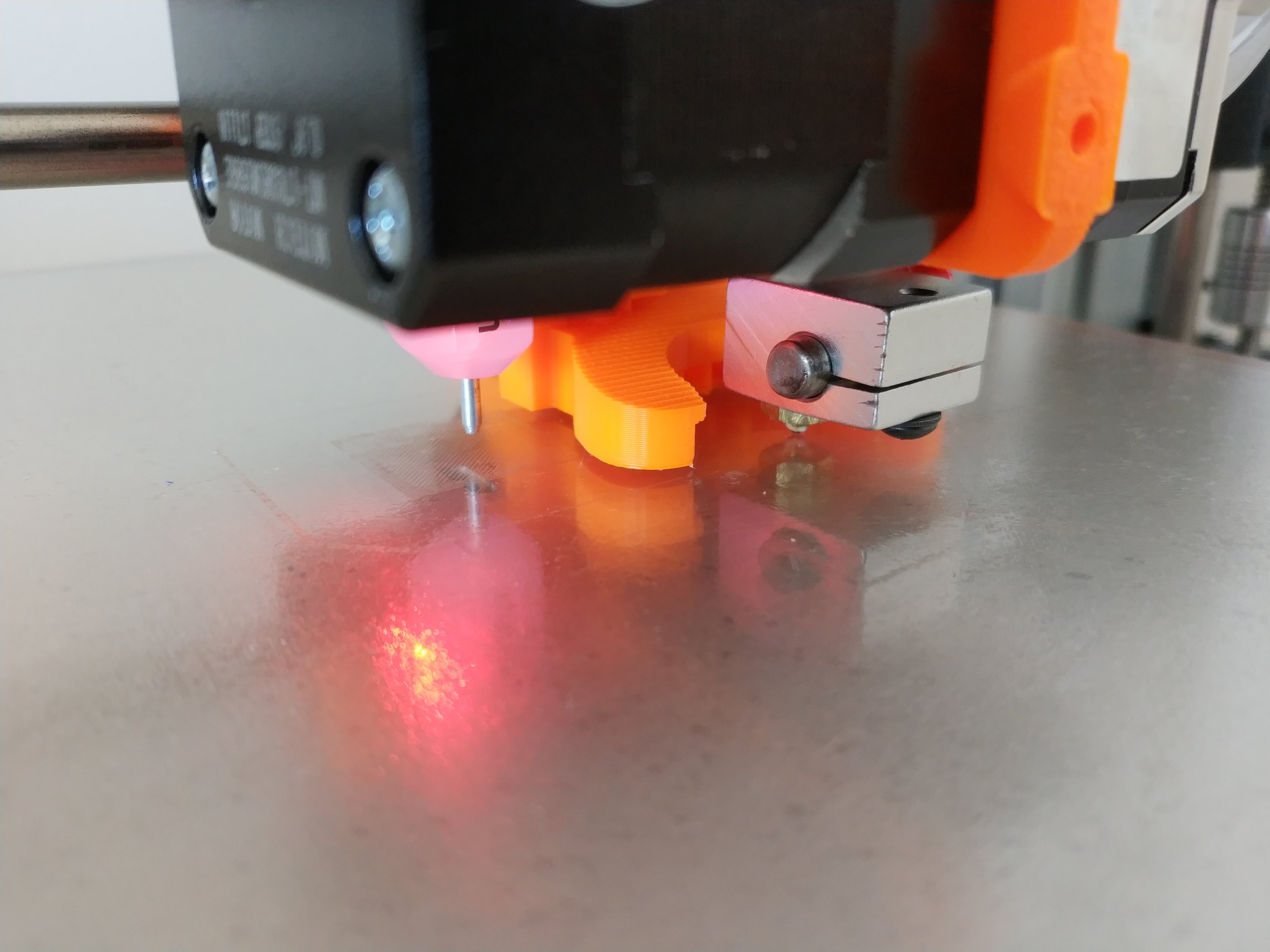
Configured ProbeZ Offset as -0.7mm. Tested as making G28 and then G1 Z0, the nozzle slightly touches the bed.
Do G29 and wait for it to finish.
When finished G1 Z0. Then I move the nozzle arbitrary and it seems to be fine. Nozzle distance to bed is almost 0 in all cases.
Do M500.
Do M501.
G28
M420 S1 and then G1 Z0.
At this point the nozzle is no more slightly touching the bed but 0.5mm over the bed. And this distance is maintained no matter where you go over the bed in XY.
Same happens with BILINEAR and UBL. The difference is that with those, just after finishing the G29, the offset is already there.
As the offset is maintained over the whole bed and the Z motors are working while moving XY, it seems like a ... offset set by the maths or the firmware. Marlin is compensating right but 0.5mm off.
Additional Information


 wjax
wjax
All 26 comments
I have a very similar issue, level bed, test, save mesh, print all good. Come back another day, test z offset with abl off, turn abl on and load the mesh from above everything is way too high. If I babystep down and get printing, it seems every layer moves up a fraction too much until a certain height (I presume is related to fade height.)
 Squid116
on 2 Jun 2018
Squid116
on 2 Jun 2018
Are you sure that G28 is leaving the head at a consistent Z height every time? You can test this by setting up your Z offset and then performing a series of G28, G1 Z0 operations and checking that the nozzle is just off the bed, repeat a few times to ensure that G28 is always accurate for Z. I had a probe that was not very consistent and was constantly having to to adjust Z offset. I switched to a different probe and now use a saved UBL mesh over and over again with no issues. If your G28 is not providing an accurate Z offset and you are using UBL then you can load the UBL mesh, perform a G28 and then use a G29 J (or better still G29 J3) to offset the mesh, I found that the G29 J provided a more consistent Z offset than G28 with the not very good probe I had.
 gloomyandy
on 2 Jun 2018
gloomyandy
on 2 Jun 2018
Couple of other thoughts are you setting the Z offset with both the bed and the nozzle heated? My bed changes shape when heated and it is very easy to have a small amount of filament still on the tip of the nozzle when checking if it touches the bed. Having the nozzle hot means any filament on the tip will get squished out of the way!
Also when setting the z offset G28 followed by G1 Z0 is probably not correct, you really need to move the nozzle so that it is in the same location as the probe when doing a G28, if not you will be using a different point on the bed to set your z offset to the point actually being probed. If your bed is not level that may introduce an error.
gloomyandy
on 2 Jun 2018
My bltouch is firmly attached to the mount (which I designed). Several tests one after the other shows the same results. The probe reading is always the same. Very stable.
The G1 Z0 is executed at the same point than the G28. Which in my case is in the center of the bed (Safe homing).
All tests are done with cold bed. But the result are the same in hot bed. However I know that I can't mix them.
Be sure that there is something going on.
I can record a video or Skype if anyone is interested
wjax
on 2 Jun 2018
Perhaps a video would be a good idea. I'd be tempted to demonstrate the problem using UBL as this seems to be the levelling system with the most active ongoing development.
gloomyandy
on 2 Jun 2018
As per @wjax bltouch, fixed on solid mount, very high repeatability. I always perform levelling with a fully heated bed.
G28 with levelling disabled sets a perfect offset every time without fail. G28 with levelling enabled produces a nozzle too high off the bed.
My mesh has the centre of my bed as all within 0.001 of zero, so levelling should hardly be doing anything.
Squid116
on 2 Jun 2018
Are you using RESTORE_LEVELING_AFTER_G28? Without this option (or with leveling off prior to G28) every G28 should produce the same Z0 position. First establish that G28 is working consistently with leveling off.
Without the RESTORE_LEVELING_AFTER_G28 option, it should not matter whether leveling is on or off at the time you do G28 because leveling is always disabled at the start of G28. Please test to make sure that with RESTORE_LEVELING_AFTER_G28 disabled, after every G28 —with or without leveling enabled— produces a consistent Z0 position.
Next thing to look at after the above tests…
After doing G28, put the nozzle at Z0, and then enable leveling with M420 S1. Then do M114 to view the current position. The current position should have been modified slightly to account for the leveling mesh at the current point. How much does it get modified? Does it seem to be adjusted by a reasonable amount, consistent with the mesh (as reported by M420 V)?
 thinkyhead
on 3 Jun 2018
thinkyhead
on 3 Jun 2018
Hi Scott.
I have RESTORE_LEVELING_AFTER_G28 disabled. So every G28 is "clean" and always finish at the right position.
When I enable the mesh (bilinear and ubl, tested both) afterwards with M420 S1, I can see in the LCD that Z is no more 0 but something around -0.5.
This is the same amount of offset that I have with the LINEAR example. I would look at it because it seems very extrange and interesting.
If I do G28 and then G29 with LINEAR, the result just after G29 is perfect. I can move the nozzle and at all times it stays where it should. So calibration works and my borosilicate bed is quite flat.
However, if just after G29, I store with M500 the bed calibration and then start G28 and load calibration with M420 S1...I no longer get the good nozzle position but the one with the -0.5 offset that curiously was in the BILiNEAR.
So I would not look at the maths of the different calibration method. But at the code that loads that calibration and use it from memory.
And maybe I would focus on LINEAR first because is very easy to reproduce and quite clear.
Thanks
wjax
on 3 Jun 2018
When I enable the mesh (bilinear and ubl, tested both) afterwards with M420 S1, I can see in the LCD that Z is no more 0 but something around -0.5.
What is the XY position at that time? What does your mesh look like? (M420 V)
thinkyhead
on 3 Jun 2018
I will print the result. The position is the same as for the Z home. Center of the bed.
That phantom offset is maintained across the whole bed. So bed leveling is working in that the mesh is correct except for the offset.
One funny thing too happens when BILINEAR. Once it finished G29. If you do G1 Z0 at that last probe position it won't touch the bed, it will stay that 0.5 over the bed. That Offset again. I would think that at the probe position the nozzle should just be perfectly at Z0
wjax
on 3 Jun 2018
Are you sure you have the nozzle at the same position as probed by the probe? For instance when you execute G28 the probe will be in the centre of the bed but the nozzle will be offset by whatever your probe X and Y offsets are. So for instance in my case I have a bed of size 220, 280. When I do a G28 the probe is at (110, 140), the centre of the bed, but the nozzle is left at (112, 123) as my probe offsets are (-2, 17). So to accurately check the Z value at an actual probe point I need to move the nozzle position before doing G1 Z0.
gloomyandy
on 3 Jun 2018
Here is a video with the problem demo in LINEAR that maybe or maybe not related with the same offset in BILINEAR AND UBL.
wjax
on 3 Jun 2018
I would think that at the probe position the nozzle should just be perfectly at Z0
If you subtract 0.5 from your current M851 Z offset value, then it should be at the correct height.
thinkyhead
on 12 Jun 2018
@thinkyhead Scott. The thing is that LINEAR works flawlessly. Just incredible.
I have in my GCODE a G28 and G29 before the work begins.
But it is a pity that BILINEAR just doesn't work because there is something in there that is not correct.
And even in LINEAR, if I recall with M501 a previously stored (M500) LINEAR calibration, it just have the "offset".
And the super curious thing is that the offset is the SAME for both "bugs", LINEAR with recalled params and BILINEAR.
wjax
on 12 Jun 2018
But it is a pity that BILINEAR just doesn't work because there is something in there that is not correct.
Unfortunately, I'm unable to reproduce your issue. Bilinear seems to be doing the right thing with relation to the stored mesh.
If your bed is flat but tilted, it is better to use LINEAR. Bilinear leveling won't work well if the bed is tilted, even if it's very flat, just as LINEAR won't work well with a warped bed, even if it is very level.
thinkyhead
on 13 Jun 2018
The process you are using to set the z offset is probably not ideal. From the video you are doing a G28 followed by a G1 Z0 to check to see if the nozzle is touching the bed. But this means you are not checking the Z0 level at the same point as you have just probed the bed. Ideally you should do
G28
G1 X<X Bed Centre> Y<Y Bed Centre>
G1 Z0
Where < X/Y bed centre> is the X and Y coordinate of the bed centre (the location your G28 actually probes). If you don't do this and your bed is not level (which I guess it isn't if you are using bed levelling) then you are likely introducing an error into your Z offset due to the probe being offset from the nozzle. I'm not saying that this is responsible for the error you are seeing, but it may be contributing to it and it is best to eliminate all possible problems, especially as others are not able to reproduce the problem you have.
gloomyandy
on 13 Jun 2018
I've been having this issue since ABL/UBL were first available.
I'm using an optical Z probe. It is tested to be accurate within 0.02mm, tested by lowering extruder onto a gauge block to check reported Z height, then move gauge block under probe and check the difference.
My Z_PROBE_OFFSET_FROM_EXTRUDER is set to 1.1 (probe is 1.1mm above nozzle). My other offsets X -14 and Y 48. These both work correctly, as during probing, the probe always checks +14 and -48 out from the intended nozzle position.
I Then run a G28, G29, M500, G28, M420 S1, and then a G0 X150 Y150 Z2 F5000. Then a G0 Z0, and the extruder ends up almost 3mm above the bed.
I'm sure those of us having a problem are just doing something wrong, but I was told this almost a year ago, and then found several bugs in the code, which I see have since been resolved, but I still have the same issue. IIRC, I gave up on ABL and just did a manual UBL which seemed to work out.
I wonder if perhaps the issue is simply documentation. I haven't found anything that describes what values ABL takes into account. IE: does it honour home offsets?
 blistovmhz
on 18 Nov 2018
blistovmhz
on 18 Nov 2018
@blistovmhz See my comments above you can not set the Z offset by following the procedure you have described "tested by lowering extruder onto a gauge block to check reported Z height, then move gauge block under probe and check the difference" you need to keep the gauge block in the same location and move the nozzle so that the probe is in the same location that you used when lowering the extruder to touch the block. If you don't do this and your bed is not level you will be introducing an offset into the system. It seems unlikely that this will introduce a 3mm error, but then again I can't imagine what else will. But it is important then when setting the Z offset you compare the heights at the same position on the bed.
You haven't posted your configuration files so it is hard to say if anything else may be causing problems. What sort of machine are you using? What version of Marlin? What exactly do you mean by "home offsets" which configuration values are you setting?
gloomyandy
on 18 Nov 2018
Looks as if you try to determine 'Z_PROBE_OFFSET_FROM_EXTRUDER' by measuring the distance between nozzle tip and probe housing. Better try to measure the distance between nozzle tip and the (on an optical probe likely invisible) trigger point below of the probes housing. You should end up with a negative z-offset.
 AnHardt
on 18 Nov 2018
AnHardt
on 18 Nov 2018
Yea, My measurements were correct. I'm not sure what I ended up doing but it's working finally. I think it was something to do with the z home offset being subtracted in the opposite direction I expected. I'll have to take another look. I'm sure this is the same issue I had before, but I'm also sure I could not make it work before, and I definitely tried all of the same possible combinations of addition/subtraction between the zprobe offset and home offsets. Either way, working great now.
I noticed I never could find anything in the docs to suggest that EEPROM needed to be enabled. Perhaps I missed it, but I've had to point this out to a lot of people trying to get ABL/UBL set up.
it'd be nice if the docs listed all the prerequisites for ABL/UBL, as well as explained the logic.
blistovmhz
on 21 Nov 2018
I ran into the same or a very similar issue. In the past, I did G28 and G29 as start code. (I use bilinear bed leveling) .Then I learned that you could save the leveling data to eeprom, so I manually did G29 G29 M500. To start a print, I used G28 M420 S1. The nozzle was about 3mm above the bed with this. The solution was to use send M420 S1 before G28.
Perhaps this helps. But in the end, I went back to G28 G29 because otherwise, my Z axis does a weird fast movement and looses steps (which is certainly not related to this issue).
 hamster65
on 23 Nov 2018
hamster65
on 23 Nov 2018
Yea, again, this really seems like a documentation issue given so many
people seem to have problems getting ABL/UBL setup. Oddly, manual mesh
worked fine for me, and gave me exactly the same numbers as the auto
leveling, but even after doing a g29, m500, g420 S1, it'd still give me
some arbitrary z height offset that I coudln't account for.
Oh well, working minty now.
On Fri, Nov 23, 2018 at 2:31 PM hamster65 notifications@github.com wrote:
I ran into the same or a very similar issue. In the past, I did G28 and
G29 as start code. (I use bilinear bed leveling) .Then I learned that you
could save the leveling data to eeprom, so I manually did G29 G29 M500. To
start a print, I used G28 M420 S1. The nozzle was about 3mm above the bed
with this. The solution was to use send M420 S1 before G28.
Perhaps this helps. But in the end, I went back to G28 G29 because
otherwise, my Z axis does a weird fast movement and looses steps (which is
certainly not related to this issue).—
You are receiving this because you were mentioned.
Reply to this email directly, view it on GitHub
https://github.com/MarlinFirmware/Marlin/issues/10907#issuecomment-441325335,
or mute the thread
https://github.com/notifications/unsubscribe-auth/APt6ks1wXxLV7KRhSjuqnFpTqGvPbgLtks5uyHc2gaJpZM4UUozJ
.
--
Fact:
- Ninjas are mammals.
- Ninjas fight ALL the time.
- The purpose of the ninja is to flip out and kill people.
blistovmhz
on 24 Nov 2018
it'd be nice if the docs listed all the prerequisites for ABL/UBL, as well as explained the logic.
Good idea! Please feel free to prepare a Pull Request that helps document this better.
 Roxy-3D
on 25 Nov 2018
Roxy-3D
on 25 Nov 2018
@wjax is this still an issue?
 boelle
on 20 Feb 2019
boelle
on 20 Feb 2019
@thinkyhead i think we can close this one
boelle
on 6 Mar 2019
This issue has been automatically locked since there has not been any recent activity after it was closed. Please open a new issue for related bugs.
![github-actions[bot] picture](https://avatars2.githubusercontent.com/in/15368?v=4&s=40) github-actions[bot]
on 8 Jul 2020
github-actions[bot]
on 8 Jul 2020
Related issues
 modem7
·
3Comments
modem7
·
3Comments
 Bobsta6
·
3Comments
Bobsta6
·
3Comments
 spanner888
·
4Comments
spanner888
·
4Comments
 Ciev
·
3Comments
Ciev
·
3Comments
 esenapaj
·
3Comments
esenapaj
·
3Comments
Most helpful comment
I've been having this issue since ABL/UBL were first available.
I'm using an optical Z probe. It is tested to be accurate within 0.02mm, tested by lowering extruder onto a gauge block to check reported Z height, then move gauge block under probe and check the difference.
My Z_PROBE_OFFSET_FROM_EXTRUDER is set to 1.1 (probe is 1.1mm above nozzle). My other offsets X -14 and Y 48. These both work correctly, as during probing, the probe always checks +14 and -48 out from the intended nozzle position.
I Then run a G28, G29, M500, G28, M420 S1, and then a G0 X150 Y150 Z2 F5000. Then a G0 Z0, and the extruder ends up almost 3mm above the bed.
I'm sure those of us having a problem are just doing something wrong, but I was told this almost a year ago, and then found several bugs in the code, which I see have since been resolved, but I still have the same issue. IIRC, I gave up on ABL and just did a manual UBL which seemed to work out.
I wonder if perhaps the issue is simply documentation. I haven't found anything that describes what values ABL takes into account. IE: does it honour home offsets?