Marlin: Need help with Auto Bed Levelling
Description
I recently tried to update to newer version of marlin, but when I finished going through all of confining and run it, my auto bed leveling stopped working as intended:
After homing in old it used to move 10mm up from bed now its just stops when induction sensor is triggered (i don't know if it's intended or not(doesn't really matter for me))
When I ran auto bed level it finds the height of the first point and doesn't go up at all and goes straight for the next one if sensor stays triggered it just skips and goes to next, only when it finds the point where the bed is below range of the sensor it does the normal check and then cycle repeats
At the end, the values look like this:
0____0_____ 1_______2
0 +9.999 +9.999 +9.842
1 +9.883 +9.847 +9.847
2 +9.726 +9.726 +9.726
so it skipped first 2, did the check on 3rd skipped 4,5,6th did the check on 7th and skipped last 2
config.zip
I used marlin 1.1.8
My printer RepRap Prusa ramps 1.4
 Rundercaster
All 35 comments
You probably should be using bugfix_v1.1.x
You are a little behind where things are at. For example... your configuration.h does not have
/**
 * Normally G28 leaves leveling disabled on completion. Enable
 * this option to have G28 restore the prior leveling state.
 */
#define RESTORE_LEVELING_AFTER_G28
You might want to use a visual diff program to help you catch up to the current source code. A Visual Diff program makes it easy to move your changes to current code base.
Also... Those numbers in your matrix are very large. You probably do no have your Z_PROBE_OFFSET_FROM_EXTRUDER set correctly.
 Roxy-3D
on 27 Mar 2018
Roxy-3D
on 27 Mar 2018
Thanks for your responds,
I used the latest stable release (1.1.8) from https://github.com/MarlinFirmware/Marlin/releases/tag/1.1.8
that's why I am behind you, but I downloaded now bugfix_v1.1.x and edited the configs files again
The same problem appears that I highlighted before, it's just assumes that if inductive probe stays triggered bed level is found at that point (which is exactly same as the last point), so it skips that point
Also:
Roxy-3D comment
Also... Those numbers in your matrix are very large. You probably do not have your Z_PROBE_OFFSET_FROM_EXTRUDER set correctly.
I haven't calibrated my probe yet as bed level doesn't work very well, because it shouldn't matter as I don't use any other endstop on my min_z (only inductive probe), and I am sure it works fine, because it can do home just fine.
my new config file for bugfix_v1.1.x: Config.zip
Also, I should mention that I use drv8825 as my stepper drive (on RAMPS1.4)
Rundercaster
on 27 Mar 2018
Can you get good numbers with M48 using your Z-Probe?
Roxy-3D
on 28 Mar 2018
If I ran M48 on its own
I get:
SENDING:M48
M48 Z-Probe Repeatability Test
Mean: 9.971125 Min: 9.970 Max: 9.971 Range: 0.001
Standard Deviation: 0.000375
But I also did the test from wiki: M48 P10 X100 Y100 V2 L5
and I get:
SENDING:M48 P10 X100 Y100 V2 L5
M48 Z-Probe Repeatability Test
1 of 10: z: 9.986
2 of 10: z: 9.987
3 of 10: z: 9.987
4 of 10: z: 9.987
5 of 10: z: 9.987
6 of 10: z: 9.987
7 of 10: z: 9.982
8 of 10: z: 9.984
9 of 10: z: 9.984
10 of 10: z: 9.984
Finished!
Mean: 9.985751 Min: 9.982 Max: 9.987 Range: 0.005
Standard Deviation: 0.001953
echo:endstops hit: Z:9.98
Also, I don't know but I think it doesn't go up after homing but changes coordinates to be 10, so all the values I get is close to 10
this is the last line when it finished Z-Probe Repeatability Test
echo:endstops hit: Z:9.98
Which I think needs to be Z:0.00
Also, at the end the nozzle crashes into the bed
Rundercaster
on 28 Mar 2018
A simple test would be helpful...
- G28 (to home machine)
- carefully lower nozzle until it just touches the bed
- M114 (Where does the machine think the nozzle is at?)
Roxy-3D
on 28 Mar 2018
I ran home(G28)
It stopped as soon as it triggered endstop and didn't go up at all
X:0.00 Y:0.00 Z:10.00 E:0.00 Count X:0 Y:0 Z:8000
and it thinks that it's at Z:10, but actually its
SENDING:M119
Reporting endstop status
x_min: TRIGGERED
y_min: TRIGGERED
z_min: TRIGGERED
z_max: open
Rundercaster
on 28 Mar 2018
OK... Move the nozzle to the center of the bed... and raise it 50 mm above the bed.
What does M119 say now? It should say everything is OPEN. If it doesn't say that, that needs to be resolved before we do anything else. Once you get everything to say OPEN... You should be able to press and hold any given end switch and do a M119 and see it say TRIGGERED.
We need to get this working as expected first.
Roxy-3D
on 28 Mar 2018
last message when i added i meant to say when its homes to (0,0,0) irl
it thinks it's (0,0,10)
and yes all of the endstop works correctly
SENDING:M119
Reporting endstop status
x_min: open
y_min: open
z_min: open
z_max: open
Rundercaster
on 28 Mar 2018
last message when i added i meant to say when its homes to (0,0,0) irl it thinks it's (0,0,10)
It is best to home in the center of the bed. We should turn on SAFE_HOMING !!!! And it is helpful right now just because we don't know what problem we are fighting.
I used the latest stable release (1.1.8) from https://github.com/MarlinFirmware/Marlin/releases/tag/1.1.8
Let's get you running on bugfix-1.1.x Can you cross your configuration.h settings over to that version? (Using a visual diff program... it should not take long. Maybe 10 minutes.)
If not... I'll do it and post your configuration.h files here.
Roxy-3D
on 28 Mar 2018
I am running bugfix-1.1.x
after you said that I should have updated to bugfix_v1.1.x:
You probably should be using bugfix_v1.1.x
You are a little behind where things are at. For example... your configuration.h does not have
from my 2nd comment:
my new config file for bugfix_v1.1.x: Config.zip
Also, I should mention that I use drv8825 as my stepper drive (on RAMPS1.4)
and yes I updated my config to bugfix_v1.1.x you can download it from my 2nd comment
or I just attach it here:config.zip
Rundercaster
on 28 Mar 2018
OK... Thank you for doing that!
I don't see anything obviously wrong with your configuration.h file. My guess is the 10mm number is coming from:
define Z_AFTER_PROBING 10 // Z position after probing is done
It might be useful to change that to 9.9 or 11.0 and see if the https://github.com/MarlinFirmware/Marlin/issues/10230#issuecomment-377005805 follows the change. The only thing out of the ordinary is you are defining a
define FIX_MOUNTED_PROBE
That should be OK... But given we are seeing weird behavior, it is worth noting.
Are you homing to Z-Max ? What is connected to Z-Max? (You have that enabled. So something must be on it, right?)
Roxy-3D
on 28 Mar 2018
when I set #define Z_AFTER_PROBING 9 it shows: (btw you cant put desimals in that varible)
SENDING:M114
X:0.00 Y:0.00 Z:9.00 E:0.00 Count X:0 Y:0 Z:7200
Also, I've tried setting #define Z_AFTER_PROBING 0
It dints help with bed leveling, but kind of solved homing issue
sorry for late replay
Rundercaster
on 29 Mar 2018
What is connected to Z-Max? (You have that enabled. So something must be on it, right?)
and yes endstop is connected to z-max like on other axis x-min, y-min (same kind of endstop switch)
Are you homing to Z-Max ?
no, I am homing to all -1 value, so all to min
Rundercaster
on 29 Mar 2018
If you're not using the Z_MAX plug on the board for anything, be sure to disable USE_ZMAX_PLUG. And if the probe isn't connected to the Z_MIN plug on the board you should disable Z_MIN_PROBE_USES_Z_MIN_ENDSTOP_PIN and enable Z_MIN_PROBE_ENDSTOP instead.
 thinkyhead
on 29 Mar 2018
thinkyhead
on 29 Mar 2018
If you're not using the Z_MAX plug on the board for anything, be sure to disable USE_ZMAX_PLUG. And if the probe isn't connected to the Z_MIN plug on the board you should disable Z_MIN_PROBE_USES_Z_MIN_ENDSTOP_PIN and enable Z_MIN_PROBE_ENDSTOP instead.
I use z-max, but I can try to disable it
, my inductive probe is connected to z-min
so should I
disable Z_MIN_PROBE_USES_Z_MIN_ENDSTOP_PIN and enable Z_MIN_PROBE_ENDSTOP
Rundercaster
on 29 Mar 2018
ok fixed the problem its to do with z-max endstop if its always open it prevents for the nozzle to go up when running homing or bed leveling even if its always open
Rundercaster
on 29 Mar 2018
ok fixed the problem its to do with z-max endstop if its always open it prevents for the nozzle to go up when running homing or bed leveling even if its always open
I'm glad you got it working. But it seems if Z-Max is OPEN, it seems like it should allow Z travel in an upward direction. @thinkyhead Do you agree?
Roxy-3D
on 29 Mar 2018
An unconnected endstop with no pullup is likely to be floating and apt to give spurious results.
thinkyhead
on 29 Mar 2018
And with regards to that... The pull up resistors are turned off for the end stops. If you have 'normal' end stops, the pull up resistors should be turned on.
Roxy-3D
on 29 Mar 2018
I have endstop with resistor on it, its little pcb board
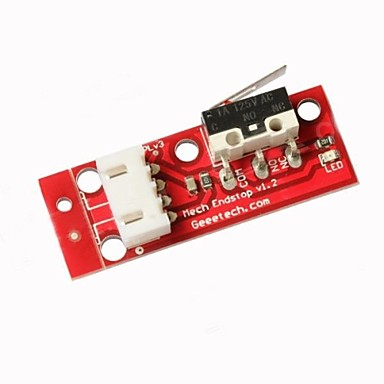
it has the resistor on it between signal and +5V and a cap between +5V and GND
Rundercaster
on 29 Mar 2018
OK! Thanks!
Roxy-3D
on 29 Mar 2018
Was one of these switches connected to z_max?
 AnHardt
on 29 Mar 2018
AnHardt
on 29 Mar 2018
Was one of these switches connected to z_max?
Good question. Because if it wasn't connected, there would be no pull up resistor on the Z-Max input.
Roxy-3D
on 29 Mar 2018
At that time it was, i disconnected now and comment it out in marlin and now it all works
Rundercaster
on 29 Mar 2018
but I still expect you guys to fix that bug
Rundercaster
on 30 Mar 2018
Wow...
Roxy-3D
on 30 Mar 2018
but I still expect you guys to fix that bug
We can work around bad configuration sometimes. Sometimes we cannot.
thinkyhead
on 30 Mar 2018
what do you mean by bad configuration
Rundercaster
on 30 Mar 2018
For example, having USE_ZMAX_PLUG set when the attached hardware has no defined function.
thinkyhead
on 30 Mar 2018
yes it has so if I leave z at the top and switch off the printer and switch back on, so when it homes it doesn't crash to the top
Rundercaster
on 30 Mar 2018
If you're using Z-Max for homing, you should have your Z_HOME_DIR set to 1 and then you can still use the probe connected to the Z-Min plug as your probe with Z_MIN_PROBE_USES_Z_MIN_ENDSTOP_PIN.
thinkyhead
on 30 Mar 2018
so I cant put all 6 endstops?
Rundercaster
on 31 Mar 2018
No, you can only use one endstop per-axis. Marlin does "homing" in only one direction. There's no extra feature to use added endstops to catch an axis moving too far.
thinkyhead
on 1 Apr 2018
ow ok, Thanks
Rundercaster
on 1 Apr 2018
This issue has been automatically locked since there has not been any recent activity after it was closed. Please open a new issue for related bugs.
![github-actions[bot] picture](https://avatars2.githubusercontent.com/in/15368?v=4&s=40) github-actions[bot]
on 31 Aug 2020
github-actions[bot]
on 31 Aug 2020
Related issues
 StefanBruens
·
4Comments
StefanBruens
·
4Comments
 manianac
·
4Comments
manianac
·
4Comments
 modem7
·
3Comments
modem7
·
3Comments
 Tamonir
·
3Comments
Tamonir
·
3Comments
 Matts-Hub
·
3Comments
Matts-Hub
·
3Comments
Most helpful comment
At that time it was, i disconnected now and comment it out in marlin and now it all works