Marlin: [1.1.x bugfix]Actual bed temperature goes to max possible after 2-3 minutes from print start, stays fully on
Bug Report
- Description: Bed temperature goes to max after 2-3 minutes from print start
When i start a print, after a few minutes, the bed output gets stuck at high. I can tell this by looking at both the leds on the ramps and the heatbed, and also measuring the voltage between heatbed pins. Set point stays at where it should be(70 celcius for my pla prints), but both read temperature and real temperature goes very high(my heated bed's physical limit at 12v is 115 celcius degree).
I use mega 2560 with ramps 1.4, when this first happened i thought that the bed mosfet gone bad mid print, but it goes to normal behaviour after restart. Whenever i start a print again, it gets out of control again.
The current heatbed i use for test purposes is an MK2B 200*200 and i use a 30A 12V power supply, if needed.
I tried:
-Auto tuning PID a few times
-Setting the PID parameters to default
-Manual tuning the PID parameters(i'm qualified to design PID controllers)
-Turning off the PID control for heat bed
-Printing from SD card
-Printing from USB
The problem doesn't happen if i turn the heat bed on to the exact same temperature i use for prints, out of a print. I left the bed on on itself for like at least 3 hour on 70 celcius degrees and it stayed stable at that temperature.
I MIGHT still have some weird problem with my hardware but the behaviour and my instincts tell me there is something wrong in the software.
I was planning to install a 4000W 500mm*500mm heater to my printer but with such a bug/problem, it is certain that there will be a catastrophic failure(fire, hardware damage, etc.).
I'm a bit on a hurry to complete the machine so any help is appreciated!
- Expected behaviour: Heat bed staying stable at set temperature
- Actual behaviour: After a few minutes heat bed heats up to the maximum temperature physically possible and stays there
- Steps to reproduce:
-Start a print from usb/sd card with heatbed enabled
 klazzera
All 8 comments
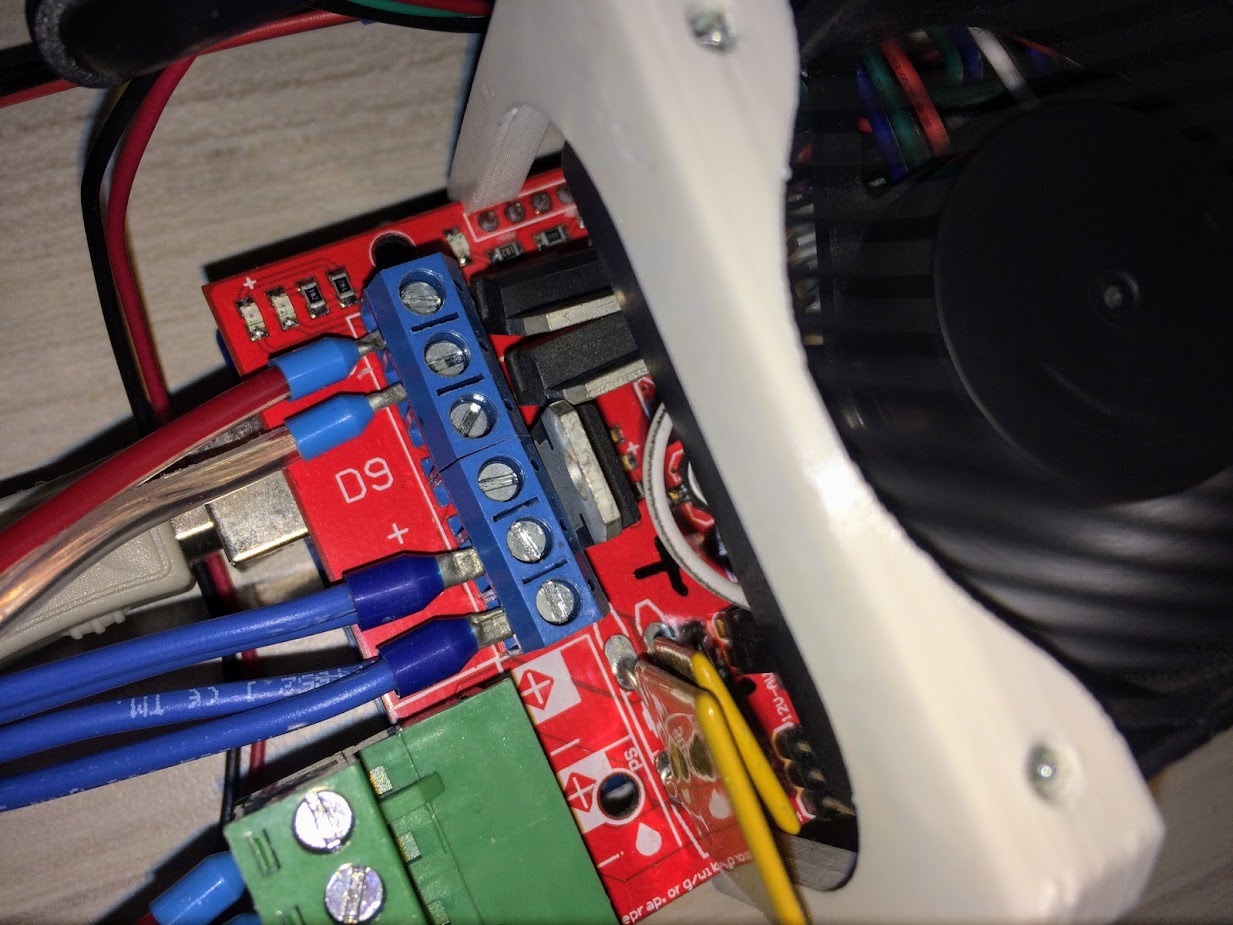
I had exactly the same behavior when I switched my Anet A8's motherboard with RAMPS. It turned out to be hardware. One of the three MOSFETs on the RAMPS was not sitting vertically, and when the MOSFET heated up it expanded so that the tab on that MOSFET was touching the tab of another of the MOSFETs. Since that tab is also connected to the MOSFET drain pin, it was shorting the two drains, and I think the other MOSFET in question was the cooling fan MOSFET so after that whenever the cooling fan turned on the bed was turning on as well. The fix was simple - just bend all three MOSFETs so they are exactly vertical (with respect to the RAMPS board). Since I did that I have not seen the problem reoccur in dozens of prints.
 ManuelMcLure
on 3 Mar 2018
ManuelMcLure
on 3 Mar 2018
Note that this would also happen if the MOSFETs were touching even when cold - since the fan is usually turned off for the first layer you would not see this start happening until the first layer was complete and the fan turned on.
ManuelMcLure
on 3 Mar 2018
hello, thanks for the info, will check the mosfets when i get back to the office. but my problem is a little bit different, the heatbed power is not synced with the extruder, its just fully on. but extruder switches on and off as usual
klazzera
on 3 Mar 2018
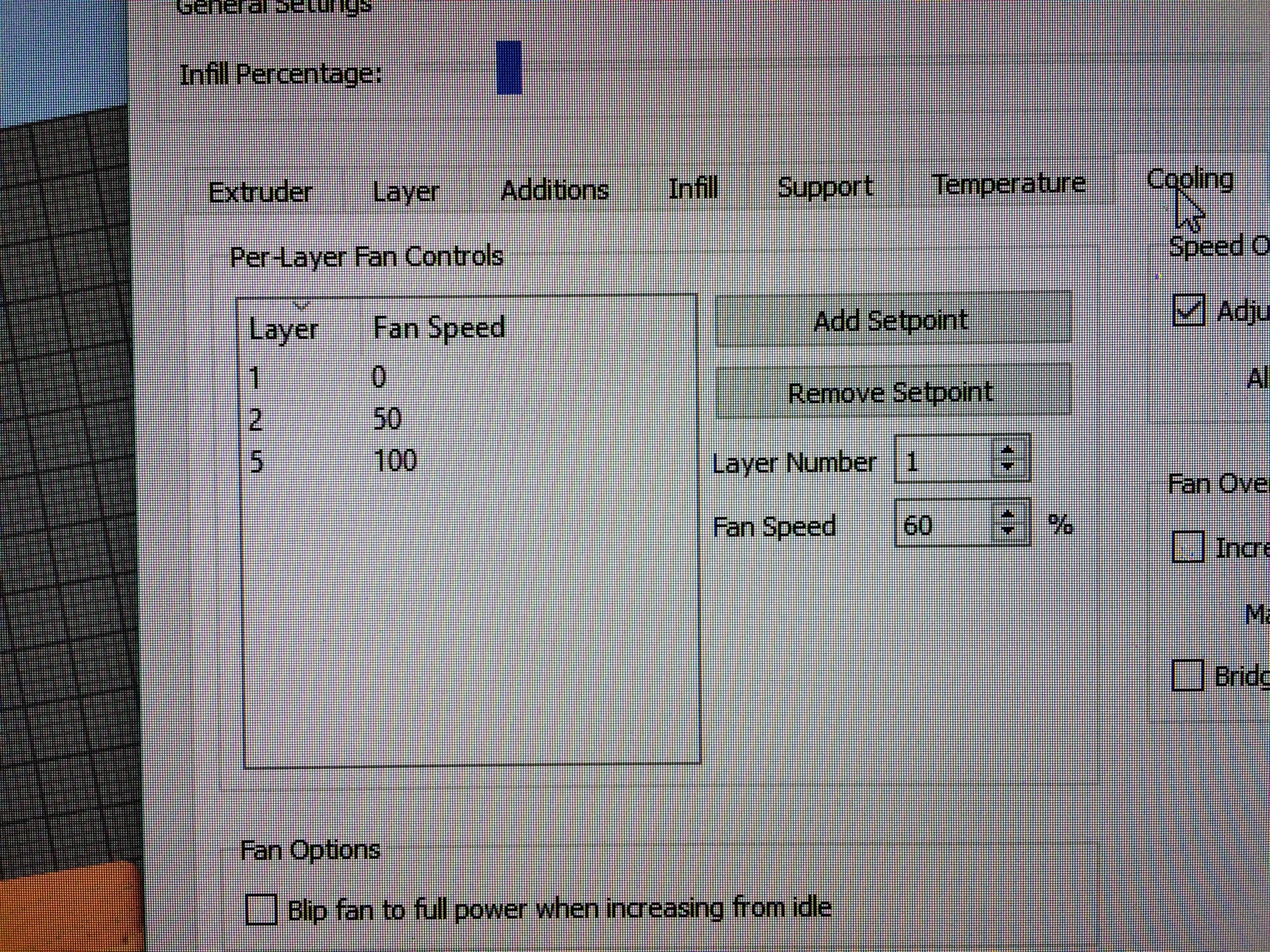
Check to see if it's synced with the cooling fan, not the extruder.
ManuelMcLure
on 3 Mar 2018
I've solved the problem, thank you so much!
Because i never connected the cooling fan to the D8-10 pins on ramps, i didnt understand you well at first. The cooling fan and heating bed MOSFET tabs were indeed shorted and that was the problem. I owe you so much!
I think everybody should isolate the MOSFETs on their ramps boards, i'll put shrink tubes over them now. They might overheat but we will see. A burnt MOSFET is better than a burnt office.
klazzera
on 5 Mar 2018
That does not explain why the 'THERMAL_PROTECTION_BED' did not bite.
 AnHardt
on 5 Mar 2018
AnHardt
on 5 Mar 2018
I wouldn't heat-shrink the MOSFETs - they need to be able to dissipate heat and heat shrink will keep that from happening. Perhaps a piece of cardboard between them would be a better idea.
ManuelMcLure
on 5 Mar 2018
i didn't know that marlin had over temperature protection, i mean it should've, and the thermal runaway protection in my printer has always triggered when the heated bed power was low due to another hardware problem.
here are my bed thermal protection advanced settings:
````
THERMAL_PROTECTION_BED_PERIOD
20
THERMAL_PROTECTION_BED_HYSTERESIS
2
WATCH_BED_TEMP_PERIOD
180
WATCH_BED_TEMP_INCREASE
2
````
klazzera
on 5 Mar 2018
Related issues
 modem7
·
3Comments
modem7
·
3Comments
 Matts-Hub
·
3Comments
Matts-Hub
·
3Comments
 heming3501
·
4Comments
heming3501
·
4Comments
 ShadowOfTheDamn
·
3Comments
ShadowOfTheDamn
·
3Comments
 Ciev
·
3Comments
Ciev
·
3Comments