Hi Roxy-3D
why the mesh does not print completely and the Z axis goes back to infinity, always on the last line to the right of the X (edge of the board) and at the same point
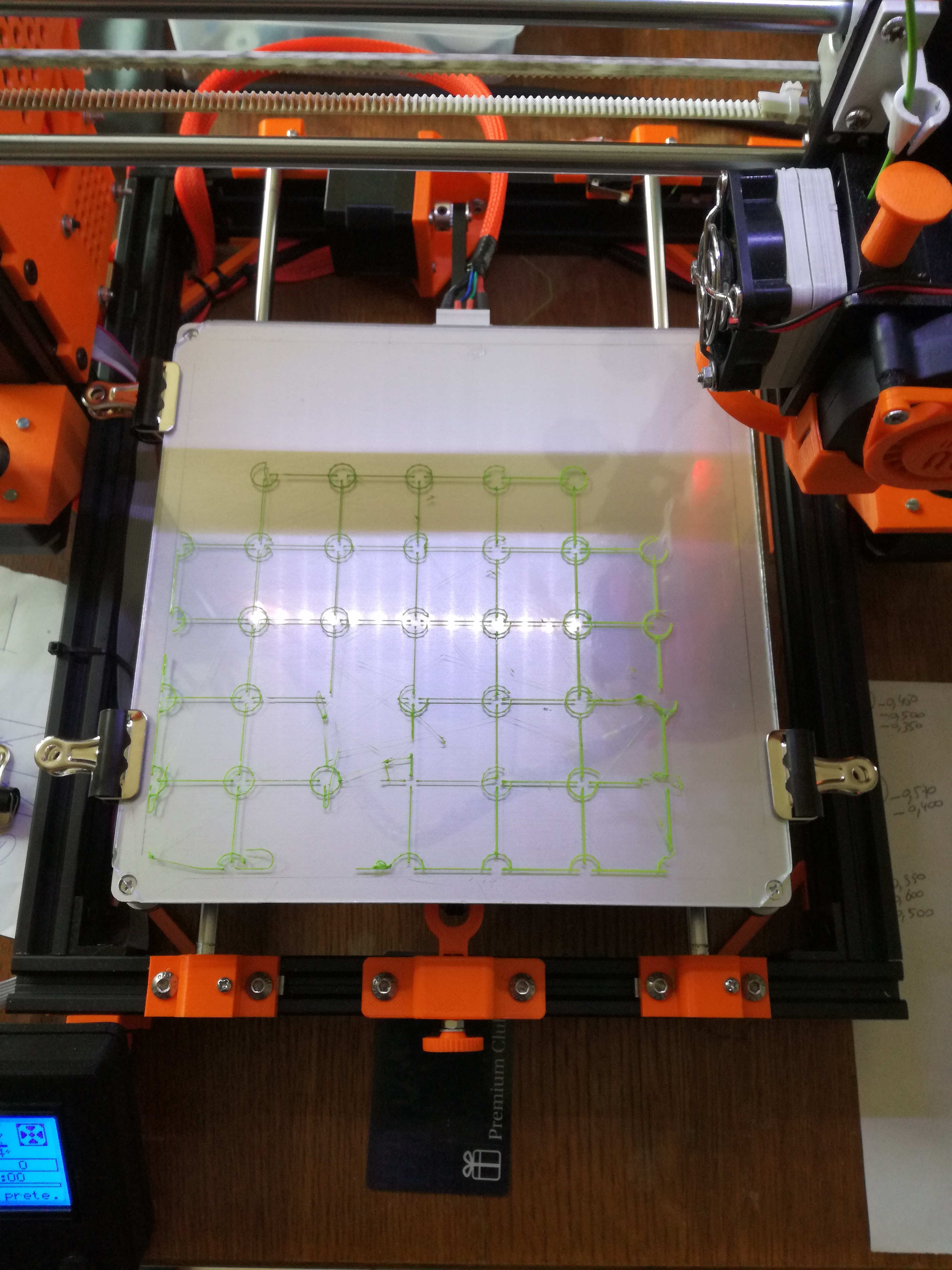
thank's you in advance
will
 will5517
All 32 comments
That should not be happening on the G26 print!!! And it should not be
happening in general either. In the past that behavior was associated
with the nozzle being moved off of the mesh.
Did you do several G29 P3's to fill in the unprobed mesh points? Can you
post the mesh that you were using to do this mesh validation pattern?
 Roxy-3D
on 31 Jan 2018
Roxy-3D
on 31 Jan 2018
yes I did several G29 P3 T well and all points are marked.
here is the topography of these points.
  0.300    0.345    0.205    0.275    0.080    0.130    0.090    0.100

  0.115    0.100    0.135    0.215    0.235    0.205    0.090   -0.150

  0.075    0.100    0.120    0.260    0.085    0.155    0.105    0.035

  0.050    0.055    0.125    0.180    0.080    0.165    0.110    0.090

  0.065    0.110    0.130    0.105    0.120    0.090    0.095   -0.015

  0.060    0.110    0.105  [ 0.235]   0.095    0.095    0.065    0.015

  0.055    0.100    0.085    0.180    0.115    0.135    0.050   -0.045

  0.040    0.120    0.140    0.210    0.190    0.105    0.065    0.010
I am in mesh 8X8
and my .H configuration is
#define X_PROBE_OFFSET_FROM_EXTRUDER 21  // X offset: -left  +right  [of the nozzle]
#define Y_PROBE_OFFSET_FROM_EXTRUDER 55  // Y offset: -front +behind [the nozzle]
#define Z_PROBE_OFFSET_FROM_EXTRUDER 0   // Z offset: -below +above  [the nozzle]

#define X_MIN_POS -31
#define Y_MIN_POS 0
#define Z_MIN_POS 0
#define X_MAX_POS X_BED_SIZE
#define Y_MAX_POS Y_BED_SIZE
#define Z_MAX_POS 240

 #define LEFT_PROBE_BED_POSITION 15
  #define RIGHT_PROBE_BED_POSITION 210
  #define FRONT_PROBE_BED_POSITION 55
  #define BACK_PROBE_BED_POSITION 205

//===========================================================================
  //========================= Unified Bed Leveling ============================
  //===========================================================================

  //#define MESH_EDIT_GFX_OVERLAY   // Display a graphics overlay while editing the mesh

  #define MESH_INSET 10              // Mesh inset margin on print area
  #define GRID_MAX_POINTS_X 8      // Don't use more than 15 points per axis, implementation limited.
  #define GRID_MAX_POINTS_Y GRID_MAX_POINTS_X

  #define UBL_PROBE_PT_1_X 39       // Probing points for 3-Point leveling of the mesh
  #define UBL_PROBE_PT_1_Y 180
  #define UBL_PROBE_PT_2_X 39
  #define UBL_PROBE_PT_2_Y 110
  #define UBL_PROBE_PT_3_X 180
  #define UBL_PROBE_PT_3_Y 55

  #define UBL_MESH_EDIT_MOVES_Z     // Sophisticated users prefer no movement of nozzle
  #define UBL_SAVE_ACTIVE_ON_M500   // Save the currently active mesh in the current slot on M500

#elif ENABLED(MESH_BED_LEVELING)

and in the file CONFIGURATION ADV.H

#if ENABLED(MESH_BED_LEVELING) || ENABLED(AUTO_BED_LEVELING_UBL)
  // Override the mesh area if the automatic (max) area is too large
  #define MESH_MIN_X 5
  #define MESH_MIN_Y 5
  #define MESH_MAX_X 215
  #define MESH_MAX_Y 215
the print is now a little further here is the photo
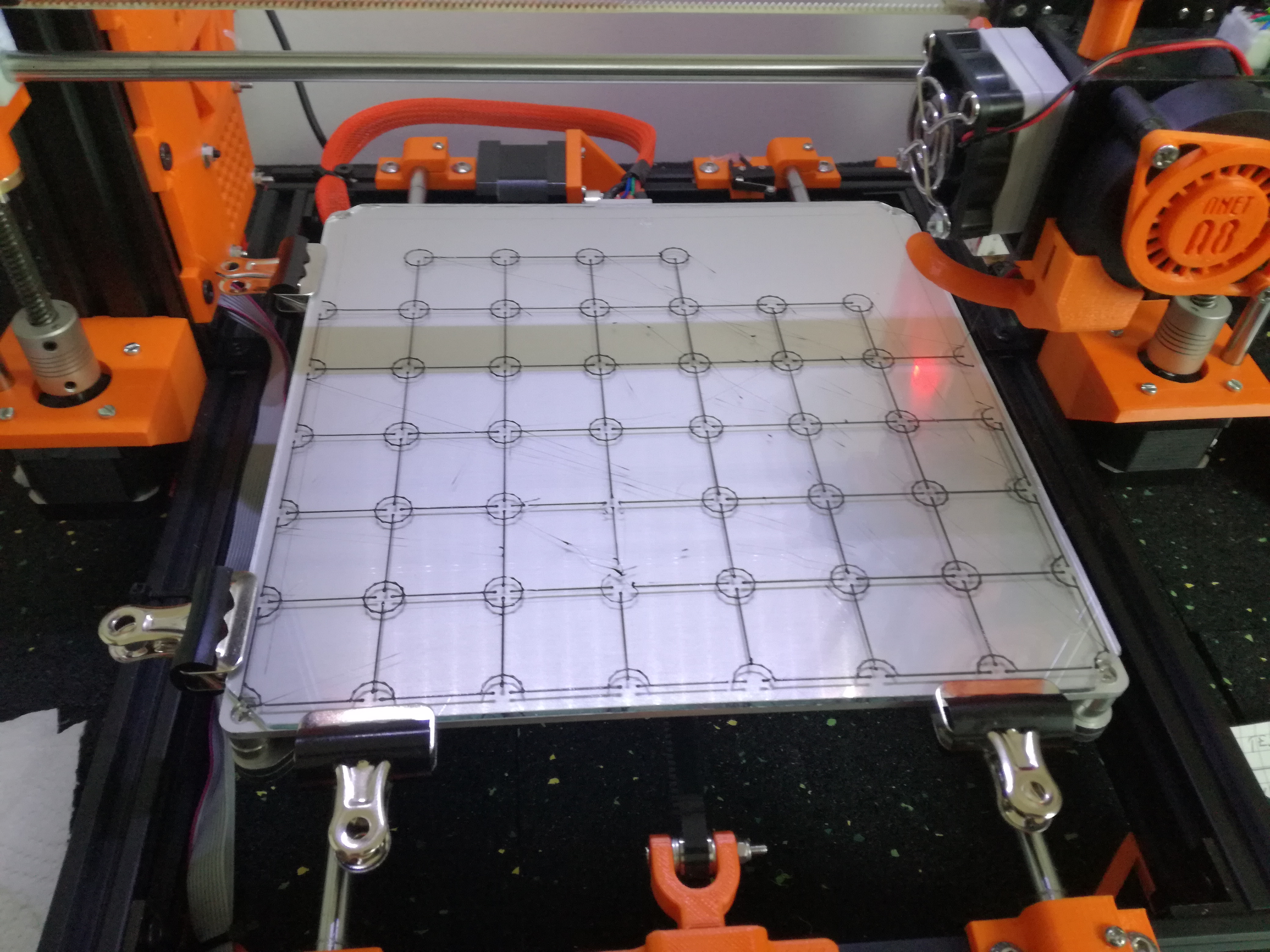
thank you in advance
will5517
on 31 Jan 2018
I've got same problem in 1.1.8 version on my anet a8 with ramps.
Biggest problem is the z axe never stop when printing mesh so, it can hurt the printer.
Go back for me to 1.1.5 and everything is fine ;-)
 ripp2003
on 1 Feb 2018
ripp2003
on 1 Feb 2018
Ripp2003
I am also on RAMP 1.4 and Firm 1.1.8. I encounter this problem on the G26 mesh UBL mode, for the "normal" print that normally happens
will5517
on 1 Feb 2018
I brought my Folger Tech i3-2020 printer with me on my trip. I was going to add the ability to edit mesh points outside of the Delta Printable Radius. Over the next few days I will try to duplicate this and see what is going on. But I'll be working in the bugfix-2.0.0 code base. If this is a v1.8 issue, I may not see it.
Roxy-3D
on 2 Feb 2018
ok Thank you in advance Roxy-3D. I hope you will find where this problem comes from.
will5517
on 2 Feb 2018
@will5517 Please test the current bugfix-1.1.x branch, as we may already have fixed your issue.
 thinkyhead
on 2 Feb 2018
thinkyhead
on 2 Feb 2018
ok thinkyhead but where is bugfix-1.1.x..... I do not understand your request
sorry for my bad english but i'm using a translater .....
will5517
on 2 Feb 2018
Simple : on the main page of this github, you can choose between different version or branch:
-> 1.0.X
-> 1.1.X (this is the code of actual release 1.1.8)
-> bugfix 1.1.x
-> bugfix-2.0.x
So you choose then you clone ;-)
I've several print at the moment, but, I have to test the bug fix too
ripp2003
on 2 Feb 2018
OK on this page then ??
https://github.com/MarlinFirmware/Marlin/tree/1.1.x
I download the file and assemble with my firm then I place my settings ???
is this correct ???
will5517
on 3 Feb 2018
Not exactly @will5517 .
On this page https://github.com/MarlinFirmware/Marlin/tree/bugfix-1.1.x
this is where you switch branches
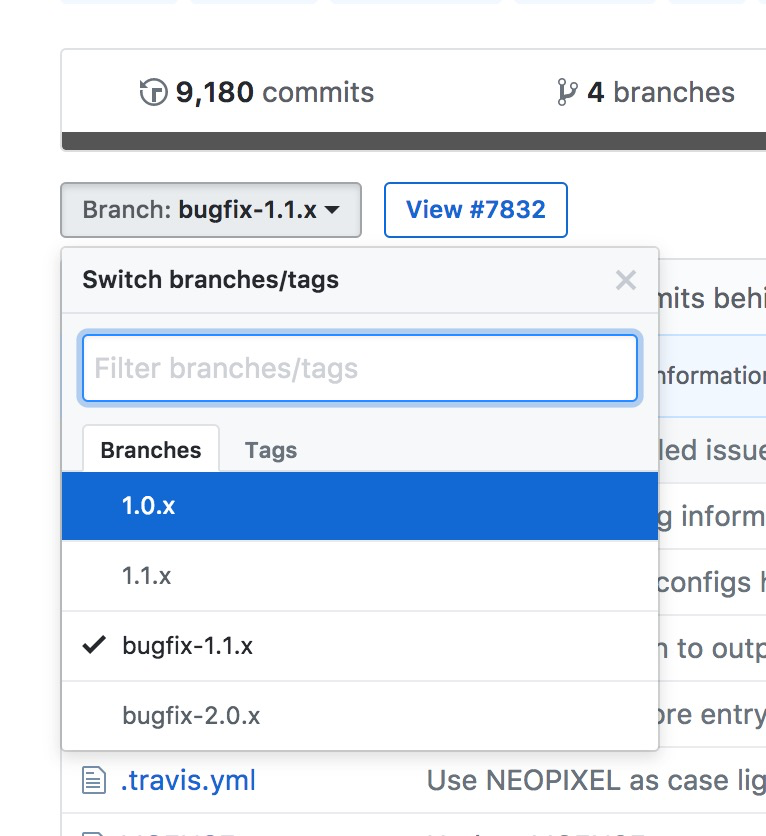
 filipgoc
on 3 Feb 2018
filipgoc
on 3 Feb 2018
(Think of branches as alternative universes.)

filipgoc
on 3 Feb 2018
hummm ok I download the firmware and I upload on my anet am8 to test ????? with my settings of course?
will5517
on 3 Feb 2018
yes with your settings but be careful, you will have to make some change in config. h and maybe config advh because there's modifications on variables name....
Just compile, you will see errors
ripp2003
on 3 Feb 2018
Had this issue a few minutes ago. After half of the G26 mesh print the Z axis moved up above the limit and the X axis tried to move to the the right and never stops trying to reach the infinity.
A simple reset did not help! After pressing the reset and calling G28, the Z axis starts moving up endless. :(
I had to power off the whole system to get out of this.
At the moment I am using 3621f21fb26bde1ace8284096ada2b07b48cce2e
 ikarisan
on 9 Feb 2018
ikarisan
on 9 Feb 2018
Can you post the output from a G29 W T ???? And can you tell us the bed coordinates of where the move to Z infinity happened?
Roxy-3D
on 9 Feb 2018
@Roxy-3D I can post the output but unfortunately I was not in the same room when it happened. I was alarmed by the loud rattling noise the beld made. :( And I remove the printed mesh from the bed. But as far as I remember the left side was complete and the right front was missing. But unfortunately I am not quite sure.
G29 W T
echo:Home XYZ first
Unified Bed Leveling System v1.01 active.
Mesh 0 Loaded.
UBL object count: 1
planner.z_fade_height : 5.0000
# of samples: 49
Mean Mesh Height: -0.069208
Standard Deviation: 0.025018
zprobe_zoffset: -0.7800000
MESH_MIN_X  ((((((220) / 2) - (220) / 2) + 20)>(-29 + 20)?((((220) / 2) - (220) / 2) + 20):(-29 + 20)))=20
MESH_MIN_Y  ((((((220) / 2) - (220) / 2) + 20)>(0 + 52)?((((220) / 2) - (220) / 2) + 20):(0 + 52)))=52
MESH_MAX_X  ((((((220) / 2) + (220) / 2) - (20))<(220 + 20)?((((220) / 2) + (220) / 2) - (20)):(220 + 20)))=200
MESH_MAX_Y  ((((((220) / 2) + (220) / 2) - (20))<(220 + 52)?((((220) / 2) + (220) / 2) - (20)):(220 + 52)))=200
GRID_MAX_POINTS_X  7
GRID_MAX_POINTS_Y  7
MESH_X_DIST  30.00
MESH_Y_DIST  24.67
X-Axis Mesh Points at: 20.000  50.000  80.000  110.000  140.000  170.000  200.000
Y-Axis Mesh Points at: 52.000  76.667  101.333  126.000  150.667  175.333  200.000
Kill pin on :41  state:1

Unified Bed Leveling sanity checks passed.

Bed Topography Report:

(0,6)                                           (6,6)
(20,200)                                        (200,200)
 -0.123   -0.082   -0.060   -0.067   -0.073   -0.100   -0.142

 -0.053   -0.048   -0.049   -0.061   -0.060   -0.075   -0.098

 -0.067   -0.044   -0.042   -0.042   -0.064   -0.107   -0.100

 -0.053   -0.039   -0.039   -0.039   -0.066   -0.079   -0.082

 -0.069   -0.050   -0.039   -0.039   -0.055   -0.070   -0.078

 -0.097   -0.067   -0.052   -0.048   -0.056   -0.060   -0.055

[-0.141]  -0.108   -0.085   -0.075   -0.077   -0.065   -0.050
(20,52)                                            (200,52)
(0,0)                                             (6,0)
ok
This was the command I used: G26 B60 H210 L0.2 O1 P10
ikarisan
on 9 Feb 2018
The mesh looks good. It has no undefined points and you have the Z_PROBE_OFFSET_FROM_EXTRUDER very close to 'correct'. My guess is the nozzle went off the mesh, but that really can't happen during a G26. (Famous last words!!!)
Can you attempt another G26 and see where things go crazy? That will help give us clues where the problem is.
Roxy-3D
on 9 Feb 2018
I tried again and now the Z axis went down, rammed the nozzle into my bed and nearly destroyed my X axis carriages! See the end of the mesh print at youtube.
ikarisan
on 12 Feb 2018
Wow!!!! For sure, that is wrong.... Sorry about that!!!! I've been trying to get my printer to mis-behave this afternoon and so far no luck. I'm doing the work in the bugfix-v2.0.0 branch. May I ask which branch you are using?
Roxy-3D
on 12 Feb 2018
At the moment I am using the bugfix-1.1.x branch (3621f21).
ikarisan
on 12 Feb 2018
ikarisan
on 12 Feb 2018
@ikarisan I found the issue and it is resolved in both code bases. The regression came in with
#define SEGMENT_LEVELED_MOVES
There really is no benefit to doing this on a UBL system. It just adds a lot of extra computation but doesn't change the trajectory of the nozzle as it crosses across mesh cells. But the real problem is UBL's checks during Z-Height correction calculations are cut out of the mix. And if an invalid mesh point (or a missing mesh point when the nozzle goes off the mesh) comes into the calculations, there are no checks to keep the number from being crazy.
If you download the current branch (either one).... The problem you found should be gone. Please let me know if this turns out to be not true. But right now, I'm pretty sure your issue is addressed.
Roxy-3D
on 14 Feb 2018
@Roxy-3D Called G26 twice with my finger on the reset button..... Thank you very much, it works now (for me)!
ikarisan
on 16 Feb 2018
Great!!!!
Roxy-3D
on 16 Feb 2018
@Roxy-3D
good evening, I do not understand anything and I'm afraid to do a stupidity would you have a link to download firmware 1.1.8 bugfix that I can put my settings and upload to my anet am8. thanks in advance
will5517
on 16 Feb 2018
Go to the top level of MarlinFirmware-Marlin:
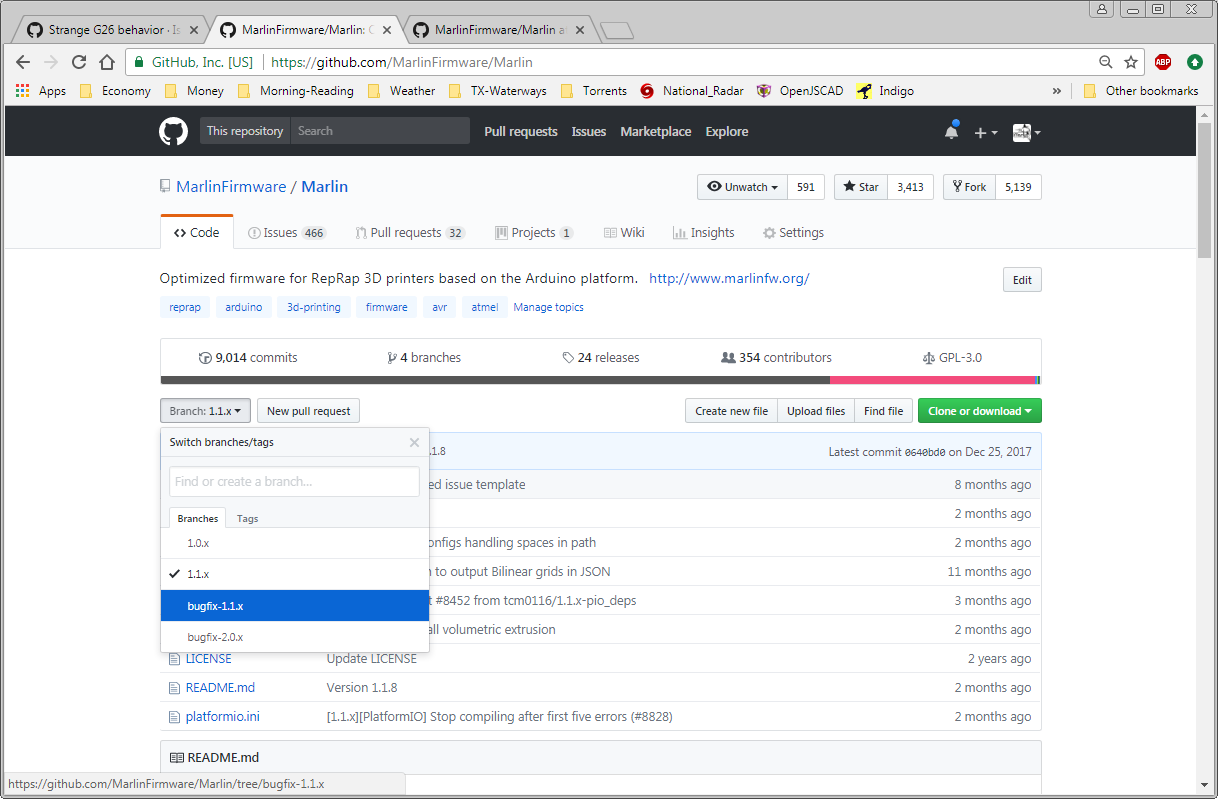
and select Bugfix-1.1.x
You should end up at a link: https://github.com/MarlinFirmware/Marlin/tree/bugfix-1.1.x
You want to use a visual diff program like ExamDiff Pro or Notepad++ (with visual diff application loaded) to cross over your settings to the new code base.
Roxy-3D
on 16 Feb 2018
ok Roxy-3D thank ' you
I will test that tomorrow
will5517
on 17 Feb 2018
@will5517 any luck? remember that the latest is now bugfix 2.0
 boelle
on 20 Feb 2019
boelle
on 20 Feb 2019
@thinkyhead i think we can close this one
boelle
on 6 Mar 2019
This issue has been automatically locked since there has not been any recent activity after it was closed. Please open a new issue for related bugs.
![github-actions[bot] picture](https://avatars2.githubusercontent.com/in/15368?v=4&s=40) github-actions[bot]
on 8 Jul 2020
github-actions[bot]
on 8 Jul 2020
Related issues
 ceturan
·
4Comments
ceturan
·
4Comments
 Tamonir
·
3Comments
Tamonir
·
3Comments
 W8KDB
·
4Comments
W8KDB
·
4Comments
 ShadowOfTheDamn
·
3Comments
ShadowOfTheDamn
·
3Comments
 modem7
·
3Comments
modem7
·
3Comments
Most helpful comment
(Think of branches as alternative universes.)