Marlin: [TMC2130] Y Axis Overdriving and Blowing Driver
Hi, I'm having an issue with my TMC2130 drivers. Everything seemed to be working properly then my Y axis started overdriving (moving very fast, and much further than it should have) and the driver blew.
I thought it may have been a problem with the driver, so I connected a new one and verified it was getting the proper settings. Everything seemed fine, so I tried again and it blew another driver.
I'm running the following settings on the drivers with an MKS Gen 1.4 board:
X = 960 mA
Y = 960 mA
Z = 800 mA
E0 = 800 mA
I have Stealthchop enabled and X, Z and E0 are working properly.
Has anyone seen this before, I think the wiring is okay but this could be a hardware issue as well. Would a bad motor cause this?
 migeorge
All 23 comments
I really don't know how to handle possessed stepper drivers. Watterott might be able help. Or Vatican.
Even if you had a short to ground, there's protection against that.
Even if you had a open load, there's protection against that too.
Even if the driver overheated, it would just shut itself down.
I don't think you can damage the driver by configuring it wrong and in Marlin the typical stuff is pre-configured and you just enable features.
Only way that I can think of is manually moving the axis so the steppers act as generators and produce high enough voltage to damage the driver. Or maybe some other voltage spiking.
 teemuatlut
on 18 Jan 2018
teemuatlut
on 18 Jan 2018
To give more context this happened from a cold boot of the printer while homing. I also did not manually move the axis at all.
I'm mostly confused because I though the chips had built in protection like you mentioned although I suppose you can't protect against everything.
I don't really want to destroy any more of these drivers since they're not exactly cheap.
Since it's driving the motor so hard when this is happening I'm thinking there has to be some extra current coming from somewhere but I'm not too sure where to look.
Since I'm in the US I grabbed the StepSticks from Filastruder, I'm assuming Watterott is the manufacturer?
migeorge
on 18 Jan 2018
You can try with flyback diodes...
I see that no/a few boards have them installed and the parasside diode present on chip is not enough.
When current is removed tension can rise a lot...
read https://www.elprocus.com/freewheeling-or-flyback-diode-circuit-working-functions/ for some info.
N.B not sure this can be your situation
 GMagician
on 18 Jan 2018
GMagician
on 18 Jan 2018
@GMagician it appears thats how the SilentStepStick Protectors are setup. I'm considering getting a set and also removing the 5V line from my USB cable to be sure I'm not causing problems on power up/down. I thought I was being careful with powering up the printer before plugging in the USB but I'm not ruling that out.
I'm in contact with Watterott and will report any findings here.
migeorge
on 18 Jan 2018
@migeorge - I'm having similar problems. Sort of. My Y axis driver seems to ignore the settings being sent over SPI, and defaults to, well, the defaults. Which means it moves the axis twice as far, and very loudly. I suspect it's something to do with the default CS pin for the Y axis being shared, on my MKS board, with the SD Detect pin.
I too have a BOARD_MKS_GEN_L, although I have the REPRAP_DISCOUNT_FULL_GRAPHIC_SMART_CONTROLLER. (Pasting from your config because who can be bothered typing such a long name?!)
I can't seem to find another pin to use as CS for Y - I've tried several and they all seem not to send the settings to the driver. I've swapped driver boards and still no go. (Swapped X and Y driver boards, the problem stayed on the Y axis.)
And now it's 2am and I'm giving up for the night and going to bed. Probably worth noting that I'm using the FYSETC version of the TMC2130.
Is there any chance that you usually don't print from an SD card and this time you had one inserted, which interfered with the signal to the Y driver, causing it to go nuts and burn itself out? Or is that just... desperate 2am logic??
Alright, ramble over. I think the SD_DETECT pin is messing with our Y CS pins.
 jameswood
on 19 Jan 2018
jameswood
on 19 Jan 2018
I spoke with Watterott and believe we found the issue. As for the drivers blowing it seems it was an incorrect power up/down sequence. I thought I was being careful with that but I must have left the USB plugged in by mistake. I've since cut the 5V line in my USB cable so that cannot happen again. The remaining drivers I have seem to be working well.
The failure actually popped the chip at the left of the Trinamic logo:
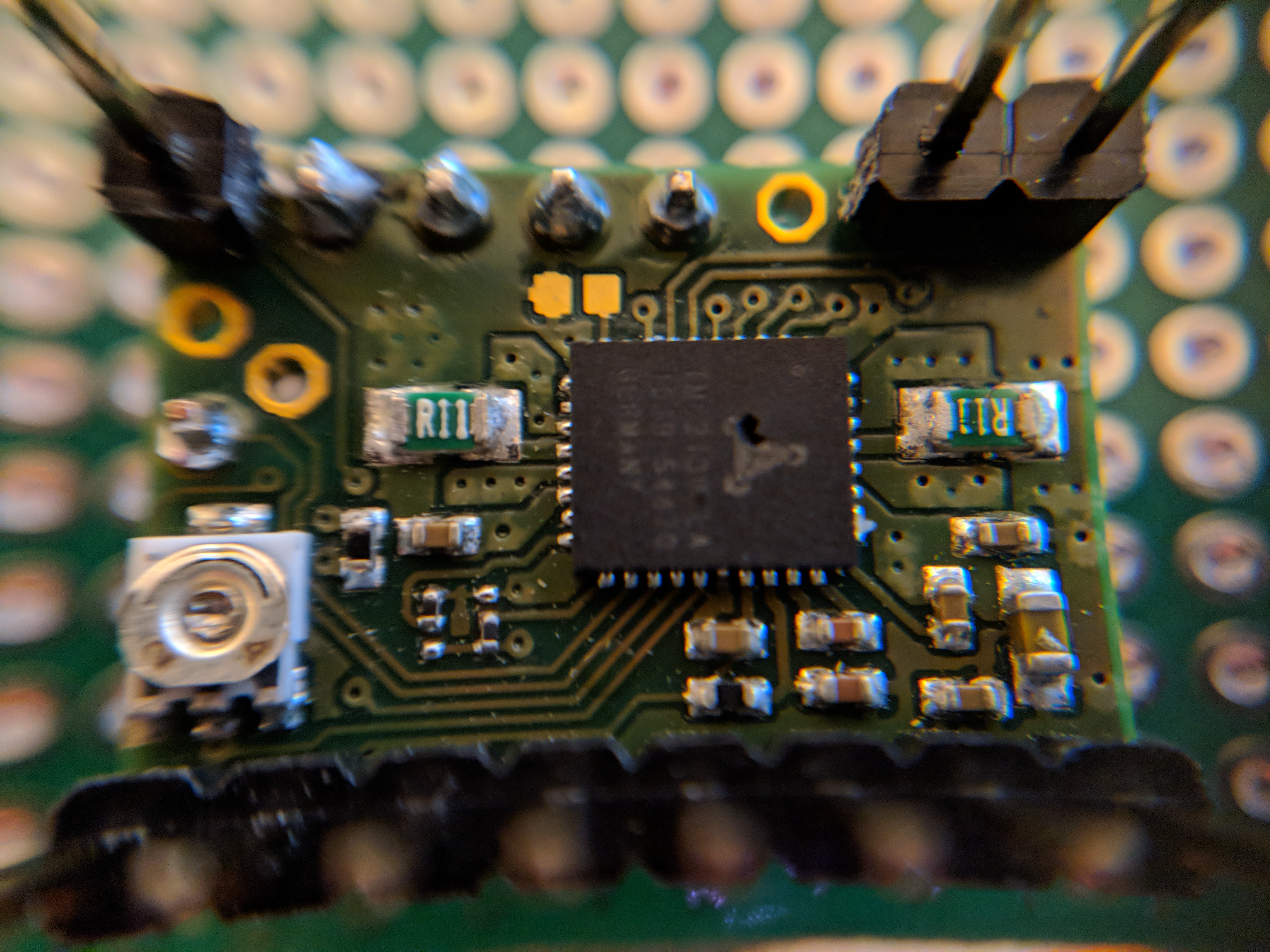
Next time I really have to RTFM there is some good info in here: https://github.com/watterott/SilentStepStick/blob/master/docs/FAQ.md
I have also ordered a set of SilentStepStick protectors to be extra safe here.
@jameswood I'm glad you posted this since I'm seeing the same problem on my Y axis. Although with TMC_DEBUG it seems that the settings are correct for my Y axis unless it's not reporting correctly. It's definitely double stepping though (also quite loud)
I've also disabled SD support and not plugged in an SD card.
I plan on seeing if I can move the CS_Y pin somewhere else tonight or tomorrow. I'll report back here if I find anything
migeorge
on 19 Jan 2018
@jameswood @teemuatlut I moved CS_Y pin to AUX-1 which should be unused and It's still double stepping on the Y Axis.
This is what I get from M122 (I notice that the PWM scale is 1 for X and 20 for Y, not really sure if that's normal or not):
SENT: M122
READ:                          X       Y
READ: Enabled       false  true
READ: Set current           960   960
READ: RMS current   939   939
READ: MAX current   1324  1324
READ: Run current   16/31  16/31
READ: Hold current   3/31  3/31
READ: CS actual      3/31  3/31
READ: PWM scale       1       20
READ: vsense                  0=.325  0=.325
READ: stealthChop     true  true
READ: msteps          16  16
READ: tstep               1048575  1048575
READ: pwm
READ: threshold        0  0
READ: [mm/s]                   -  -
READ: OT prewarn            false  false
READ: OT prewarn has
READ: been triggered       false  true
READ: off time         5  5
READ: blank time               24  24
READ: hysterisis
READ: -end                2  2
READ: -start                  3  3
READ: Stallguard thrs     2  3
READ: DRVSTATUS   X  Y
READ: stallguard
READ: sg_result       0  0
READ: fsactive
READ: stst                X  X
READ: olb
READ: ola
READ: s2gb
READ: s2ga
READ: otpw
READ: ot
READ: Driver registers:
READ:   X = 0x80:03:00:00
READ:   Y = 0x80:03:00:00
While debugging I also swapped the places of E1 and Y in pins_RAMPS.h and moved the driver, this did not make a difference.
migeorge
on 20 Jan 2018
@jameswood I think I figured it out, I reduced the current going to Y from 960ma -> 800ma and the stepping returned to normal. The PWM scale also started reading 1 which matches the X axis.
I guess this would depend on your motors, for reference I'm running 1.7A 1.8 deg NEMA 17 motors
migeorge
on 20 Jan 2018
Is there any chance of this happening in the Re-Arm board?
Can you explain how you modified the USB cable?
 psavva
on 20 Jan 2018
psavva
on 20 Jan 2018
@psavva I'm not familiar with the specific board, but if it powers up when you connect USB then yes.
When powering up the printer you need to make sure the main power supply is on before the USB cable is connected.
When powering down the printer you need to be sure to unplug the USB before the main power supply is shut off.
What I did was strip part of the jacket of my USB cable and cut a chunk of the red (5V) out so it couldn't connect anymore. I then taped it up. This ensures your board is never powered from the USB cable.
migeorge
on 20 Jan 2018
For the record, I've never paid any attention to the power up/down order. And on a standard board like RAMPS we don't even have much control over it as typically they both come on/off at the same time and are not controlled by any pin.
teemuatlut
on 20 Jan 2018
@migeorge legend!! Lowering the current solved it for me too. Thanks mate!
I made a male-to-female USB socket/plug back to back with the 5v disconnected. It's pretty handy for any time you want to disempower a cable. Although @teemuatlut says maybe we don't need to bother, so that's great news!
Thanks all
jameswood
on 20 Jan 2018
@jameswood Glad it worked for you!
@teemuatlut Maybe it depends on the board, I'm going off of what the guys at Watterott told me and this part of the FAQ:
If you use a control board with USB power supply (like Arduino + RAMPS) then always ensure that the motor voltage (VM) is present, when you connect the board via USB. Otherwise the TMC2xxx is not powered via the internal voltage regulator and a high current can flow into VIO or the IOs and this can damage the internal logic.
At $14 a whack I'll happily chop up a USB cable to be doubly sure :P
migeorge
on 20 Jan 2018
Those involved, please try the latest bugfix-1.1.x or bugfix-2.0.x branch to test if the recent fix works.
teemuatlut
on 10 Feb 2018
I fried my first arduino and TMC2130 driver today. It all happened so fast I'm not 100% sure of what I did, but I think it was the power sequence.
Would cutting the 5v and 3.3v pins on the RAMPS board isolate the board from power through the arduino/USB port? As opposed to modifying a cable? Actually, if I did that I'd have to run power to the arduino as well as the RAMPS, I guess.
Thank you.
 ToddBeaulieu
on 18 Feb 2018
ToddBeaulieu
on 18 Feb 2018
@ToddBeaulieu I can't confirm if cutting the pins would work since I use a board that integrates the Arduino directly with the RAMPS. Any specific reason you wouldn't just want to modify the cable? Cutting the voltage line won't disturb the communication between the printer and the computer.
migeorge
on 18 Feb 2018
For a brief moment I thought it would be a quick solution not requiring me to modify a Type B cable and a micro cable for the two styles of arduinos that I'm using.
ToddBeaulieu
on 18 Feb 2018
You may want to try modifying a USB extension so you can plug either in.
migeorge
on 18 Feb 2018
so, is there a way to use currents higher than 900mA without this happening? its driving me nuts
 amedsoprano
on 7 Apr 2018
amedsoprano
on 7 Apr 2018
This is a several months old issue but I seem to recall it was solved in the bugfix-1.1.x branch.
teemuatlut
on 7 Apr 2018
im sorry, i'll be trying that now
amedsoprano
on 7 Apr 2018
can confirm, Bugfix 1.1.x works
amedsoprano
on 8 Apr 2018
This issue has been automatically locked since there has not been any recent activity after it was closed. Please open a new issue for related bugs.
![github-actions[bot] picture](https://avatars2.githubusercontent.com/in/15368?v=4&s=40) github-actions[bot]
on 31 Aug 2020
github-actions[bot]
on 31 Aug 2020
Related issues
 ceturan
·
4Comments
ceturan
·
4Comments
 Anion-anion
·
3Comments
Anion-anion
·
3Comments
 Kaibob2
·
4Comments
Kaibob2
·
4Comments
 W8KDB
·
4Comments
W8KDB
·
4Comments
 Glod76
·
3Comments
Glod76
·
3Comments