Marlin: [BUG] Planner ignores jerk limits if buffer is drained
If the block buffer gets drained, for example during a fast or detailed arc, the last block is calculated to be finished at MINIMUM_PLANNER_SPEED. The next-added block is then ignoring the jerk speed limits as the following chart is showing. Instead, it's jumping to a speed instantly without acceleration which seems to be related to the maximum speed which would have been reached if the last block wasn't forced to stop acceleration.
The graph shows a part (not starting from 0) of the result of a X-Axis only move, where each move segment has the same short length. It shows the x-axis speed in steps / second over x-axis steps. Red circles show the faulty speed jumps, blue dotted is the (hand aproximated) curve if the last acceleration would have had continued.
Jerk speed is 8, with 100.5 steps / mm on X = 805 steps /s safe speed.

Expected result: Next move starts at speed of last move, even if its MINIMUM_PLANNER_SPEED.
Favored result of any move starting from 0: Start at MINIMUM_PLANNER_SPEED instead of using jerk speed. As every final move is finished with it, it's only logical to also use it as start speed from 0. Jerk should only be necessary to circle around arcs without coming to a full stop.
Found during research for #9048.
 Sebastianv650
All 24 comments
Take a look at PRs #8761 and #8735.
The very first acceleration step in a block is missed. 8735 tried to fix that but some users reported long delays (jerky motion, 1/4 second pauses) after it was merged.
The planner also doesn't take into account stepper direction changes when looking at jerk limitations. 8761 addressed that problem. 8761 was put on hold after the 8735 disaster.
I haven't had time to get back to these since they seem to be low priority because no one has had related complaints.
 Bob-the-Kuhn
on 7 Jan 2018
Bob-the-Kuhn
on 7 Jan 2018
Thanks for the hint!
I haven't had time to get back to these since they seem to be low priority because no one has had related complaints.
I guess it's not causing enough problems to be noticeable in issue reports. In cartesian systems (vast majority of all printers?), where no stepper will change its direction until the print line also changes direction the only thing you might see is a little extra stutter in high-speed or high resolution arcs. But I guess most people will not recognise that this is due to a bug.
So now I have to add "prevents proper LIN_ADVANCE implementation" to your list of impacts, therefore I will study the PRs and pause LIN_ADVANCE development until there is a solution. I don't think I'm very good at motion planner math, but maybe I can find a way..
Sebastianv650
on 8 Jan 2018
I just realized I think I got you wrong. I first understand you say that the stepper direction changes are somwhat related to kinematic printers, but if I got it this time it should be true for ever move that changes direction 180°.
Sebastianv650
on 8 Jan 2018
If the block buffer gets drained, for example during a fast or detailed arc, the last block is calculated to be finished at MINIMUM_PLANNER_SPEED. The next-added block is then ignoring the jerk speed limits as the following chart is showing.
I don't think there's much we can do about that, except to prevent the buffer from draining. This could be done by dynamically slowing down the print speed when the buffer appears to be draining too quickly. It's a tricky proposition, and would require adding an additional block flag to indicate that further moves are guaranteed to follow the current block. This could be set with certitude when segmenting moves, but when printing G-code that has lots of small segments, it would be trickier, since any move could be immediately followed by M400.
I think for now we may have to just tell people experiencing this issue to manually reduce their print speed and/or segments-per-second until the problem goes away. This would be consistent with the advice we've been giving since Marlin 1.0.
 thinkyhead
on 9 Jan 2018
thinkyhead
on 9 Jan 2018
As you can see in the third, not circled ramp up it's not always doing this unaccelerated thing. Therefore I think it's a special constelation that results in this problem and it should be solveable. But I might be wrong, more tests to come..
Sebastianv650
on 9 Jan 2018
I found a test case to get sudden speed jumps. It's realy crazy. I have two simple gcodes:
Nr. 1:
G1 F2400
G1 X1
G1 X0
So all it does is a forward movement and going back again. If I execute this, all is fine. Even if I execute it multiple times.
Nr. 2:
G1 F2400
G1 X1
G1 F480
G1 X2
So this one starts as Nr. 1, but then does a slow move in the same direction. This one is also executed as you would expect it.
But if I execute Nr. 2 folowed by Nr. 1 (not in the same gcode file, I mean as two files one after each other), the second move of Nr. 1 has no acceleration. If I execute Nr. 1 once again after that this one (end every next time if I do it more than once) it has acceleration again.
Here are the two possible results from Nr. 1. The blue one is Nr. 1 executed without Nr. 2 before it, the red one is the first execution after Nr. 2:
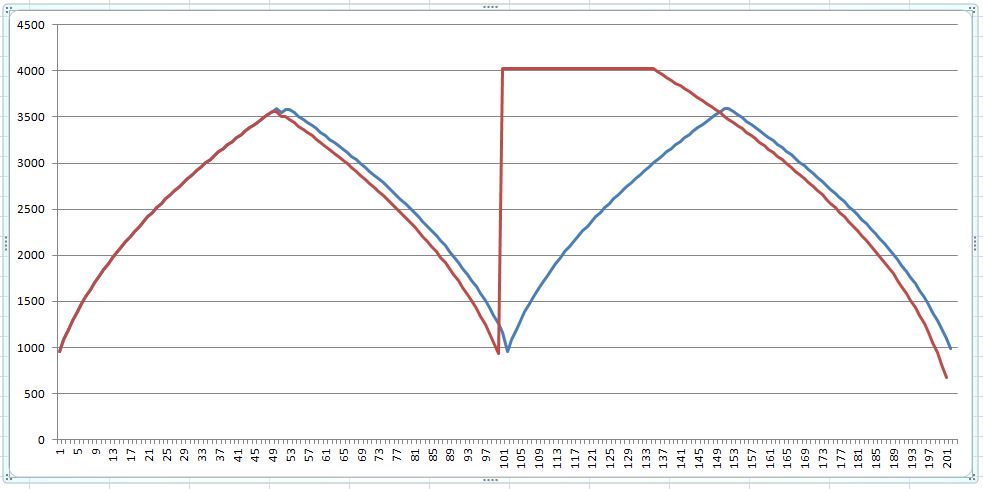
I even got a plateau shape once as if both movements would point into the same direction. But up to now this wasn't repeatable. This might be the once special case @Bob-the-Kuhn has seen when he wrote about the planner isn't respecting axis reversal.
No idea what's going on here..
Edit: I get the same result if I put both gcodes in one single file. No acceleration at the specific block.
Sebastianv650
on 9 Jan 2018
The solution seems to be quite simple. That simple that I will not trust it instantly, but I want to give other a chance for a test.
The problem is that the planner sets a block entry speed, believing that the previous block will end at the speed it had calculated before. That's not true, the buffer could have also drained until the new block is added to the buffer.
Instead of setting the initial block entry speed to a as high as possible value and hope the best
// Initialize block entry speed. Compute based on deceleration to user-defined
MINIMUM_PLANNER_SPEED.
const float v_allowable = max_allowable_speed(-block->acceleration, MINIMUM_PLANNER_SPEED, block->millimeters);
block->entry_speed = min(vmax_junction, v_allowable);
set the initial speed to the minimum planner speed, comparable what recalculate() will always do to the last block in the buffer at its final speed:
// Initialize block entry speed. Compute based on deceleration to user-defined MINIMUM_PLANNER_SPEED.
const float v_allowable = max_allowable_speed(-block->acceleration, MINIMUM_PLANNER_SPEED, block->millimeters);
block->entry_speed = MINIMUM_PLANNER_SPEED;
Then recalculate() will increase the junction speed if possible. If the last block was finished before the new block was added to the buffer, it will start at MINIMUM_PLANNER_SPEED which was also the final speed of the last block.
Sebastianv650
on 10 Jan 2018
That's how an overloaded planners speed graph should look like :-)
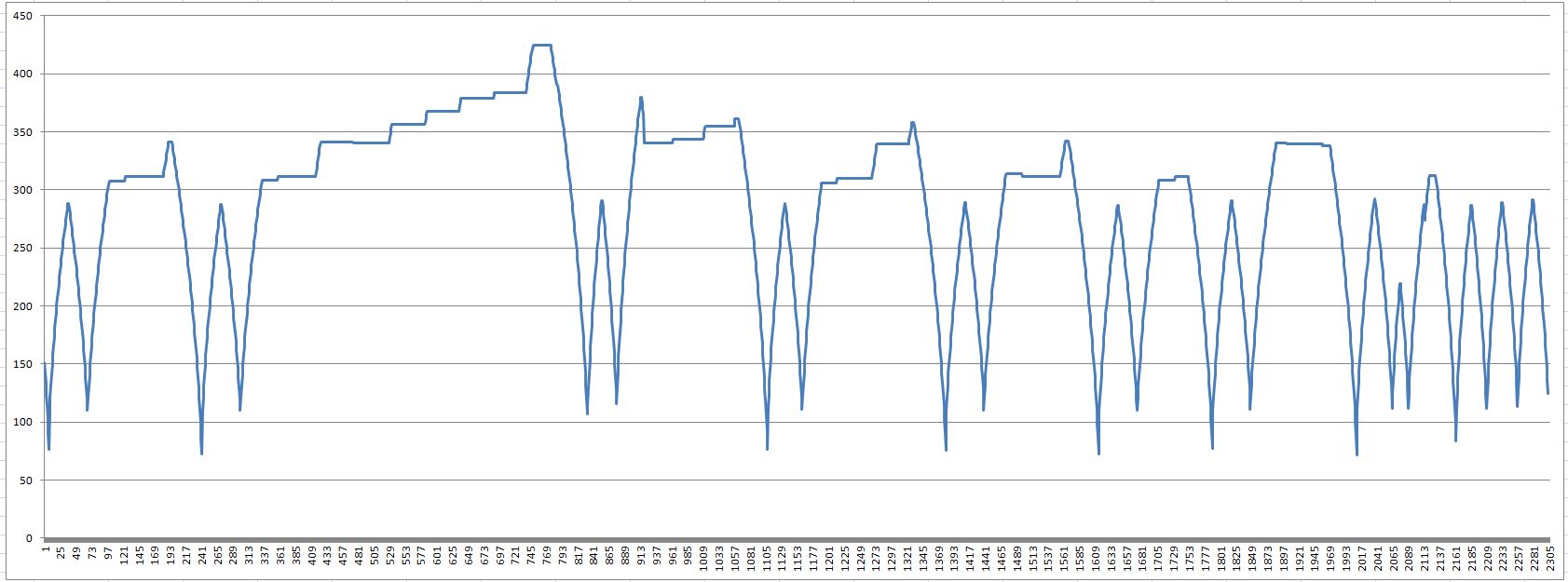
This will make live much easier for LIN_ADVANCE and stuttering in arcs is now much less "stuttery". Time for cleanup and a PR to have some more testers..
Sebastianv650
on 11 Jan 2018
Sweet! Nicely done.
I'm assuming if there was a simple solution to buffer emptying, you guys would have already implemented it. Does this happen during normal printing speeds and reasonable STL tolerances? I usually export with an STL tolerance of 0.02mm.
I'm assuming perimeter laps around high resolution circles are taxing on the buffer.
 CCS86
on 11 Jan 2018
CCS86
on 11 Jan 2018
There is the SLOWDOWN feature (see Configuration_adv.h) which should work for most cases. But it's not guaranteed to work, therefore we need a "failsafe".
I see arc stuttering mostly on stls from the internet (figurines and other organic shape), where the designer had no clue about 3D printing and exported his model to stl at a resolution beyond any reasonable limit. Self-designed files are usualy no problem, as you stated we know about resolutions and 3D printer performance so we can adopt.
But even then I get stuttering some times, mostly when I need a functional only part where I crank up printing speed to the hot ends upper flow speed limit.
Sebastianv650
on 11 Jan 2018
Is it possible to know the buffer has been emptied? Can a bigger buffer (I think BLOCK_BUFFER_SIZE) help?
 MasterPIC
on 11 Jan 2018
MasterPIC
on 11 Jan 2018
If the buffer is not empty, a bigger buffer will slow down the process of adding new blocks as the planner has to go over all existing blocks inside the buffer during optimization.
If the buffer is empty, which means the stepper ISR is eating blocks faster than the planner can add them, buffer size isn't relevant except you have only a very short period of short moves followed by longer ones.
The buffer status can be (and is) checked, but there is always the problem that your result may not be valid a few clocks later..
Sebastianv650
on 11 Jan 2018
I meant to know if it's possible for the user to detect if too many empty buffer events occur to be able to tune its size...
MasterPIC
on 11 Jan 2018
There is no user way of reading the buffer state. But it's possible to get an idea of how many blocks per second your printer is able to handle: Create a gcode that contains an high-resolution circle that repeats itself some times. Then execute it, increasing the feed rate until the printer starts stuttering. Knowing the speed at stuttering you can calculate based on your gcode how many blocks are there in one second.
I made the proposal to incorporate a speed limiter based on gcode resolution and printers block per second ability for Prusa Slic3r to prevent buffer underuns. If it should find it's way on @bubnikv (very long) list some day we could create maybe a Marlin built-in test to get the number, or something like the LIN_ADVANCE test pattern generator.
Sebastianv650
on 11 Jan 2018
There is no user way of reading the buffer state.
Well actually, Roxy created one, but it requires this…
/**
 * MAX7219 Debug Matrix
 *
 * Add support for a low-cost 8x8 LED Matrix based on the Max7219 chip, which can be used as a status
 * display. Requires 3 signal wires. Some useful debug options are included to demonstrate its usage.
 *
 * Fully assembled MAX7219 boards can be found on the internet for under $2(US).
 * For example, see https://www.ebay.com/sch/i.html?_nkw=332349290049
 */
//#define MAX7219_DEBUG
. . .
  #define MAX7219_DEBUG_STEPPER_QUEUE 0  // Show the current stepper queue depth on this and the next LED matrix row
                                         // If you experience stuttering, reboots, etc. this option can reveal how
                                         // tweaks made to the configuration are affecting the printer in real-time.
What about a counter and a Gcode command to know how many times the buffer has been emptied?
MasterPIC
on 12 Jan 2018
Like, as part of a suite of debugging add-ons for developers to use in testing!
thinkyhead
on 12 Jan 2018
I also thought about that. There are a lot of useful debugging things I can think of, but I guess everyone would need different ones during debugging so I'm not sure if it's useful to add a lot of code that will not make code reading easier.
Sebastianv650
on 12 Jan 2018
Do you think that is what is going on here:

This is a spiral vase, running at 30 mm/s, accel @ 700 mm/s/s, jerk at 10 mm/s. Marlin 1.1.6
For the last ~10mm or so, I increased jerk to 15 mm/s, and the incidence of these "loops" seems to have dropped a good bit.
Model: (scaled down in my print)
Julia_Vase_004_-_Bloom_-_Solid.stl.txt
Gcode:
JuliaVase.gcode.txt
CCS86
on 17 Jan 2018
I can't say for sure that your planner was draining or if that's due to normal repeated acceleration or deceleration. I tend to say it's not the buffer, or it should get worse in the increased jerk top due to even higher average print speed. But the visible artefact is definitly caused by nozzle pressure inconsistences and they got less with high jerk because the printer is now able to follow the contour with much less acceleration/deceleration.
Sebastianv650
on 17 Jan 2018
If you don't feel like this is related, let me know. I will start a new thread, and edit out these replies here.
It seems like it is very hard to set jerk and max acceleration to values that work well in all situations. In this case, it seems like jerk being too low (10, which is the new "default"), coupled with low acceleration (700), causes Marlin to "trip" in segment dense areas. I have definitely seen this consistently in printing small circles. I'm not sure why the anomalies are so inconsistent though. Cura is set to keep segments lengths at or above 0.010mm. So, at 30 mm/s, we are pushing a maximum of 3000 segments/s. With my printer settings 4800 steps/s.
However, if you set jerk higher, it can cause too much resonance, during infill for example, as you are allowing max stepper torque to be applied as acceleration bounds are bypassed (briefly).
Visualizing the gcode in Repetier, it generally looks very clean (besides a handful of isolated "bad segments"):
[edit: not sure why image preview are broken. Click for full size]

Zooming in very close, the segment density seems generally similar between layers. But maybe it is the relative angle between segments the varies; "casting a loop" when the angle change steps over some threshold. I marked a couple that look sharper than others:

Here is a closer look at the print in question (now upside down, with the higher jerk setting at the bottom):

For reference, here is a different spiral vase print, with similar settings. It shows that mechanically, this printer is doing a repeatable job. But there are a few of these "cast loops" in the print as well:


CCS86
on 17 Jan 2018
Could it be a too low extruder jerk value the cause? Maybe all jerk values should be tuned taking care of their interactions...
MasterPIC
on 17 Jan 2018
@MasterPIC no print move will ever exceed extruder jerk in reality.
@CCS86 You are right, it's not easy and for some cases even impossible to find a set of acceleration and jerk values fitting all needs. We want not too many segments per second to keep Marlin running, but a low res circle needs some jerk to run smoothly. A low jerk setting would be fine for a high-res circle, but then we might overload Marlin.
You can play with this analyser to get a feeling for jerk settings during corners and how segment length changes the top speed:
http://www.gcodeanalyser.com/
Just keep in mind this analyser assumes that the printers buffer is always full and it has enough length inside the buffer to max out the speeds.
I think you are on the right track when you assume that these print faults might occur at the higher-angled segment junctions. If you want to analyse it in detail, I recomend to print very small test segments of your file so you can assign points between gcode preview and real print.
While this is all not related to the real topic here, it's still intresting ;)
Personal opinion: We need a much more powerful platform and a version of Marlin that can get rid of all the approximations we have to make to keep the stepper and planner running. In a time where we have 2-4 CPU cores and lots of GHz in each PC, it's a pain to live with rough iterations that will never result in the steprates we realy wanted just to avoid a single square root per ISR.. :-(
Sebastianv650
on 17 Jan 2018
This issue has been automatically locked since there has not been any recent activity after it was closed. Please open a new issue for related bugs.
![github-actions[bot] picture](https://avatars2.githubusercontent.com/in/15368?v=4&s=40) github-actions[bot]
on 14 Jul 2020
github-actions[bot]
on 14 Jul 2020
Related issues
 heming3501
·
4Comments
heming3501
·
4Comments
 modem7
·
3Comments
modem7
·
3Comments
 ahsnuet09
·
3Comments
ahsnuet09
·
3Comments
 W8KDB
·
4Comments
W8KDB
·
4Comments
 Glod76
·
3Comments
Glod76
·
3Comments