Marlin: [request(to anyone)] Improve Linear Advance docs page
This is a call out to the Marlin fans who have enjoyed it but aren’t programmers so aren’t sure how to give back: I went to link a newbie to the Marlin page on Linear Advance and realized that it didn’t include a single piece of information about how to actually use the feature. It explains a little bit of how to set the K constant, but if you’re brand new to 3D printing, and don’t know what to do with that value it’s rather useless.
If someone could review the link above and submit a PR to the Marlin documentation repo, adding a small section of how to use the M900 feature in a slicer (including the linking to the M900 code page, and augmenting it as necessary) so that someone understands they must add this into their slicers start G code, that would be a big help !
-=dave
 fiveangle
All 24 comments
This is the only mention buried in the copy:
If you are using different materials, you might want to insert a “M900 K..” line into the start code inside your slicer profile used for the corresponding material.
It really needs to have very brief section of its own. Perhaps, “how to enable in your slicer” or something like that.
fiveangle
on 8 Oct 2017
It's this the documentation that you are referring to?
http://marlinfw.org/docs/features/lin_advance.html
 psavva
on 10 Oct 2017
psavva
on 10 Oct 2017
Yes, that's it @psavva (as I also linked above in this issue description). It covers a lot of detail, but just needs one additional section for the complete newbs to tell them how to actually use it in their slicer so when a google search lands them there, they don't scan the page and think "oh this is a bunch of theory, I need to find how to actually use it..." then keep searching. If you're good a documentation, it would be a big help. Currently I'm pointing newbs to a 3rd-party page on Lin Advance to get them started.
fiveangle
on 10 Oct 2017
@fiveangle what is that 3rd party page that you're referring to? I wrote the one here https://mattshub.com/2017/10/02/linear-advance/ and might be able to create a pull request for a section on enabling it in the slicer. I also think the line test by Sebastianv650 is much better for getting an accurate calibration than just a cube
 Matts-Hub
on 12 Oct 2017
Matts-Hub
on 12 Oct 2017
yeah @Quintox303 - it's your page i've been sending people to. @Sebastianv650 's calibration gcode has also been ported to a bash script that generates gcode based on user parameters such as desired K values. Another user I think has ported that to HTML with embedded javascript too, so that might be useful too (can't seem to find that one now).
I wish they would submit a PR to the project (against the correct branch :) so it will have a permanent place to live so docs can refer to it 😄
If anyone could improve the Linear Advance docs, it's certainly you :)
fiveangle
on 4 Nov 2017
Nice job @Sineos and @token47 ! - https://github.com/Sineos/k-factorjs/blob/master/k-factor.html
@thinkyhead - is there some way @Quintox303 can incorporate this embedded js HTML directly into the MarlinDocumentation so he can use it in his revamp of https://github.com/fiveangle/MarlinDocumentation/blob/master/_features/lin_advance.md ?
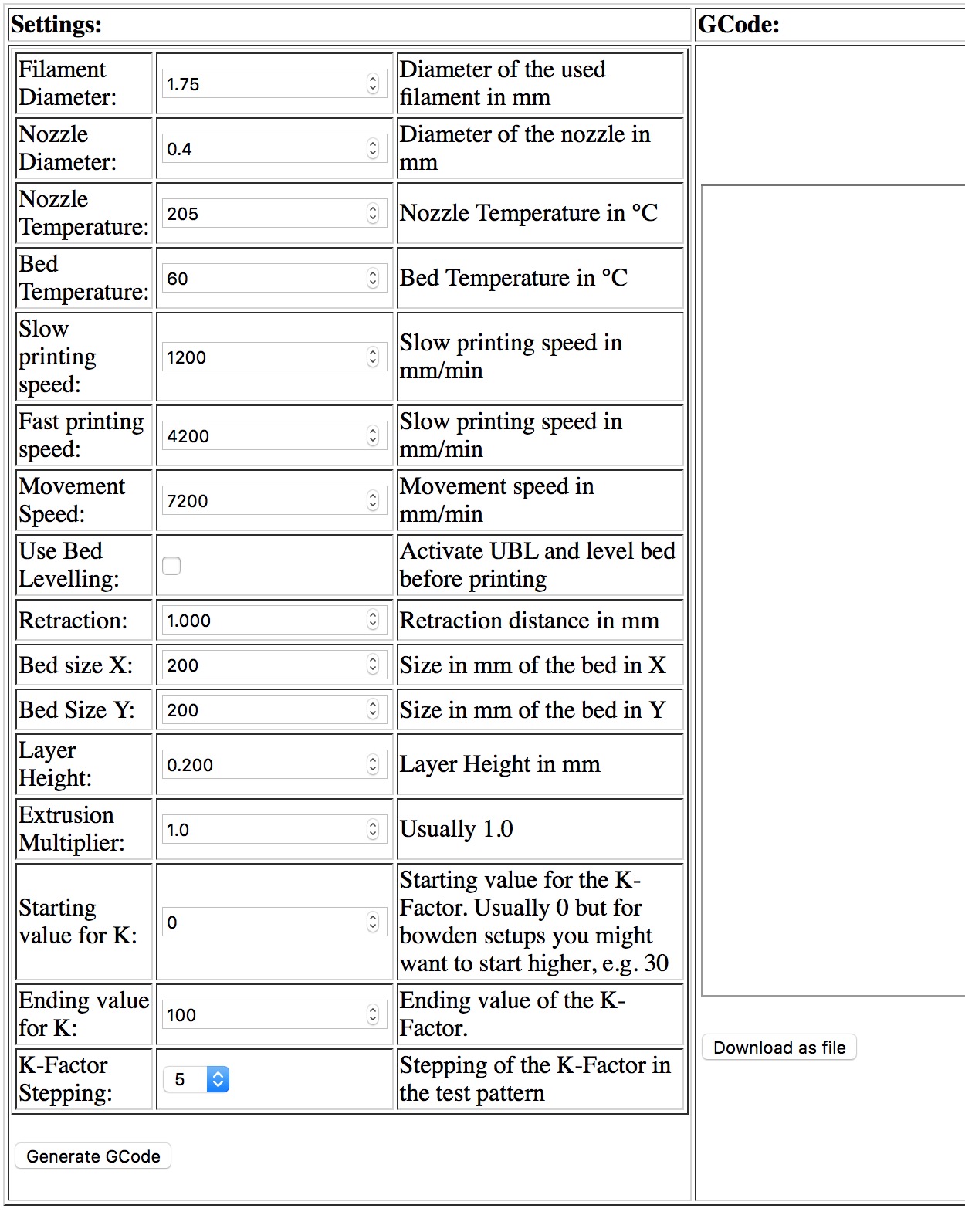
fiveangle
on 4 Nov 2017
Some finishing touches and we will submit a PR against the two bugfix branches
 Sineos
on 4 Nov 2017
Sineos
on 4 Nov 2017
Ideally it would be submitted against the MarlinDocumentation project so that users can just click to the html page directly from the Linear Advance docs page. Submitting to the MarlinFirmware project direct means someone has to go to the page, click view the raw source, "save as...' in their browser, name with ".html" extension, then open with their browser. That's already too complicated for most people ;)
fiveangle
on 4 Nov 2017
For the shell and html variant under https://github.com/Sineos/k-factorjs would it match your expectations to have a pull request for:
shell:
MarlinFirmware/Marlin/tree/bugfix-1.1.x/buildroot/share/scripts
MarlinFirmware/Marlin/tree/bugfix-2.0.x/buildroot/share/scripts
html:
MarlinFirmware/MarlinDocumentation/blob/master/_features
Sineos
on 6 Nov 2017
Seems reasonable, but is the shell variant even needed ?
fiveangle
on 6 Nov 2017
I started with the shell script because it was a quick hack to do the tests I needed. Then it grew and became a tool that might be interesting to others so I published it, sugesting that it would be better if it was a web page but that was what I got for the moment. @Sineos agreed and came up with the javascript version, which is, indeed, a finer and better solution (bash will always be clumsy for this kind of thing). I think the bash one did it's job as a starting point and may no longer be needed, but will leave the decision to him.
 token47
on 6 Nov 2017
token47
on 6 Nov 2017
Well, I like the shell version and function wise it is the same as the html variant. I agree that most users will likely prefer the html variant.
For me following options would make sense:
html variant:
- put it into
MarlinFirmware/MarlinDocumentation/blob/master/_features - create a link from the
lin_advance.mdto thek-factor.html
shell script:
- Option 1: Declare it obsolete
- Option 2: Offer it as download from
lin_advance.mdas alternative to the html --> also put it intoMarlinFirmware/MarlinDocumentation/blob/master/_features - Option 3: Mention in
lin_advance.mdthat there is a shell variant and point to my github repo
I don't have any preferences so I guess the Marlin team here should decide @thinkyhead @fiveangle
Sineos
on 6 Nov 2017
My only concern is the need to keep both variants updated if either ever changes, as it would be a completley manual process since they don't use the same source for their logic.
If you want to keep JS and shell versions, I would recommend at a minimum to put very clear comment in the header of each stating that any changes must be replicated in the corresponding shell/html version with a URL right in the comment that links directly to the other file in their respective github repository, so there is zero effort for someone unfamiliar to know what is expected of them in updating each. It may not prevent them from diverging entirely, but it will give them a fighting chance :)
fiveangle
on 7 Nov 2017
I got a ping from @thinkyhead but to be honest I maybe don't got the reson, so feel free to beat me onto it ;)
Regarding the scripts, I realy like them as I stated in another issue (can't remeber where it was exactly). Personaly, I would keep the html variant prior to a shell script just because of the usability. But I don't know how it can be linked into the documentation in a way it opens just as a web page - in github it opens as a text file or editor view.
Regarding the original question of this issue, I'm a little bit unsure where to start and stop. When I wrote the inital version of the documentation, I definitly had no beginners in mind and that's intentionaly. If you don't know about start gcodes in slicer, it's very likely this person also isn't able to judge the print results in a way so he can tell what's causing an issue. For such a person, a new variable of a (back in this time) not widely tested and somewhat experimental feature is not a good thing in my eyes.
Even if I would mention start gcode, this is set different in every slicer. So we would have to go even a step more backward, describing how to edit start gcode of common slicer programs. At such a point, the documentation would be quite of topic, it's likely to end in the descripton how to enable LIN_ADVANCE in the Marlin sources and how to compile them for the printer.
But don't get me wrong, if you have specific topics that should be covered I will definitly try to write something. I'm just not a good writer of documentations, that's why I preffer personal training in real life before writing something. This way it's easy to recognise what's the knowledge level of the trained person and to adopt to it..
 Sebastianv650
on 14 Nov 2017
Sebastianv650
on 14 Nov 2017
I found this write-up quite good, especially with the graphs.
As it seems the K-Factor in Marlin is calculated a bit differently, the question is if the graphs actually match.
I would not go to that great length as to explain how to set start gcode in slicers but a good understanding what this feature does and why it is useful. Of course finally how to determine the correct K-Factor.
Sineos
on 14 Nov 2017
I don't know why he pinged you either @Sebastianv650.
@Quintox303 can obviously communicate this well and has offered to toss together improvements to make the existing page actually useful for people trying to get going on using the feature.
What we need isn't him getting yet more technical oversight (there is too much of that already). We need him to address the question in https://github.com/MarlinFirmware/Marlin/issues/7899#issuecomment-341876778 :
thinkyhead - is there some way @Quintox303 can incorporate this embedded js HTML directly into the MarlinDocumentation so he can use it in his revamp of https://github.com/MarlinFirmware/MarlinDocumentation/blob/master/_features/lin_advance.md ?
Sineos: I would not go to that great length as to explain how to set start gcode in slicers
No, that is exactly what's needed. There are tech docs already but no simple recipe to actually get started.
@Quintox303 - if you're still willing to tweak the existing page to make it more useful (like your blog post touches on), it would be a big help ! Feel free to submit PR against the above page whenever you're ready !
fiveangle
on 15 Nov 2017
Pinged Scott at #8427 . Once the file has a home, you guys can tweak/finalize it (I see a few typos, etc) but no sense in waiting for that until it has a permanent home in the repo.
fiveangle
on 15 Nov 2017
I'll come up with a pull request against Marlin docu the next days to include the js version.
Sineos
on 16 Nov 2017
Sineos
on 16 Nov 2017
@fiveangle
If you agree with the current version, this one can be closed.
Sineos
on 27 Nov 2017
But don't get me wrong, if you have specific topics that should be covered I will definitely try to write something. I'm just not a good writer of documentations, that's why I prefer personal training in real life before writing something. This way it's easy to recognize what's the knowledge level of the trained person and to adopt to it..
@Sebastianv650 This suggestion is in a different area... But what would be very good is a short 5 minute video showing the steps and what to expect as the UBL bed leveling system is brought up. Right now... I think the problem here https://github.com/MarlinFirmware/Marlin/issues/8513#issuecomment-347043865 is the user has different expectations than what the firmware is meant to do.
If you were to video the entire process of bringing up UBL, and then cut out most of the repetitive stuff, I think you end up with a high power, very valuable video that gets people up the learning curve fast.
By repetitive... When doing a G29 P1 on a 10 x 10 mesh, there probably isn't a need to show each point being probed. But there is value to showing the user how to stop the probing if the nozzle is getting too close to the bed. And then on the G26 / G29 P4 R cycle... There would be no need to show an entire G26 but there would be value to showing how to identify and edit a bad area of the mesh.
 Roxy-3D
on 27 Nov 2017
Roxy-3D
on 27 Nov 2017
@Roxy-3D my offer was meant more related to LIN_ADVANCE. Sorry, all I know about UBL is that it's existing and that it is fancy cool new stuff. But I'm not using it, my print beds are damn flat ;)
Sebastianv650
on 27 Nov 2017
OK! Thanks!
Roxy-3D
on 27 Nov 2017
http://marlinfw.org/docs/features/lin_advance.html looks awesome guys !!! - just what was needed !
Gladly closing :)
fiveangle
on 28 Nov 2017
Related issues
 modem7
·
3Comments
modem7
·
3Comments
 ahsnuet09
·
3Comments
ahsnuet09
·
3Comments
 ceturan
·
4Comments
ceturan
·
4Comments
 spanner888
·
4Comments
spanner888
·
4Comments
 Glod76
·
3Comments
Glod76
·
3Comments