Marlin: [FR] Hold button to show About page.
Currently if you push the LCD button while on the info screen, the splash screen flashes momentarily. We often use this to check the firmware version, but this is an unintended feature (i.e. bug). It flashes really quickly, making it hard to read the version number.
How about making this bug into a feature so that holding down the LCD button keeps the About screen up until you release it? :)
 marcio-ao
All 15 comments
What LCD do you have and could you post your configuration file?
I can't reproduce what you are seeing.
Firmware version is displayed by MENU > ABOUT PRINTER > PRINTER INFO.
 Tannoo
on 22 Jul 2017
Tannoo
on 22 Jul 2017
If I hold mine from the status screen, it just cycles from status, main, z-offset, status, main, z-offset, ....
No splash screen. That only shows during boot. Do you have a possible short or bad LCD?
You could verify if Marlin is getting reset or not by opening a terminal window to see the serial output from Marlin. No extra output is generated from switching screens on the LCD (In this case).
Tannoo
on 22 Jul 2017
If Marlin is resetting while trying to go to the menu, there is a voltage drop on the 5v rail. Enough to cause the CPU to restart.
Tannoo
on 22 Jul 2017
Hum. I don't have an "About Printer" under Marlin 1.1.4 stable. It does flash the startup screen momentarily when I press the button, right before showing the menu. It's very fast though, you can barely see it.
marcio-ao
on 24 Jul 2017
Try bugfix-1.1.x.
Tannoo
on 24 Jul 2017
I don't have an "About Printer" under Marlin 1.1.4 stable.
Oh... I have LCD_INFO_MENU enabled.
I will disable that and try again.
Tannoo
on 26 Jul 2017
Yeah... I still can't reproduce your issue with bugfix-1.1.x
Tannoo
on 26 Jul 2017
Ah. It only happens if SHOW_CUSTOM_BOOTSCREEN is enabled.
marcio-ao
on 26 Jul 2017
Do you have a custom bootscreen?
Tannoo
on 26 Jul 2017
Let me explain exactly what I am trying to do. I modified the lcd_custom_bootscreen() in ultralcd_impl_DOGM.h so it shows some additional information about our printers. I kept the Marlin splash screen the same. So currently at startup I get this screen:
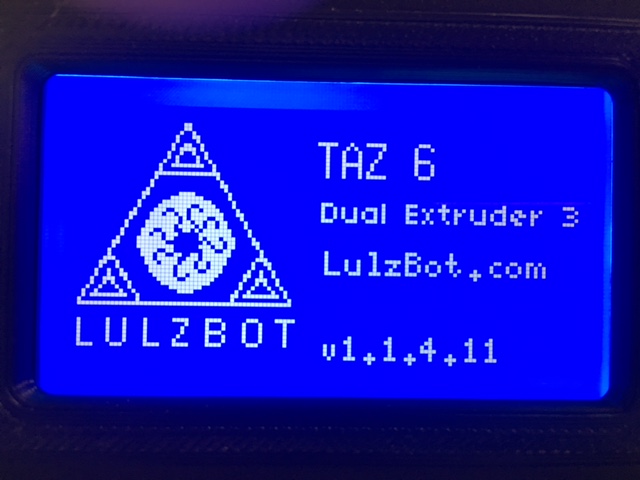
Followed by this screen:

The bug is that the first (custom) screen flashes momentarily when I push the encoder wheel. Not sure why this happens. It seems to be a bug.
But what I would like to have is actually have a menu option that shows the first splash screen until the user clicks the button again. I could modify our firmware to do this if someone would give me a few pointers on how to do it. I can't imagine it would be very hard to do.
Thanks.
marcio-ao
on 26 Jul 2017
@Tannoo: Yes. I do. I think this issue request may have been confusing because I was mistakenly referring to the lcd_custom_bootscreen as an About screen. I wasn't aware (until today) of LCD_INFO_MENU, which I guess is what you guys are calling the "About printer" screen.
I just tried LCD_INFO_MENU and I understand better the distinction now. I would still like to be able to call up our customized lcd_custom_bootscreen again.
marcio-ao
on 26 Jul 2017
Sounds like this could be easily implemented by adding a _Bootscreen_ item to the LCD_INFO_MENU structure. You click into the menu item and it shows the custom bootscreen, click again, returns to the LCD_INFO_MENU structure. If I had a custom boot screen I would certainly want to be able to see it somewhere again too :)
But I could think of a million better things to use long-press on the encoder for than this.
Look here to put your CUSTOM_BOOTSCREEN conditional around your new lcd_info_bootscreen_menu() just like PRINTCOUNTER does:
https://github.com/MarlinFirmware/Marlin/blob/bugfix-1.1.x/Marlin/ultralcd.cpp#L127-L134
  #if ENABLED(LCD_INFO_MENU)
    #if ENABLED(PRINTCOUNTER)
      void lcd_info_stats_menu();
    #endif
    void lcd_info_thermistors_menu();
    void lcd_info_board_menu();
    void lcd_info_menu();
  #endif // LCD_INFO_MENU
Menu is built up from the last item first.
 fiveangle
on 27 Jul 2017
fiveangle
on 27 Jul 2017
How about another info option to show the custom boot screen?
Tannoo
on 27 Jul 2017
@Tannoo: That would be great, it's what I am looking for.
@fiveangle: The code you quoted appears to be function prototypes. I would be surprised if that bit of code was generating the menus. Is there any document anywhere giving a high level overview on how menus are defined?
marcio-ao
on 27 Jul 2017
I was able to implement the custom menu entry to do what I wanted by following the examples in "ultralcd.cpp". Now I have an "About Printer" menu, but it shows the custom splash screen rather than showing a submenu. I will close this ticket since I have accomplished what I needed.
marcio-ao
on 27 Jul 2017
Related issues
 pubalan12
·
4Comments
pubalan12
·
4Comments
 Anion-anion
·
3Comments
Anion-anion
·
3Comments
 ShadowOfTheDamn
·
3Comments
ShadowOfTheDamn
·
3Comments
 heming3501
·
4Comments
heming3501
·
4Comments
 Ciev
·
3Comments
Ciev
·
3Comments
Most helpful comment
I was able to implement the custom menu entry to do what I wanted by following the examples in "ultralcd.cpp". Now I have an "About Printer" menu, but it shows the custom splash screen rather than showing a submenu. I will close this ticket since I have accomplished what I needed.