Marlin: Do we need a HAS_LCD_PANEL value?
I think we need a HAS_LCD value. Right now, we are using NEWPANEL to determine if a LCD Panel is on the machine. But there are some LCD Displays that do not turn on NEWPANEL.
Should we add a HAS_LCD_PANEL ? That would simplify some of the code that Tannoo is doing.
 Roxy-3D
All 21 comments
I found this limitation trying to compile UBL as well so I just hacked around the NEWPANEL test. Since an LCD needs to be enabled for LCD functionality to work, DISPLAY_PRESENT and ENCODER_PRESENT test could be put into the LCD conditionals and managed for every new panel added. NEWPANEL does not capture all cases.
 fiveangle
on 8 Jun 2017
fiveangle
on 8 Jun 2017
FYI: It has been working on a reprap discount full graphic.
 Tannoo
on 8 Jun 2017
Tannoo
on 8 Jun 2017
In the next couple of days it will be working on 20x4's too... But right now things in the UBL System are being switched on or off based on ULTIPANEL (https://github.com/MarlinFirmware/Marlin/blob/bugfix-1.1.x/Marlin/G26_Mesh_Validation_Tool.cpp#L191) instead if whether or not there is an LCD Panel. That is just because ULTIPANEL is usually turned on for most LCD Displays. It isn't always the case and needs to be corrected.
And as soon as we get that fixed, we have a follow up issue. We need to change: https://github.com/Tannoo/Marlin/blob/UBL_Mesh_Plotting/Marlin/ultralcd.cpp#L2076 so this is only for the graphics display. And put a similar one in place for the 20x4 displays. The problem is, we don't have an easy way to know what type of display we are dealing with right now.
Roxy-3D
on 8 Jun 2017
ULTIPANEL indicates that there is some kind of LCD display. NEWPANEL indicates that there is an encoder or some form of input. Together they indicate that there can be a menu system.
There may be cases where this is incorrect in Conditionals_LCD.h. Please correct as you find them.
 thinkyhead
on 3 Nov 2017
thinkyhead
on 3 Nov 2017
This is kind of cryptic. Can we change the names to indicate what you mentioned?
ULTIPANEL >>>---> HAS_LCD_DISPLAY
NEWPANEL >>>---> HAS_ENCODER_OR_BUTTONS
It may seem like a trivial thing to you old hats, but if you haven't looked the code countless times, it can be confusing to have what appears to be both a display and a display-feature being used as a test indicator. It's fine to do, but confusing when you have to look at the context of how the term is used in order to determine what the code is doing (until you get used to it after a few months of looking at the code ;)
I see the confusion mostly by individuals trying to implement their one-off panels who get frustrated and finally open an issue. Once it's explained, they get it and are usually good to go.
I vote:
HAS_DISPLAY- more accurate and concise ? BTW- would there be any value in indicating a differentiator between text and graphics display here ? I know current code translates automatically but figured I'd mention now just in case you can envision a reason this might be useful D — I can't at the momentHAS_CONTROLS,HAS_HUMAN_CONTROLS, orHAS_TACTILE_CONTROLS- not ideal but clear enough and should be more future proof to cover anything that plugs into the navigation back-end ?
These are used internal to Marlin so only devs and aformentioned adventurous component assemblers would really be exposed.
fiveangle
on 4 Nov 2017
I think I agree with fiveangle's names... The reason I put HAS_LCD_PANEL is just because it seems it always has had (in the past) LCD in the description. But there is no reason it has to be LCD and HAS_DISPLAY gets us close to home. And HAS_CONTROLS is good too.... My vote is we go with something close to this.
Roxy-3D
on 4 Nov 2017
I'm working on this project now, and here are the lcd/controller conditionals that emerge:
  #define HAS_DISPLAY           (ENABLED(ULTRA_LCD) || ENABLED(DOGLCD))
  #define HAS_GRAPHICAL_DISPLAY ENABLED(DOGLCD)
  #define HAS_CHARACTER_DISPLAY (ENABLED(ULTRA_LCD) && DISABLED(DOGLCD))
  #define HAS_ENCODER           ENABLED(ULTIPANEL)
  #define HAS_DIRECTIONAL_BUTTONS (BUTTON_EXISTS(UP) || BUTTON_EXISTS(DWN) || BUTTON_EXISTS(LFT) || BUTTON_EXISTS(RT))
  #define HAS_RESUME_CONTINUE   (HAS_ENCODER || ENABLED(REPRAPWORLD_KEYPAD) || ENABLED(EMERGENCY_PARSER))
When the code uses #if ENABLED(ULTIPANEL) it almost always means "display plus encoder" because menus only appear when there's some way to navigate. Inside the pins files it means something more like Ultipanel-derivative displays (which includes DOGLCD). For a long time ULTIPANEL has been synonymous with NEWPANEL, but NEWPANEL has not been used nearly as often. So, all this is why I picked HAS_ENCODER to replace ENABLED(ULTIPANEL) — specifically referring to a click-wheel.
The meaning of ULTRA_LCD is obscured in the code because when it's set, either in Configuration.h or Conditionals_LCD.h due to an LCD selection it refers to a character-based LCD. But lastly it gets set as a synonym of ULTIPANEL, so it no longer refers to a character-based display. In fact, the best replacement in the code for ENABLED(ULTRA_LCD) is simply HAS_DISPLAY.
Note that we now have the Malyan LCD, and probably more like it will come along. Yes, it has a display, but it doesn't count. It's more like a microcosm of OctoPrint.
Anyway, I'll have a PR soon, and hopefully it will eliminate any confusion over which conditions to use.
thinkyhead
on 6 Feb 2018
While you are at it
DOGLCD was the first supported graphical display. Later some more u8glib supporter displays have been added, but the name did not change. I guess replacing DOGLCD with GRAPHICAL_DISPLAY or U8G_DISPLAY (or something alike) makes as much sense as replacing ULTIPANEL (in case of a display class description).
 AnHardt
on 6 Feb 2018
AnHardt
on 6 Feb 2018
These changes are going to help a lot to make all of the LCD conditional compilation easier to understand.
Roxy-3D
on 6 Feb 2018
I guess replacing
DOGLCDwithGRAPHICAL_DISPLAYorU8G_DISPLAY(or something alike) makes as much sense as replacingULTIPANEL.
So, at the config level, I presume we would preserve the option for generic DOGLCD?
And, how does that relate to the DOGLCD_XXXX pins? Are those applicable more generally —for displays that use the same interface— or do they only apply to the "DOGLCD" model / type? In other words, should the pins files keep using ENABLED(DOGLCD)?
thinkyhead
on 7 Feb 2018
Note also that HAS_ENCODER is distinct from ENABLED(REPRAPWORLD_KEYPAD). It might be more suitable to call it HAS_LCD_ENCODER because with all current models the encoder wheel implies LCD integration.
thinkyhead
on 7 Feb 2018
For me... HAS_ENCODER would mean there is an encoder wheel that can spin and be clicked....
Roxy-3D
on 7 Feb 2018
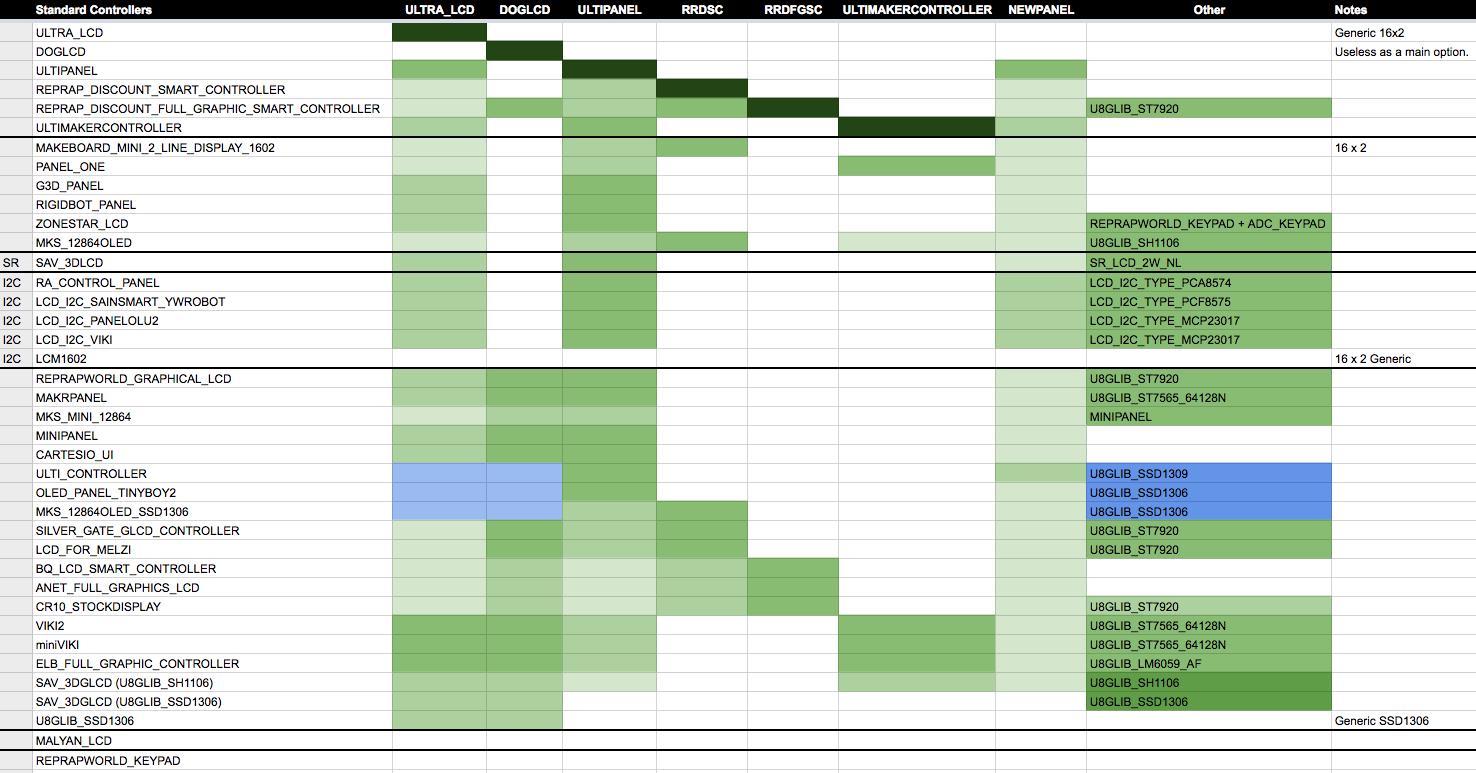
Here's how it all breaks down. The darker the color, the more direct the setting. Green is the main condition path, while blue indicates a secondary condition path where items get set.
thinkyhead
on 7 Feb 2018
From the above chart, we can see that almost all LCDs lead to ULTIPANEL. And once that is set, you get ULTRA_LCD and NEWPANEL automatically. Nothing else sets NEWPANEL independently. So, we can safely replace NEWPANEL across-the-board with HAS_ENCODER. Or, again, it could be HAS_LCD_ENCODER to make clear that it's both an encoder and LCD, since you can't get HAS_ENCODER without HAS_DISPLAY.
Zonestar LCD is one of the more interesting, since it combines a display lacking an encoder with a keypad. Although it does set NEWPANEL it supersedes that in the pin definitions. There it un-sets the encoder pins. The rest of the code is thus told "encoder exists" but it's not a wheel in this case. I'll do a cleanup of its pin defines, moving them within the current HAS_ENCODER condition, to make it more consistent with the other LCDs.
thinkyhead
on 7 Feb 2018
i just searched the configs and we no longer have HAS_LCD_PANEL, so maybe this one has just been forgotten?
 boelle
on 16 Mar 2019
boelle
on 16 Mar 2019
Can anyone close this?
 Phr3d13
on 10 Jun 2019
Phr3d13
on 10 Jun 2019
@thinkyhead Another one that needs to be closed. Sorry, I got bored.
boelle
on 22 Jun 2019
Rather than close, it might be better left open as a reminder until cycles are available to coddle it over the goal line ? The confusion around the whole NEWPANEL, ULTIPANEL, etc and all the display/control config still exists and trips up almost every newbie it seems. Sure, they get over it eventually but it seems low hanging fruit to ease new adoption 🤷♂ : https://github.com/MarlinFirmware/Marlin/pull/9519#issuecomment-374864564
fiveangle
on 28 Jun 2019
The conditionals have been simplified, eliminating the eliminate-able granular LCD properties. We will continue to simplify where possible (for example, #14428). For now the added conditionals, plus ULTIPANEL and NEWPANEL give us the general flags we need to decide which LCD pins to allocate in the pins files.
thinkyhead
on 28 Jun 2019
This issue has been automatically locked since there has not been any recent activity after it was closed. Please open a new issue for related bugs.
![github-actions[bot] picture](https://avatars2.githubusercontent.com/in/15368?v=4&s=40) github-actions[bot]
on 5 Jul 2020
github-actions[bot]
on 5 Jul 2020
Related issues
 ceturan
·
4Comments
ceturan
·
4Comments
 otisczech
·
3Comments
otisczech
·
3Comments
 spanner888
·
4Comments
spanner888
·
4Comments
 pubalan12
·
4Comments
pubalan12
·
4Comments
 jerryerry
·
4Comments
jerryerry
·
4Comments