Hello,
today i installed the new RC7 release and when the Delta homes the first time, it homes normally but it drives additional 100mm down. So far so good... But when i drive 600mm down and try to home again, the Delta stucks at this 100mm point (before it can hit the endstops) and cannot be moved any more (my RUMBA board hangs on). I have to turn on and off again the Board to get it run again. The odd thing is, when i only drive like 400mm downwards the Delta homes normally and everything is ok.
 judokan9
All 59 comments
I had similar issues. Using the RcBuxFix branch helped.
 oxivanisher
on 3 Aug 2016
oxivanisher
on 3 Aug 2016
Okay,
thank you. I give it a try when im at home. Did you now what is different in this version ? Or what caused this problem ? Its pretty odd that it don´t homes normally after driven more than 550mm or so.
judokan9
on 3 Aug 2016
I hope this gives you the needed information #4454
oxivanisher
on 3 Aug 2016
Nope, i got the same results with the RcBuxFix branch. The printer Stops 100mm before it can reach the Endstops and hang on.
Here is my current config file:
Printer Messures are:
Heigh ~760mm
Bed-radius 100mm
Extruder/s 1x
judokan9
on 3 Aug 2016
Another job for @MarlinFirmware/testers-delta-team
 thinkyhead
on 3 Aug 2016
thinkyhead
on 3 Aug 2016
I hope they can solve my odd problem
judokan9
on 4 Aug 2016
@judokan9
If you disable USE_WATCHDOG, Is problem solved?
 esenapaj
on 4 Aug 2016
esenapaj
on 4 Aug 2016
sorry for my late answering, i was very busy today.
BUT i disabled #define USE_WATCHDOG in the Configuration_adv.h and it worked perfectly.
judokan9
on 4 Aug 2016
Will try either tomorrow night or Saturday.
 tiagom62
on 5 Aug 2016
tiagom62
on 5 Aug 2016
@esenapaj Wow, you are my hero.
@AnHardt You're the WATCHDOG man! What the heck is going on with the watchdog timing out in the middle of a print? We must be resetting it often enough, yes? Where is this falling down?
thinkyhead
on 6 Aug 2016
BUT i disabled #define WATCHDOG_RESET_MANUAL in the Configurations_adv.h and it worked perfectly.
WATCHDOG_RESET_MANUAL only defines how to react on a watchdog reset - whether showing a kill screen and going into a endless loop, or making a hardware reset, where most boards do not come out of the bootloader but resetting again and again and ...
If USE_WATCHDOG would be involved, i'd say it could be a problem with refreshing the watchdog timer, but with WATCHDOG_RESET_MANUAL i guess the user is seeing a random result, caused by something else.
So what can give us the impression of a hanging machine but not causing a Watchdog Timer Overflow Reset (the user did not tell us about the typical symptoms of WTOR , a fast blinking LED, or the killscreen)?
A endless loop in a IRC in combination with WATCHDOG_RESET_MANUAL could cause a hang not able to execute WTOR because cli is set.
A extremely slow move? Like in the auto retract problem?
Something completely different.
With the users config. he has 200steps/mm and a z-max of ~760mm. At some place the machine crosses the 128k steps border. (200*760mm=152000, 128k/200=655mm). That could be about matching to the errors description. Could some intermediate integer result have flipped the sign?
However. When the problem is away now, one of our patches may have helped. A relation to WATCHDOG_RESET_MANUAL seems to be unlikely. The hang would show different symptoms but should not have disappeared.
 AnHardt
on 6 Aug 2016
AnHardt
on 6 Aug 2016
Today i have printed several times. Every Time the printer homes normally but when i reenable USE_WATCHDOG it stuck's and don't move slowly it stays on this point. The idea with overflowing variables sounds very plausible. I want to build an even bigger printer... Would this problem appear when i scale up the height ? How can i avoid this Problem ? Use Long_INT ?
Any Ideas why it worked with disabled USE_WATCHDOG in RC7 and RCBugFix ?
Sorry for my wrong information, i din't disabled WATCHDOG_RESET_MANUAL this was disabled from the firmware normally. I was in hurry... I disabled USE_WATCHDOG...
judokan9
on 7 Aug 2016
I was in hurry... I disabled
USE_WATCHDOG...
Without WATCHDOG_RESET_MANUAL the watchdog gets reset in the following manner:
updateTemperaturesFromRawValuesresets the watchdog timer and clearstemp_meas_ready.manage_heatercallsupdateTemperaturesFromRawValueswhentemp_meas_readyis set.manage_heateris called fromidle,safe_delay, and elsewhere
For the temp_meas_ready flag to get set…
set_current_temp_rawsets thetemp_meas_readyflag.Temperature::isrcallsset_current_temp_rawwhentemp_count >= OVERSAMPLENR(iftemp_meas_readyis unset)
So basically, anything that blocks for too long (in our case, 4 seconds) without calling manage_heater could trigger the watchdog timer. Either something is blocking for 4 seconds, or the watchdog timer is expiring too soon.
thinkyhead
on 8 Aug 2016
Just for understanding, you mean that my homing routine takes more then 4 secs and in this Time manage_heater does not been called ? That sounds possible, but i think my homing routine does not need more then 3 seconds...
anyway....
What is when i have a big Printer, maybe a Delta with a very large build height and homing takes like 10 seconds. The only way to avoid the stuck after 4 seconds "BUG" is to change the value to 11 seconds or so ?
judokan9
on 8 Aug 2016
I might have a similar issue. My end script looks like this:
M104 S0 ; turn off extruder
M140 S0 ; turn off bed
G28 X0  ; home X axis
M84 ; disable motors
G4 S60 ; sleep 60 seconds to cool down
M81 ; power off
I am waiting 60 seconds to let the nozzle cool before i power off the power supply.
And while it is waiting the 60 seconds, it looks like it is crashing. After every print, Octoprint detects a error in communication and disconnects. This could be due to the same reason.
oxivanisher
on 8 Aug 2016
What is when i have a big Printer, maybe a Delta with a very large build height and homing takes like 10 seconds. The only way to avoid the stuck after 4 seconds "BUG" is to change the value to 11 seconds or so ?
If you have a very large printer, probably other things will have to change. It is possible your extruder will be larger too. So a larger time out on thermal will make sense.
 Roxy-3D
on 8 Aug 2016
Roxy-3D
on 8 Aug 2016
my homing routine takes more then 4 secs and in this Time manage_heater does not been called?
The idle() function is called frequently during processes like waiting for the nozzle to cool, during G4, or doing G29, and as long as the main loop is running. For this 4 second timer to expire, something would have to go very wrong, a crash or infinite loop preventing the timer being reset. According to Arduino documentation this timer may slow down if the voltage is low. Perhaps it speeds up if it gets a surge of higher current also.
Keep an eye out for a period of 4 seconds when the machine is unresponsive before it actually does a watchdog reset.
thinkyhead
on 8 Aug 2016
@thinkyhead
Made some debug code to find out what Marlin is doing all the time.
Please have a look at: "Add debug counters https://github.com/AnHardt/Marlin/pull/64"
Do you think this could be helpful with this kind of problems? :-)
AnHardt
on 10 Aug 2016
When a timeout happens, it would be interesting to see the stack frame. If we saved the top 100 bytes of the stack in EEPROM, it would be possible to know EXACTLY what led to the failure. It would be slightly more tricky to accomplish, but it could be saved in RAM also because the RAM is not cleared when the processor is reset.
Roxy-3D
on 10 Aug 2016
@AnHardt
This is my case.
After freezing, LCD is filled with squares.
#define DELTA_SEGMENTS_PER_SECOND 180
#define XYZ_FULL_STEPS_PER_ROTATION 400
#define XYZ_MICROSTEPS 32
log
23:49:01.103 : Printer reset detected - initalizing
23:49:01.103 : start
23:49:01.107 : echo: External Reset
23:49:01.108 : Marlin 1.1.0-RCBugFix
23:49:01.108 : echo: Last Updated: 2016-07-26 12:00 | Author: (Micromake)
23:49:01.112 : Compiled: Aug 10 2016
23:49:01.112 : echo: Free Memory: 2504  PlannerBufferBytes: 1408
23:49:01.116 : echo:V24 stored settings retrieved (427 bytes)
23:49:01.116 : echo:Steps per unit:
23:49:01.116 : echo:  M92 X400.00 Y400.00 Z400.00 E953.10
23:49:01.116 : echo:Maximum feedrates (mm/s):
23:49:01.120 : echo:  M203 X300.00 Y300.00 Z300.00 E300.00
23:49:01.120 : echo:Maximum Acceleration (mm/s2):
23:49:01.124 : echo:  M201 X3000 Y3000 Z3000 E9000
23:49:01.124 : echo:Accelerations: P=printing, R=retract and T=travel
23:49:01.128 : echo:  M204 P3000.00 R9000.00 T3000.00
23:49:01.132 : echo:Advanced variables: S=Min feedrate (mm/s), T=Min travel feedrate (mm/s), B=minimum segment time (ms), X=maximum XY jerk (mm/s),  Z=maximum Z jerk (mm/s),  E=maximum E jerk (mm/s)
23:49:01.136 : echo:  M205 S0.00 T0.00 B20000 X10.00 Z10.00 E5.00
23:49:01.136 : echo:Home offset (mm)
23:49:01.136 : echo:  M206 X0.00 Y0.00 Z0.00
23:49:01.140 : echo:Endstop adjustment (mm):
23:49:01.140 : echo:  M666 X0.00 Y0.00 Z0.00
23:49:01.145 : echo:Delta settings: L=diagonal_rod, R=radius, S=segments_per_second, ABC=diagonal_rod_trim_tower_[123]
23:49:01.149 : echo:  M665 L217.30 R95.00 S180.00 A0.00 B0.00 C0.00
23:49:01.149 : echo:Material heatup parameters:
23:49:01.149 : echo:  M145 S0 H200 B70 F255
23:49:01.149 : echo:  M145 S1 H240 B100 F255
23:49:01.153 : echo:PID settings:
23:49:01.153 : echo:  M301 P46.03 I6.24 D84.84 C100.00 L20
23:49:01.157 : echo:Retract: S=Length (mm) F:Speed (mm/m) Z: ZLift (mm)
23:49:01.157 : echo:  M207 S3.00 F2700.00 Z0.00
23:49:01.157 : echo:Recover: S=Extra length (mm) F:Speed (mm/m)
23:49:01.161 : echo:  M208 S0.00 F480.00
23:49:01.165 : echo:Auto-Retract: S=0 to disable, 1 to interpret extrude-only moves as retracts or recoveries
23:49:01.165 : echo:  M209 S0
23:49:01.165 : echo:Filament settings: Disabled
23:49:01.165 : echo:  M200 D1.75
23:49:01.165 : echo:  M200 D0
23:49:01.168 : echo:Z-Probe Offset (mm):
23:49:01.168 : echo:  M851 Z0.75
23:49:01.306 : N1 M110*34
23:49:01.306 : N2 M115*36
23:49:01.306 : N4 M114*35
23:49:01.327 : N5 M111 S6*98
23:49:01.328 : N6 T0*60
23:49:01.328 : N7 M20*22
23:49:01.329 : N8 M80*19
23:49:04.608 : echo:SD card ok
23:49:04.609 : N11 M20*33
23:49:04.621 : echo:SD card ok
23:49:04.683 : FIRMWARE_NAME:Marlin 1.1.0-RCBugFix (Github) SOURCE_CODE_URL:https://github.com/MarlinFirmware/Marlin PROTOCOL_VERSION:1.0 MACHINE_TYPE:Micromake EXTRUDER_COUNT:1 UUID:cede2a2f-41a2-4748-9b12-c55c62f367ff EMERGENCY_CODES:M108,M112,M410
23:49:04.683 : N12 M20*34
23:49:04.704 : N13 M220 S100*83
23:49:04.705 : X:0.00 Y:0.00 Z:0.00 E:0.00 Count X: 78173 Y:78173 Z:78173
23:49:04.705 : echo:DEBUG:INFO,ERRORS
23:49:04.705 : N14 M221 S100*85
23:49:04.705 : echo:Active Extruder: 0
23:49:04.706 : Begin file list
23:49:04.706 : N15 M111 S6*83
23:49:04.706 : End file list
23:49:04.707 : N16 T0*13
23:49:04.708 : Begin file list
23:49:04.713 : End file list
23:49:04.713 : Begin file list
23:49:04.720 : End file list
23:49:04.724 : echo:DEBUG:INFO,ERRORS
23:49:04.724 : echo:Active Extruder: 0
23:49:05.613 : echo:jitter: 0, idle(): 7721.00, loop(): 7721.00, watchdog reset: 21.00, tempISR: 4338.00, stepISR:4170.00, lines parsed:16.00, moves planed:0.00
23:49:05.962 : N17 M111 S32*102
23:49:05.964 : echo:DEBUG:LEVELING
23:49:06.616 : echo:jitter: 0, idle(): 8695.00, loop(): 8695.00, watchdog reset: 5.00, tempISR: 976.00, stepISR:999.00, lines parsed:1.00, moves planed:0.00
23:49:07.616 : echo:jitter: 0, idle(): 8684.00, loop(): 8684.00, watchdog reset: 5.00, tempISR: 975.00, stepISR:998.00, lines parsed:1.00, moves planed:0.00
23:49:08.056 : N19 M502*28
23:49:08.062 : echo:Hardcoded Default Settings Loaded
23:49:08.616 : echo:jitter: 0, idle(): 8689.00, loop(): 8689.00, watchdog reset: 5.00, tempISR: 976.00, stepISR:999.00, lines parsed:1.00, moves planed:0.00
23:49:09.614 : echo:jitter: 0, idle(): 8696.00, loop(): 8696.00, watchdog reset: 5.00, tempISR: 975.00, stepISR:998.00, lines parsed:0.00, moves planed:0.00
23:49:09.814 : N20 M500*20
23:49:10.934 : echo:Settings Stored (427 bytes)
23:49:10.938 : echo:jitter: 320, idle(): 1193.18, loop(): 1193.18, watchdog reset: 0.76, tempISR: 976.52, stepISR:999.24, lines parsed:0.76, moves planed:0.00
23:49:11.937 : echo:jitter: 0, idle(): 8684.00, loop(): 8684.00, watchdog reset: 6.00, tempISR: 976.00, stepISR:998.00, lines parsed:1.00, moves planed:0.00
23:49:12.940 : echo:jitter: 0, idle(): 8696.00, loop(): 8696.00, watchdog reset: 5.00, tempISR: 975.00, stepISR:998.00, lines parsed:0.00, moves planed:0.00
23:49:13.940 : echo:jitter: 0, idle(): 8695.00, loop(): 8695.00, watchdog reset: 5.00, tempISR: 976.00, stepISR:999.00, lines parsed:1.00, moves planed:0.00
23:49:14.943 : echo:jitter: 0, idle(): 8705.00, loop(): 8705.00, watchdog reset: 5.00, tempISR: 976.00, stepISR:999.00, lines parsed:0.00, moves planed:0.00
23:49:15.943 : echo:jitter: 0, idle(): 8694.00, loop(): 8694.00, watchdog reset: 6.00, tempISR: 975.00, stepISR:998.00, lines parsed:0.00, moves planed:0.00
23:49:16.942 : echo:jitter: 0, idle(): 8694.00, loop(): 8694.00, watchdog reset: 5.00, tempISR: 976.00, stepISR:999.00, lines parsed:1.00, moves planed:0.00
23:49:17.945 : echo:jitter: 0, idle(): 8696.00, loop(): 8696.00, watchdog reset: 5.00, tempISR: 975.00, stepISR:998.00, lines parsed:0.00, moves planed:0.00
23:49:18.945 : echo:jitter: 0, idle(): 8706.00, loop(): 8706.00, watchdog reset: 5.00, tempISR: 976.00, stepISR:1000.00, lines parsed:0.00, moves planed:0.00
23:49:19.945 : echo:jitter: 0, idle(): 8686.00, loop(): 8686.00, watchdog reset: 5.00, tempISR: 975.00, stepISR:999.00, lines parsed:1.00, moves planed:0.00
23:49:20.947 : echo:jitter: 0, idle(): 8705.00, loop(): 8705.00, watchdog reset: 5.00, tempISR: 976.00, stepISR:1000.00, lines parsed:0.00, moves planed:0.00
23:49:21.948 : echo:jitter: 0, idle(): 8705.00, loop(): 8705.00, watchdog reset: 5.00, tempISR: 976.00, stepISR:1000.00, lines parsed:0.00, moves planed:0.00
23:49:22.947 : echo:jitter: 0, idle(): 8685.00, loop(): 8685.00, watchdog reset: 5.00, tempISR: 975.00, stepISR:999.00, lines parsed:1.00, moves planed:0.00
23:49:23.950 : echo:jitter: 0, idle(): 8705.00, loop(): 8705.00, watchdog reset: 5.00, tempISR: 976.00, stepISR:1000.00, lines parsed:0.00, moves planed:0.00
23:49:24.949 : echo:jitter: 0, idle(): 8696.00, loop(): 8696.00, watchdog reset: 5.00, tempISR: 975.00, stepISR:999.00, lines parsed:0.00, moves planed:0.00
23:49:25.195 : N26 G28*39
23:49:25.198 : >>> gcode_G28
23:49:25.198 : reset_bed_level
23:49:25.203 : current_position=(0.00, 0.00, 0.00) : setup_for_endstop_or_probe_move
23:49:25.203 : > endstops.enable(true)
23:49:25.206 : current_position=(0.00, 0.00, 0.00) : sync_plan_position
Video clip:
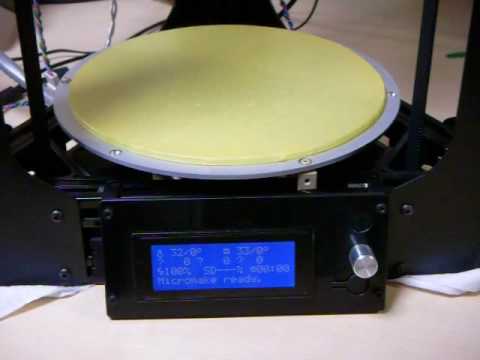
A branch that it was used for test: https://github.com/esenapaj/Marlin/tree/testes2
esenapaj
on 10 Aug 2016
@esenapaj YES my printer does exactly the same thing. But i din't have an LCD Display. After i disabled #define USE_WATCHDOG in the Configuration_adv.h the Printer homes normally.
judokan9
on 10 Aug 2016
Definitely not a watchdog problem. The processor is running much longer then 4seconds until the display begins to fill.
Looks more like a memory overflow.
idle() is not called any more after:
  #if ENABLED(DELTA)
    /**
     * A delta can only safely home all axes at the same time
     */

    // Pretend the current position is 0,0,0
    // This is like quick_home_xy() but for 3 towers.
    current_position[X_AXIS] = current_position[Y_AXIS] = current_position[Z_AXIS] = 0.0;
    sync_plan_position(); /////////////////// this is the last we can see.

    // Move all carriages up together until the first endstop is hit.
    current_position[X_AXIS] = current_position[Y_AXIS] = current_position[Z_AXIS] = 3.0 * (Z_MAX_LENGTH);
    feedrate_mm_s = 1.732 * homing_feedrate_mm_s[X_AXIS];
+    SERIAL_ECHOLNPGM("before move");
    line_to_current_position(); // if not already at the top this move should last long enough to
+    SERIAL_ECHOLNPGM("behind move");
    stepper.synchronize(); // idle here
+    SERIAL_ECHOLNPGM("behind sync");

    endstops.hit_on_purpose(); // clear endstop hit flags
    current_position[X_AXIS] = current_position[Y_AXIS] = current_position[Z_AXIS] = 0.0;

    // take care of back off and rehome. Now one carriage is at the top.
    HOMEAXIS(X);
    HOMEAXIS(Y);
    HOMEAXIS(Z);

    SYNC_PLAN_POSITION_KINEMATIC();

    #if ENABLED(DEBUG_LEVELING_FEATURE)
      if (DEBUGGING(LEVELING)) DEBUG_POS("(DELTA)", current_position);
    #endif
Additionally change to
#define DEBUG_COUNTER_INTERVAL_MS 100
Maybe we can place a
  SERIAL_ECHO_START;
  SERIAL_ECHOPGM(MSG_FREE_MEMORY);
  SERIAL_ECHOLN(freeMemory());
somewhere in the #if ENABLED(DEBUG_IDLE_COUNTER) block, to see how much RAM is remaining.
To get a nice kill-screen if the watchdog reset is triggered i suggest to activate WATCHDOG_RESET_MANUAL - at lest for this tests.
 Blue-Marlin
on 10 Aug 2016
Blue-Marlin
on 10 Aug 2016
@Blue-Marlin Turning on the M100 Free Memory Watcher will help you know how close you are to running out of memory. But you have to be able to give Marlin an M100 command to get the information from it.
Roxy-3D
on 10 Aug 2016
Ok
now the Delta sticks again.... With disabled watchdog... About 2 days in the past i configured the printer height to keep the distance between the nozzle and print bed like 0,15 mm. Yesterday evening i have to change the nozzle and correct the height downwards like ~2 mm again. Now the Printer doesn't home when im on Z 754.42.
Combined:
The printer homes when #define MANUAL_Z_HOME_POS is 753.67
AND
The printer stuck's when #define MANUAL_Z_HOME_POS is 754.42
I think a memory overflow is probably the problem and i have to agree my previous writers.
But how can i prevent this ?
judokan9
on 10 Aug 2016
I think a memory overflow is probably the problem and i have to agree my previous writers. But how can i prevent this ?
First, lets get some data. Let's see how much stack and heap space is there. Please turn on:
#define M100_FREE_MEMORY_WATCHER // uncomment to add the M100 Free Memory Watcher for debug purpose
Flash the new firmware and bring up Marlin. Then give Marlin a: M100 I command to initialize the memory watcher. Then do a M100 F to see how much free memory is available.
Then... start a print. Let it do a few layers. Pause the print. And do another M100 F we will know from this how tight memory is.
Roxy-3D
on 10 Aug 2016
@Roxy-3D I will try i directly.
judokan9
on 10 Aug 2016
Here are the Results
Send: M100 I
Recv: Initializing free memory block.
Recv:
Recv:
Recv: bss_end : 4887
Recv: Stack Pointer : 8592
Recv:
Recv: 3633 bytes of memory initialized.
Recv:
Recv: ok
After the first Layer:
Send: M100 F
Recv: Found 3366 bytes free at 0x131F
Recv: ok
Second layer nearly finished:
Send: N2076 M100 F*119
Recv: Found 3366 bytes free at 0x131F
Recv: ok
After that i paused the print and send an G28. The Printer homes and keeps stuck before it reaches the endstops... after ~5-6 seconds Octoprint says "unkown communication error .... Too many consecutive timeouts, printer still connected and alive?"
Sorry the start is been cutted of the log because of autoscroll from octoprint.
At the end, the Memory is not the problem here or not ?
judokan9
on 10 Aug 2016
3366 bytes free after printing several layers leads me to think you are not out of memory. Something else is corrupting memory or causing the hang.
Roxy-3D
on 10 Aug 2016
Yust for fun try:
    // Move all carriages up together until the first endstop is hit.
-    current_position[X_AXIS] = current_position[Y_AXIS] = current_position[Z_AXIS] = 3.0 * (Z_MAX_LENGTH );
+    current_position[X_AXIS] = current_position[Y_AXIS] = current_position[Z_AXIS] = 1.5 * (Z_MAX_LENGTH );
    feedrate_mm_s = 1.732 * homing_feedrate_mm_s[X_AXIS];
If the height makes a difference, this should too.
Blue-Marlin
on 10 Aug 2016
I changed from 3.0 to 1.5 and the Result is identical.
judokan9
on 10 Aug 2016
Ok,
i have disabled #define USE_WATCHDOGagain and now i can home normally....
judokan9
on 10 Aug 2016
The M100 test cannot catch a buffer overflow. A buffer overflow occurs when we write accidentally into memory either because a buffer is too small, or what we're writing is too long. A buffer overflow can lead to stack corruption, crashing, anomalous behavior… It's an awful thing and often quite hard to find.
Also, since we don't use any dynamic allocation, the amount of free memory that M100 reports should be always the same as it was at boot up.
Anyway, with USE_WATCHDOG being involved, I think possibly there might be something else going on! There's a small number of Arduino boards that don't support the 4 second timeout (only much shorter ones), but I doubt you have one of those.
thinkyhead
on 11 Aug 2016
I have a Rumba board.
Go down with the time should fix the Problem ? From 4 seconds to 2 or so ?
judokan9
on 11 Aug 2016
@judokan9 The opposite. A shorter timeout will cause the watchdog to trigger more often, and 2 seconds is not one of the available options. A longer timeout would be better, but it's no guarantee. If you'd like to test an 8s timeout to see if it makes any difference, change the line…
- wdt_enable(WDTO_4S);
+ wdt_enable(WDTO_8S);
The M100 test cannot catch a buffer overflow.
Agreed. But they said 'Memory overflow' and not 'Buffer overflow'.
Also, since we don't use any dynamic allocation, the amount of free memory that M100 reports should be always the same as it was at boot up.
This isn't true. At boot up, the various GCode commands have not been invoked. Some of the GCode commands like G29 P5 will wind up the stack and you will see a different amount of 'free' memory after it is invoked. Running G29 a second time should not lower the free memory by any significant amount. (It is possible to lose a small amount of additional 'free' memory because you can't control when the interrupts fire and their stack usage.)
        int abl2 = sq(auto_bed_leveling_grid_points);
        double eqnAMatrix[abl2 * 3], // "A" matrix of the linear system of equations
               eqnBVector[abl2],     // "B" vector of Z points
               mean = 0.0;
        int8_t indexIntoAB[auto_bed_leveling_grid_points][auto_bed_leveling_grid_points];
      #endif // !DELTA
@thinkyhead Changing from - wdt_enable(WDTO_4S); + wdt_enable(WDTO_8S); fixed the Problem... But is this fix good ? When i understood it right, the timer is looking about the status of the printer every 4s set an higher value would detect problems etc. not so far or not ?
judokan9
on 12 Aug 2016
If the time is 4 or 8 seconds does not matter. The regular refresh is 5 times/second.
You just will see the reset 4 seconds later, or not at all, if the problem does not last that long.
The watchdog reset is a symptom - not the reason.
Blue-Marlin
on 12 Aug 2016
But they said 'Memory overflow' and not 'Buffer overflow'.
@Roxy-3D None of the code does any dynamic allocation, so I presume he was simply using the imprecise language of a layperson because there's no such thing as a "memory overflow."
the timer is looking about the status of the printer every 4s
@judokan9 No. How it works is, if we fail to reset the watchdog timer within 4 seconds, the board reboots. Increasing it to 8 seconds simply gives more leeway.
The watchdog reset is a symptom - not the reason.
@Blue-Marlin And yet changing it has given us new information. Something is delaying the watchdog reset by some amount that is bad for the given board. It may also be that the timer on the board is running too fast, losing bits, or getting hit with static. The Arduino documentation on the watchdog timer indicates it can run slower if the current is low, and I speculate that perhaps it can run too fast if it gets too much current.
thinkyhead
on 12 Aug 2016
I tried to test with the WATCHDOG_RESET_MANUAL, but I'm seeing a strange result.
When I enable the WATCHDOG_RESET_MANUAL and REPRAP_DISCOUNT_SMART_CONTROLLER and upload a sketch,
MEGA2560 + RAMPS freeze immediately at every startup, and red LED on RAMPS flash, no response.
When I only enable the WATCHDOG_RESET_MANUAL, LED doesn't flash, freeze, but can get response.
response
13:48:35.352 : Printer reset detected - initalizing
13:48:35.352 : start
13:48:35.352 : echo: External Reset
13:48:35.356 : Marlin 1.1.0-RCBugFix
13:48:35.356 : echo: Last Updated: 2016-07-26 12:00 | Author: (none, default config)
13:48:35.356 : Compiled: Aug 13 2016
13:48:35.360 : echo: Free Memory: 5357  PlannerBufferBytes: 1232
13:48:35.360 : echo:Hardcoded Default Settings Loaded
13:48:35.364 : echo:Steps per unit:
13:48:35.364 : echo:  M92 X80.00 Y80.00 Z4000.00 E500.00
13:48:35.364 : echo:Maximum feedrates (mm/s):
13:48:35.368 : echo:  M203 X300.00 Y300.00 Z5.00 E25.00
13:48:35.368 : echo:Maximum Acceleration (mm/s2):
13:48:35.372 : echo:  M201 X3000 Y3000 Z100 E10000
13:48:35.372 : echo:Accelerations: P=printing, R=retract and T=travel
13:48:35.376 : echo:  M204 P3000.00 R3000.00 T3000.00
13:48:35.380 : echo:Advanced variables: S=Min feedrate (mm/s), T=Min travel feedrate (mm/s), B=minimum segment time (ms), X=maximum XY jerk (mm/s),  Z=maximum Z jerk (mm/s),  E=maximum E jerk (mm/s)
13:48:35.384 : echo:  M205 S0.00 T0.00 B20000 X20.00 Z0.40 E5.00
13:48:35.384 : echo:Home offset (mm)
13:48:35.388 : echo:  M206 X0.00 Y0.00 Z0.00
13:48:35.389 : echo:PID settings:
13:48:35.389 : echo:  M301 P22.20 I1.08 D114.00
13:48:35.392 : echo:Filament settings: Disabled
13:48:35.392 : echo:  M200 D3.00
13:48:35.392 : echo:  M200 D0
13:48:35.520 : N1 M110*34
13:48:35.520 : N2 M115*36
13:48:35.520 : N4 M114*35
13:48:35.569 : N5 M111 S15*80
13:48:35.570 : N6 T0*60
13:48:35.570 : N7 M20*22
13:48:35.570 : N8 M80*19
13:48:35.655 : FIRMWARE_NAME:Marlin 1.1.0-RCBugFix (Github) SOURCE_CODE_URL:https://github.com/MarlinFirmware/Marlin PROTOCOL_VERSION:1.0 MACHINE_TYPE:3D Printer EXTRUDER_COUNT:1 UUID:cede2a2f-41a2-4748-9b12-c55c62f367ff
13:48:35.655 : N10 M220 S100*80
13:48:35.659 : N11 M221 S100*80
13:48:35.660 : N12 M111 S15*102
13:48:35.660 : X:0.00 Y:0.00 Z:0.00 E:0.00 Count X: 0 Y:0 Z:0
13:48:35.661 : N13 T0*8
13:48:35.663 : echo:DEBUG:ECHO,INFO,ERRORS,DRYRUN
13:48:35.663 : echo:N6 T0*60
13:48:35.663 : echo:Active Extruder: 0
13:48:35.663 : echo:N7 M20*22
13:48:35.667 : echo:N8 M80*19
13:48:35.667 : echo:NError:Something is wrong, please turn off the printer.
13:48:35.667 : Error:Printer halted. kill() called!
This freeze happens wether RAMPS is connected to MEGA2560 or not.
So I guess that my MEGA2560 is almost broken. Thus I've ordered new MEGA2560 + RAMPS...
But why, when I disabled WATCHDOG_RESET_MANUAL (but USE_WATCHDOG is still enabled) it looks like that Marlin is booted normally.
Strange...
esenapaj
on 13 Aug 2016
Hardware with one leg in the coffin can bring you strange and random results... Same can cheap knockoff's do :-D
Let us know if new hardware changes anything
 boelle
on 14 Aug 2016
boelle
on 14 Aug 2016
Something completely different.
With the users config. he has 200steps/mm and a z-max of ~760mm. At some place the machine crosses the 128k steps border. (200*760mm=152000, 128k/200=655mm). That could be about matching to the errors description. Could some intermediate integer result have flipped the sign?
I think AnHardt was on to something here.
If someone has a delta printer and pulls the belts off all 3 towers to prevent carriage movements, what happens when you issue a G28? Does it try to home for ever? Does it eventually give up? Does it crash after a certain distance is moved, possibly due to integer overflow/sign change?
I'd do this, but I am in the office at the moment.
Also, judokan, what happens if you do a G1 X0 Y0 Z110 and then try to home? If you then do a G1 X0 Y0 Z100 and try to home, does it behave the same way?
 zenmetsu
on 19 Aug 2016
zenmetsu
on 19 Aug 2016
Does it try to home for ever?
Look at the code. To home it does a movement towards the endstops, 1.5 times the total movement range.
Does it eventually give up?
Look at the code. It simply assumes after this movement that it has reached the endstops.
Does it crash after a certain distance is moved, possibly due to integer overflow/sign change?
No. To overflow you would have to move the axis by several miles.
thinkyhead
on 19 Aug 2016
I did look at the G29 code, but I don't know the firmware well enough to know if there are timeouts that could affect it, nor did I bother looking to see how big the int/floats were for storing this. It was just a suggestion based upon observed issue.
Anyways, when the value overflows, it doesn't appear to crash Marlin, it just aborts the move and prints some interesting Z values to the display...

And for anyone interested, 40km tall delta bots will probably not work. Also, setting the z-home to 1km and executing G28 did not result in a crash, it just kept spinning away trying to get to the sky. So @thinkyhead your statement is validated and the height probably has nothing to do with the issue @judokan9 is having
zenmetsu
on 19 Aug 2016
nor did I bother looking to see how big the int/floats were for storing this.
@zenmetsu I needed to know this recently because I was trying to pack a data structure efficiently. I just ran the code and it reports:
sizeof(char): 1
sizeof(unsigned char): 1
sizeof(int): 2
sizeof(unsigned int): 2
sizeof(long): 4
sizeof(unsigned long int): 4
sizeof(float): 4
sizeof(double): 4
sizeof(void *): 2
sizeof(void *()): 1
Check out the last line. That makes no sense. Unless maybe GCC puts a jump table at the front of the RAM just for this purpose?
Roxy-3D
on 19 Aug 2016
Maybe. The inner workings of GCC are black magic to me... i'm more of an ASM guy.
zenmetsu
on 19 Aug 2016
That last one would be "void pointer to function". yes? It's possible that the 1 result is spurious, and in fact the real result is something like an empty return value. When I attempt this on my OSX machine with gcc, the compiler simply replies error: invalid application of 'sizeof' to a function type. The Arduino compiler should probably choke on this too, but instead it's mapping it to something that has a size.
thinkyhead
on 21 Aug 2016
@judokan9 We've made a lot of changes in the realm of homing and leveling lately, including some possible bug fixes. I suggest testing again with RCBugFix to see if your issue still exists, or if there are any other oddities that need to be addressed before we put out the next release candidate.
thinkyhead
on 21 Aug 2016
i'm more of an ASM guy
@zenmetsu I used to be an Assembly programmer exclusively and published a couple of games for the Amiga. When RISC processors came along it became nearly impossible to write by hand (and still have a life), so I moved on to C/C++. Of course now with these 8-bit embedded processors making a comeback, I can once again utilize all my old 6502 and 680x0 experience.
If you need it, I've made a helpful script to open the most recent Arduino build as Assembly in a text editor (for OSX, but it's adaptable to other *nixen). I find that reading the Assembler really helps to understand the way the compiler "thinks."
#!/usr/bin/env bash
#
# marlindump
#
# Dump and view Marlin's object output in Assembler
#

OBJDUMP="`which avr-objdump`"
TEMPFIND="/var/folders/*/*/T/*.tmp"
HOME=`echo ~`
DEST="$HOME/Desktop/scratch"

MARNAME=Marlin.ino
ELFNAME=$MARNAME.elf
HEXNAME=$MARNAME.hex

MARLIN_ELF=$(find $TEMPFIND -name $ELFNAME)
MARLIN_HEX=$(find $TEMPFIND -name $HEXNAME)

if [[ -z $MARLIN_ELF ]]; then
  echo "`basename $0`: No 'Marlin.ino.elf' found." 1>&2 ; exit 1
fi

SIZE=`stat -f%z "$MARLIN_HEX"`
DATE=`ls -la "$MARLIN_ELF" | awk '{ print $6 " " $7 " " $8 }'`

echo "Dumping build from $DATE ($SIZE)"

mkdir -p "$DEST"

"$OBJDUMP" -S "$MARLIN_ELF" >"$DEST/marlin.a" && subl "$DEST/marlin.a"
If you need it, I've made a helpful script to open the most recent Arduino build as Assembly in a text editor (for OSX, but it's adaptable to other *nixen). I find that reading the Assembler really helps to understand the way the compiler "thinks."
I wish I had this for Windows. I'm re-ordering a lot of floating point calculations to speed things up. But I don't have enough knowledge about how expensive the calls to calc_z0() are. And I need to see how much (if anything) I'm saving by indexing into an array to get the coordinate of a Mesh Index instead of doing a multiply and add.
Maybe I'll see if I can do these commands by hand. What I really would like are the --ii files that mix the comments with the assembly.
Roxy-3D
on 21 Aug 2016
Windows, by failing to be a Unix or variant, is a bit of a barrier to deeper collaboration. The *nix shell is such a vital thing. We get all the GNU built-in, and the window system is really just a "thin layer" over all that power.
thinkyhead
on 21 Aug 2016
I wish I had this for Windows.
Voila! http://forum.arduino.cc/index.php?topic=3537.msg27339#msg27339
thinkyhead
on 21 Aug 2016
Thanks!!! I'll see if I can get it to dump stuff for me!
Roxy-3D
on 22 Aug 2016
@zenmetsu
Are you sure to use RCBugFix? This corrupted z-display looks like a bug we fixed some month ago.
AnHardt
on 23 Aug 2016
Yes, I am using RCBugFix... but please understand that I set my Z max to 40 kilometers, figuring that the software would immediately have an issue when it tried to home since internally it multiplies that value by 1.5 and then tries to home. As it turns out, the software immediately gives up and puts out display as I attached in photo.
zenmetsu
on 23 Aug 2016
@thinkyhead does this make any sense to you ?
boelle
on 28 Aug 2016
I did a patch earlier to fix the first Z probe when PROBE_DOUBLE_TOUCH is disabled. It should now move the proper distance in that case.
thinkyhead
on 29 Aug 2016
@zenmetsu have you rested?
boelle
on 29 Aug 2016
Hello,
i was very busy, but I was finally able test the new RCBugFix. What should i say, nothing changes... It stucks on the same point as last time. When i disable Watchdog in the Configuration_adv.h everything is okay.
judokan9
on 21 Sep 2016
@judokan9 If the watchdog is timing out, that gives a clear indication… The CPU may simply not be able to keep up with the number of steps required per-second using 32x microstepping. Try using a lower homing feedrate, and if that doesn't fix the issue, try reducing your microsteps from 32x down to 16x. One of these will surely clear up the issue for you.
thinkyhead
on 21 Sep 2016
Related issues
 W8KDB
·
4Comments
W8KDB
·
4Comments
 Ciev
·
3Comments
Ciev
·
3Comments
 modem7
·
3Comments
modem7
·
3Comments
 jerryerry
·
4Comments
jerryerry
·
4Comments
 heming3501
·
4Comments
heming3501
·
4Comments