Marked: [Documentation Request]: custom parsing
Describe the feature
I read the docs for modifying the renderer functions here (https://marked.js.org/#/USING_PRO.md#lexer)
From which it is unclear to me how I could your libraries excellent md parsing and rendering, but add a custom change as needed.
For example
const md = `
# Markdown to be Parsed
should be parsed as expected with the supported flavors.

**However** it would be nice if I could add some extra [[flavor]] by specifying unique
regex expressions to [[change]] behavior
`
const myMDExtension = {
  re: /\[\[(.+?)\]\]/gi , // captures [[<text here>]]
  render: (ptn) => `<flavorful name="${ptn}">${ptn}</flavorful>`
}

marked(md, {extensions: [myMDExtension]})
with the expected output:
<h1>Markdown to be Parsed</h1>
<p>should be parsed as expected with the supported flavors.</p>

<p>
<em>However</em> it would be nice if I could add some extra <flavorful name="flavor">flavor</flavorful> by specifying unique
regex expressions to <flavorful name="change">change</flavorful>behavior
</p>
Why is this feature necessary?
Quality of life feature
Describe alternatives you've considered
reparse parsed input to search for extra patterns
 SumNeuron
All 6 comments
Right now we are trying to get marked spec compliant and secure. One of the steps in our plan is to make marked easier to extend.
Right now the only way to extend the lexer is to create a wrapper around marked that replaces some of the parts.
example:
const marked = require("marked");

function newParser(markdown, options) {

  // parse markdown into tokens

  return marked.parser(lexed, options);
}

module.exports = newParser;
 UziTech
on 18 Apr 2019
UziTech
on 18 Apr 2019
In the mean time could you:
provide a full example (e.g. based on what is above)
improve the documentation for render functions and what the defaults are. If we want to add classes to a
<p>tag for instance, I do not know what the default function is I am overwriting and this may have cascading effects if your presets are not included. Either link to link to line number where this code is (in the docs) or just provide example:
render.paragraph = (text) => `<p>${text}</p>`
PRs are welcome 😃👍
UziTech
on 18 Apr 2019
@UziTech I'm not at that level of git wizardry 🙃 yet
SumNeuron
on 18 Apr 2019
You can create a PR right from GitHub:
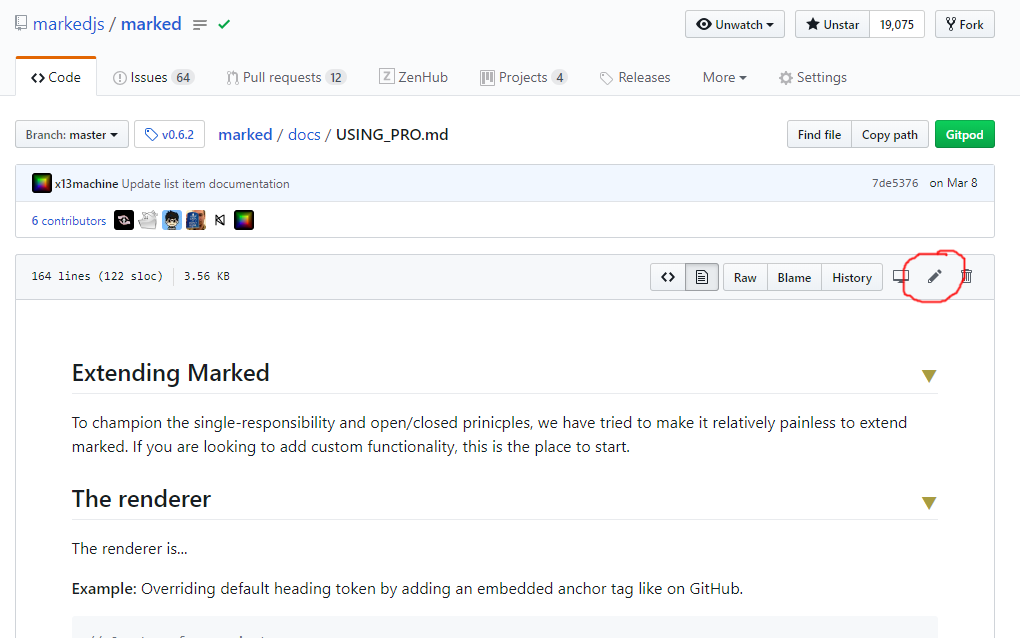
Go to the file you want to edit and click the pencil icon in the top right corner.
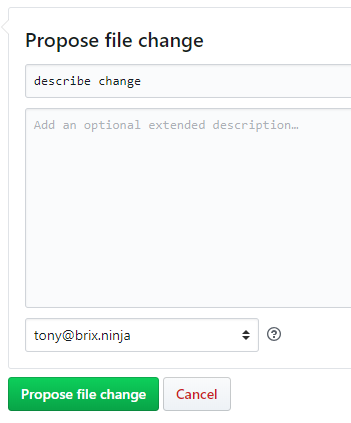
Once you are done editing the file, fill out the change description and click the Propose file change button at the bottom.
Then just follow the directions to fill out the PR form.
We can help you if you get stuck.
UziTech
on 18 Apr 2019
This seems to have been resolved, now that the Extendability documentation has been filled out.
 calculuschild
on 9 Dec 2020
calculuschild
on 9 Dec 2020
Related issues
 pigtooter
·
4Comments
pigtooter
·
4Comments
 mjbvz
·
4Comments
mjbvz
·
4Comments
 amejiarosario
·
3Comments
amejiarosario
·
3Comments
 FireflyAndStars
·
3Comments
FireflyAndStars
·
3Comments
 chunhei2008
·
3Comments
chunhei2008
·
3Comments
Most helpful comment
You can create a PR right from GitHub:
Go to the file you want to edit and click the pencil icon in the top right corner.
Once you are done editing the file, fill out the change description and click the Propose file change button at the bottom.
Then just follow the directions to fill out the PR form.
We can help you if you get stuck.