Markdown-preview-enhanced: "Create ToC" not working
Hi.
Using this package in atom (linux). After the new update, the insertion of table of contents is not working. When I use the command Create ToC in the command pallette, only the below line is appended -
<!-- @import "[TOC]" {cmd:"toc", depthFrom:1, depthTo:6, orderedList:false} -->
Headings are not generated below the above insertion.
Let me know if you need more details. Thanks for this great package!
 werunom
All 15 comments
The TOC will be updated when you save the file.
On Tue, Jul 18, 2017 at 1:08 AM werunom notifications@github.com wrote:
Hi.
Using this package in atom (linux). After the new update, the insertion of
table of contents is not working. When I use the command Create ToC in
the command pallette, only the below line is appended -Headings are not generated below the above insertion.
Let me know if you need more details. Thanks for this great package!
—
You are receiving this because you are subscribed to this thread.
Reply to this email directly, view it on GitHub
https://github.com/shd101wyy/markdown-preview-enhanced/issues/508, or mute
the thread
https://github.com/notifications/unsubscribe-auth/AB0gf0LxhTsn8fcJ6itV_XB8hvNQ5sRwks5sPEvVgaJpZM4Oa4kW
.
 shd101wyy
on 18 Jul 2017
shd101wyy
on 18 Jul 2017
I had tried that and nothing happened.
Am I missing something or not doing right?
werunom
on 18 Jul 2017
Oh that's weird. I don't have Linux so I am not able to test it. Can you
open developer tool and see if there are any error messages appeared in the
console?
Also please send me your markdown file if you can. I will have a look this
weekend probably.
And you can help me try the vscode version to test if that issue also
happened.
Thanks
On Tue, Jul 18, 2017 at 1:39 AM werunom notifications@github.com wrote:
I had tried that and nothing happened.
Am I missing something or not doing right?—
You are receiving this because you commented.Reply to this email directly, view it on GitHub
https://github.com/shd101wyy/markdown-preview-enhanced/issues/508#issuecomment-315972115,
or mute the thread
https://github.com/notifications/unsubscribe-auth/AB0gf2Eed1xGAcY1OZ6rHw76EJNu-wmFks5sPFMMgaJpZM4Oa4kW
.
shd101wyy
on 18 Jul 2017
I tried the following -
- Used the "create ToC" command
- Opened the preview and clicked on the first symbol
- This opened the side bar having the ToC
Is this what you are suggesting? if yes, then this is working fine.
I got alarmed because I was expecting the previous functionality - where the toc is embedded right into the md/txt file. Looks like in this updated package, toc is something which is visible only in the preview. Am I right?
But, if I can vote and suggest, can you still keep the functionality to embed the toc? I was using this functionality a lot. Having embedded toc is useful for long notes.
werunom
on 18 Jul 2017
The embeded TOC should be inserted to your markdown file when you save the
markdown file. So I think it's a bug now. It works fine on my Mac and
Windows though.
On Tue, Jul 18, 2017 at 1:48 AM werunom notifications@github.com wrote:
I tried the following -
- Used the "create ToC" command
- Opened the preview and clicked on the first symbol
- This opened the side bar having the ToC
Is this what you are suggesting? if yes, then this is working fine.
I got alarmed because I was expecting the previous functionality - where
the toc is embedded right into the md/txt file. Looks like in this updated
package, toc is something which is visible only in the preview. Am I right?But, if I can vote and suggest, can you still keep the functionality to
embed the toc? I was using this functionality a lot. Having embedded toc is
useful for long notes.—
You are receiving this because you commented.Reply to this email directly, view it on GitHub
https://github.com/shd101wyy/markdown-preview-enhanced/issues/508#issuecomment-315973700,
or mute the thread
https://github.com/notifications/unsubscribe-auth/AB0gf6xiP6gtTAdXZwa4RHBrfWPXRpGeks5sPFUrgaJpZM4Oa4kW
.
shd101wyy
on 18 Jul 2017
Oh! Glad to know that this functionality is still present.
Will wait for the fix. Thanks again.
werunom
on 18 Jul 2017
@shd101wyy 我用MAC保存的时候不能自动生成TOC导航啊,window却可以。都是升级到最新版,
 Niefee
on 21 Jul 2017
Niefee
on 21 Jul 2017
@werunom @Niefee Fixed now. Thanks :)
shd101wyy
on 23 Jul 2017
@shd101wyy - Updated the package. But, still the issue persists. When I use the command-pallette command to insert toc, the following line is inserted
<!-- @import "[TOC]" {cmd:"toc", depthFrom:1, depthTo:6, orderedList:false} -->
Nothing else happens on save. Toc is not embedded.
werunom
on 24 Jul 2017
Can you toggle developer tool and send me a screenshot of console?
On Mon, Jul 24, 2017 at 1:13 AM werunom notifications@github.com wrote:
@shd101wyy https://github.com/shd101wyy - Updated the package. But,
still the issue persists. When I use the command-pallette command to insert
toc, the following line is insertedNothing else happens on save. Toc is not embedded.
—
You are receiving this because you were mentioned.Reply to this email directly, view it on GitHub
https://github.com/shd101wyy/markdown-preview-enhanced/issues/508#issuecomment-317328661,
or mute the thread
https://github.com/notifications/unsubscribe-auth/AB0gfx7S_mnjOJ1jhHPJZnFtQXGwcWikks5sRDYEgaJpZM4Oa4kW
.
shd101wyy
on 24 Jul 2017
In the console of the developer tool, nothing rolled when I inserted the toc. In any case, I am attaching the screenshot for reference...
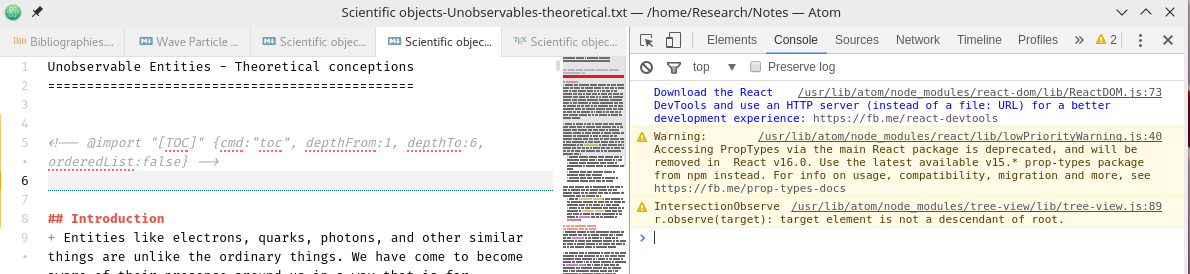
have I done it right - the way you wanted it? Let me know if you need something else...
werunom
on 24 Jul 2017
You need to open preview first before you use the create TOC command.
Could you please send me a gif showing how you operate?
shd101wyy
on 24 Jul 2017
@shd101wyy - I had done the same - keep the console open; then in couple of markdown files I executed the following steps: 1) insert toc using command pallette 2) save the file and 3) open the markdown-preview
Only in the step (3), the console logs the below comments -
webview:  %c 01:13:23 (410) :%cDEBUG:
preview-content-provider.js:224 webview:  init webview: /home/Research/Notes/Philosophy Readings/Philosophy of Science/Scientific objects.txt
preview-content-provider.js:224 webview:  %c 01:13:23 (409) :%cDEBUG:
Apart from that nothing else comes up in the console. I will try to post the gif in sometime...
werunom
on 25 Jul 2017
@werunom Try:
- Open Markdown Preview first.
- Save your markdown file.
From your description, you saved the markdown file before you opened the preview.
shd101wyy
on 25 Jul 2017
Finally! Thanks for pointing the right steps. Got the toc embedded. :)
Closing the issue...
werunom
on 25 Jul 2017
Related issues
 AdexoMing
·
3Comments
AdexoMing
·
3Comments
 abhayghatpande
·
5Comments
abhayghatpande
·
5Comments
 TKFB
·
3Comments
TKFB
·
3Comments
 adamaltmejd
·
5Comments
adamaltmejd
·
5Comments
 ckdanny
·
5Comments
ckdanny
·
5Comments