Markbind: Minimized view of a panel should not center contents
If the panels in the current 'Syntax cheat sheet' page were to be minimized (i.e., using the :x: button), this is what we get:
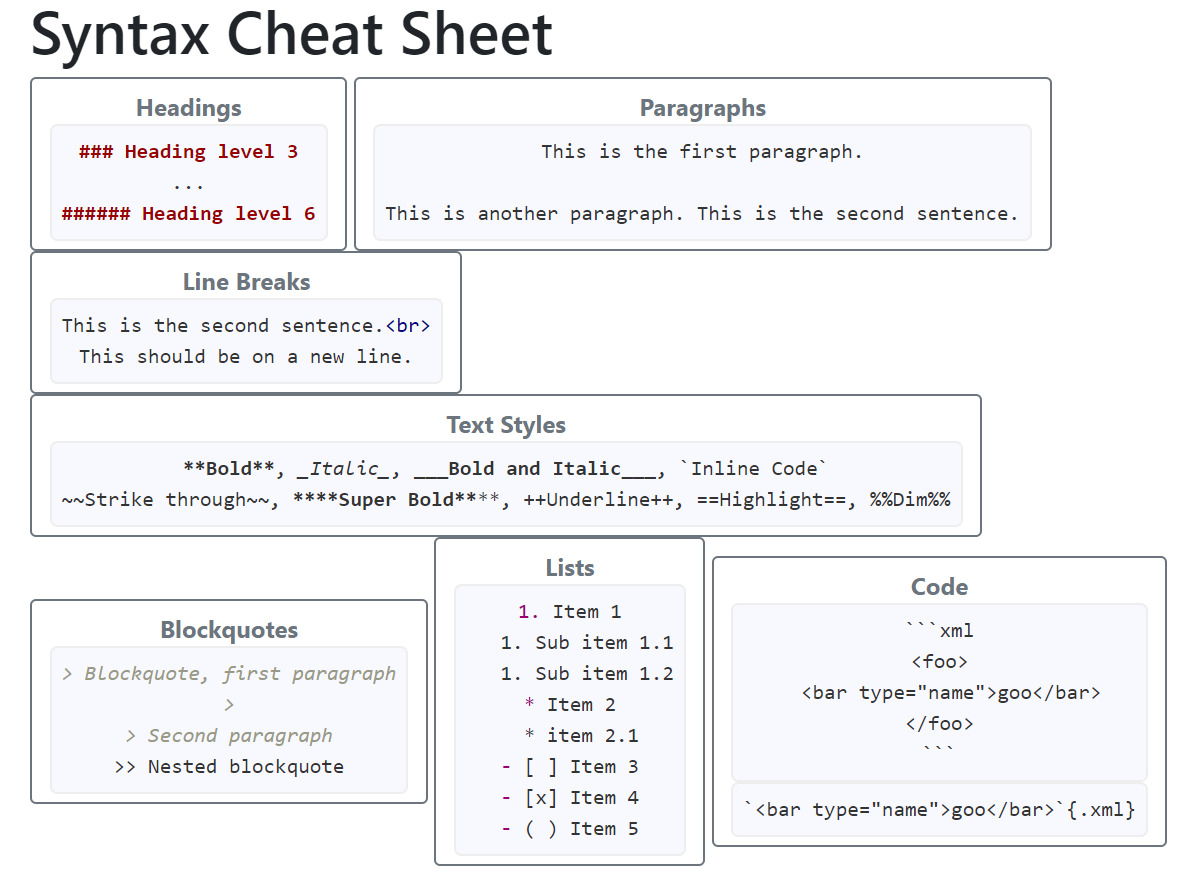
It's a pity that all conent are centered. If not, we could have used this as the initial view of the cheat sheet More generally, we can use minimized panels as a way to present a more _packed_ overview of the contents
 damithc
All 9 comments
I guess we don't usually expect headers to be multilines.
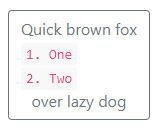
The code snippets can be wrapped around a <div> and use bootstrap's text-left class. For example:
<panel header="Quick brown fox <div class='text-left'>`1. One`<br>`2. Two`</div> over lazy dog">
  Content
</panel>
 yamgent
on 17 Feb 2019
yamgent
on 17 Feb 2019
@yamgent This kind of headers are usually in a slot. But is it possible to not to center by default?
damithc
on 17 Feb 2019
But is it possible to not to center by default?
We can do that I guess, we can modify the Panel to automatically add the text-left class. Single-line headers are not affected either way, and multi-line headers will get left-aligned.
yamgent
on 17 Feb 2019
@damithc , I did some testing and concluded we are unable to add the text-left class to slot headers, the author have to manually specify it E.G
<panel minimized>
  <p slot="header" class="card-title text-left">
    My multi-line <br>
    slot <br>
    header <br>
  </p>
<panel>
We can automatically add it for header and alt text but you mentioned that multi-line headers are usually inserted using a slot.
If we do not require header and alt text to be left aligned (on the assumption they are not multi-line), then we do not need to have any enhancements and this issue can be closed.
 Chng-Zhi-Xuan
on 27 May 2019
Chng-Zhi-Xuan
on 27 May 2019
As discussed:
- let's do this:
We can automatically add it for header and alt text but you mentioned that multi-line headers are usually inserted using a slot.
- As a separate PR (low priority), we can add
slotsupport foralt
damithc
on 27 May 2019
Hang on; the first bullet point doesn't help unless the second one is done, am I right?
damithc
on 27 May 2019
It helps if you author multi-line alt text inline with the panel attributes (but very ugly)
<panel alt="my multi-line<br>alt<br>text">
   ...
</panel>
As discussed, if both header and alt text are the same, you can use the current implementation of slots for your needs.
Chng-Zhi-Xuan
on 27 May 2019
In that case, shall we put this issue on hold until there is slot support for alt?
damithc
on 27 May 2019
Yes, that would make sense.
Specifically for the case whereby the user wants a different text from header when minimised, that is richly formatted.
Chng-Zhi-Xuan
on 27 May 2019
Related issues
yamgent
·
6Comments
damithc
·
4Comments
Chng-Zhi-Xuan
·
4Comments
 le0tan
·
7Comments
damithc
·
6Comments
le0tan
·
7Comments
damithc
·
6Comments