Markbind: Move footer outside "#app" div
Tell us about your environment
- MarkBind Version: 1.10.0
What did you do? Please include the actual source code causing the issue.
Due to how container-fluid works, everything that is placed inside it will have a padding added on its left and right side. If we did not intervene with this css style, the footer will look like this (notice the white space at the left and right of footer):
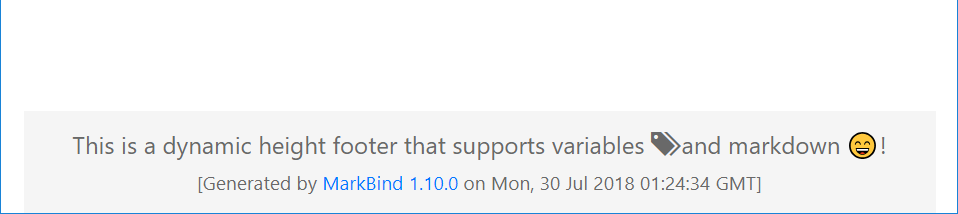
We resolved that issue by specifying margin-left: -15px and margin-right: -15px as shown below:
However, this workaround is counter-intuitive, as users wanting to override the css of container-fluid must now also modify the css of footer, as seen in https://github.com/se-edu/learningresources/commit/d8f206f04b5565dba134066dbf379109bc4683da.
As such, a better workaround on our site would be to change page.ejs:
such that the footer is outside the container-fluid (if we do not want the padding effect of container-fluid, we should not include it inside in the first place):
<div id="app">
    <div class="container-fluid">
        <%- content %>
    </div>
    <%- footer %>
</div>
 yamgent
All 5 comments
Why can't the container-fluid class be removed?
 pyokagan
on 30 Jul 2018
pyokagan
on 30 Jul 2018
That is a good point, the users do not need to use container-fluid unless they utilize the Bootstrap's grid system.
I don't recall seeing the grid system being utilized in the MarkBind documentation website or in cs2103 website, so I don't mind the removal of container-fluid class entirely.
yamgent
on 30 Jul 2018
Not sure if relevant here: ATM I'm using plain old tables when I need multiple blocks of text side-by-side. Hoping to switch to a better bootstrap-provided or markbind-provided mechanism in future.
 damithc
on 30 Jul 2018
damithc
on 30 Jul 2018
Example for the above:
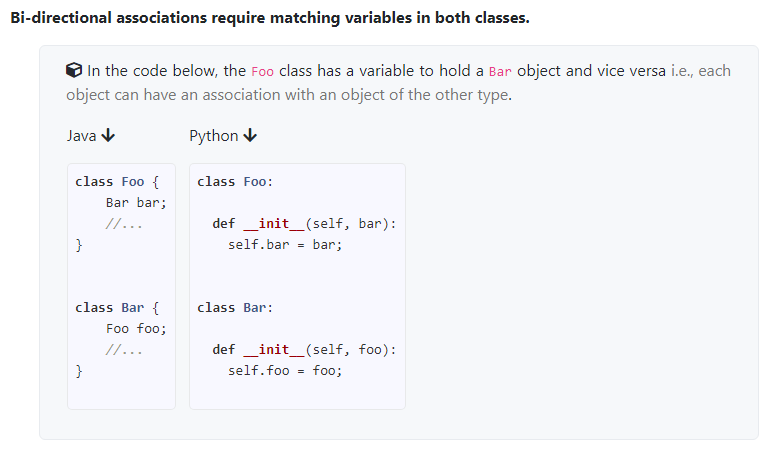
<table>
<tr>
<td>
Java {{ icon_output }}
`` `java
class Foo {
Bar bar;
//...
}
class Bar {
Foo foo;
//...
}
`` `
</td>
<td valign="bottom"> <br><br></td>
<td valign="bottom">
Python {{ icon_output }}
`` `python
class Foo:
def __init__(self, bar):
self.bar = bar;
class Bar:
def __init__(self, foo):
self.foo = foo;
`` `
</td>
</tr>
</table>
If I didn't read the Bootstrap documentation wrongly, I think in those case you can specify certain divs to use container-fluid (and then just use the grid system inside the div). So the container doesn't need to be applied to the entire document actually.
yamgent
on 30 Jul 2018
Related issues
damithc
·
5Comments
damithc
·
4Comments
damithc
·
4Comments
 Chng-Zhi-Xuan
·
4Comments
Chng-Zhi-Xuan
·
4Comments
 ang-zeyu
·
4Comments
ang-zeyu
·
4Comments
Most helpful comment
If I didn't read the Bootstrap documentation wrongly, I think in those case you can specify certain divs to use
container-fluid(and then just use the grid system inside the div). So the container doesn't need to be applied to the entire document actually.